[GH-ISSUE #866] library does not work on core 2.5.0 #732

Closed
opened 2026-02-28 01:26:48 +03:00 by kerem · 28 comments
Owner

Originally created by @agrath on GitHub (Apr 16, 2019).
Original GitHub issue: https://github.com/tzapu/WiFiManager/issues/866

I have deleted the template as I just wanted to track this in this project
With esp8266 core 2.5.0 no matter what I did I could not get the access point to be visible on my iphone. Password, ssid format, hacked the channel number in etc. Once or twice it would pop up but then I couldn't connect.
Even switched to the development branch of this library.
Downgraded esp8266 core to 2.4.2 from 2.5.0 and works first time.

Originally created by @agrath on GitHub (Apr 16, 2019). Original GitHub issue: https://github.com/tzapu/WiFiManager/issues/866 I have deleted the template as I just wanted to track this in this project With esp8266 core 2.5.0 no matter what I did I could not get the access point to be visible on my iphone. Password, ssid format, hacked the channel number in etc. Once or twice it would pop up but then I couldn't connect. Even switched to the development branch of this library. Downgraded esp8266 core to 2.4.2 from 2.5.0 and works first time.
Author
Owner

@tablatronix commented on GitHub (Apr 16, 2019):

I will give it a try, I always use staging so I should have found this, I only use development version though of wm

<!-- gh-comment-id:483776235 --> @tablatronix commented on GitHub (Apr 16, 2019): I will give it a try, I always use staging so I should have found this, I only use development version though of wm
Author
Owner

@tablatronix commented on GitHub (Apr 16, 2019):

you will have to provide the basic info, what version of wm, what board, which example etc

<!-- gh-comment-id:483776466 --> @tablatronix commented on GitHub (Apr 16, 2019): you will have to provide the basic info, what version of wm, what board, which example etc
Author
Owner

@agrath commented on GitHub (Apr 16, 2019):

@tablatronix apologies, that was rude and I should have provided more info.

I'm not exactly sure which board I have (I got it from my local hackspace rather than purchase directly), but it detects as a WeMos D1 R1 in VS Code.
On the back it says HW-628 v1.1 / WiFi-ESP8266 / USB-TTCH340 / VIN 5-9V

I read the docs rather than building from an example but my setup was like so:

//shared
uint8_t MacAddressBytes[6];
char MacAddress[12];

//used for captive portal
char captiveSSID[sizeof(MacAddress) + 3];

void setup()
{
  initializeSerial();
  Serial.println("begin");
  getMacAddress();
  Serial.println("got mac");
  if (!initializeWifi())
  {
    return;
  }

  //wifi connection established
  Serial.println("hello world!");
}

with supporting functions

void configModeCallback(WiFiManager *myWiFiManager)
{
  Serial.println("configModeCallback");
  Serial.println(F("Entered config mode"));
  Serial.println(WiFi.softAPIP());
  //if you used auto generated SSID, print it
  Serial.println(myWiFiManager->getConfigPortalSSID());
}
bool initializeWifi()
{
  //ensure we are disconnected as a station
  //WiFi.disconnect(); //this will also clear the saved credentials
  Serial.println("initializeWifi");
  //build the captive ssid (dhtFFFFFFFFFFFF)
  strcpy(captiveSSID, (const char *)F("dht"));
  strcat(captiveSSID, MacAddress);
  Serial.println(captiveSSID);
  WiFiManager wifiManager;
  wifiManager.setConfigPortalTimeout(180);
  //wifiManager.setMinimumSignalQuality(25);
  //wifiManager.setAPStaticIPConfig(IPAddress(8, 8, 8, 8), IPAddress(8, 8, 8, 8), IPAddress(255, 255, 255, 0));
  WiFi.setSleepMode(WIFI_NONE_SLEEP); // disable sleep, can improve ap stability

  //wifiManager.resetSettings(); //reset settings for testing
  wifiManager.setAPCallback(configModeCallback);
  //wifiManager.setDebugOutput(false); //turn off debug for wifimanager
  //fetch stored ssid & pass from eeprom, if available and connect to wifiManager
  //if can't connect or nothing stored, start captive portal
  //if timeout reached, returns false
  if(!wifiManager.autoConnect(captiveSSID, "mkv29qqht"))
  {
    Serial.println("timeout");
    //reset and try again
    ESP.reset();
    delay(1000);
    return false;
  }
  Serial.println("success");
  return true;
}
void getMacAddress()
{
  Serial.println("getMacAddress");
  WiFi.macAddress(MacAddressBytes);
  for (int i = 0; i < sizeof(MacAddressBytes); ++i)
  {
    sprintf(MacAddress, "%s%02X", MacAddress, MacAddressBytes[i]);
  }
  Serial.print("Device mac address: ");
  Serial.println(MacAddress);
}

I will grab you the serial logs running on 2.5.0 shortly.

<!-- gh-comment-id:483808936 --> @agrath commented on GitHub (Apr 16, 2019): @tablatronix apologies, that was rude and I should have provided more info. I'm not exactly sure which board I have (I got it from my local hackspace rather than purchase directly), but it detects as a WeMos D1 R1 in VS Code. On the back it says HW-628 v1.1 / WiFi-ESP8266 / USB-TTCH340 / VIN 5-9V I read the docs rather than building from an example but my setup was like so: ``` //shared uint8_t MacAddressBytes[6]; char MacAddress[12]; //used for captive portal char captiveSSID[sizeof(MacAddress) + 3]; void setup() { initializeSerial(); Serial.println("begin"); getMacAddress(); Serial.println("got mac"); if (!initializeWifi()) { return; } //wifi connection established Serial.println("hello world!"); } ``` with supporting functions ``` void configModeCallback(WiFiManager *myWiFiManager) { Serial.println("configModeCallback"); Serial.println(F("Entered config mode")); Serial.println(WiFi.softAPIP()); //if you used auto generated SSID, print it Serial.println(myWiFiManager->getConfigPortalSSID()); } bool initializeWifi() { //ensure we are disconnected as a station //WiFi.disconnect(); //this will also clear the saved credentials Serial.println("initializeWifi"); //build the captive ssid (dhtFFFFFFFFFFFF) strcpy(captiveSSID, (const char *)F("dht")); strcat(captiveSSID, MacAddress); Serial.println(captiveSSID); WiFiManager wifiManager; wifiManager.setConfigPortalTimeout(180); //wifiManager.setMinimumSignalQuality(25); //wifiManager.setAPStaticIPConfig(IPAddress(8, 8, 8, 8), IPAddress(8, 8, 8, 8), IPAddress(255, 255, 255, 0)); WiFi.setSleepMode(WIFI_NONE_SLEEP); // disable sleep, can improve ap stability //wifiManager.resetSettings(); //reset settings for testing wifiManager.setAPCallback(configModeCallback); //wifiManager.setDebugOutput(false); //turn off debug for wifimanager //fetch stored ssid & pass from eeprom, if available and connect to wifiManager //if can't connect or nothing stored, start captive portal //if timeout reached, returns false if(!wifiManager.autoConnect(captiveSSID, "mkv29qqht")) { Serial.println("timeout"); //reset and try again ESP.reset(); delay(1000); return false; } Serial.println("success"); return true; } void getMacAddress() { Serial.println("getMacAddress"); WiFi.macAddress(MacAddressBytes); for (int i = 0; i < sizeof(MacAddressBytes); ++i) { sprintf(MacAddress, "%s%02X", MacAddress, MacAddressBytes[i]); } Serial.print("Device mac address: "); Serial.println(MacAddress); } ``` I will grab you the serial logs running on 2.5.0 shortly.
Author
Owner

@agrath commented on GitHub (Apr 16, 2019):

Okay my wm library version is 4873c7c632 (dev)
I do not think this to be a bug in WM, I couldn't see anything digging into the WM source and switching the core library fixed the issue.

The symptoms are that with no credentials stored (cleared with WiFi.disconnect() or the WM helper method, whose name escapes me right now) that the WM library successfully detects no saved credentials and then turns on the soft AP for the captive portal.
That wifi access point never shows up on my iPhone and I also have a TP Link Wifi Dongle in my PC and it could not see the AP either.
Once I did get the AP to show up on my iPhone but I couldn't join it.
I tried with different SSID names, with and without a password, ensured password length was > 8 chars (I found a bug on that somewhere) and also at one point (before I switched to wm-dev) edited wm to allow me to set the wifi channel to something other than the default of 1 to ensure that it wasn't a signal strength issue (fighting with my local neighbour wifi or similar)
I also tried using setAPStaticIPConfig to set an alternate static IP, using a hard coded SSID, disabling the sleep mode, the configPortalTimeout and the APCallback.
In short, I couldn't figure out why the AP wouldn't show up.

Here is the serial log from starting with 2.5.0 (after saving with 2.4.2)

Initializing serial...
begin
getMacAddress
Device mac address: 84F3EB77044F
got mac
initializeWifi
dht84F3EB77044F
*WM: 
*WM: AutoConnect
*WM: Connecting as wifi client...
*WM: Using last saved values, should be faster
*WM: MyRepublic C34D

If I clear the settings with wifiManager.resetSettings() then run again:

Initializing serial...
begin
getMacAddress
Device mac address: 84F3EB77044F
got mac
initializeWifi
dht84F3EB77044F
*WM: settings invalidated
*WM: THIS MAY CAUSE AP NOT TO START UP PROPERLY. YOU NEED TO COMMENT IT OUT AFTER ERASING THE DATA.
*WM: 
*WM: AutoConnect
*WM: Connecting as wifi client...
*WM: Using last saved values, should be faster
*WM: 
*WM: Connection result: 
*WM: 0
configModeCallback
Entered config mode
192.168.4.1
dht84F3EB77044F
*WM: 
*WM: Configuring access point... 
*WM: dht84F3EB77044F
*WM: mkv29qqht
*WM: AP IP address: 
*WM: 192.168.4.1
*WM: HTTP server started

And the AP does not show up

<!-- gh-comment-id:483814505 --> @agrath commented on GitHub (Apr 16, 2019): Okay my wm library version is 4873c7c6326fcbfb069731035b1ed79ebd11746a (dev) I do not think this to be a bug in WM, I couldn't see anything digging into the WM source and switching the core library fixed the issue. The symptoms are that with no credentials stored (cleared with WiFi.disconnect() or the WM helper method, whose name escapes me right now) that the WM library successfully detects no saved credentials and then turns on the soft AP for the captive portal. That wifi access point never shows up on my iPhone and I also have a TP Link Wifi Dongle in my PC and it could not see the AP either. Once I did get the AP to show up on my iPhone but I couldn't join it. I tried with different SSID names, with and without a password, ensured password length was > 8 chars (I found a bug on that somewhere) and also at one point (before I switched to wm-dev) edited wm to allow me to set the wifi channel to something other than the default of 1 to ensure that it wasn't a signal strength issue (fighting with my local neighbour wifi or similar) I also tried using setAPStaticIPConfig to set an alternate static IP, using a hard coded SSID, disabling the sleep mode, the configPortalTimeout and the APCallback. In short, I couldn't figure out why the AP wouldn't show up. Here is the serial log from starting with 2.5.0 (after saving with 2.4.2) ``` Initializing serial... begin getMacAddress Device mac address: 84F3EB77044F got mac initializeWifi dht84F3EB77044F *WM: *WM: AutoConnect *WM: Connecting as wifi client... *WM: Using last saved values, should be faster *WM: MyRepublic C34D ``` If I clear the settings with `wifiManager.resetSettings()` then run again: ``` Initializing serial... begin getMacAddress Device mac address: 84F3EB77044F got mac initializeWifi dht84F3EB77044F *WM: settings invalidated *WM: THIS MAY CAUSE AP NOT TO START UP PROPERLY. YOU NEED TO COMMENT IT OUT AFTER ERASING THE DATA. *WM: *WM: AutoConnect *WM: Connecting as wifi client... *WM: Using last saved values, should be faster *WM: *WM: Connection result: *WM: 0 configModeCallback Entered config mode 192.168.4.1 dht84F3EB77044F *WM: *WM: Configuring access point... *WM: dht84F3EB77044F *WM: mkv29qqht *WM: AP IP address: *WM: 192.168.4.1 *WM: HTTP server started ``` And the AP does not show up
Author
Owner

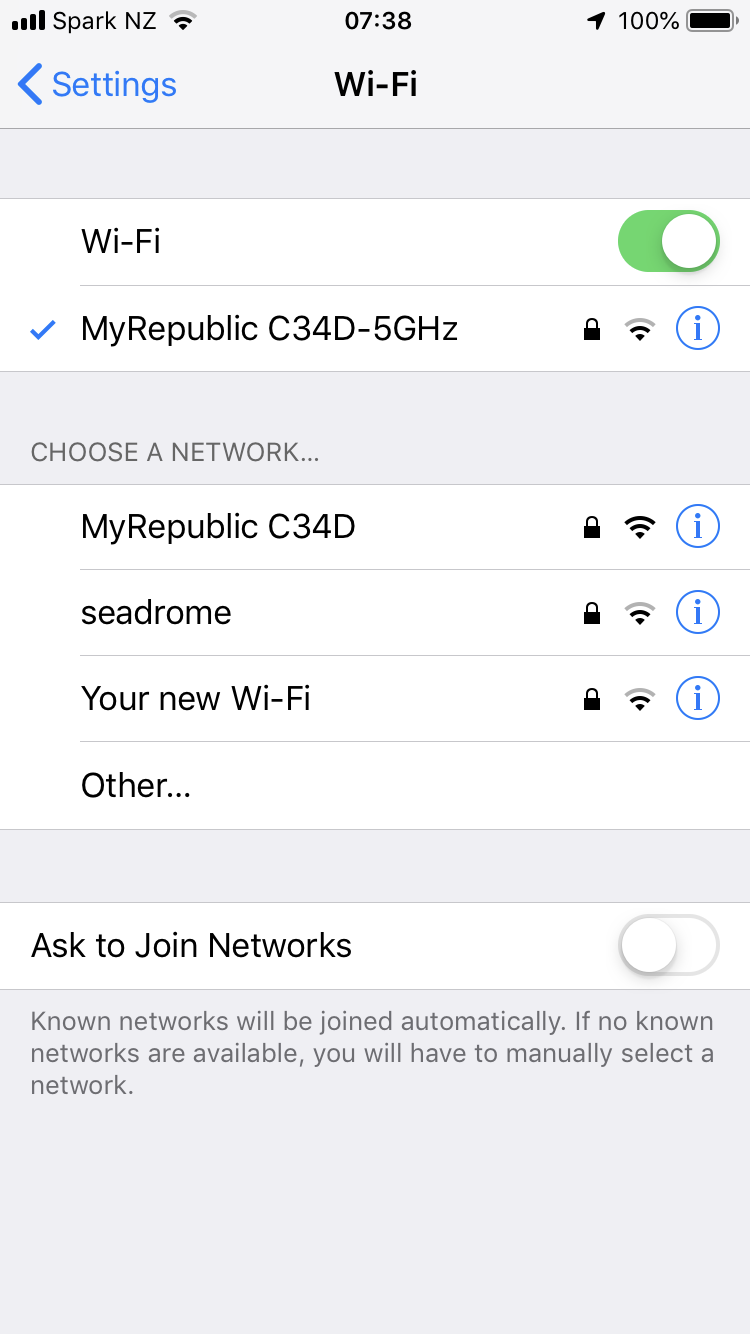
@agrath commented on GitHub (Apr 16, 2019):

Windows 10:
image

iPhone:
2019-04-17 07 38 18

<!-- gh-comment-id:483815077 --> @agrath commented on GitHub (Apr 16, 2019): Windows 10: ![image](https://user-images.githubusercontent.com/78284/56238978-ece84b00-60e3-11e9-90c7-e46b1eff0364.png) iPhone: ![2019-04-17 07 38 18](https://user-images.githubusercontent.com/78284/56239028-12755480-60e4-11e9-8e34-8f8318315bba.png)
Author
Owner

@agrath commented on GitHub (Apr 16, 2019):

If I remove resetSettings (due to the warning that it may cause it to not work properly)

Initializing serial...
begin
getMacAddress
Device mac address: 84F3EB77044F
got mac
initializeWifi
dht84F3EB77044F
*WM: 
*WM: AutoConnect
*WM: Connecting as wifi client...
*WM: Using last saved values, should be faster
*WM: 
*WM: Connection result: 
*WM: 0
configModeCallback
Entered config mode
192.168.4.1
dht84F3EB77044F
*WM: 
*WM: Configuring access point... 
*WM: dht84F3EB77044F
*WM: mkv29qqht
*WM: AP IP address: 
*WM: 192.168.4.1
*WM: HTTP server started

Still nothing visible,

And if I switch back to core 2.4.2 then it works (AP is visible, I can join, get the portal etc.) with the following log:

Initializing serial...
begin
getMacAddress
Device mac address: 84F3EB77044F
got mac
initializeWifi
dht84F3EB77044F
*WM: 
*WM: AutoConnect
*WM: Connecting as wifi client...
*WM: Using last saved values, should be faster
*WM: 
*WM: Connection result: 
*WM: 0
configModeCallback
Entered config mode
192.168.4.1
dht84F3EB77044F
*WM: 
*WM: Configuring access point... 
*WM: dht84F3EB77044F
*WM: mkv29qqht
*WM: AP IP address: 
*WM: 192.168.4.1
*WM: HTTP server started

image

Hope this helps, let me know if I can supply anything else specific. Happy to make edits to the library to diagnose this or switch to an alternate branch for testing.

<!-- gh-comment-id:483816501 --> @agrath commented on GitHub (Apr 16, 2019): If I remove resetSettings (due to the warning that it may cause it to not work properly) ``` Initializing serial... begin getMacAddress Device mac address: 84F3EB77044F got mac initializeWifi dht84F3EB77044F *WM: *WM: AutoConnect *WM: Connecting as wifi client... *WM: Using last saved values, should be faster *WM: *WM: Connection result: *WM: 0 configModeCallback Entered config mode 192.168.4.1 dht84F3EB77044F *WM: *WM: Configuring access point... *WM: dht84F3EB77044F *WM: mkv29qqht *WM: AP IP address: *WM: 192.168.4.1 *WM: HTTP server started ``` Still nothing visible, And if I switch back to core 2.4.2 then it works (AP is visible, I can join, get the portal etc.) with the following log: ``` Initializing serial... begin getMacAddress Device mac address: 84F3EB77044F got mac initializeWifi dht84F3EB77044F *WM: *WM: AutoConnect *WM: Connecting as wifi client... *WM: Using last saved values, should be faster *WM: *WM: Connection result: *WM: 0 configModeCallback Entered config mode 192.168.4.1 dht84F3EB77044F *WM: *WM: Configuring access point... *WM: dht84F3EB77044F *WM: mkv29qqht *WM: AP IP address: *WM: 192.168.4.1 *WM: HTTP server started ``` ![image](https://user-images.githubusercontent.com/78284/56239316-beb73b00-60e4-11e9-9b5c-475587f42f0d.png) Hope this helps, let me know if I can supply anything else specific. Happy to make edits to the library to diagnose this or switch to an alternate branch for testing.
Author
Owner

@tablatronix commented on GitHub (Apr 16, 2019):

have you done a full erase?

I will see if i can reproduce, but definitely use a built in example for reproducibility.

<!-- gh-comment-id:483838301 --> @tablatronix commented on GitHub (Apr 16, 2019): have you done a full erase? I will see if i can reproduce, but definitely use a built in example for reproducibility.
Author
Owner

@agrath commented on GitHub (Apr 16, 2019):

@tablatronix I've not done a full erase - will try that sometime late tonight (just got to work and this is a personal project)
Not sure how but looks like I can use esptool to both query the chip and do a flash erase.

I will also spin up an example using one of your samples just to be sure but I pasted almost the entire app above (sans headers) so as you can see it's super simple with nothing crazy.

<!-- gh-comment-id:483841778 --> @agrath commented on GitHub (Apr 16, 2019): @tablatronix I've not done a full erase - will try that sometime late tonight (just got to work and this is a personal project) Not sure how but looks like I can use esptool to both query the chip and do a flash erase. I will also spin up an example using one of your samples just to be sure but I pasted almost the entire app above (sans headers) so as you can see it's super simple with nothing crazy.
Author
Owner

@agrath commented on GitHub (Apr 17, 2019):

@tablatronix

I have set up esptool and queried the chip and flash:

esptool.py v2.6
Serial port com4
Connecting....
Detecting chip type... ESP8266
Chip is ESP8266EX
Features: WiFi
MAC: 84:f3:eb:77:04:4f
Uploading stub...
Running stub...
Stub running...
Chip ID: 0x0077044f
Manufacturer: c8
Device: 4016
Detected flash size: 4MB
Hard resetting via RTS pin...

So then I went ahead and did a erase_flash

Erasing flash (this may take a while)...
Chip erase completed successfully in 5.5s

Ensuring I am on the development branch, I built and deployed AutoConnectWithFeedbackLED to my device. I'm using my laptop tonight so I had to also install esp8266 2.5.0 fresh and I'm building on a different machine, just in case that ends up being relevant.

With the master branch, the access point appears and I can join it from my iPhone but I never get a captive portal.
With the development branch, the access point never shows up.
(using the sample)

So it looks like my original issue is confirmed, this library is not working against 2.5.0 even with an erase flash and using one of the shipped samples

Note: device needs to be selected as Node MCU 1.0 (ESP-12E module) to flash it, generic esp8266 module won't allow flashing

<!-- gh-comment-id:484005639 --> @agrath commented on GitHub (Apr 17, 2019): @tablatronix I have set up esptool and queried the chip and flash: ``` esptool.py v2.6 Serial port com4 Connecting.... Detecting chip type... ESP8266 Chip is ESP8266EX Features: WiFi MAC: 84:f3:eb:77:04:4f Uploading stub... Running stub... Stub running... Chip ID: 0x0077044f Manufacturer: c8 Device: 4016 Detected flash size: 4MB Hard resetting via RTS pin... ``` So then I went ahead and did a erase_flash ``` Erasing flash (this may take a while)... Chip erase completed successfully in 5.5s ``` Ensuring I am on the development branch, I built and deployed AutoConnectWithFeedbackLED to my device. I'm using my laptop tonight so I had to also install esp8266 2.5.0 fresh and I'm building on a different machine, just in case that ends up being relevant. With the master branch, the access point appears and I can join it from my iPhone but I never get a captive portal. With the development branch, the access point never shows up. (using the sample) So it looks like my original issue is confirmed, this library is not working against 2.5.0 even with an erase flash and using one of the shipped samples Note: device needs to be selected as Node MCU 1.0 (ESP-12E module) to flash it, generic esp8266 module won't allow flashing
Author
Owner

@agrath commented on GitHub (Apr 17, 2019):

Okay, I definitely wasn't using the development branch before. The serial log messages are completely different as are my findings.
Still using esp8266 2.5.0 and with my original sketch, the captive portal is coming up.
The wifi scan is not finding any access points though;

Initializing serial...
begin
getMacAddress
Device mac address: 84F3EB77044F
got mac
initializeWifi
dht84F3EB77044F
*WM: [1] AutoConnect 
*WM: [2] Connecting as wifi client... 
*WM: [1] STA static IP:
*WM: [2] setSTAConfig static ip not set 
*WM: [3] WIFI station disconnect 
*WM: [1] No saved credentials, skipping wifi 
*WM: [2] Connection result: WL_NO_SSID_AVAIL
*WM: [3] lastconxresult: WL_NO_SSID_AVAIL
*WM: [1] AutoConnect: FAILED 
*WM: [2] AccessPoint set password is VALID 
*WM: [1] mkv29qqht 
*WM: [3] WIFI station disconnect 
*WM: [3] WiFi station enable 
*WM: [2] Disabling STA 
*WM: [2] Enabling AP 
*WM: [1] StartAP with SSID:  dht84F3EB77044F
*WM: [1] AP IP address: 192.168.4.1
configModeCallback
Entered config mode
192.168.4.1
dht84F3EB77044F
*WM: [3] setupConfigPortal 
*WM: [1] Starting Web Portal 
*WM: [3] dns server started with ip:  192.168.4.1
*WM: [2] HTTP server started 
*WM: [2] WiFi Scan ASYNC started 
*WM: [2] Config Portal Running, blocking, waiting for clients... 
*WM: [2] WiFi Scan ASYNC completed in 2200 ms
*WM: [2] WiFi Scan ASYNC found:
*WM: [3] -> captive.apple.com 
*WM: [2] <- Request redirected to captive portal 
*WM: [2] Portal Timeout In 150 seconds
*WM: [2] <- HTTP Root 
*WM: [3] -> 192.168.4.1 
*WM: [3] lastconxresult: WL_IDLE_STATUS
*WM: [2] WiFi Scan ASYNC started 
*WM: [2] WiFi Scan ASYNC completed in 2200 ms
*WM: [2] WiFi Scan ASYNC found:
*WM: [3] -> captive.apple.com 
*WM: [2] <- Request redirected to captive portal 
*WM: [2] <- HTTP Root 
*WM: [3] -> 192.168.4.1 
*WM: [3] lastconxresult: WL_IDLE_STATUS
*WM: [2] WiFi Scan ASYNC started 
*WM: [3] -> captive.apple.com 
*WM: [2] <- Request redirected to captive portal 
*WM: [2] <- HTTP Root 
*WM: [3] -> 192.168.4.1 
*WM: [3] lastconxresult: WL_IDLE_STATUS
*WM: [2] WiFi Scan ASYNC completed in 2202 ms
*WM: [2] WiFi Scan ASYNC found:
*WM: [2] WiFi Scan ASYNC started 
*WM: [2] <- HTTP Wifi 
*WM: [0] [ERROR] scan waiting 
*WM: [0] . 
*WM: [0] . 
*WM: [0] . 
*WM: [0] . 
*WM: [0] . 
*WM: [0] . 
*WM: [0] . 
*WM: [0] . 
*WM: [0] . 
*WM: [0] . 
*WM: [0] . 
*WM: [0] . 
*WM: [0] . 
*WM: [0] . 
*WM: [0] . 
*WM: [0] . 
*WM: [0] . 
*WM: [0] . 
*WM: [0] . 
*WM: [0] . 
*WM: [0] . 
*WM: [0] . 
*WM: [2] WiFi Scan ASYNC completed in 2158 ms
*WM: [2] WiFi Scan ASYNC found:
*WM: [2] WiFi Scan completed in 2211 ms
*WM: [2] WiFi Scan completed in 2196 ms
*WM: [1] No networks found 
*WM: [3] lastconxresult: WL_IDLE_STATUS
*WM: [3] Sent config page 
*WM: [3] -> captive.apple.com 
*WM: [2] <- Request redirected to captive portal 
*WM: [2] <- HTTP Root 
*WM: [3] -> 192.168.4.1 
*WM: [3] lastconxresult: WL_IDLE_STATUS
*WM: [2] WiFi Scan ASYNC started 
*WM: [2] WiFi Scan ASYNC completed in 2199 ms
*WM: [2] WiFi Scan ASYNC found:
*WM: [2] Portal Timeout In 161 seconds
*WM: [2] Portal Timeout In 131 seconds
*WM: [2] Portal Timeout In 101 seconds
<!-- gh-comment-id:484018265 --> @agrath commented on GitHub (Apr 17, 2019): Okay, I definitely wasn't using the development branch before. The serial log messages are completely different as are my findings. Still using esp8266 2.5.0 and with my original sketch, the captive portal is coming up. The wifi scan is not finding any access points though; ``` Initializing serial... begin getMacAddress Device mac address: 84F3EB77044F got mac initializeWifi dht84F3EB77044F *WM: [1] AutoConnect *WM: [2] Connecting as wifi client... *WM: [1] STA static IP: *WM: [2] setSTAConfig static ip not set *WM: [3] WIFI station disconnect *WM: [1] No saved credentials, skipping wifi *WM: [2] Connection result: WL_NO_SSID_AVAIL *WM: [3] lastconxresult: WL_NO_SSID_AVAIL *WM: [1] AutoConnect: FAILED *WM: [2] AccessPoint set password is VALID *WM: [1] mkv29qqht *WM: [3] WIFI station disconnect *WM: [3] WiFi station enable *WM: [2] Disabling STA *WM: [2] Enabling AP *WM: [1] StartAP with SSID: dht84F3EB77044F *WM: [1] AP IP address: 192.168.4.1 configModeCallback Entered config mode 192.168.4.1 dht84F3EB77044F *WM: [3] setupConfigPortal *WM: [1] Starting Web Portal *WM: [3] dns server started with ip: 192.168.4.1 *WM: [2] HTTP server started *WM: [2] WiFi Scan ASYNC started *WM: [2] Config Portal Running, blocking, waiting for clients... *WM: [2] WiFi Scan ASYNC completed in 2200 ms *WM: [2] WiFi Scan ASYNC found: *WM: [3] -> captive.apple.com *WM: [2] <- Request redirected to captive portal *WM: [2] Portal Timeout In 150 seconds *WM: [2] <- HTTP Root *WM: [3] -> 192.168.4.1 *WM: [3] lastconxresult: WL_IDLE_STATUS *WM: [2] WiFi Scan ASYNC started *WM: [2] WiFi Scan ASYNC completed in 2200 ms *WM: [2] WiFi Scan ASYNC found: *WM: [3] -> captive.apple.com *WM: [2] <- Request redirected to captive portal *WM: [2] <- HTTP Root *WM: [3] -> 192.168.4.1 *WM: [3] lastconxresult: WL_IDLE_STATUS *WM: [2] WiFi Scan ASYNC started *WM: [3] -> captive.apple.com *WM: [2] <- Request redirected to captive portal *WM: [2] <- HTTP Root *WM: [3] -> 192.168.4.1 *WM: [3] lastconxresult: WL_IDLE_STATUS *WM: [2] WiFi Scan ASYNC completed in 2202 ms *WM: [2] WiFi Scan ASYNC found: *WM: [2] WiFi Scan ASYNC started *WM: [2] <- HTTP Wifi *WM: [0] [ERROR] scan waiting *WM: [0] . *WM: [0] . *WM: [0] . *WM: [0] . *WM: [0] . *WM: [0] . *WM: [0] . *WM: [0] . *WM: [0] . *WM: [0] . *WM: [0] . *WM: [0] . *WM: [0] . *WM: [0] . *WM: [0] . *WM: [0] . *WM: [0] . *WM: [0] . *WM: [0] . *WM: [0] . *WM: [0] . *WM: [0] . *WM: [2] WiFi Scan ASYNC completed in 2158 ms *WM: [2] WiFi Scan ASYNC found: *WM: [2] WiFi Scan completed in 2211 ms *WM: [2] WiFi Scan completed in 2196 ms *WM: [1] No networks found *WM: [3] lastconxresult: WL_IDLE_STATUS *WM: [3] Sent config page *WM: [3] -> captive.apple.com *WM: [2] <- Request redirected to captive portal *WM: [2] <- HTTP Root *WM: [3] -> 192.168.4.1 *WM: [3] lastconxresult: WL_IDLE_STATUS *WM: [2] WiFi Scan ASYNC started *WM: [2] WiFi Scan ASYNC completed in 2199 ms *WM: [2] WiFi Scan ASYNC found: *WM: [2] Portal Timeout In 161 seconds *WM: [2] Portal Timeout In 131 seconds *WM: [2] Portal Timeout In 101 seconds ```
Author
Owner

@agrath commented on GitHub (Apr 17, 2019):

Just tested with 2.4.2 and both development & master branch, changing nothing else.
Both working fine.
Can't report the same success on 2.5.0 though.

<!-- gh-comment-id:484033438 --> @agrath commented on GitHub (Apr 17, 2019): Just tested with 2.4.2 and both development & master branch, changing nothing else. Both working fine. Can't report the same success on 2.5.0 though.
Author
Owner

@tablatronix commented on GitHub (Apr 17, 2019):

ok let me check what is going on

<!-- gh-comment-id:484076047 --> @tablatronix commented on GitHub (Apr 17, 2019): ok let me check what is going on
Author
Owner

@agrath commented on GitHub (May 2, 2019):

hey @tablatronix is there an esp core bug for this that I can follow?

<!-- gh-comment-id:488527961 --> @agrath commented on GitHub (May 2, 2019): hey @tablatronix is there an esp core bug for this that I can follow?
Author
Owner

@lbussy commented on GitHub (Sep 28, 2019):

Hi, looking for any update at all, please? Searched the core issues list and I don't find anything so I'm not sure which way to go.

<!-- gh-comment-id:536149502 --> @lbussy commented on GitHub (Sep 28, 2019): Hi, looking for any update at all, please? Searched the core issues list and I don't find anything so I'm not sure which way to go.
Author
Owner

@tablatronix commented on GitHub (Sep 28, 2019):

I do not think we ever determined the issue, but that something changed in esp lib or sdk.

If you are still having an issue, can you post your findings and what you ar seeing and what you have tried?

<!-- gh-comment-id:536197763 --> @tablatronix commented on GitHub (Sep 28, 2019): I do not think we ever determined the issue, but that something changed in esp lib or sdk. If you are still having an issue, can you post your findings and what you ar seeing and what you have tried?
Author
Owner

@lbussy commented on GitHub (Sep 28, 2019):

Sure - I'll try to work up an MWE and post shortly.

<!-- gh-comment-id:536200500 --> @lbussy commented on GitHub (Sep 28, 2019): Sure - I'll try to work up an MWE and post shortly.
Author
Owner

@tablatronix commented on GitHub (Sep 28, 2019):

K thanks, I will try to reproduce and debug, are you using 0.15 beta or development ?

I assumed this was something they just fixed in 2.5.x later

<!-- gh-comment-id:536211301 --> @tablatronix commented on GitHub (Sep 28, 2019): K thanks, I will try to reproduce and debug, are you using 0.15 beta or development ? I assumed this was something they just fixed in 2.5.x later
Author
Owner

@lbussy commented on GitHub (Sep 29, 2019):

I was using 0.15 beta, switched to development.

I've seen this mentioned in a few projects and just hit it in mine. It's been treated as a "well this is what happens" so in one project the gentleman forked your code some time back and just worked around it. Nothing gets fixed that way so I did some searching and found this issue so here we are.

I have some time this morning so I'll see if I can reproduce cleanly.

<!-- gh-comment-id:536296580 --> @lbussy commented on GitHub (Sep 29, 2019): I was using 0.15 beta, switched to development. I've seen this mentioned in a few projects and just hit it in mine. It's been treated as a "well this is what happens" so in one project the gentleman forked your code some time back and just worked around it. Nothing gets fixed that way so I did some searching and found this issue so here we are. I have some time this morning so I'll see if I can reproduce cleanly.
Author
Owner

@tablatronix commented on GitHub (Sep 29, 2019):

Well what problem are you having exactly ? Not sure which issue theres a couple here

<!-- gh-comment-id:536315236 --> @tablatronix commented on GitHub (Sep 29, 2019): Well what problem are you having exactly ? Not sure which issue theres a couple here
Author
Owner

@lbussy commented on GitHub (Sep 29, 2019):

The primary issue which sent me to Googling was when auto connect failed (AP no longer available) a connection to the portal was not possible. I’m not yet to the point where I have a MWE, when I found this thread/issue it seemed like what I was seeing.

So, I’m still experimenting and honestly a little hampered by not having two access points with which to test so in between football games I’m trying to make strange things work on my laptop.

I get that it’s on me to clearly describe my issue, trying to do that.

<!-- gh-comment-id:536342429 --> @lbussy commented on GitHub (Sep 29, 2019): The primary issue which sent me to Googling was when auto connect failed (AP no longer available) a connection to the portal was not possible. I’m not yet to the point where I have a MWE, when I found this thread/issue it seemed like what I was seeing. So, I’m still experimenting and honestly a little hampered by not having two access points with which to test so in between football games I’m trying to make strange things work on my laptop. I get that it’s on me to clearly describe my issue, trying to do that.
Author
Owner

@tablatronix commented on GitHub (Sep 30, 2019):

Does the esp softap ssid show up ? You will want to enable debugging and get logs before you even bother anything else. It will show you if there is an issue somewhere starting the ap.

<!-- gh-comment-id:536373027 --> @tablatronix commented on GitHub (Sep 30, 2019): Does the esp softap ssid show up ? You will want to enable debugging and get logs before you even bother anything else. It will show you if there is an issue somewhere starting the ap.
Author
Owner

@lbussy commented on GitHub (Sep 30, 2019):

Yes, it shows up. When I was having the issue I would get a "connect" and then right away a "disconnect" message in the Serial stream. Like I said though - this was in the "Master" branch. I'm still trying to figure out if there's a real issue or not in the Development branch.

I appreciate your questions and engagement - and you are right, I have to do "things" to allow you to help me. I get that. Like I said when I started, I started with the (seemingly incorrect) assumption that this was a known bug based on the title and existence of this issue.

Basically though what happened was I had it connected to my home AP. I was traveling and intended to configure it with a mobile hotspot. I used a semi-typical autoConnect block to handle that like this:

if (!wifiManager.autoConnect(config->ssid, config->appwd)) {
	Log.warning(F("Hit timeout on connect, restarting." CR));
	ESP.restart();
}

I could see the controller fail to connect to the (now missing) AP, start-up in AP mode, and I could see that AP. When I connected to it, it would connect then disconnect right away.

BUT (big but) ... I have not been able to reproduce that yet in the Development branch so maybe it's all fixed now. I also have not done any hard-core regression testing so I still need to do that.

Again, thanks for the replies and engagement. I owe you information if I need your help and I've not provided that yet. I'll either come up with an MWE or confirm that I was unable to reproduce.

Thanks.

<!-- gh-comment-id:536545299 --> @lbussy commented on GitHub (Sep 30, 2019): Yes, it shows up. When I was having the issue I would get a "connect" and then right away a "disconnect" message in the Serial stream. Like I said though - this was in the "Master" branch. I'm still trying to figure out if there's a real issue or not in the Development branch. I appreciate your questions and engagement - and you are right, I have to do "things" to allow you to help me. I get that. Like I said when I started, I started with the (seemingly incorrect) assumption that this was a known bug based on the title and existence of this issue. Basically though what happened was I had it connected to my home AP. I was traveling and intended to configure it with a mobile hotspot. I used a semi-typical autoConnect block to handle that like this: ``` if (!wifiManager.autoConnect(config->ssid, config->appwd)) { Log.warning(F("Hit timeout on connect, restarting." CR)); ESP.restart(); } ``` I could see the controller fail to connect to the (now missing) AP, start-up in AP mode, and I could see that AP. When I connected to it, it would connect then disconnect right away. BUT (big but) ... I have not been able to reproduce that yet in the Development branch so maybe it's all fixed now. I also have not done any hard-core regression testing so I still need to do that. Again, thanks for the replies and engagement. I owe you information if I need your help and I've not provided that yet. I'll either come up with an MWE or confirm that I was unable to reproduce. Thanks.
Author
Owner

@tablatronix commented on GitHub (Sep 30, 2019):

Would you have noticed if it was actually crashing?

<!-- gh-comment-id:536778846 --> @tablatronix commented on GitHub (Sep 30, 2019): Would you have noticed if it was actually crashing?
Author
Owner

@lbussy commented on GitHub (Oct 1, 2019):

Yes sir, so far I've noticed every time I've managed to crash my own code. :)

<!-- gh-comment-id:536812196 --> @lbussy commented on GitHub (Oct 1, 2019): Yes sir, so far I've noticed every time I've managed to crash my own code. :)
Author
Owner

@tablatronix commented on GitHub (Oct 1, 2019):

ok since you had that reboot in there. I thought maybe it was crashing as soon as you connected.
Not sure if you saw disconnect in your serial or on your device.

<!-- gh-comment-id:536823966 --> @tablatronix commented on GitHub (Oct 1, 2019): ok since you had that reboot in there. I thought maybe it was crashing as soon as you connected. Not sure if you saw disconnect in your serial or on your device.
Author
Owner

@lbussy commented on GitHub (Oct 27, 2019):

Just a follow-up: Cannot reproduce in Development branch.

Seems like Dev has been open a long time. Any plans to merge it back? Seems like a lot of good changes.

<!-- gh-comment-id:546700361 --> @lbussy commented on GitHub (Oct 27, 2019): Just a follow-up: Cannot reproduce in Development branch. Seems like Dev has been open a long time. Any plans to merge it back? Seems like a lot of good changes.
Author
Owner

@tablatronix commented on GitHub (Oct 27, 2019):

It will be beta soon

<!-- gh-comment-id:546711107 --> @tablatronix commented on GitHub (Oct 27, 2019): It will be beta soon
Author
Owner

@tablatronix commented on GitHub (May 11, 2020):

I am assuming this has resolved itself, closing due to inactivity.

<!-- gh-comment-id:626853476 --> @tablatronix commented on GitHub (May 11, 2020): I am assuming this has resolved itself, closing due to inactivity.
Sign in to join this conversation.
No milestone
No project
No assignees
1 participant
Notifications
Due date
The due date is invalid or out of range. Please use the format "yyyy-mm-dd".

No due date set.

Dependencies

No dependencies set.

Reference
starred/WiFiManager#732
No description provided.