mirror of
https://github.com/tzapu/WiFiManager.git
synced 2026-04-27 17:15:53 +03:00
[GH-ISSUE #767] Testing ota branch #641
Labels
No labels
📶 WiFi
🕸️ HTTP
Branch
DEV Help Wanted
Discussion
Documentation
ESP32
Example
Good First Issue
Hotfix
In Progress
Incomplete
Needs Feeback
Priority
QA
Question
Task
Upstream/Dependancy
bug
duplicate
enhancement
invalid
pull-request
wontfix
No milestone
No project
No assignees
1 participant

Notifications
Due date
No due date set.
Dependencies
No dependencies set.
Reference
starred/WiFiManager#641
Loading…
Add table
Add a link
Reference in a new issue
No description provided.
Delete branch "%!s()"
Deleting a branch is permanent. Although the deleted branch may continue to exist for a short time before it actually gets removed, it CANNOT be undone in most cases. Continue?
Originally created by @martinberlin on GitHub (Nov 17, 2018).
Original GitHub issue: https://github.com/tzapu/WiFiManager/issues/767
So far is a bit confusing.
Scenario
Updated Wifi Manager to ota branch
/Arduino/libraries/WiFiManager$ git status
On branch ota
Your branch is up to date with 'origin/ota'
In my sketch : Added the "update" option to menu vector.
What is expected to happen
That update option appears when WiFi manager captive portal starts
What is happening
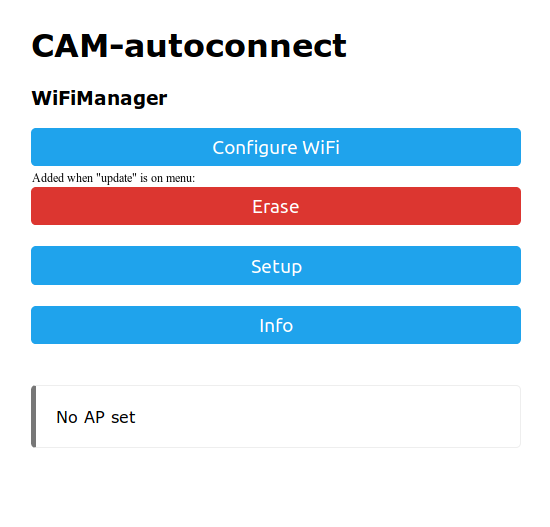
A new Erase option appears (But I didn't add erase to the menu array)
Note: My comment on the image is wrong, Erase option appears automatically, has nothing to do with adding the additional "update" option to the menu
No update option appears. If I go to info, I see there is a /u Route, clicking on it I get:
File Not Found
URI: /u
Method: GET
Arguments: 0
Can you please explain in a short note how to test this ?
Thanks in advance
UPDATE: Now I see this
github.com/tzapu/WiFiManager@0ec7a58b7bI will try again later and update this. But still don't get fully how it should work.
Maybe you can provide a working demo in your /examples Folder ?
@tablatronix commented on GitHub (Nov 17, 2018):
what is your menu code?
@martinberlin commented on GitHub (Nov 17, 2018):
Is the same as you can see in the develop branch of the FS2 project. I copied it from your example if I remember well.
@tablatronix commented on GitHub (Nov 17, 2018):
I dont see any menu code in develop, did you push it?
@martinberlin commented on GitHub (Nov 18, 2018):
Good morning Shawn,
Just added a feature/ota branch and added "update" in the menu:
github.com/martinberlin/FS2@a8bf7ec6d7Note: I'm using the latest updates in your ota branch. There if you add "sep" to the menu
It will make appear automatically the Erase red button. But update for me is completely ignored, there is no update coming as an option.
@tablatronix commented on GitHub (Nov 18, 2018):
sorry about that, the menu token for update was missing and you found a bug, fixing
@tablatronix commented on GitHub (Nov 18, 2018):
Fixed thanks!
@martinberlin commented on GitHub (Nov 19, 2018):
Works fantastic, thanks!!!
@rodri16 commented on GitHub (Nov 27, 2019):
Hi, I am also testing OTA branch and when trying to upload a code I get an error, it says
@tablatronix commented on GitHub (Nov 27, 2019):
Ill take a look and merge in updates
@tablatronix commented on GitHub (Nov 27, 2019):
Did you check esp lib for this error?
@rodri16 commented on GitHub (Nov 27, 2019):
I made it work sorry, it was a wrong file!!! I was trying tih .ino file and I have to use .bin
Is OTA branch updated with last DEV changes?
Thanks @tablatronix
@rodri16 commented on GitHub (Dec 12, 2019):
Hi @tablatronix
I moved to dev branch but left "update" on the menu. Adding
But update button doesn't apper in WM menu
@tablatronix commented on GitHub (Dec 12, 2019):
I gotta update that branch
@tablatronix commented on GitHub (Dec 12, 2019):
merged , let me test it real quick
@tablatronix commented on GitHub (Dec 12, 2019):
OTA is in the OTA branch, not dev
@tablatronix commented on GitHub (Dec 12, 2019):
#981
realized there was no issue for this