[GH-ISSUE #1445] Chip not remembering custom Parameters that are set, after Power Cycle #1236

Closed
opened 2026-02-28 01:29:10 +03:00 by kerem · 2 comments
Owner

Originally created by @atulravi on GitHub (Jul 1, 2022).
Original GitHub issue: https://github.com/tzapu/WiFiManager/issues/1445

I have been trying to see if the ESP will automatically perform a task that was setup after a power-cycle only to notice that it is not remembering the data that is input during setup.

[Hardware details given in the end. Using an ESP01]

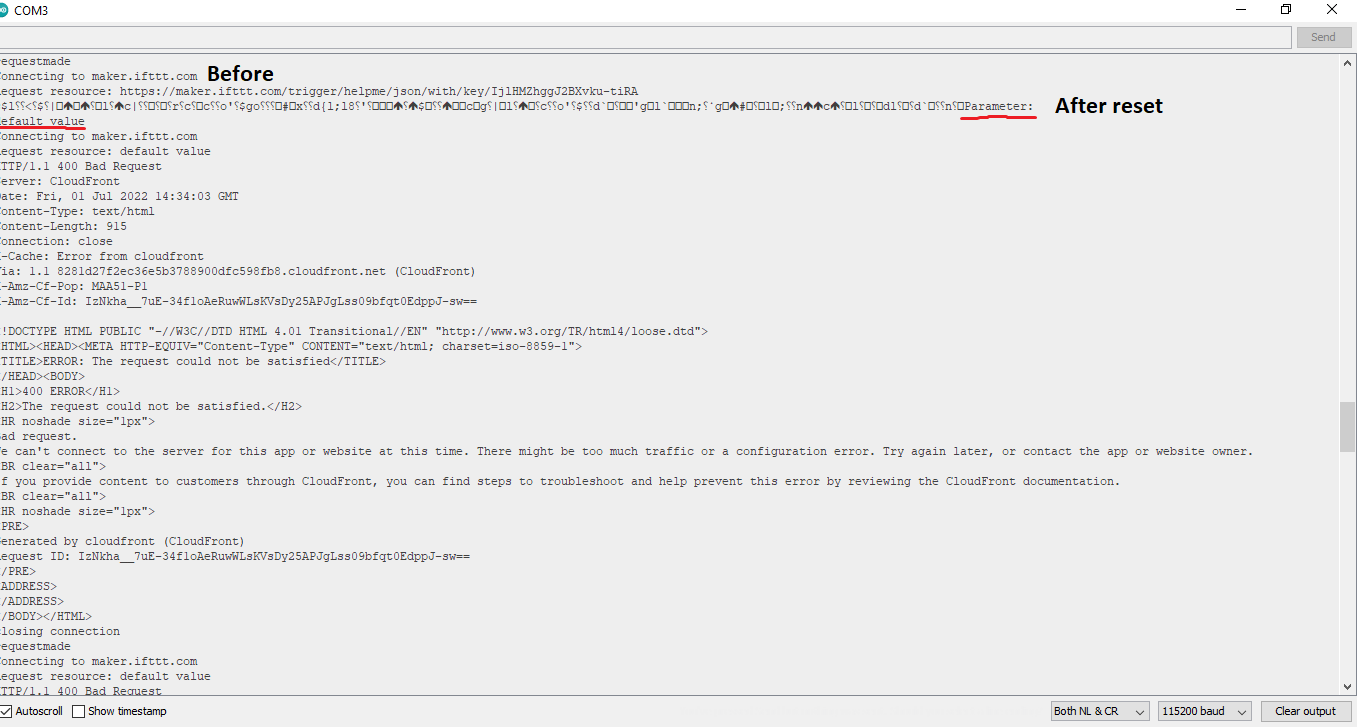
On the setup page, I have a custom input parameter where I input my IFTTT webhook link so that I don't need to hard code it in every-time. After a power cycle, the webhook link is becoming the placeholder text which in my case is Default value. ( Serial Monitor data given below)

Before Power-cycle (Just after setup):

500
Parameter:
https://maker.ifttt.com/trigger/helpme/json/with/key/****************
Connecting to maker.ifttt.com
Request resource: https://maker.ifttt.com/trigger/helpme/json/with/key/***************
HTTP/1.1 200 OK
Content-Type: text/html; charset=utf-8
Content-Length: 51
Connection: close
X-Powered-By: Sad Unicorns
X-Robots-Tag: none
X-Top-SecreTTT: VG9vIGVhc3k/IElmIHlvdSBjYW4gcmVhZCB0aGlzLCBFbWFpbCB1cyBhdCBqb2JzK3NlY3JldEBpZnR0dC5jb20uIFdlIHdhbnQgTWFrZXJzLg==
Date: Fri, 01 Jul 2022 14:33:50 GMT
ETag: W/"33-1PhScKy8yGhDdh/TbzClK+PieyE"
Vary: Accept-Encoding
X-Cache: RefreshHit from cloudfront
Via: 1.1 7ddf286a74f41d315547cb4965fc2464.cloudfront.net (CloudFront)
X-Amz-Cf-Pop: MAA51-P1
X-Amz-Cf-Id: h78-yFLR2h_mmEoUfoPHswk1ICn4_FHO8KYKY-Hzu6Th41syNZQlYQ==

Congratulations! You've fired the helpme json event
closing connection
requestmade
Connecting to maker.ifttt.com
Request resource: https://maker.ifttt.com/trigger/helpme/json/with/key/*********************
HTTP/1.1 200 OK
Content-Type: text/html; charset=utf-8
Content-Length: 51
Connection: close
X-Powered-By: Sad Unicorns
X-Robots-Tag: none
X-Top-SecreTTT: VG9vIGVhc3k/IElmIHlvdSBjYW4gcmVhZCB0aGlzLCBFbWFpbCB1cyBhdCBqb2JzK3NlY3JldEBpZnR0dC5jb20uIFdlIHdhbnQgTWFrZXJzLg==
Date: Fri, 01 Jul 2022 14:33:50 GMT
ETag: W/"33-1PhScKy8yGhDdh/TbzClK+PieyE"
Vary: Accept-Encoding
X-Cache: RefreshHit from cloudfront
Via: 1.1 98505de3b08a10ebacb304bf006d1078.cloudfront.net (CloudFront)
X-Amz-Cf-Pop: MAA51-P1
X-Amz-Cf-Id: 7mS_GjkVwEEPRFu6tMzBi-Che7t55zyChtxO7oj5s5Vc4JUoK5nZ5A==

After Power Cycle (Un Plugging and Re-Plugging):
image

image

It can be noticed that the data that was custom input during setup has gotten reset to the placeholder text (code given below for reference). So effectively, after a power-cycle, the device no longer works.

Code:

#include <WiFiManager.h>

const int buttonPin = 0; // the number of the pushbutton pin
const int resetsw = 1;
const int ledPin = 5; // the number of the LED pin
int buttonState = 0;
int resetState = 0;

const char* server = "maker.ifttt.com";
WiFiManager manager;
WiFiManagerParameter parameterglobal("parameterId", "IFTTT Maker Link", "default value", 500);

//flag for saving data
bool shouldSaveConfig = true;
void setup() {
//manager.resetSettings();
pinMode(buttonPin, INPUT);
pinMode(5,OUTPUT);
pinMode(resetsw,INPUT);
Serial.begin(115200);
manager.setDebugOutput(false);

WiFi.setAutoReconnect(true);

manager.addParameter(&parameterglobal);

 std::vector<const char *> menu = {"wifi"};
manager.setMenu(menu);
 
manager.autoConnect("automation-device","password");

Serial.println("Parameter:");
Serial.println(parameterglobal.getValue());;

}

void loop(){
resetState = digitalRead(resetsw);
makeIFTTTRequest();
Serial.println("requestmade");

if (resetState == HIGH){
manager.resetSettings();
Serial.println("chip reset");
}

}
//data
void saveConfigCallback () {
Serial.println("Should save config");
shouldSaveConfig = true;
}
// Ifttt request
void makeIFTTTRequest() {
Serial.print("Connecting to ");
Serial.print(server);

WiFiClient client;
int retries = 5;
while(!!!client.connect(server, 80) && (retries-- > 0)) {
Serial.print(".");
}
Serial.println();
if(!!!client.connected()) {
Serial.println("Failed to connect, going back to sleep");
}

Serial.print("Request resource: ");
Serial.println(parameterglobal.getValue());
client.print(String("GET ") + parameterglobal.getValue() +
" HTTP/1.1\r\n" +
"Host: " + server + "\r\n" +
"Connection: close\r\n\r\n");

int timeout = 5 * 10; // 5 seconds
while(!!!client.available() && (timeout-- > 0)){
delay(100);
}
if(!!!client.available()) {
Serial.println("No response, going back to sleep");
}
while(client.available()){
Serial.write(client.read());
}

Serial.println("\nclosing connection");
client.stop();
}

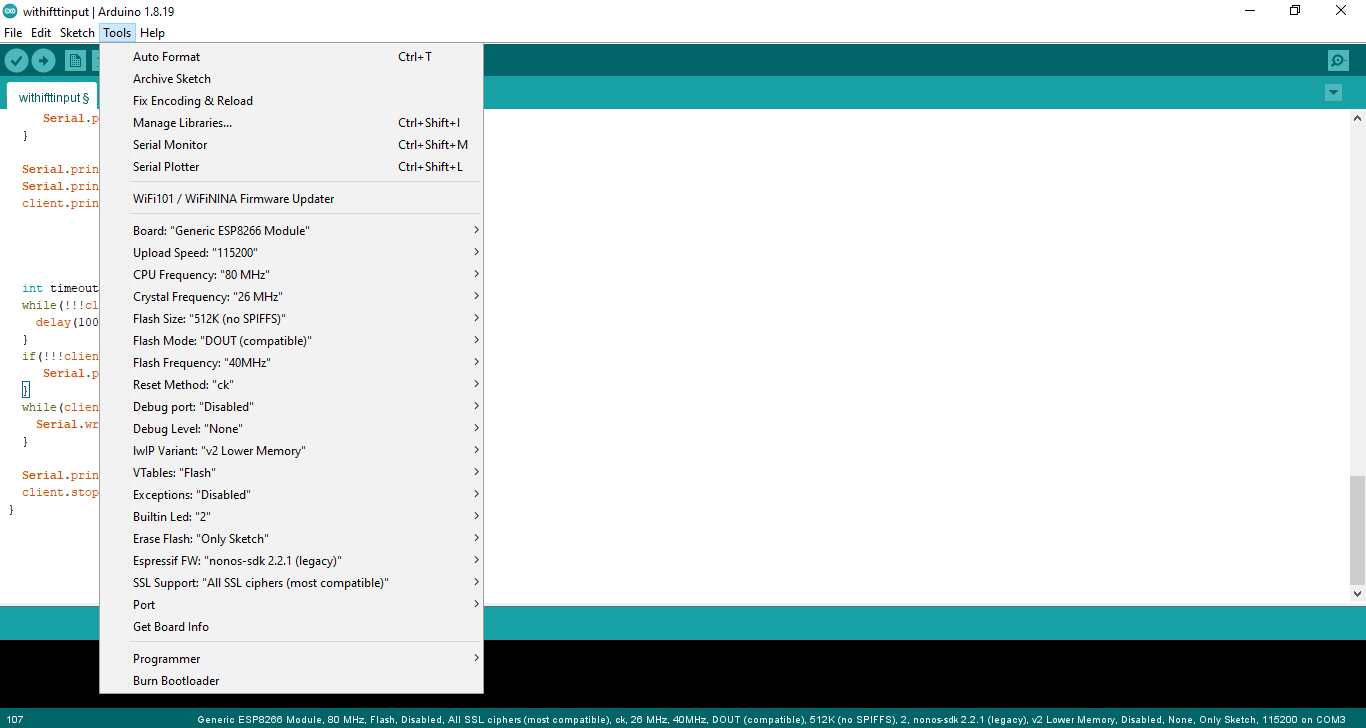
Hardware Specs:

Chip: ESP-01 (ESP8266) {Generic ESP8266 module}
Reset Method: ck
Flash Size: 512K
Debug Port: disabled.
[Other details attached in image below]
image

Originally created by @atulravi on GitHub (Jul 1, 2022). Original GitHub issue: https://github.com/tzapu/WiFiManager/issues/1445 I have been trying to see if the ESP will automatically perform a task that was setup after a power-cycle only to notice that it is not remembering the data that is input during setup. [Hardware details given in the end. Using an ESP01] On the setup page, I have a custom input parameter where I input my IFTTT webhook link so that I don't need to hard code it in every-time. After a power cycle, the webhook link is becoming the placeholder text which in my case is Default value. ( Serial Monitor data given below) **Before Power-cycle (Just after setup):** 500 Parameter: https://maker.ifttt.com/trigger/helpme/json/with/key/**************** Connecting to maker.ifttt.com Request resource: https://maker.ifttt.com/trigger/helpme/json/with/key/*************** HTTP/1.1 200 OK Content-Type: text/html; charset=utf-8 Content-Length: 51 Connection: close X-Powered-By: Sad Unicorns X-Robots-Tag: none X-Top-SecreTTT: VG9vIGVhc3k/IElmIHlvdSBjYW4gcmVhZCB0aGlzLCBFbWFpbCB1cyBhdCBqb2JzK3NlY3JldEBpZnR0dC5jb20uIFdlIHdhbnQgTWFrZXJzLg== Date: Fri, 01 Jul 2022 14:33:50 GMT ETag: W/"33-1PhScKy8yGhDdh/TbzClK+PieyE" Vary: Accept-Encoding X-Cache: RefreshHit from cloudfront Via: 1.1 7ddf286a74f41d315547cb4965fc2464.cloudfront.net (CloudFront) X-Amz-Cf-Pop: MAA51-P1 X-Amz-Cf-Id: h78-yFLR2h_mmEoUfoPHswk1ICn4_FHO8KYKY-Hzu6Th41syNZQlYQ== Congratulations! You've fired the helpme json event closing connection requestmade Connecting to maker.ifttt.com Request resource: https://maker.ifttt.com/trigger/helpme/json/with/key/********************* HTTP/1.1 200 OK Content-Type: text/html; charset=utf-8 Content-Length: 51 Connection: close X-Powered-By: Sad Unicorns X-Robots-Tag: none X-Top-SecreTTT: VG9vIGVhc3k/IElmIHlvdSBjYW4gcmVhZCB0aGlzLCBFbWFpbCB1cyBhdCBqb2JzK3NlY3JldEBpZnR0dC5jb20uIFdlIHdhbnQgTWFrZXJzLg== Date: Fri, 01 Jul 2022 14:33:50 GMT ETag: W/"33-1PhScKy8yGhDdh/TbzClK+PieyE" Vary: Accept-Encoding X-Cache: RefreshHit from cloudfront Via: 1.1 98505de3b08a10ebacb304bf006d1078.cloudfront.net (CloudFront) X-Amz-Cf-Pop: MAA51-P1 X-Amz-Cf-Id: 7mS_GjkVwEEPRFu6tMzBi-Che7t55zyChtxO7oj5s5Vc4JUoK5nZ5A== **After Power Cycle (Un Plugging and Re-Plugging):** ![image](https://user-images.githubusercontent.com/70395057/176917324-0bd1f9ac-1bed-48a8-8276-4f322d26a866.png) ![image](https://user-images.githubusercontent.com/70395057/176915581-d88c6edb-5dfb-43ea-8840-4cd1e1b73e5d.png) It can be noticed that the data that was custom input during setup has gotten reset to the placeholder text (code given below for reference). So effectively, after a power-cycle, the device no longer works. **Code:** #include <WiFiManager.h> const int buttonPin = 0; // the number of the pushbutton pin const int resetsw = 1; const int ledPin = 5; // the number of the LED pin int buttonState = 0; int resetState = 0; const char* server = "maker.ifttt.com"; WiFiManager manager; WiFiManagerParameter parameterglobal("parameterId", "IFTTT Maker Link", "default value", 500); //flag for saving data bool shouldSaveConfig = true; void setup() { //manager.resetSettings(); pinMode(buttonPin, INPUT); pinMode(5,OUTPUT); pinMode(resetsw,INPUT); Serial.begin(115200); manager.setDebugOutput(false); WiFi.setAutoReconnect(true); manager.addParameter(&parameterglobal); std::vector<const char *> menu = {"wifi"}; manager.setMenu(menu); manager.autoConnect("automation-device","password"); Serial.println("Parameter:"); Serial.println(parameterglobal.getValue());; } void loop(){ resetState = digitalRead(resetsw); makeIFTTTRequest(); Serial.println("requestmade"); if (resetState == HIGH){ manager.resetSettings(); Serial.println("chip reset"); } } //data void saveConfigCallback () { Serial.println("Should save config"); shouldSaveConfig = true; } // Ifttt request void makeIFTTTRequest() { Serial.print("Connecting to "); Serial.print(server); WiFiClient client; int retries = 5; while(!!!client.connect(server, 80) && (retries-- > 0)) { Serial.print("."); } Serial.println(); if(!!!client.connected()) { Serial.println("Failed to connect, going back to sleep"); } Serial.print("Request resource: "); Serial.println(parameterglobal.getValue()); client.print(String("GET ") + parameterglobal.getValue() + " HTTP/1.1\r\n" + "Host: " + server + "\r\n" + "Connection: close\r\n\r\n"); int timeout = 5 * 10; // 5 seconds while(!!!client.available() && (timeout-- > 0)){ delay(100); } if(!!!client.available()) { Serial.println("No response, going back to sleep"); } while(client.available()){ Serial.write(client.read()); } Serial.println("\nclosing connection"); client.stop(); } **Hardware Specs:** Chip: ESP-01 (ESP8266) {Generic ESP8266 module} Reset Method: ck Flash Size: 512K Debug Port: disabled. [Other details attached in image below] ![image](https://user-images.githubusercontent.com/70395057/176918279-f1d91d30-6d96-4048-a54b-28da798fbfc3.png)
kerem 2026-02-28 01:29:10 +03:00
  • closed this issue
  • added the
    Question
    label
Author
Owner

@TI-SH-K205 commented on GitHub (Jul 1, 2022):

Thanks for everything sir ..........❤️❤️❤️❤️❤️

On Fri, Jul 1, 2022, 8:57 PM ESCcrasci @.***> wrote:

I have been trying to see if the ESP will automatically perform a task
that was setup after a power-cycle only to notice that it is not
remembering the data that is input during setup.

[Hardware details given in the end. Using an ESP01]

On the setup page, I have a custom input parameter where I input my IFTTT
webhook link so that I don't need to hard code it in every-time. After a
power cycle, the webhook link is becoming the placeholder text which in my
case is Default value. ( Serial Monitor data given below)

Before Power-cycle (Just after setup):

500
Parameter:
https://maker.ifttt.com/trigger/helpme/json/with/key/****************
Connecting to maker.ifttt.com
Request resource: https://maker.ifttt.com/trigger/helpme/json/with/key/


HTTP/1.1 200 OK
Content-Type: text/html; charset=utf-8
Content-Length: 51
Connection: close
X-Powered-By: Sad Unicorns
X-Robots-Tag: none
X-Top-SecreTTT:
VG9vIGVhc3k/IElmIHlvdSBjYW4gcmVhZCB0aGlzLCBFbWFpbCB1cyBhdCBqb2JzK3NlY3JldEBpZnR0dC5jb20uIFdlIHdhbnQgTWFrZXJzLg==
Date: Fri, 01 Jul 2022 14:33:50 GMT
ETag: W/"33-1PhScKy8yGhDdh/TbzClK+PieyE"
Vary: Accept-Encoding
X-Cache: RefreshHit from cloudfront
Via: 1.1 7ddf286a74f41d315547cb4965fc2464.cloudfront.net (CloudFront)
X-Amz-Cf-Pop: MAA51-P1
X-Amz-Cf-Id: h78-yFLR2h_mmEoUfoPHswk1ICn4_FHO8KYKY-Hzu6Th41syNZQlYQ==

Congratulations! You've fired the helpme json event
closing connection
requestmade
Connecting to maker.ifttt.com
Request resource: https://maker.ifttt.com/trigger/helpme/json/with/key/


HTTP/1.1 200 OK
Content-Type: text/html; charset=utf-8
Content-Length: 51
Connection: close
X-Powered-By: Sad Unicorns
X-Robots-Tag: none
X-Top-SecreTTT:
VG9vIGVhc3k/IElmIHlvdSBjYW4gcmVhZCB0aGlzLCBFbWFpbCB1cyBhdCBqb2JzK3NlY3JldEBpZnR0dC5jb20uIFdlIHdhbnQgTWFrZXJzLg==
Date: Fri, 01 Jul 2022 14:33:50 GMT
ETag: W/"33-1PhScKy8yGhDdh/TbzClK+PieyE"
Vary: Accept-Encoding
X-Cache: RefreshHit from cloudfront
Via: 1.1 98505de3b08a10ebacb304bf006d1078.cloudfront.net (CloudFront)
X-Amz-Cf-Pop: MAA51-P1
X-Amz-Cf-Id: 7mS_GjkVwEEPRFu6tMzBi-Che7t55zyChtxO7oj5s5Vc4JUoK5nZ5A==

After Power Cycle (Un Plugging and Re-Plugging):
[image: image]
https://user-images.githubusercontent.com/70395057/176917324-0bd1f9ac-1bed-48a8-8276-4f322d26a866.png

[image: image]
https://user-images.githubusercontent.com/70395057/176915581-d88c6edb-5dfb-43ea-8840-4cd1e1b73e5d.png

It can be noticed that the data that was custom input during setup has
gotten reset to the placeholder text (code given below for reference). So
effectively, after a power-cycle, the device no longer works.

Code:

#include <WiFiManager.h>

const int buttonPin = 0; // the number of the pushbutton pin
const int resetsw = 1;
const int ledPin = 5; // the number of the LED pin
int buttonState = 0;
int resetState = 0;

const char* server = "maker.ifttt.com";
WiFiManager manager;
WiFiManagerParameter parameterglobal("parameterId", "IFTTT Maker Link",
"default value", 500);

//flag for saving data
bool shouldSaveConfig = true;
void setup() {
//manager.resetSettings();
pinMode(buttonPin, INPUT);
pinMode(5,OUTPUT);
pinMode(resetsw,INPUT);
Serial.begin(115200);
manager.setDebugOutput(false);

WiFi.setAutoReconnect(true);

manager.addParameter(&parameterglobal);

std::vector<const char *> menu = {"wifi"};
manager.setMenu(menu);

manager.autoConnect("automation-device","password");

Serial.println("Parameter:");
Serial.println(parameterglobal.getValue());;

}

void loop(){
resetState = digitalRead(resetsw);
makeIFTTTRequest();
Serial.println("requestmade");

if (resetState == HIGH){
manager.resetSettings();
Serial.println("chip reset");
}

}
//data
void saveConfigCallback () {
Serial.println("Should save config");
shouldSaveConfig = true;
}
// Ifttt request
void makeIFTTTRequest() {
Serial.print("Connecting to ");
Serial.print(server);

WiFiClient client;
int retries = 5;
while(!!!client.connect(server, 80) && (retries-- > 0)) {
Serial.print(".");
}
Serial.println();
if(!!!client.connected()) {
Serial.println("Failed to connect, going back to sleep");
}

Serial.print("Request resource: ");
Serial.println(parameterglobal.getValue());
client.print(String("GET ") + parameterglobal.getValue() +
" HTTP/1.1\r\n" +
"Host: " + server + "\r\n" +
"Connection: close\r\n\r\n");

int timeout = 5 * 10; // 5 seconds
while(!!!client.available() && (timeout-- > 0)){
delay(100);
}
if(!!!client.available()) {
Serial.println("No response, going back to sleep");
}
while(client.available()){
Serial.write(client.read());
}

Serial.println("\nclosing connection");
client.stop();
}

Hardware Specs:

Chip: ESP-01 (ESP8266) {Generic ESP8266 module}
Reset Method: ck
Flash Size: 512K
Debug Port: disabled.
[Other details attached in image below]
[image: image]
https://user-images.githubusercontent.com/70395057/176918279-f1d91d30-6d96-4048-a54b-28da798fbfc3.png


Reply to this email directly, view it on GitHub
https://github.com/tzapu/WiFiManager/issues/1445, or unsubscribe
https://github.com/notifications/unsubscribe-auth/AZ3PEOPFPO25GLRETUEAM73VR4BM7ANCNFSM52M7YIQQ
.
You are receiving this because you are subscribed to this thread.Message
ID: @.***>

<!-- gh-comment-id:1172446752 --> @TI-SH-K205 commented on GitHub (Jul 1, 2022): Thanks for everything sir ..........❤️❤️❤️❤️❤️ On Fri, Jul 1, 2022, 8:57 PM ESCcrasci ***@***.***> wrote: > I have been trying to see if the ESP will automatically perform a task > that was setup after a power-cycle only to notice that it is not > remembering the data that is input during setup. > > [Hardware details given in the end. Using an ESP01] > > On the setup page, I have a custom input parameter where I input my IFTTT > webhook link so that I don't need to hard code it in every-time. After a > power cycle, the webhook link is becoming the placeholder text which in my > case is Default value. ( Serial Monitor data given below) > > *Before Power-cycle (Just after setup):* > > 500 > Parameter: > https://maker.ifttt.com/trigger/helpme/json/with/key/**************** > Connecting to maker.ifttt.com > Request resource: https://maker.ifttt.com/trigger/helpme/json/with/key/ > *************** > HTTP/1.1 200 OK > Content-Type: text/html; charset=utf-8 > Content-Length: 51 > Connection: close > X-Powered-By: Sad Unicorns > X-Robots-Tag: none > X-Top-SecreTTT: > VG9vIGVhc3k/IElmIHlvdSBjYW4gcmVhZCB0aGlzLCBFbWFpbCB1cyBhdCBqb2JzK3NlY3JldEBpZnR0dC5jb20uIFdlIHdhbnQgTWFrZXJzLg== > Date: Fri, 01 Jul 2022 14:33:50 GMT > ETag: W/"33-1PhScKy8yGhDdh/TbzClK+PieyE" > Vary: Accept-Encoding > X-Cache: RefreshHit from cloudfront > Via: 1.1 7ddf286a74f41d315547cb4965fc2464.cloudfront.net (CloudFront) > X-Amz-Cf-Pop: MAA51-P1 > X-Amz-Cf-Id: h78-yFLR2h_mmEoUfoPHswk1ICn4_FHO8KYKY-Hzu6Th41syNZQlYQ== > > Congratulations! You've fired the helpme json event > closing connection > requestmade > Connecting to maker.ifttt.com > Request resource: https://maker.ifttt.com/trigger/helpme/json/with/key/ > ********************* > HTTP/1.1 200 OK > Content-Type: text/html; charset=utf-8 > Content-Length: 51 > Connection: close > X-Powered-By: Sad Unicorns > X-Robots-Tag: none > X-Top-SecreTTT: > VG9vIGVhc3k/IElmIHlvdSBjYW4gcmVhZCB0aGlzLCBFbWFpbCB1cyBhdCBqb2JzK3NlY3JldEBpZnR0dC5jb20uIFdlIHdhbnQgTWFrZXJzLg== > Date: Fri, 01 Jul 2022 14:33:50 GMT > ETag: W/"33-1PhScKy8yGhDdh/TbzClK+PieyE" > Vary: Accept-Encoding > X-Cache: RefreshHit from cloudfront > Via: 1.1 98505de3b08a10ebacb304bf006d1078.cloudfront.net (CloudFront) > X-Amz-Cf-Pop: MAA51-P1 > X-Amz-Cf-Id: 7mS_GjkVwEEPRFu6tMzBi-Che7t55zyChtxO7oj5s5Vc4JUoK5nZ5A== > > *After Power Cycle (Un Plugging and Re-Plugging):* > [image: image] > <https://user-images.githubusercontent.com/70395057/176917324-0bd1f9ac-1bed-48a8-8276-4f322d26a866.png> > > [image: image] > <https://user-images.githubusercontent.com/70395057/176915581-d88c6edb-5dfb-43ea-8840-4cd1e1b73e5d.png> > > It can be noticed that the data that was custom input during setup has > gotten reset to the placeholder text (code given below for reference). So > effectively, after a power-cycle, the device no longer works. > > *Code:* > > #include <WiFiManager.h> > > const int buttonPin = 0; // the number of the pushbutton pin > const int resetsw = 1; > const int ledPin = 5; // the number of the LED pin > int buttonState = 0; > int resetState = 0; > > const char* server = "maker.ifttt.com"; > WiFiManager manager; > WiFiManagerParameter parameterglobal("parameterId", "IFTTT Maker Link", > "default value", 500); > > //flag for saving data > bool shouldSaveConfig = true; > void setup() { > //manager.resetSettings(); > pinMode(buttonPin, INPUT); > pinMode(5,OUTPUT); > pinMode(resetsw,INPUT); > Serial.begin(115200); > manager.setDebugOutput(false); > > WiFi.setAutoReconnect(true); > > manager.addParameter(&parameterglobal); > > std::vector<const char *> menu = {"wifi"}; > manager.setMenu(menu); > > manager.autoConnect("automation-device","password"); > > Serial.println("Parameter:"); > Serial.println(parameterglobal.getValue());; > > } > > void loop(){ > resetState = digitalRead(resetsw); > makeIFTTTRequest(); > Serial.println("requestmade"); > > if (resetState == HIGH){ > manager.resetSettings(); > Serial.println("chip reset"); > } > > } > //data > void saveConfigCallback () { > Serial.println("Should save config"); > shouldSaveConfig = true; > } > // Ifttt request > void makeIFTTTRequest() { > Serial.print("Connecting to "); > Serial.print(server); > > WiFiClient client; > int retries = 5; > while(!!!client.connect(server, 80) && (retries-- > 0)) { > Serial.print("."); > } > Serial.println(); > if(!!!client.connected()) { > Serial.println("Failed to connect, going back to sleep"); > } > > Serial.print("Request resource: "); > Serial.println(parameterglobal.getValue()); > client.print(String("GET ") + parameterglobal.getValue() + > " HTTP/1.1\r\n" + > "Host: " + server + "\r\n" + > "Connection: close\r\n\r\n"); > > int timeout = 5 * 10; // 5 seconds > while(!!!client.available() && (timeout-- > 0)){ > delay(100); > } > if(!!!client.available()) { > Serial.println("No response, going back to sleep"); > } > while(client.available()){ > Serial.write(client.read()); > } > > Serial.println("\nclosing connection"); > client.stop(); > } > > *Hardware Specs:* > > Chip: ESP-01 (ESP8266) {Generic ESP8266 module} > Reset Method: ck > Flash Size: 512K > Debug Port: disabled. > [Other details attached in image below] > [image: image] > <https://user-images.githubusercontent.com/70395057/176918279-f1d91d30-6d96-4048-a54b-28da798fbfc3.png> > > — > Reply to this email directly, view it on GitHub > <https://github.com/tzapu/WiFiManager/issues/1445>, or unsubscribe > <https://github.com/notifications/unsubscribe-auth/AZ3PEOPFPO25GLRETUEAM73VR4BM7ANCNFSM52M7YIQQ> > . > You are receiving this because you are subscribed to this thread.Message > ID: ***@***.***> >
Author
Owner

@mrjerzy commented on GitHub (Jul 7, 2022):

Hi,

the README states that you need to store custom parameters on your own.

You are responsible for saving and loading these custom values. The library just collects and displays the data for you as a convenience.

In the examples folder you can find some code, which explains how to read the values collected by WifiManager: https://github.com/tzapu/WiFiManager/blob/master/examples/Parameters/SPIFFS/AutoConnectWithFSParameters/AutoConnectWithFSParameters.ino#L125-L131

Once you have extracted those values you could use for example the ESP's non-volatile storage.

There are some nice examples in the esp-idf examples library how to read and write to the NVS:
https://github.com/espressif/esp-idf/blob/master/examples/storage/nvs_rw_value/main/nvs_value_example_main.c

In the examples library of the wifi manager you will find also some alternatives to NVS.

BR

<!-- gh-comment-id:1177219609 --> @mrjerzy commented on GitHub (Jul 7, 2022): Hi, the [README](https://github.com/tzapu/WiFiManager#custom-parameters) states that you need to store custom parameters on your own. > You are responsible for saving and loading these custom values. The library just collects and displays the data for you as a convenience. In the examples folder you can find some code, which explains how to read the values collected by WifiManager: https://github.com/tzapu/WiFiManager/blob/master/examples/Parameters/SPIFFS/AutoConnectWithFSParameters/AutoConnectWithFSParameters.ino#L125-L131 Once you have extracted those values you could use for example the ESP's [non-volatile storage](https://docs.espressif.com/projects/esp-idf/en/latest/esp32/api-reference/storage/nvs_flash.html?highlight=nvs). There are some nice examples in the esp-idf examples library how to read and write to the NVS: https://github.com/espressif/esp-idf/blob/master/examples/storage/nvs_rw_value/main/nvs_value_example_main.c In the examples library of the wifi manager you will find also some alternatives to NVS. BR
Sign in to join this conversation.
No milestone
No project
No assignees
1 participant
Notifications
Due date
The due date is invalid or out of range. Please use the format "yyyy-mm-dd".

No due date set.

Dependencies

No dependencies set.

Reference
starred/WiFiManager#1236
No description provided.