[GH-ISSUE #1294] [QUESTION] Make inputs mandatory on config page- Custom HTML #1110

Closed
opened 2026-02-28 01:28:33 +03:00 by kerem · 1 comment
Owner

Originally created by @shariq-azim on GitHub (Sep 19, 2021).
Original GitHub issue: https://github.com/tzapu/WiFiManager/issues/1294

Hardware

WiFimanager Branch/Release: Master

Esp8266/Esp32: Esp32

Hardware: Esp32

Core Version: 2.4.0, staging

Description

Hello All,

This is a question not an issue.

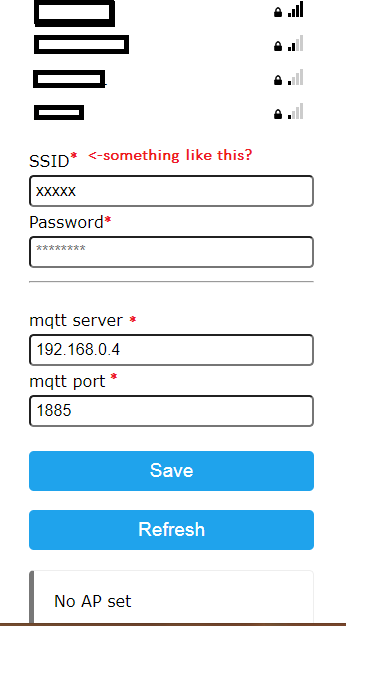
Is there a way to make the fields mandatory during configurations, such that users do not just click on save without giving information on wifi ssid, password and custom parameters.
Currently, one can even save the credentials or custom param values without any real values. a mandatory check should prevent the same.
Better if the check icon can also be shown like the reference image
image

Please suggest.

Originally created by @shariq-azim on GitHub (Sep 19, 2021). Original GitHub issue: https://github.com/tzapu/WiFiManager/issues/1294 #### Hardware WiFimanager Branch/Release: Master Esp8266/Esp32: Esp32 Hardware: Esp32 Core Version: 2.4.0, staging ### Description Hello All, This is a question not an issue. Is there a way to make the fields mandatory during configurations, such that users do not just click on save without giving information on wifi ssid, password and custom parameters. Currently, one can even save the credentials or custom param values without any real values. a mandatory check should prevent the same. Better if the check icon can also be shown like the reference image ![image](https://user-images.githubusercontent.com/37748914/133922573-0c61d3f6-41cc-4e23-bf5b-7b484991d9dc.png) Please suggest.
kerem closed this issue 2026-02-28 01:28:34 +03:00
Author
Owner

@shariq-azim commented on GitHub (Sep 20, 2021):

Hello,
I have realised a js script like this should be helpful here:
"";

So , i used one of the examples from advanced folder and added the code (snippet):

wm.addParameter(&custom_mqtt_server);
wm.addParameter(&custom_mqtt_port);

String html_script = "";

new (&custom_field) WiFiManagerParameter(html_script.c_str()); // custom html input
wm.addParameter(&custom_field);

if (!wm.autoConnect("AutoConnectAP")) {
Serial.println("failed to connect and hit timeout");
delay(3000);
//reset and try again, or maybe put it to deep sleep
//ESP.restart();
//delay(5000);
}

And it worked!!

Thanks for reading

<!-- gh-comment-id:923107104 --> @shariq-azim commented on GitHub (Sep 20, 2021): Hello, I have realised a js script like this should be helpful here: "<script> document.getElementById('s').required = true; document.getElementsByName('s')[0].labels[0].innerHTML=document.getElementsByName('s')[0].labels[0].innerHTML +'*';</script>"; So , i used one of the examples from advanced folder and added the code (snippet): wm.addParameter(&custom_mqtt_server); wm.addParameter(&custom_mqtt_port); String html_script = "<script>document.getElementById('s').required = true;document.getElementsByName('s')[0].labels[0].innerHTML=document.getElementsByName('s')[0].labels[0].innerHTML +\"<span style='color: red;'>*</span>\";"; html_script += "document.getElementById('p').required = true;document.getElementsByName('p')[0].labels[0].innerHTML=document.getElementsByName('p')[0].labels[0].innerHTML +\"<span style='color: red;'>*</span>\";"; html_script += "document.getElementById('server').required = true;document.getElementsByName('server')[0].labels[0].innerHTML=document.getElementsByName('server')[0].labels[0].innerHTML +\"<span style='color: red;'>*</span>\";"; html_script += "document.getElementById('port').required = true;document.getElementsByName('port')[0].labels[0].innerHTML=document.getElementsByName('port')[0].labels[0].innerHTML +\"<span style='color: red;'>*</span>\";</script>"; new (&custom_field) WiFiManagerParameter(html_script.c_str()); // custom html input wm.addParameter(&custom_field); if (!wm.autoConnect("AutoConnectAP")) { Serial.println("failed to connect and hit timeout"); delay(3000); //reset and try again, or maybe put it to deep sleep //ESP.restart(); //delay(5000); } And it worked!! Thanks for reading
Sign in to join this conversation.
No milestone
No project
No assignees
1 participant
Notifications
Due date
The due date is invalid or out of range. Please use the format "yyyy-mm-dd".

No due date set.

Dependencies

No dependencies set.

Reference
starred/WiFiManager#1110
No description provided.