[GH-ISSUE #1179] Problem connecting to pubsubclient using wifiManager.addParameter result #1007

Closed
opened 2026-02-28 01:28:05 +03:00 by kerem · 5 comments
Owner

Originally created by @AlbanT on GitHub (Dec 20, 2020).
Original GitHub issue: https://github.com/tzapu/WiFiManager/issues/1179

Hi,

I'm using the AutoConnectWithFSParameters example and combined it with the knolleary/pubsubclient/examples/mqtt_basic/mqtt_basic.ino to use the custom_mqtt_server and custom_mqtt_port WiFiManagerParameters.

When I manually type:

  client.setServer("192.168.178.100", 1883);
  client.setCallback(callback);

It works fine.

But how do I use the parameters I've set thru the WifiManager?
I can print them and they look alright to me but the MQTT client won't connect:

  Serial.print("client.setServer(");
  Serial.print(custom_mqtt_server.getValue());
  Serial.print(", ");
  Serial.print(atoi(custom_mqtt_port.getValue()));
  Serial.println(")");

  client.setServer(custom_mqtt_server.getValue(), atoi(custom_mqtt_port.getValue()));
  client.setCallback(callback);

The serial prints:

Should save config
connected...yeey :)
The values in the file are:
        mqtt_server : 192.168.178.100
        mqtt_port : 1883
saving config
{"mqtt_server":"192.168.178.100","mqtt_port":"1883"}

local ip
192.168.178.67


client.setServer(192.168.178.100, 1883)
*WM: freeing allocated params!
Attempting MQTT connection...failed, rc=-2 try again in 5 seconds

I'm pretty sure it is something simple but I cannot figure it out :(

Originally created by @AlbanT on GitHub (Dec 20, 2020). Original GitHub issue: https://github.com/tzapu/WiFiManager/issues/1179 Hi, I'm using the AutoConnectWithFSParameters example and combined it with the knolleary/pubsubclient/examples/mqtt_basic/mqtt_basic.ino to use the custom_mqtt_server and custom_mqtt_port WiFiManagerParameters. When I manually type: ``` client.setServer("192.168.178.100", 1883); client.setCallback(callback); ``` It works fine. But how do I use the parameters I've set thru the WifiManager? I can print them and they look alright to me but the MQTT client won't connect: ``` Serial.print("client.setServer("); Serial.print(custom_mqtt_server.getValue()); Serial.print(", "); Serial.print(atoi(custom_mqtt_port.getValue())); Serial.println(")"); client.setServer(custom_mqtt_server.getValue(), atoi(custom_mqtt_port.getValue())); client.setCallback(callback); ``` The serial prints: ``` Should save config connected...yeey :) The values in the file are: mqtt_server : 192.168.178.100 mqtt_port : 1883 saving config {"mqtt_server":"192.168.178.100","mqtt_port":"1883"} local ip 192.168.178.67 client.setServer(192.168.178.100, 1883) *WM: freeing allocated params! Attempting MQTT connection...failed, rc=-2 try again in 5 seconds ``` I'm pretty sure it is something simple but I cannot figure it out :(
kerem 2026-02-28 01:28:05 +03:00
  • closed this issue
  • added the
    Question
    label
Author
Owner

@tablatronix commented on GitHub (Dec 20, 2020):

I am assuming you need to convert your ip address to ipaddress() datatype, if you are reading it from spiffs its probably a string

<!-- gh-comment-id:748632160 --> @tablatronix commented on GitHub (Dec 20, 2020): I am assuming you need to convert your ip address to ipaddress() datatype, if you are reading it from spiffs its probably a string
Author
Owner

@AlbanT commented on GitHub (Dec 20, 2020):

I am assuming you need to convert your ip address to ipaddress() datatype, if you are reading it from spiffs its probably a string

I managed to get it working but I needed to use a String object.

String mqtt_ip_string = custom_mqtt_server.getValue();
String mqtt_port_number = custom_mqtt_port.getValue();
String str_first_octet = "";
String str_second_octet = "";
String str_third_octet = "";
String str_fourth_octet = "";

int start = 0;
int end = mqtt_ip_string.indexOf(".");
str_first_octet = mqtt_ip_string.substring(start,end);

start = end + 1;
end = mqtt_ip_string.indexOf(".",start),
str_second_octet = mqtt_ip_string.substring(start,end);

start = end + 1;
end = mqtt_ip_string.indexOf(".",start),
str_third_octet = mqtt_ip_string.substring(start,end);

start = end + 1;
end = mqtt_ip_string.indexOf(".",start),
str_fourth_octet = mqtt_ip_string.substring(start,end);

IPAddress ip(str_first_octet.toInt(), str_second_octet.toInt(), str_third_octet.toInt(), str_fourth_octet.toInt());
client.setServer(ip, mqtt_port_number.toInt());

I'm sure there is a more elegant way so if anyone has one please let me know...

Would be nice if the example (AutoConnectWithFSParameters) was updated to show the mqtt address converted to an ipaddress datatype.

<!-- gh-comment-id:748652514 --> @AlbanT commented on GitHub (Dec 20, 2020): > > > I am assuming you need to convert your ip address to ipaddress() datatype, if you are reading it from spiffs its probably a string I managed to get it working but I needed to use a String object. ``` String mqtt_ip_string = custom_mqtt_server.getValue(); String mqtt_port_number = custom_mqtt_port.getValue(); String str_first_octet = ""; String str_second_octet = ""; String str_third_octet = ""; String str_fourth_octet = ""; int start = 0; int end = mqtt_ip_string.indexOf("."); str_first_octet = mqtt_ip_string.substring(start,end); start = end + 1; end = mqtt_ip_string.indexOf(".",start), str_second_octet = mqtt_ip_string.substring(start,end); start = end + 1; end = mqtt_ip_string.indexOf(".",start), str_third_octet = mqtt_ip_string.substring(start,end); start = end + 1; end = mqtt_ip_string.indexOf(".",start), str_fourth_octet = mqtt_ip_string.substring(start,end); IPAddress ip(str_first_octet.toInt(), str_second_octet.toInt(), str_third_octet.toInt(), str_fourth_octet.toInt()); client.setServer(ip, mqtt_port_number.toInt()); ``` I'm sure there is a more elegant way so if anyone has one please let me know... Would be nice if the example (AutoConnectWithFSParameters) was updated to show the mqtt address converted to an ipaddress datatype.
Author
Owner

@tablatronix commented on GitHub (Dec 20, 2020):

Its a standard arduino thing

<!-- gh-comment-id:748667345 --> @tablatronix commented on GitHub (Dec 20, 2020): Its a standard arduino thing
Author
Owner

@tablatronix commented on GitHub (Dec 20, 2020):

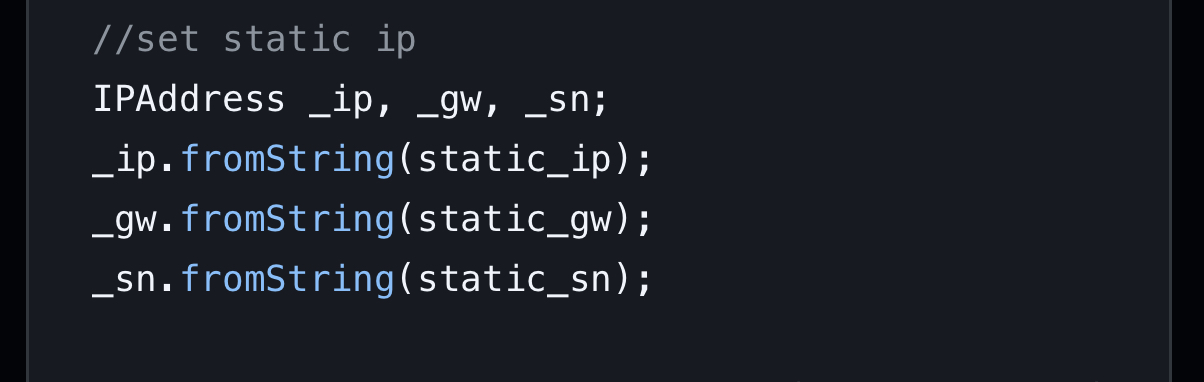
Also its already there
379165F2-B773-4659-A59A-42E19895B7F7

<!-- gh-comment-id:748667715 --> @tablatronix commented on GitHub (Dec 20, 2020): Also its already there ![379165F2-B773-4659-A59A-42E19895B7F7](https://user-images.githubusercontent.com/807787/102723869-e656a180-42d0-11eb-9707-1f692a88c3d0.jpeg)
Author
Owner

@AlbanT commented on GitHub (Jan 1, 2021):

Sorry I missed that one :)
It is in the other example file.

<!-- gh-comment-id:753311666 --> @AlbanT commented on GitHub (Jan 1, 2021): Sorry I missed that one :) It is in the other example file.
Sign in to join this conversation.
No milestone
No project
No assignees
1 participant
Notifications
Due date
The due date is invalid or out of range. Please use the format "yyyy-mm-dd".

No due date set.

Dependencies

No dependencies set.

Reference
starred/WiFiManager#1007
No description provided.