mirror of
https://github.com/007revad/Synology_HDD_db.git
synced 2026-04-25 13:45:59 +03:00
[GH-ISSUE #7] Samsung 970 listed as incompatible on 1621+ when trying to create storage pool #9
Labels
No milestone
No project
No assignees
1 participant

Notifications
Due date
No due date set.
Dependencies
No dependencies set.
Reference
starred/Synology_HDD_db#9
Loading…
Add table
Add a link
Reference in a new issue
No description provided.
Delete branch "%!s()"
Deleting a branch is permanent. Although the deleted branch may continue to exist for a short time before it actually gets removed, it CANNOT be undone in most cases. Continue?
Originally created by @MarkErik on GitHub (Mar 9, 2023).
Original GitHub issue: https://github.com/007revad/Synology_HDD_db/issues/7
I've run the script (and tried running it again):
Is there a different database that gets checked for the new feature in DSM 7.2 where creating storage pools from NVME drives is supported in the 1621+?
@MarkErik commented on GitHub (Mar 9, 2023):
I wanted to add that I know I can use the command line to create a storage pool using this drive, the only drawback is that via the command line, when the storage pool is created, it doesn't let me turn on (says not available) the whole-volume encryption for this drive.
That's why I was hoping that now that the 1621+ is officially supported as one of the models that can natively in DSM do m.2 nvme storage pools, I could use the GUI to create the storage pool and thus hopefully having it enable encryption for the volume.
I wonder if the m.2 nvme support is baked-into DSM since its only their 2 Synology SSDs at the moment.
@007revad commented on GitHub (Mar 9, 2023):
This is actually something I can test myself as I have a DS1821+. I was reluctant to try DSM 7.2 beta but I now I have a reason to try it to see how Synology is blocking 3rd party NVMe drives. It might take me a few days to figure out.
@linguowei commented on GitHub (Mar 10, 2023):
@007revad Looking forward to your test results
@MarkErik commented on GitHub (Mar 13, 2023):
@007revad I wanted to ask whether in the ReadMe when it says:
Bypass unsupported M.2 drives for use as volumes in DSM 7.2 (for models that supported M.2 volumes).
Do you mean "Allow"?
@007revad commented on GitHub (Mar 13, 2023):
Yes.
@ctrlaltdelete007 commented on GitHub (Mar 15, 2023):
Maybe this should be added:
/etc.default/synoinfo.conf
the following parameter has to be changed to "yes"
support_m2_pool="no"
@007revad commented on GitHub (Mar 17, 2023):
support_m2_pool="yes" is already set on models that support M.2 volumes. And on models that don't officially support M.2 volumes my script sets it to yes, or adds the line if it's missing.
@007revad commented on GitHub (Mar 23, 2023):
I've written another script that creates the storage pool for you and you can then go into DSM, select Online assemble and then create the volume (without any stupid warnings from DSM). This method allows full volume encryption to be enabled.
https://github.com/007revad/Synology_M2_volume
@prt1999 commented on GitHub (Mar 24, 2023):
enabling storage pool is not synlogy with ssd:
https://xpenology.com/forum/topic/67961-use-nvmem2-hard-drives-as-storage-pools-in-synology/
@007revad commented on GitHub (Mar 25, 2023):
Unfortunately that didn't work on my DS1821+ with DSM 7.2 beta.
@inkpool commented on GitHub (Apr 4, 2023):
Do you still have a plan to support 3rd party NVMe SSD creating Volume with GUI?
@007revad commented on GitHub (Apr 6, 2023):
@inkpool Sorry, I didn't see your comment until just now.
I've written another script that enables creating M.2 storage pools and volumes all from within Storage Manager.
https://github.com/007revad/Synology_enable_M2_volume
And also another script that does exactly the same as Synology_enable_M2_volume but also enables Data Deduplication on any brand SSDs, even on unsupported models.
https://github.com/007revad/Synology_enable_Deduplication
Using Data Deduplication from the GUI is very cool. I hope to be able to make it work on HDDs as well.
@nicolerenee commented on GitHub (Apr 8, 2023):
I was able to create a new 3rd party NVMe volume in the GUI after running the script in this repo and then running the following command:
For my NVMe drive. I only have one right now so I only ran it for that drive, once I get my other one I'll test what it required for it if anything.
@007revad commented on GitHub (Apr 8, 2023):
@nicolerenee I've added you to the credits at the bottom of the readme
echo 1 > /run/synostorage/disks/nvme0n1/m2_pool_supportI've seen this mentioned a month ago on both synology-forum.de and xpenology.com and again a week ago here on reddit, but the comments were always short and vague.
Your comment has made it clear to me now. Thank you.
@007revad commented on GitHub (Apr 8, 2023):
@inkpool @ctrlaltdelete007 @linguowei @MarkErik
v2.0.35 just released and now, thanks to @nicolerenee, allows creating the storage pool and volume from Storage Manager, for any M.2 drive(s).
@nicolerenee commented on GitHub (Apr 8, 2023):
I just tested the new version since my second NVMe showed up today and it worked perfectly.
@007revad commented on GitHub (Apr 9, 2023):
@nicolerenee What Synology model do you have and which DSM version are running?
@hawie commented on GitHub (Apr 11, 2023):
/usr/syno/sbin/synostgdisk missing, any idea?
Msg:
Synology_HDD_db v2.0.35
DS918+ DSM 6.2.3-25426-3
HDD/SSD models found: 1
CT2000MX500SSD1,033
M.2 drive models found: 1
SanDisk Ultra 3D NVMe,21705000
No M.2 cards found
No Expansion Units found
Backed up ds918+_host.db
Added CT2000MX500SSD1 to ds918+_host.db
Added CT2000MX500SSD1 to ds918+_host.db.new
Added SanDisk Ultra 3D NVMe to ds918+_host.db
Added SanDisk Ultra 3D NVMe to ds918+_host.db.new
Backed up synoinfo.conf
Re-enabled support disk compatibility.
Enabled M.2 volume support.
Disabled drive db auto updates.
./syno_hdd_db.sh: line 1016: /usr/syno/sbin/synostgdisk: No such file or directory
You may need to reboot the Synology to see the changes.
@hawie commented on GitHub (Apr 11, 2023):
works fine with 7.2 beta.
@MarkErik commented on GitHub (Apr 14, 2023):
I wanted to share that using the script I was able to create a Storage Pool in the Synology GUI for my Samsung 970 EVO PLUS in the 7.2 Beta. Being able to have it recognized as an officially supported drive is great because then I could also enable file encryption for the Volume.
However...
For anyone else who has also created a SSD volume in 7.2 - does it seem like it is less performant than what you would expect?
In my 1621+ (32GB RAM) I have a 2TB Samsung 970 EVO PLUS as an encrypted volume, and a 6x14TB WD RAID10, with a 20TB encrypted volume.
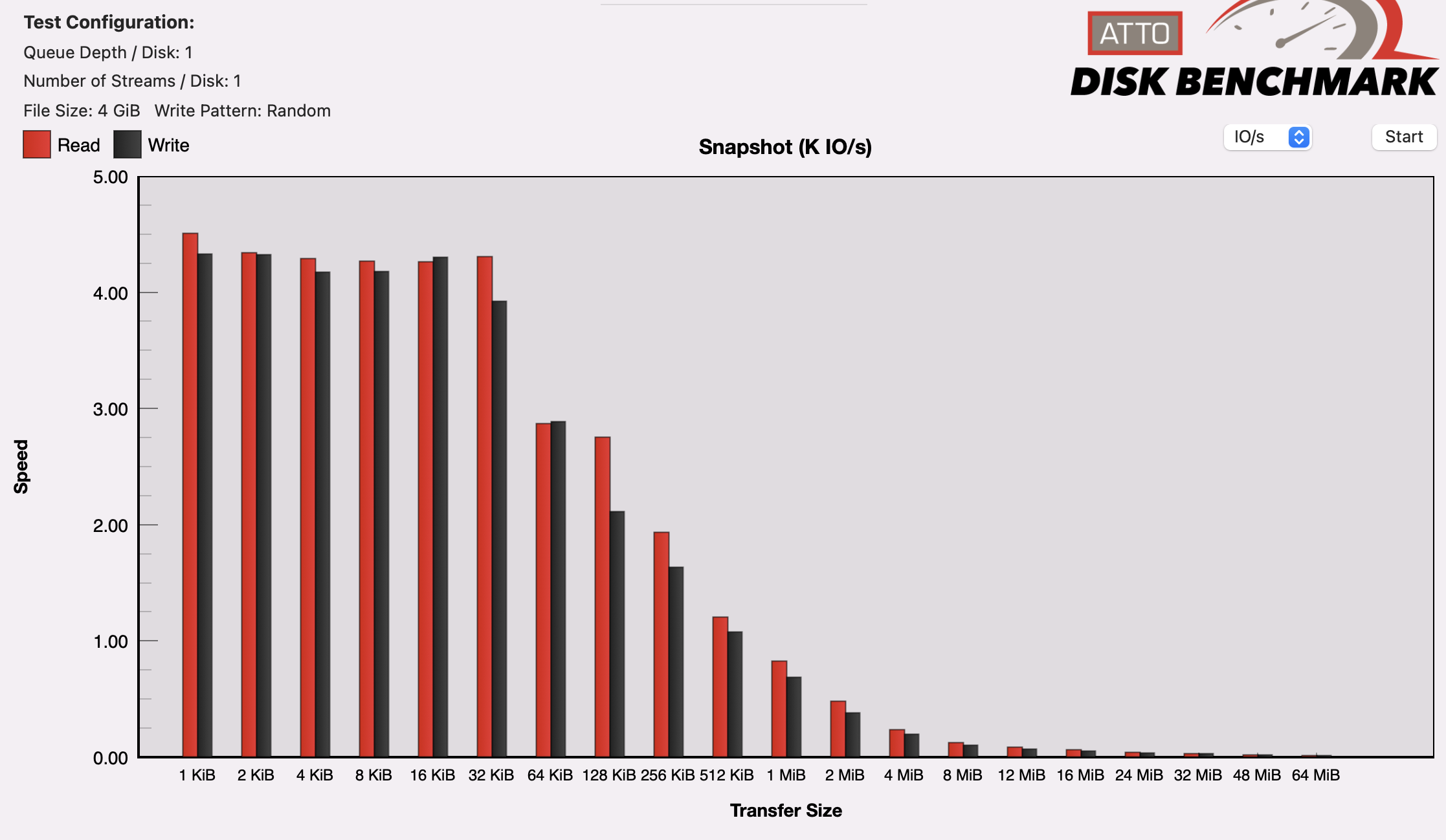
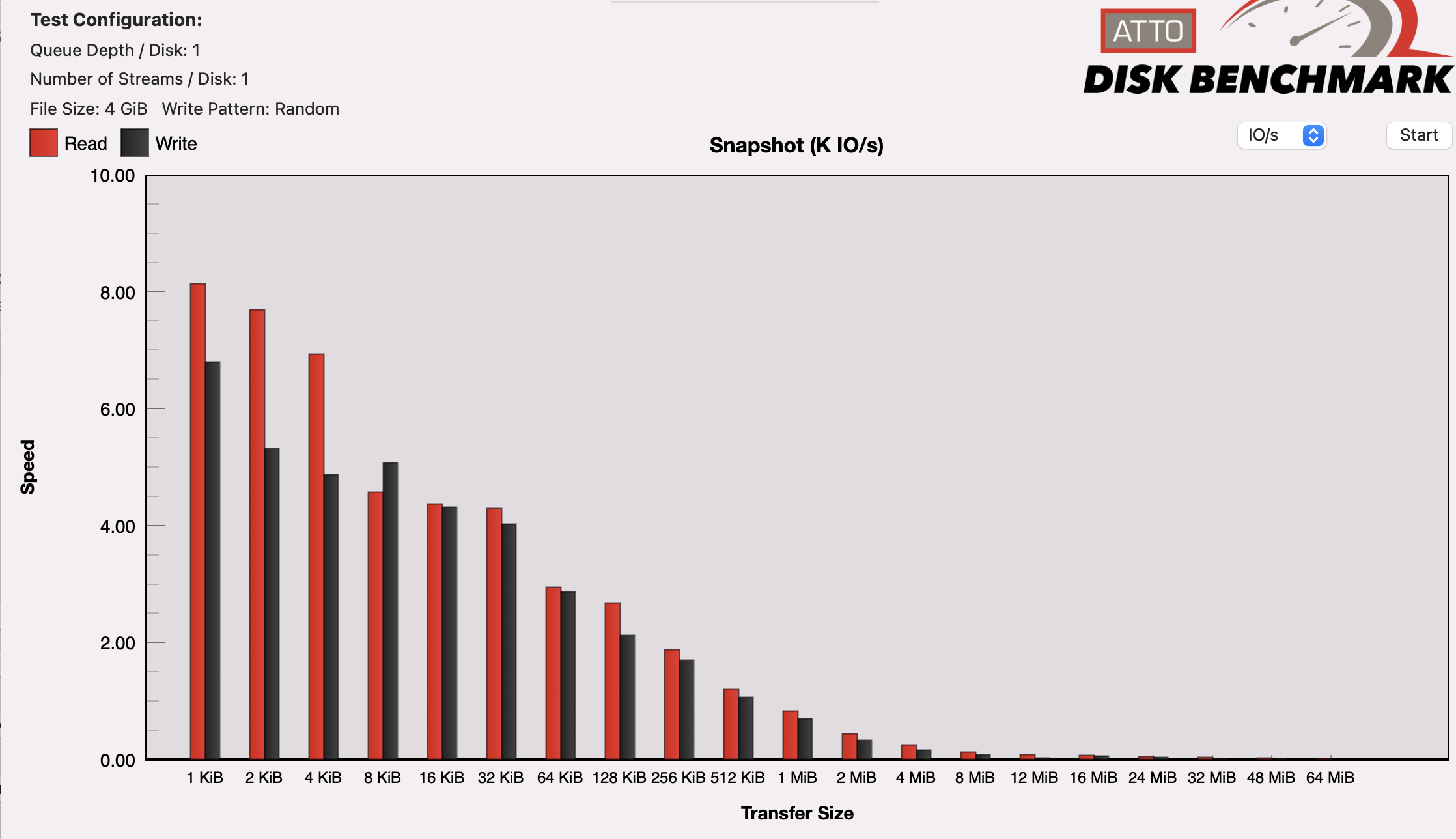
If I run the ATTO Benchmark, the RAID10 is getting higher IOPS (almost 2x) for the small file sizes than the SSD. Maybe I am mistaken, but I thought that the SSD would be much better.
Here's the charts (look at the scale on the left):
This is for the SSD
This is for the RAID10
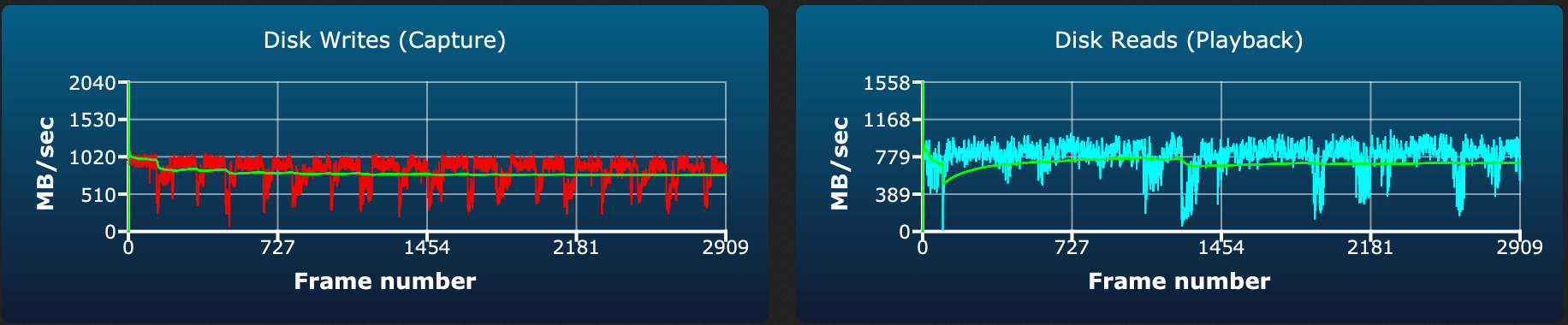
Also, I am seeing some strange dips on the disk writes, and the reads look messy in the AJA 64GB test for the SSD
Compared to the more consistent writes on the RAID10

@007revad commented on GitHub (Apr 16, 2023):
@MarkErik I've not seen any real benefit from using NVMe drives as a volume or a cache.
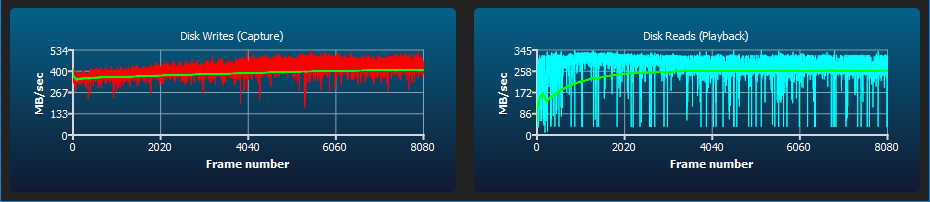
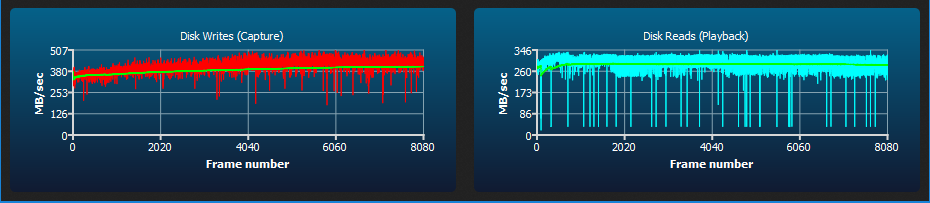
But I'd actually be really happy if I was getting your read and write speeds on my DS1821+. With 32G of ECC memory and a E10G18-T1 10G card I only get 410 MB/s writes and 280 MB/s reads.
DS1821+ AJA 64GB test for a WD Black SN770 NVMe (no encryption or data checksums).
DS1821+ AJA 64GB test for a 4x 16TB Ironwolf SHR array (no encryption and each drive's write cache disabled).
@MarkErik commented on GitHub (Apr 16, 2023):
@007revad Interesting about your speeds, especially the NVME, since we have nearly the same NAS hardware configuration (same amount of RAM, same 10G card).
A few points about my config at the moment is that the RAID10 (6 x shucked 14TB WD USB drives that turned out to be WD140EDGZ) is empty, so my read and write speeds are ideal. At the moment I also don't have any other services running on my NAS.
Your SHR write speeds seems quite good, from many comments indicating that SHR write speed is typically that of a single drive. But in the same vein, reads where meant to be N-1 speed of the number of drives, so something looks a bit off on that for you.
What I've noticed is that the SSD volume seems to perform best right after a reboot, whereas the RAID10 performs similar regardless.
I found some benchmark numbers from testing on the previous version of DSM (7.1), using Blackmagic, comparing the command-line created SSD volume, to the RAID10 - and using a 3GB file (so that it would supposedly cache the entire operation in RAM), the SSD volume performed about 100MB/s slower than the RAID10. But then after a reboot, the SSD performed better.
So across different DSM versions, with and without encryption, the SSD volume seems to be more temperamental.
I have a 500GB Samsung 970 EVO PLUS in the second slot that I was going to use as a cache drive for the RAID10, but I'll test it today as a volume, to see how it behaves performance-wise.
@inkpool commented on GitHub (Apr 17, 2023):
I did some tests, the performance of NVMe volume is not significant better than HDD volume. I have a SN570 NVMe RAID0 and a HDD RAID 5. So disappointed.
@inkpool commented on GitHub (Apr 17, 2023):
The single drive, raid1 and raid0 of NVMe volume did not show much difference.
One good thing is we could achieve nearly 8-drive HDD RAID5 performance with a single NVMe drive.
@MarkErik commented on GitHub (Apr 25, 2023):
FYI: No problems doing the upgrade from 7.2 Beta to 7.2 RC. All the SSD volumes that I had created were still there working. edit. However the inconsistent speed/performance still persists.