[GH-ISSUE #54] Cannot bind parameter 'Path' to the target #19

Closed
opened 2026-02-27 20:30:50 +03:00 by kerem · 7 comments
Owner

Originally created by @dakolta on GitHub (Sep 7, 2022).
Original GitHub issue: https://github.com/Set-OutlookSignatures/Set-OutlookSignatures/issues/54

Originally assigned to: @dakolta on GitHub.

This is on a new computer that has office 2016 installed

Start Word background process @2022-09-07T13:20:46-04:00@
PS>TerminatingError(Add-Type): "Cannot bind parameter 'Path' to the target. Exception setting "Path": "Cannot find path 'C:\WINDOWS\assembly\GAC_MSIL\Microsoft.Office.Interop.Word\15.0.0.0__71e9bce111e9429c\Microsoft.Office.Interop.Word.dll' because it does not exist.""
  Word not installed or not working correctly. Exit.
Add-Type : Cannot bind parameter 'Path' to the target. Exception setting "Path": "Cannot find path 'C:\WINDOWS\assembly
\GAC_MSIL\Microsoft.Office.Interop.Word\15.0.0.0__71e9bce111e9429c\Microsoft.Office.Interop.Word.dll' because it does
not exist."
At C:\drivers\desktops\Set-OutlookSignatures\Set-OutlookSignatures.ps1:1660 char:28
+ ... -Type -Path (Get-ChildItem -LiteralPath ((Join-Path -Path ($env:Syste ...
+                 ~~~~~~~~~~~~~~~~~~~~~~~~~~~~~~~~~~~~~~~~~~~~~~~~~~~~~~~~~
    + CategoryInfo          : WriteError: (:) [Add-Type], ParameterBindingException
    + FullyQualifiedErrorId : ParameterBindingFailed,Microsoft.PowerShell.Commands.AddTypeCommand

Here is the verbose output:
SetSig.txt

Originally created by @dakolta on GitHub (Sep 7, 2022). Original GitHub issue: https://github.com/Set-OutlookSignatures/Set-OutlookSignatures/issues/54 Originally assigned to: @dakolta on GitHub. This is on a new computer that has office 2016 installed ``` Start Word background process @2022-09-07T13:20:46-04:00@ PS>TerminatingError(Add-Type): "Cannot bind parameter 'Path' to the target. Exception setting "Path": "Cannot find path 'C:\WINDOWS\assembly\GAC_MSIL\Microsoft.Office.Interop.Word\15.0.0.0__71e9bce111e9429c\Microsoft.Office.Interop.Word.dll' because it does not exist."" Word not installed or not working correctly. Exit. Add-Type : Cannot bind parameter 'Path' to the target. Exception setting "Path": "Cannot find path 'C:\WINDOWS\assembly \GAC_MSIL\Microsoft.Office.Interop.Word\15.0.0.0__71e9bce111e9429c\Microsoft.Office.Interop.Word.dll' because it does not exist." At C:\drivers\desktops\Set-OutlookSignatures\Set-OutlookSignatures.ps1:1660 char:28 + ... -Type -Path (Get-ChildItem -LiteralPath ((Join-Path -Path ($env:Syste ... + ~~~~~~~~~~~~~~~~~~~~~~~~~~~~~~~~~~~~~~~~~~~~~~~~~~~~~~~~~ + CategoryInfo : WriteError: (:) [Add-Type], ParameterBindingException + FullyQualifiedErrorId : ParameterBindingFailed,Microsoft.PowerShell.Commands.AddTypeCommand ``` Here is the verbose output: [SetSig.txt](https://github.com/GruberMarkus/Set-OutlookSignatures/files/9509655/SetSig.txt)
kerem closed this issue 2026-02-27 20:30:50 +03:00
Author
Owner

@GruberMarkus commented on GitHub (Sep 8, 2022):

Set-OutlookSignatures does the following:

  1. Search the .Net Framework Global Assembly Cache in the file system for the file 'Microsoft.Office.Interop.Word.dll' and select the last entry from the list (usually, there is only one entry anyway - if there are more, the last entry is the most recent due to GAC folder naming conventions)
  2. Load that DLL

The full code is:

Add-Type -Path (Get-ChildItem -LiteralPath ((Join-Path -Path ($env:SystemRoot) -ChildPath 'assembly\GAC_MSIL\Microsoft.Office.Interop.Word')) -Filter 'Microsoft.Office.Interop.Word.dll' -Recurse | Select-Object -ExpandProperty FullName -Last 1)

The part finding the DLL file to load is:

(Get-ChildItem -LiteralPath ((Join-Path -Path ($env:SystemRoot) -ChildPath 'assembly\GAC_MSIL\Microsoft.Office.Interop.Word')) -Filter 'Microsoft.Office.Interop.Word.dll' -Recurse | Select-Object -ExpandProperty FullName -Last 1)

The DLL file found is 'C:\WINDOWS\assembly\GAC_MSIL\Microsoft.Office.Interop.Word\15.0.0.0__71e9bce111e9429c\Microsoft.Office.Interop.Word.dll', which is the same as on many other systems (including some of my test systems).

What happens on your client, is that the Add-Type part of the code fails with an error stating that the file found a fraction of a second before does not exist.

Test if

Add-Type -Path (Get-ChildItem -LiteralPath ((Join-Path -Path ($env:SystemRoot) -ChildPath 'assembly\GAC_MSIL\Microsoft.Office.Interop.Word')) -Filter 'Microsoft.Office.Interop.Word.dll' -Recurse | Select-Object -ExpandProperty FullName -Last 1)

brings up the same error as

[void]([System.Reflection.Assembly]::LoadFrom((Get-ChildItem -LiteralPath ((Join-Path -Path ($env:SystemRoot) -ChildPath 'assembly\GAC_MSIL\Microsoft.Office.Interop.Word')) -Filter 'Microsoft.Office.Interop.Word.dll' -Recurse | Select-Object -ExpandProperty FullName -Last 1)))

and

$assemblyBytes = [System.IO.File]::ReadAllBytes((Get-ChildItem -LiteralPath ((Join-Path -Path ($env:SystemRoot) -ChildPath 'assembly\GAC_MSIL\Microsoft.Office.Interop.Word')) -Filter 'Microsoft.Office.Interop.Word.dll' -Recurse | Select-Object -ExpandProperty FullName -Last 1))
([System.Reflection.Assembly]::Load($assemblyBytes))
<!-- gh-comment-id:1240281136 --> @GruberMarkus commented on GitHub (Sep 8, 2022): Set-OutlookSignatures does the following: 1. Search the .Net Framework Global Assembly Cache in the file system for the file 'Microsoft.Office.Interop.Word.dll' and select the last entry from the list (usually, there is only one entry anyway - if there are more, the last entry is the most recent due to GAC folder naming conventions) 2. Load that DLL The full code is: ``` Add-Type -Path (Get-ChildItem -LiteralPath ((Join-Path -Path ($env:SystemRoot) -ChildPath 'assembly\GAC_MSIL\Microsoft.Office.Interop.Word')) -Filter 'Microsoft.Office.Interop.Word.dll' -Recurse | Select-Object -ExpandProperty FullName -Last 1) ``` The part finding the DLL file to load is: ``` (Get-ChildItem -LiteralPath ((Join-Path -Path ($env:SystemRoot) -ChildPath 'assembly\GAC_MSIL\Microsoft.Office.Interop.Word')) -Filter 'Microsoft.Office.Interop.Word.dll' -Recurse | Select-Object -ExpandProperty FullName -Last 1) ``` The DLL file found is 'C:\WINDOWS\assembly\GAC_MSIL\Microsoft.Office.Interop.Word\15.0.0.0__71e9bce111e9429c\Microsoft.Office.Interop.Word.dll', which is the same as on many other systems (including some of my test systems). What happens on your client, is that the `Add-Type` part of the code fails with an error stating that the file found a fraction of a second before does not exist. Test if ``` Add-Type -Path (Get-ChildItem -LiteralPath ((Join-Path -Path ($env:SystemRoot) -ChildPath 'assembly\GAC_MSIL\Microsoft.Office.Interop.Word')) -Filter 'Microsoft.Office.Interop.Word.dll' -Recurse | Select-Object -ExpandProperty FullName -Last 1) ``` brings up the same error as ``` [void]([System.Reflection.Assembly]::LoadFrom((Get-ChildItem -LiteralPath ((Join-Path -Path ($env:SystemRoot) -ChildPath 'assembly\GAC_MSIL\Microsoft.Office.Interop.Word')) -Filter 'Microsoft.Office.Interop.Word.dll' -Recurse | Select-Object -ExpandProperty FullName -Last 1))) ``` and ``` $assemblyBytes = [System.IO.File]::ReadAllBytes((Get-ChildItem -LiteralPath ((Join-Path -Path ($env:SystemRoot) -ChildPath 'assembly\GAC_MSIL\Microsoft.Office.Interop.Word')) -Filter 'Microsoft.Office.Interop.Word.dll' -Recurse | Select-Object -ExpandProperty FullName -Last 1)) ([System.Reflection.Assembly]::Load($assemblyBytes)) ```
Author
Owner

@dakolta commented on GitHub (Sep 8, 2022):

Ok, I ran those 3 commands, here are the results:

PS C:\Users\mvogel> Add-Type -Path (Get-ChildItem -LiteralPath ((Join-Path -Path ($env:SystemRoot) -ChildPath 'assembly\GAC_MSIL\Microsoft.Office.Interop.Word')) -Filter 'Microsoft.Office.Interop.Word.dll' -Recurse | Select-Object -ExpandProperty FullName -Last 1)
Add-Type : Cannot bind parameter 'Path' to the target. Exception setting "Path": "Cannot find path 'C:\WINDOWS\assembly
\GAC_MSIL\Microsoft.Office.Interop.Word\15.0.0.0__71e9bce111e9429c\Microsoft.Office.Interop.Word.dll' because it does 
not exist."
At line:1 char:16
+ ... -Type -Path (Get-ChildItem -LiteralPath ((Join-Path -Path ($env:Syste ...
+                 ~~~~~~~~~~~~~~~~~~~~~~~~~~~~~~~~~~~~~~~~~~~~~~~~~~~~~~~~~
    + CategoryInfo          : WriteError: (:) [Add-Type], ParameterBindingException
    + FullyQualifiedErrorId : ParameterBindingFailed,Microsoft.PowerShell.Commands.AddTypeCommand
 
PS C:\Users\mvogel> [void]([System.Reflection.Assembly]::LoadFrom((Get-ChildItem -LiteralPath ((Join-Path -Path ($env:SystemRoot) -ChildPath 'assembly\GAC_MSIL\Microsoft.Office.Interop.Word')) -Filter 'Microsoft.Office.Interop.Word.dll' -Recurse | Select-Object -ExpandProperty FullName -Last 1)))
Exception calling "LoadFrom" with "1" argument(s): "Could not load file or assembly 'file:///C:\WINDOWS\assembly\GAC_MS
IL\Microsoft.Office.Interop.Word\15.0.0.0__71e9bce111e9429c\Microsoft.Office.Interop.Word.dll' or one of its 
dependencies. Access is denied."
At line:1 char:1
+ [void]([System.Reflection.Assembly]::LoadFrom((Get-ChildItem -Literal ...
+ ~~~~~~~~~~~~~~~~~~~~~~~~~~~~~~~~~~~~~~~~~~~~~~~~~~~~~~~~~~~~~~~~~~~~~
    + CategoryInfo          : NotSpecified: (:) [], MethodInvocationException
    + FullyQualifiedErrorId : FileLoadException
 
PS C:\Users\mvogel> $assemblyBytes = [System.IO.File]::ReadAllBytes((Get-ChildItem -LiteralPath ((Join-Path -Path ($env:SystemRoot) -ChildPath 'assembly\GAC_MSIL\Microsoft.Office.Interop.Word')) -Filter 'Microsoft.Office.Interop.Word.dll' -Recurse | Select-Object -ExpandProperty FullName -Last 1)) ([System.Reflection.Assembly]::Load($assemblyBytes))
At line:1 char:280
+ ... -Recurse | Select-Object -ExpandProperty FullName -Last 1)) ([System. ...
+                                                                 ~
Unexpected token '(' in expression or statement.
    + CategoryInfo          : ParserError: (:) [], ParentContainsErrorRecordException
    + FullyQualifiedErrorId : UnexpectedToken

Also ran them as system:

PS C:\WINDOWS\system32> Add-Type -Path (Get-ChildItem -LiteralPath ((Join-Path -Path ($env:SystemRoot) -ChildPath 'assembly\GAC_MSIL\Microsoft.Office.Interop.Word')) -Filter 'Microsoft.Office.Interop.Word.dll' -Recurse | Select-Object -ExpandProperty FullName -Last 1)
PS C:\WINDOWS\system32> [void]([System.Reflection.Assembly]::LoadFrom((Get-ChildItem -LiteralPath ((Join-Path -Path ($env:SystemRoot) -ChildPath 'assembly\GAC_MSIL\Microsoft.Office.Interop.Word')) -Filter 'Microsoft.Office.Interop.Word.dll' -Recurse | Select-Object -ExpandProperty FullName -Last 1)))
PS C:\WINDOWS\system32> $assemblyBytes = [System.IO.File]::ReadAllBytes((Get-ChildItem -LiteralPath ((Join-Path -Path ($env:SystemRoot) -ChildPath 'assembly\GAC_MSIL\Microsoft.Office.Interop.Word')) -Filter 'Microsoft.Office.Interop.Word.dll' -Recurse | Select-Object -ExpandProperty FullName -Last 1)) ([System.Reflection.Assembly]::Load($assemblyBytes))
At line:1 char:280
+ ... -Recurse | Select-Object -ExpandProperty FullName -Last 1)) ([System. ...
+                                                                 ~
Unexpected token '(' in expression or statement.
    + CategoryInfo          : ParserError: (:) [], ParentContainsErrorRecordException
    + FullyQualifiedErrorId : UnexpectedToken
<!-- gh-comment-id:1241017021 --> @dakolta commented on GitHub (Sep 8, 2022): Ok, I ran those 3 commands, here are the results: ``` PS C:\Users\mvogel> Add-Type -Path (Get-ChildItem -LiteralPath ((Join-Path -Path ($env:SystemRoot) -ChildPath 'assembly\GAC_MSIL\Microsoft.Office.Interop.Word')) -Filter 'Microsoft.Office.Interop.Word.dll' -Recurse | Select-Object -ExpandProperty FullName -Last 1) Add-Type : Cannot bind parameter 'Path' to the target. Exception setting "Path": "Cannot find path 'C:\WINDOWS\assembly \GAC_MSIL\Microsoft.Office.Interop.Word\15.0.0.0__71e9bce111e9429c\Microsoft.Office.Interop.Word.dll' because it does not exist." At line:1 char:16 + ... -Type -Path (Get-ChildItem -LiteralPath ((Join-Path -Path ($env:Syste ... + ~~~~~~~~~~~~~~~~~~~~~~~~~~~~~~~~~~~~~~~~~~~~~~~~~~~~~~~~~ + CategoryInfo : WriteError: (:) [Add-Type], ParameterBindingException + FullyQualifiedErrorId : ParameterBindingFailed,Microsoft.PowerShell.Commands.AddTypeCommand PS C:\Users\mvogel> [void]([System.Reflection.Assembly]::LoadFrom((Get-ChildItem -LiteralPath ((Join-Path -Path ($env:SystemRoot) -ChildPath 'assembly\GAC_MSIL\Microsoft.Office.Interop.Word')) -Filter 'Microsoft.Office.Interop.Word.dll' -Recurse | Select-Object -ExpandProperty FullName -Last 1))) Exception calling "LoadFrom" with "1" argument(s): "Could not load file or assembly 'file:///C:\WINDOWS\assembly\GAC_MS IL\Microsoft.Office.Interop.Word\15.0.0.0__71e9bce111e9429c\Microsoft.Office.Interop.Word.dll' or one of its dependencies. Access is denied." At line:1 char:1 + [void]([System.Reflection.Assembly]::LoadFrom((Get-ChildItem -Literal ... + ~~~~~~~~~~~~~~~~~~~~~~~~~~~~~~~~~~~~~~~~~~~~~~~~~~~~~~~~~~~~~~~~~~~~~ + CategoryInfo : NotSpecified: (:) [], MethodInvocationException + FullyQualifiedErrorId : FileLoadException PS C:\Users\mvogel> $assemblyBytes = [System.IO.File]::ReadAllBytes((Get-ChildItem -LiteralPath ((Join-Path -Path ($env:SystemRoot) -ChildPath 'assembly\GAC_MSIL\Microsoft.Office.Interop.Word')) -Filter 'Microsoft.Office.Interop.Word.dll' -Recurse | Select-Object -ExpandProperty FullName -Last 1)) ([System.Reflection.Assembly]::Load($assemblyBytes)) At line:1 char:280 + ... -Recurse | Select-Object -ExpandProperty FullName -Last 1)) ([System. ... + ~ Unexpected token '(' in expression or statement. + CategoryInfo : ParserError: (:) [], ParentContainsErrorRecordException + FullyQualifiedErrorId : UnexpectedToken ``` Also ran them as system: ``` PS C:\WINDOWS\system32> Add-Type -Path (Get-ChildItem -LiteralPath ((Join-Path -Path ($env:SystemRoot) -ChildPath 'assembly\GAC_MSIL\Microsoft.Office.Interop.Word')) -Filter 'Microsoft.Office.Interop.Word.dll' -Recurse | Select-Object -ExpandProperty FullName -Last 1) PS C:\WINDOWS\system32> [void]([System.Reflection.Assembly]::LoadFrom((Get-ChildItem -LiteralPath ((Join-Path -Path ($env:SystemRoot) -ChildPath 'assembly\GAC_MSIL\Microsoft.Office.Interop.Word')) -Filter 'Microsoft.Office.Interop.Word.dll' -Recurse | Select-Object -ExpandProperty FullName -Last 1))) PS C:\WINDOWS\system32> $assemblyBytes = [System.IO.File]::ReadAllBytes((Get-ChildItem -LiteralPath ((Join-Path -Path ($env:SystemRoot) -ChildPath 'assembly\GAC_MSIL\Microsoft.Office.Interop.Word')) -Filter 'Microsoft.Office.Interop.Word.dll' -Recurse | Select-Object -ExpandProperty FullName -Last 1)) ([System.Reflection.Assembly]::Load($assemblyBytes)) At line:1 char:280 + ... -Recurse | Select-Object -ExpandProperty FullName -Last 1)) ([System. ... + ~ Unexpected token '(' in expression or statement. + CategoryInfo : ParserError: (:) [], ParentContainsErrorRecordException + FullyQualifiedErrorId : UnexpectedToken ```
Author
Owner

@GruberMarkus commented on GitHub (Sep 9, 2022):

You executed the last code sequence as one line instead of two, that's why you receive the "Unexpected token '('" error message.

Your other tests show that everything works fine when using the SYSTEM account, but getting errors when using a regular user account.

The error message from [System.Reflection.Assembly]::LoadFrom() may point you in the right direction: Instead of Cannot find path, this command throws 'Access is denied' and the hint that maybe not the DLL file itself has a problem, but one it's dependencies.

As running the commands with the SYSTEM account shows no error, the root cause is very unlikely in Set-OutlookSignatures, PowerShell or the underlying .Net Framework, but rather in corrupt or missing files, NTFS permissions, corrupt or missing registry entries.

My next steps would be running the Office repair, maybe even uninstalling and reinstalling Office, checking registry keys (compare registry entries for '{00020970-0000-0000-C000-000000000046}' between a working and a non-working client computer), checking NTFS permissions and finally watching the whole sequence with a tool like process explorer.

<!-- gh-comment-id:1241511003 --> @GruberMarkus commented on GitHub (Sep 9, 2022): You executed the last code sequence as one line instead of two, that's why you receive the "Unexpected token '('" error message. Your other tests show that everything works fine when using the SYSTEM account, but getting errors when using a regular user account. The error message from `[System.Reflection.Assembly]::LoadFrom()` may point you in the right direction: Instead of `Cannot find path`, this command throws 'Access is denied' and the hint that maybe not the DLL file itself has a problem, but one it's dependencies. As running the commands with the SYSTEM account shows no error, the root cause is very unlikely in Set-OutlookSignatures, PowerShell or the underlying .Net Framework, but rather in corrupt or missing files, NTFS permissions, corrupt or missing registry entries. My next steps would be running the Office repair, maybe even uninstalling and reinstalling Office, checking registry keys (compare registry entries for '{00020970-0000-0000-C000-000000000046}' between a working and a non-working client computer), checking NTFS permissions and finally watching the whole sequence with a tool like process explorer.
Author
Owner

@dakolta commented on GitHub (Sep 9, 2022):

Repaired the install of Office and ran the script from command line.
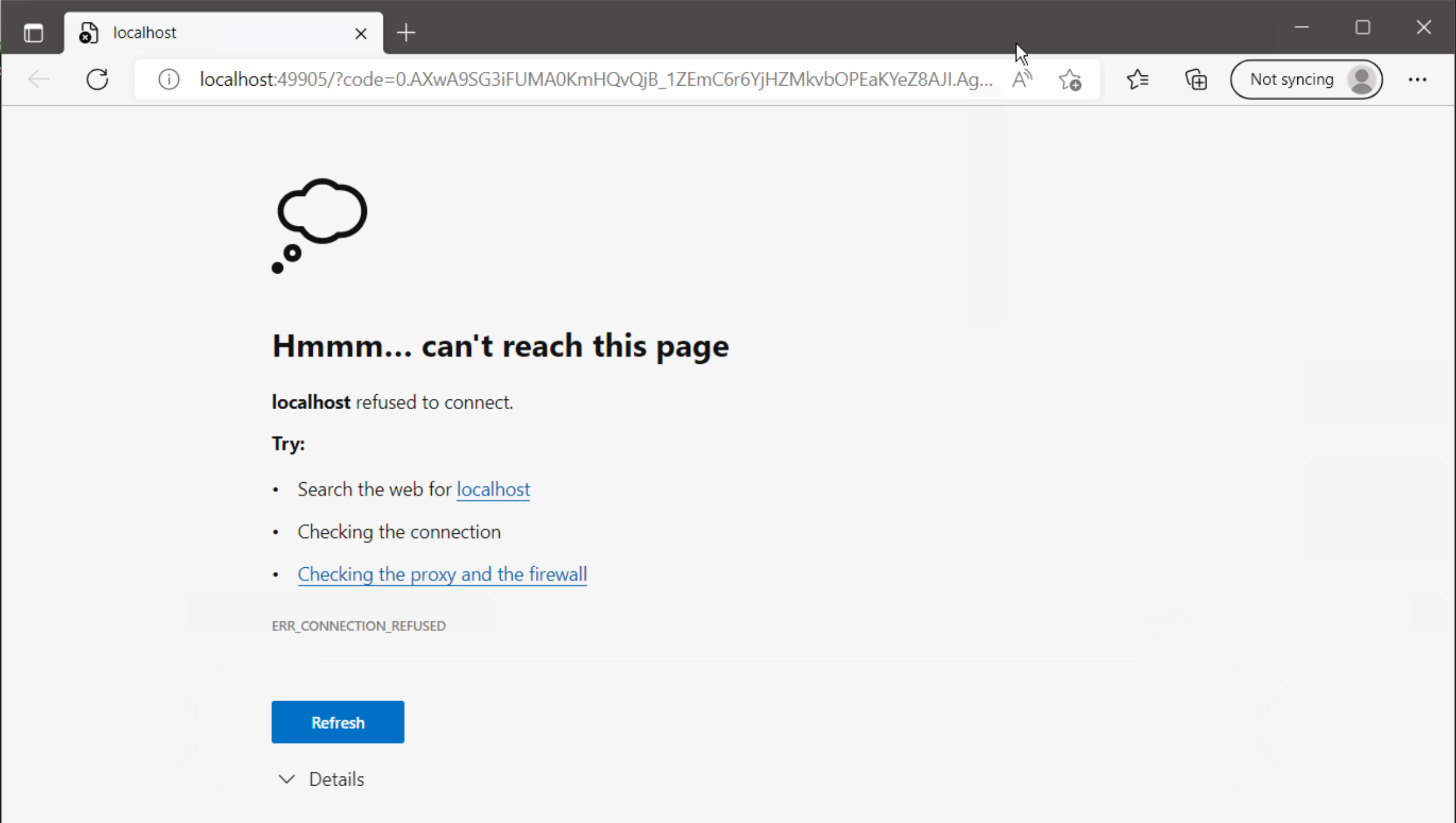
Web page comes up:
Screen Shot 2022-09-09 at 11 20 58 AM
and we have the following error:

VERBOSE: Importing function 'Select-MsalClientApplication'.
      Execute config file 'C:\drivers\desktops\Set-OutlookSignatures\config\default graph config.ps1'
      MSAL.PS Graph token cache: 'C:\Users\mvogel\AppData\Local\MSAL.PS\MSAL.PS.msalcache.bin3'
PS>TerminatingError(ForEach-Object): "Exception calling "Add" with "2" argument(s): "Item has already been added. Key in dictionary: 'NgcSet'  Key being added: 'NgcSet'""
PS>TerminatingError(Get-MsalToken): "The running command stopped because the preference variable "ErrorActionPreference" or common parameter is set to Stop: One or more errors occurred."
PS>TerminatingError(Get-MsalToken): "The running command stopped because the preference variable "ErrorActionPreference" or common parameter is set to Stop: Failed to get user name. "
>> TerminatingError(Get-MsalToken): "The running command stopped because the preference variable "ErrorActionPreference" or common parameter is set to Stop: Failed to get user name. "
>> TerminatingError(Get-MsalToken): "Exception calling "GetResult" with "0" argument(s): "Key not valid for use in specified state.
""
PS>TerminatingError(Get-MsalToken): "The running command stopped because the preference variable "ErrorActionPreference" or common parameter is set to Stop: One or more errors occurred."
PS>TerminatingError(Get-MsalToken): "The running command stopped because the preference variable "ErrorActionPreference" or common parameter is set to Stop: Sequence contains no elements"
>> TerminatingError(Get-MsalToken): "The running command stopped because the preference variable "ErrorActionPreference" or common parameter is set to Stop: Sequence contains no elements"
      Problem connecting to Microsoft Graph. Exit.
You cannot call a method on a null-valued expression.
At C:\drivers\desktops\Set-OutlookSignatures\Set-OutlookSignatures.ps1:3272 char:13
+             $script:authorizationHeader = @{
+             ~~~~~~~~~~~~~~~~~~~~~~~~~~~~~~~~
    + CategoryInfo          : InvalidOperation: (:) [], RuntimeException
    + FullyQualifiedErrorId : InvokeMethodOnNull

Here is the verbose output:
SetSig.txt

<!-- gh-comment-id:1242331397 --> @dakolta commented on GitHub (Sep 9, 2022): Repaired the install of Office and ran the script from command line. Web page comes up: <img width="1266" alt="Screen Shot 2022-09-09 at 11 20 58 AM" src="https://user-images.githubusercontent.com/18648939/189419639-6e7aad8f-4442-4e8b-a019-8365401a6e06.png"> and we have the following error: ``` VERBOSE: Importing function 'Select-MsalClientApplication'. Execute config file 'C:\drivers\desktops\Set-OutlookSignatures\config\default graph config.ps1' MSAL.PS Graph token cache: 'C:\Users\mvogel\AppData\Local\MSAL.PS\MSAL.PS.msalcache.bin3' PS>TerminatingError(ForEach-Object): "Exception calling "Add" with "2" argument(s): "Item has already been added. Key in dictionary: 'NgcSet' Key being added: 'NgcSet'"" PS>TerminatingError(Get-MsalToken): "The running command stopped because the preference variable "ErrorActionPreference" or common parameter is set to Stop: One or more errors occurred." PS>TerminatingError(Get-MsalToken): "The running command stopped because the preference variable "ErrorActionPreference" or common parameter is set to Stop: Failed to get user name. " >> TerminatingError(Get-MsalToken): "The running command stopped because the preference variable "ErrorActionPreference" or common parameter is set to Stop: Failed to get user name. " >> TerminatingError(Get-MsalToken): "Exception calling "GetResult" with "0" argument(s): "Key not valid for use in specified state. "" PS>TerminatingError(Get-MsalToken): "The running command stopped because the preference variable "ErrorActionPreference" or common parameter is set to Stop: One or more errors occurred." PS>TerminatingError(Get-MsalToken): "The running command stopped because the preference variable "ErrorActionPreference" or common parameter is set to Stop: Sequence contains no elements" >> TerminatingError(Get-MsalToken): "The running command stopped because the preference variable "ErrorActionPreference" or common parameter is set to Stop: Sequence contains no elements" Problem connecting to Microsoft Graph. Exit. You cannot call a method on a null-valued expression. At C:\drivers\desktops\Set-OutlookSignatures\Set-OutlookSignatures.ps1:3272 char:13 + $script:authorizationHeader = @{ + ~~~~~~~~~~~~~~~~~~~~~~~~~~~~~~~~ + CategoryInfo : InvalidOperation: (:) [], RuntimeException + FullyQualifiedErrorId : InvokeMethodOnNull ``` Here is the verbose output: [SetSig.txt](https://github.com/GruberMarkus/Set-OutlookSignatures/files/9537906/SetSig.txt)
Author
Owner

@GruberMarkus commented on GitHub (Sep 9, 2022):

Delete 'C:\Users\mvogel\AppData\Local\MSAL.PS\MSAL.PS.msalcache.bin3' and run the script again.

It is very likely a problem with browsing, as the browser message 'http://localhost/ refused to connect' suggests.

<!-- gh-comment-id:1242521477 --> @GruberMarkus commented on GitHub (Sep 9, 2022): Delete 'C:\Users\mvogel\AppData\Local\MSAL.PS\MSAL.PS.msalcache.bin3' and run the script again. It is very likely a problem with browsing, as the browser message 'http://localhost/ refused to connect' suggests.
Author
Owner

@dakolta commented on GitHub (Sep 12, 2022):

I created a new user on this computer.
Still getting error and web browser localhost issue.

Start Word background process @2022-09-12T14:05:21-04:00@
  Word not installed or not working correctly. Exit.
Add-Type : Cannot bind parameter 'Path' to the target. Exception setting "Path": "Cannot find path 'C:\WINDOWS\assembly
\GAC_MSIL\Microsoft.Office.Interop.Word\15.0.0.0__71e9bce111e9429c\Microsoft.Office.Interop.Word.dll' because it does 
not exist."
At C:\drivers\desktops\Set-OutlookSignatures\Set-OutlookSignatures.ps1:1660 char:28
+ ... -Type -Path (Get-ChildItem -LiteralPath ((Join-Path -Path ($env:Syste ...
+                 ~~~~~~~~~~~~~~~~~~~~~~~~~~~~~~~~~~~~~~~~~~~~~~~~~~~~~~~~~
    + CategoryInfo          : WriteError: (:) [Add-Type], ParameterBindingException
    + FullyQualifiedErrorId : ParameterBindingFailed,Microsoft.PowerShell.Commands.AddTypeCommand

I get the logon page, and password, this comes after the login.
Screen Shot 2022-09-12 at 11 05 28 AM

Here is the verbose output:
SetSig (1).txt

<!-- gh-comment-id:1244111505 --> @dakolta commented on GitHub (Sep 12, 2022): I created a new user on this computer. Still getting error and web browser localhost issue. ``` Start Word background process @2022-09-12T14:05:21-04:00@ Word not installed or not working correctly. Exit. Add-Type : Cannot bind parameter 'Path' to the target. Exception setting "Path": "Cannot find path 'C:\WINDOWS\assembly \GAC_MSIL\Microsoft.Office.Interop.Word\15.0.0.0__71e9bce111e9429c\Microsoft.Office.Interop.Word.dll' because it does not exist." At C:\drivers\desktops\Set-OutlookSignatures\Set-OutlookSignatures.ps1:1660 char:28 + ... -Type -Path (Get-ChildItem -LiteralPath ((Join-Path -Path ($env:Syste ... + ~~~~~~~~~~~~~~~~~~~~~~~~~~~~~~~~~~~~~~~~~~~~~~~~~~~~~~~~~ + CategoryInfo : WriteError: (:) [Add-Type], ParameterBindingException + FullyQualifiedErrorId : ParameterBindingFailed,Microsoft.PowerShell.Commands.AddTypeCommand ``` I get the logon page, and password, this comes after the login. <img width="1562" alt="Screen Shot 2022-09-12 at 11 05 28 AM" src="https://user-images.githubusercontent.com/18648939/189725059-173d41eb-bc3f-4bba-afed-3867ab0e903a.png"> Here is the verbose output: [SetSig (1).txt](https://github.com/GruberMarkus/Set-OutlookSignatures/files/9550677/SetSig.1.txt)
Author
Owner

@GruberMarkus commented on GitHub (Sep 12, 2022):

All tests until now have shown that loading the Word Interop DLL in Powershell outside Set-OutlookSignatures in three different programmatic ways

  • works fine for users on clients installed earlier (you are not aware of differences to more recently installed clients)
  • works fine on newly installed clients with the SYSTEM account only, not with regular user accounts

I cannot see where Set-OutlookSignatures could change anything for the better regarding this error. From my point of view, the root cause is clearly something on your clients, outside of Set-OutlookSignatures.

Repairing office did not help, but there are other proposed approaches you have not followed yet:

  • Check registry keys: Compare registry entries and permissions for '{00020970-0000-0000-C000-000000000046}' between a working and a non-working client computer
  • Check NTFS permissions for the DLL file and its dependencies
  • Use a tool like Process Explorer or - better - Process Monitor to find the root cause by watching what's happening in the background when the error comes up
<!-- gh-comment-id:1244138933 --> @GruberMarkus commented on GitHub (Sep 12, 2022): All tests until now have shown that loading the Word Interop DLL in Powershell outside Set-OutlookSignatures in three different programmatic ways - works fine for users on clients installed earlier (you are not aware of differences to more recently installed clients) - works fine on newly installed clients with the SYSTEM account only, not with regular user accounts I cannot see where Set-OutlookSignatures could change anything for the better regarding this error. From my point of view, the root cause is clearly something on your clients, outside of Set-OutlookSignatures. Repairing office did not help, but there are other proposed approaches you have not followed yet: - Check registry keys: Compare registry entries and permissions for '{00020970-0000-0000-C000-000000000046}' between a working and a non-working client computer - Check NTFS permissions for the DLL file and its dependencies - Use a tool like Process Explorer or - better - Process Monitor to find the root cause by watching what's happening in the background when the error comes up
Sign in to join this conversation.
No milestone
No project
No assignees
1 participant
Notifications
Due date
The due date is invalid or out of range. Please use the format "yyyy-mm-dd".

No due date set.

Dependencies

No dependencies set.

Reference
starred/Set-OutlookSignatures-Set-OutlookSignatures#19
No description provided.