[GH-ISSUE #53] MsalToken problem on windows 10 and 11 computers #18

Closed
opened 2026-02-27 20:30:49 +03:00 by kerem · 4 comments
Owner

Originally created by @dakolta on GitHub (Sep 6, 2022).
Original GitHub issue: https://github.com/Set-OutlookSignatures/Set-OutlookSignatures/issues/53

Originally assigned to: @dakolta on GitHub.

We are replacing computers and are running the script on new computers and are getting the following error:

      Execute config file 'C:\drivers\desktops\Set-OutlookSignatures\config\default graph config.ps1'
      MSAL.PS Graph token cache: 'C:\WINDOWS\system32\config\systemprofile\AppData\Local\MSAL.PS\MSAL.PS.msalcache.bin3'
PS>TerminatingError(Get-MsalToken): "The running command stopped because the preference variable "ErrorActionPreference" or common parameter is set to Stop: One or more errors occurred."
PS>TerminatingError(Get-MsalToken): "The running command stopped because the preference variable "ErrorActionPreference" or common parameter is set to Stop: Failed to get user name. "
>> TerminatingError(Get-MsalToken): "The running command stopped because the preference variable "ErrorActionPreference" or common parameter is set to Stop: Failed to get user name. "
PS>TerminatingError(Get-MsalToken): "The running command stopped because the preference variable "ErrorActionPreference" or common parameter is set to Stop: One or more errors occurred."
PS>TerminatingError(Get-MsalToken): "The running command stopped because the preference variable "ErrorActionPreference" or common parameter is set to Stop: No account or login hint was passed to the AcquireTokenSilent call. "
>> TerminatingError(Get-MsalToken): "The running command stopped because the preference variable "ErrorActionPreference" or common parameter is set to Stop: No account or login hint was passed to the AcquireTokenSilent call. "
Get-Process : Cannot find a process with the process identifier 18968.
At C:\WINDOWS\TEMP\5a091755-3c8f-4429-be51-4deeb910b2db\msal.ps\Get-MsalToken.ps1:262 char:42
+ ... ParentWindow = (Get-Process -Id $Win32Process.ParentProcessId).MainWi ...
+                     ~~~~~~~~~~~~~~~~~~~~~~~~~~~~~~~~~~~~~~~~~~~~~
    + CategoryInfo          : ObjectNotFound: (18968:Int32) [Get-Process], ProcessCommandException
    + FullyQualifiedErrorId : NoProcessFoundForGivenId,Microsoft.PowerShell.Commands.GetProcessCommand
Get-Process : Cannot find a process with the process identifier 18968.
At C:\WINDOWS\TEMP\5a091755-3c8f-4429-be51-4deeb910b2db\msal.ps\Get-MsalToken.ps1:262 char:42
+ ... ParentWindow = (Get-Process -Id $Win32Process.ParentProcessId).MainWi ...
+                     ~~~~~~~~~~~~~~~~~~~~~~~~~~~~~~~~~~~~~~~~~~~~~
    + CategoryInfo          : ObjectNotFound: (18968:Int32) [Get-Process], ProcessCommandException
    + FullyQualifiedErrorId : NoProcessFoundForGivenId,Microsoft.PowerShell.Commands.GetProcessCommand

PS>TerminatingError(Get-MsalToken): "The property 'MainWindowHandle' cannot be found on this object. Verify that the property exists."
      Problem connecting to Microsoft Graph. Exit.
You cannot call a method on a null-valued expression.
At C:\drivers\desktops\Set-OutlookSignatures\Set-OutlookSignatures.ps1:3272 char:13
+             $script:authorizationHeader = @{
+             ~~~~~~~~~~~~~~~~~~~~~~~~~~~~~~~~
    + CategoryInfo          : InvalidOperation: (:) [], RuntimeException
    + FullyQualifiedErrorId : InvokeMethodOnNull

I have attached a verbose output from one of the computers:
SetSig.txt

Originally created by @dakolta on GitHub (Sep 6, 2022). Original GitHub issue: https://github.com/Set-OutlookSignatures/Set-OutlookSignatures/issues/53 Originally assigned to: @dakolta on GitHub. We are replacing computers and are running the script on new computers and are getting the following error: ``` Execute config file 'C:\drivers\desktops\Set-OutlookSignatures\config\default graph config.ps1' MSAL.PS Graph token cache: 'C:\WINDOWS\system32\config\systemprofile\AppData\Local\MSAL.PS\MSAL.PS.msalcache.bin3' PS>TerminatingError(Get-MsalToken): "The running command stopped because the preference variable "ErrorActionPreference" or common parameter is set to Stop: One or more errors occurred." PS>TerminatingError(Get-MsalToken): "The running command stopped because the preference variable "ErrorActionPreference" or common parameter is set to Stop: Failed to get user name. " >> TerminatingError(Get-MsalToken): "The running command stopped because the preference variable "ErrorActionPreference" or common parameter is set to Stop: Failed to get user name. " PS>TerminatingError(Get-MsalToken): "The running command stopped because the preference variable "ErrorActionPreference" or common parameter is set to Stop: One or more errors occurred." PS>TerminatingError(Get-MsalToken): "The running command stopped because the preference variable "ErrorActionPreference" or common parameter is set to Stop: No account or login hint was passed to the AcquireTokenSilent call. " >> TerminatingError(Get-MsalToken): "The running command stopped because the preference variable "ErrorActionPreference" or common parameter is set to Stop: No account or login hint was passed to the AcquireTokenSilent call. " Get-Process : Cannot find a process with the process identifier 18968. At C:\WINDOWS\TEMP\5a091755-3c8f-4429-be51-4deeb910b2db\msal.ps\Get-MsalToken.ps1:262 char:42 + ... ParentWindow = (Get-Process -Id $Win32Process.ParentProcessId).MainWi ... + ~~~~~~~~~~~~~~~~~~~~~~~~~~~~~~~~~~~~~~~~~~~~~ + CategoryInfo : ObjectNotFound: (18968:Int32) [Get-Process], ProcessCommandException + FullyQualifiedErrorId : NoProcessFoundForGivenId,Microsoft.PowerShell.Commands.GetProcessCommand Get-Process : Cannot find a process with the process identifier 18968. At C:\WINDOWS\TEMP\5a091755-3c8f-4429-be51-4deeb910b2db\msal.ps\Get-MsalToken.ps1:262 char:42 + ... ParentWindow = (Get-Process -Id $Win32Process.ParentProcessId).MainWi ... + ~~~~~~~~~~~~~~~~~~~~~~~~~~~~~~~~~~~~~~~~~~~~~ + CategoryInfo : ObjectNotFound: (18968:Int32) [Get-Process], ProcessCommandException + FullyQualifiedErrorId : NoProcessFoundForGivenId,Microsoft.PowerShell.Commands.GetProcessCommand PS>TerminatingError(Get-MsalToken): "The property 'MainWindowHandle' cannot be found on this object. Verify that the property exists." Problem connecting to Microsoft Graph. Exit. You cannot call a method on a null-valued expression. At C:\drivers\desktops\Set-OutlookSignatures\Set-OutlookSignatures.ps1:3272 char:13 + $script:authorizationHeader = @{ + ~~~~~~~~~~~~~~~~~~~~~~~~~~~~~~~~ + CategoryInfo : InvalidOperation: (:) [], RuntimeException + FullyQualifiedErrorId : InvokeMethodOnNull ``` I have attached a verbose output from one of the computers: [SetSig.txt](https://github.com/GruberMarkus/Set-OutlookSignatures/files/9500243/SetSig.txt)
kerem 2026-02-27 20:30:49 +03:00
Author
Owner

@GruberMarkus commented on GitHub (Sep 7, 2022):

This is not a bug, but wrong usage of the script as the script is executed in the SYSTEM account context:

Windows PowerShell transcript start
Start time: 20220906153906
Username: HLADMC.COM\SYSTEM
RunAs User: HLADMC.COM\SYSTEM


Set-OutlookSignatures must run in the security context of the user who shall receive a signature, as stated in the 'Requirements' section in the 'README' file:

The script must run in the security context of the currently logged in user.

<!-- gh-comment-id:1238957425 --> @GruberMarkus commented on GitHub (Sep 7, 2022): This is not a bug, but wrong usage of the script as the script is executed in the SYSTEM account context: > Windows PowerShell transcript start > Start time: 20220906153906 > Username: HLADMC.COM\SYSTEM > RunAs User: HLADMC.COM\SYSTEM <br><br> Set-OutlookSignatures must run in the security context of the user who shall receive a signature, as stated in the 'Requirements' section in the 'README' file: > The script must run in the security context of the currently logged in user.
Author
Owner

@dakolta commented on GitHub (Sep 7, 2022):

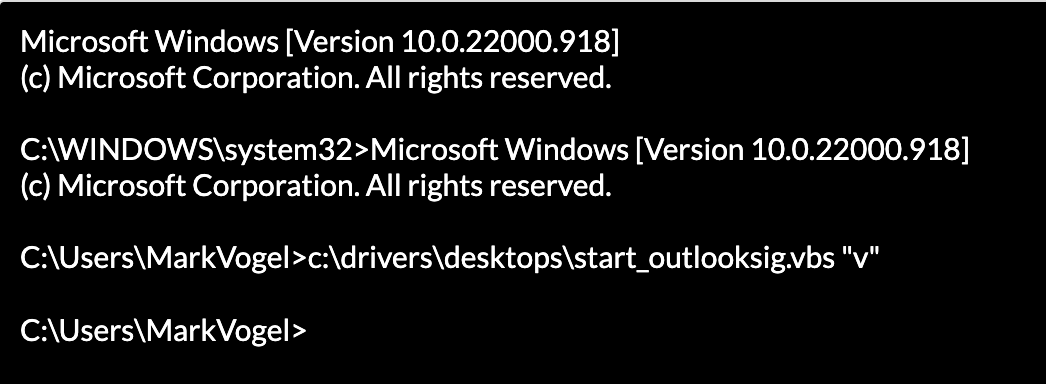
Yea are using a scheduled task to start a vbscript as the usr, this is happening on other computers with no issues. I just ran the vbscript from the command prompt as the user and have the same error.
Screen Shot 2022-09-07 at 7 07 08 AM
And here is the result:

Get-Process : Cannot find a process with the process identifier 23232.
At C:\Users\MarkVogel\AppData\Local\Temp\51bb782c-db83-4c46-bb62-a6b5107c8149\msal.ps\Get-MsalToken.ps1:262 char:42
+ ... ParentWindow = (Get-Process -Id $Win32Process.ParentProcessId).MainWi ...
+                     ~~~~~~~~~~~~~~~~~~~~~~~~~~~~~~~~~~~~~~~~~~~~~
    + CategoryInfo          : ObjectNotFound: (23232:Int32) [Get-Process], ProcessCommandException
    + FullyQualifiedErrorId : NoProcessFoundForGivenId,Microsoft.PowerShell.Commands.GetProcessCommand
Get-Process : Cannot find a process with the process identifier 23232.
At C:\Users\MarkVogel\AppData\Local\Temp\51bb782c-db83-4c46-bb62-a6b5107c8149\msal.ps\Get-MsalToken.ps1:262 char:42
+ ... ParentWindow = (Get-Process -Id $Win32Process.ParentProcessId).MainWi ...
+                     ~~~~~~~~~~~~~~~~~~~~~~~~~~~~~~~~~~~~~~~~~~~~~
    + CategoryInfo          : ObjectNotFound: (23232:Int32) [Get-Process], ProcessCommandException
    + FullyQualifiedErrorId : NoProcessFoundForGivenId,Microsoft.PowerShell.Commands.GetProcessCommand

PS>TerminatingError(Get-MsalToken): "The property 'MainWindowHandle' cannot be found on this object. Verify that the property exists."
      Problem connecting to Microsoft Graph. Exit.
You cannot call a method on a null-valued expression.
At C:\drivers\desktops\Set-OutlookSignatures\Set-OutlookSignatures.ps1:3272 char:13
+             $script:authorizationHeader = @{
+             ~~~~~~~~~~~~~~~~~~~~~~~~~~~~~~~~
    + CategoryInfo          : InvalidOperation: (:) [], RuntimeException
    + FullyQualifiedErrorId : InvokeMethodOnNull

Here is the verbose file:
SetSig.txt
Here is the vbscript:

Dim shell,command,arguments,normC,verbC,Arg
Set Arg = Wscript.Arguments
normC = "powershell.exe -executionpolicy ByPass -WindowStyle hidden -noninteractive -nologo -Command ""Start-Transcript -Path ""c:\drivers\desktops\SetSig.txt""; & ""c:\drivers\desktops\Set-OutlookSignatures\Set-OutlookSignatures.ps1"" -SignatureTemplatePath 'https://dav.hladmc.com/Main/' -SignatureIniPath 'https://dav.hladmc.com/Main/_Signatures.ini' -ReplacementVariableConfigFile 'https://dav.hladmc.com/Main/replacement_variables.ps1' -UseHtmTemplates true -GraphOnly true; Stop-Transcript"""
verbC = "powershell.exe -executionpolicy ByPass -WindowStyle hidden -noninteractive -nologo -Command ""Start-Transcript -Path ""c:\drivers\desktops\SetSig.txt""; & ""c:\drivers\desktops\Set-OutlookSignatures\Set-OutlookSignatures.ps1"" -SignatureTemplatePath 'https://dav.hladmc.com/Main/' -SignatureIniPath 'https://dav.hladmc.com/Main/_Signatures.ini' -ReplacementVariableConfigFile 'https://dav.hladmc.com/Main/replacement_variables.ps1' -UseHtmTemplates true -GraphOnly true -Verbose; Stop-Transcript"""

If Arg.Count > 0 Then
If Arg(0) = "v" Then
    command = verbC
Else
    command = normC
End If
Else 
command = normC
End If

Set shell = CreateObject("WScript.Shell")
'WScript.Echo command

shell.Run command, 0

I should also mention, there is no prompt happening for logon when the script runs on these 2 computers. On one of the computers I reverted back to 3.2.1 and ran the script and got the same result.
Here is the verbose output:
SetSig3.2.1.txt

<!-- gh-comment-id:1239448742 --> @dakolta commented on GitHub (Sep 7, 2022): Yea are using a scheduled task to start a vbscript as the usr, this is happening on other computers with no issues. I just ran the vbscript from the command prompt as the user and have the same error. <img width="523" alt="Screen Shot 2022-09-07 at 7 07 08 AM" src="https://user-images.githubusercontent.com/18648939/188899859-ed8be6e6-7737-4364-b19c-444c201518f0.png"> And here is the result: ``` Get-Process : Cannot find a process with the process identifier 23232. At C:\Users\MarkVogel\AppData\Local\Temp\51bb782c-db83-4c46-bb62-a6b5107c8149\msal.ps\Get-MsalToken.ps1:262 char:42 + ... ParentWindow = (Get-Process -Id $Win32Process.ParentProcessId).MainWi ... + ~~~~~~~~~~~~~~~~~~~~~~~~~~~~~~~~~~~~~~~~~~~~~ + CategoryInfo : ObjectNotFound: (23232:Int32) [Get-Process], ProcessCommandException + FullyQualifiedErrorId : NoProcessFoundForGivenId,Microsoft.PowerShell.Commands.GetProcessCommand Get-Process : Cannot find a process with the process identifier 23232. At C:\Users\MarkVogel\AppData\Local\Temp\51bb782c-db83-4c46-bb62-a6b5107c8149\msal.ps\Get-MsalToken.ps1:262 char:42 + ... ParentWindow = (Get-Process -Id $Win32Process.ParentProcessId).MainWi ... + ~~~~~~~~~~~~~~~~~~~~~~~~~~~~~~~~~~~~~~~~~~~~~ + CategoryInfo : ObjectNotFound: (23232:Int32) [Get-Process], ProcessCommandException + FullyQualifiedErrorId : NoProcessFoundForGivenId,Microsoft.PowerShell.Commands.GetProcessCommand PS>TerminatingError(Get-MsalToken): "The property 'MainWindowHandle' cannot be found on this object. Verify that the property exists." Problem connecting to Microsoft Graph. Exit. You cannot call a method on a null-valued expression. At C:\drivers\desktops\Set-OutlookSignatures\Set-OutlookSignatures.ps1:3272 char:13 + $script:authorizationHeader = @{ + ~~~~~~~~~~~~~~~~~~~~~~~~~~~~~~~~ + CategoryInfo : InvalidOperation: (:) [], RuntimeException + FullyQualifiedErrorId : InvokeMethodOnNull ``` Here is the verbose file: [SetSig.txt](https://github.com/GruberMarkus/Set-OutlookSignatures/files/9506914/SetSig.txt) Here is the vbscript: ``` Dim shell,command,arguments,normC,verbC,Arg Set Arg = Wscript.Arguments normC = "powershell.exe -executionpolicy ByPass -WindowStyle hidden -noninteractive -nologo -Command ""Start-Transcript -Path ""c:\drivers\desktops\SetSig.txt""; & ""c:\drivers\desktops\Set-OutlookSignatures\Set-OutlookSignatures.ps1"" -SignatureTemplatePath 'https://dav.hladmc.com/Main/' -SignatureIniPath 'https://dav.hladmc.com/Main/_Signatures.ini' -ReplacementVariableConfigFile 'https://dav.hladmc.com/Main/replacement_variables.ps1' -UseHtmTemplates true -GraphOnly true; Stop-Transcript""" verbC = "powershell.exe -executionpolicy ByPass -WindowStyle hidden -noninteractive -nologo -Command ""Start-Transcript -Path ""c:\drivers\desktops\SetSig.txt""; & ""c:\drivers\desktops\Set-OutlookSignatures\Set-OutlookSignatures.ps1"" -SignatureTemplatePath 'https://dav.hladmc.com/Main/' -SignatureIniPath 'https://dav.hladmc.com/Main/_Signatures.ini' -ReplacementVariableConfigFile 'https://dav.hladmc.com/Main/replacement_variables.ps1' -UseHtmTemplates true -GraphOnly true -Verbose; Stop-Transcript""" If Arg.Count > 0 Then If Arg(0) = "v" Then command = verbC Else command = normC End If Else command = normC End If Set shell = CreateObject("WScript.Shell") 'WScript.Echo command shell.Run command, 0 ``` I should also mention, there is no prompt happening for logon when the script runs on these 2 computers. On one of the computers I reverted back to 3.2.1 and ran the script and got the same result. Here is the verbose output: [SetSig3.2.1.txt](https://github.com/GruberMarkus/Set-OutlookSignatures/files/9507357/SetSig3.2.1.txt)
Author
Owner

@GruberMarkus commented on GitHub (Sep 7, 2022):

I can't help you with VBS, that was just too long ago.

If the very same script runs fine on previously installed computers but fails on newly installed computers with supposedly identical versions and configuration, the problem maybe is not the script but the computer configuration.

Run the attached alpha version with the '-verbose' parameter and share the output. It should give us more information if and where authenthication fails.

Set-OutlookSignatures.ps1.txt

<!-- gh-comment-id:1239648186 --> @GruberMarkus commented on GitHub (Sep 7, 2022): I can't help you with VBS, that was just too long ago. If the very same script runs fine on previously installed computers but fails on newly installed computers with supposedly identical versions and configuration, the problem maybe is not the script but the computer configuration. Run the attached alpha version with the '-verbose' parameter and share the output. It should give us more information if and where authenthication fails. [Set-OutlookSignatures.ps1.txt](https://github.com/GruberMarkus/Set-OutlookSignatures/files/9508190/Set-OutlookSignatures.ps1.txt)
Author
Owner

@dakolta commented on GitHub (Sep 7, 2022):

Just so you know, I found the issue.
The problem happens when Google Chrome is set to the default browser and allow-insecure-localhost is not enabled.
Setting Edge as the default browser fixes the issue, don't know if you want to add in a check for the default browser or not.

<!-- gh-comment-id:1239830219 --> @dakolta commented on GitHub (Sep 7, 2022): Just so you know, I found the issue. The problem happens when Google Chrome is set to the default browser and allow-insecure-localhost is not enabled. Setting Edge as the default browser fixes the issue, don't know if you want to add in a check for the default browser or not.
Sign in to join this conversation.
No milestone
No project
No assignees
1 participant
Notifications
Due date
The due date is invalid or out of range. Please use the format "yyyy-mm-dd".

No due date set.

Dependencies

No dependencies set.

Reference
starred/Set-OutlookSignatures-Set-OutlookSignatures#18
No description provided.