[GH-ISSUE #910] Two questions about dark mode #703

Closed
opened 2026-02-26 09:32:21 +03:00 by kerem · 14 comments
Owner

Originally created by @DeepChirp on GitHub (Jun 4, 2021).
Original GitHub issue: https://github.com/NickeManarin/ScreenToGif/issues/910

Originally assigned to: @pawlos on GitHub.

Hello!
1.The title bar in dark mode is not black, so it is not very coordinated.
image
2.The color scheme of the editor does not seem to follow the system.
image
Can u fix it in the next version? Thanks!

Originally created by @DeepChirp on GitHub (Jun 4, 2021). Original GitHub issue: https://github.com/NickeManarin/ScreenToGif/issues/910 Originally assigned to: @pawlos on GitHub. Hello! 1.The title bar in dark mode is not black, so it is not very coordinated. ![image](https://user-images.githubusercontent.com/66902050/120821021-aa19b380-c587-11eb-8b35-42fdf5fe5320.png) 2.The color scheme of the editor does not seem to follow the system. ![image](https://user-images.githubusercontent.com/66902050/120821752-552a6d00-c588-11eb-97ee-848ff9aa1dbf.png) Can u fix it in the next version? Thanks!
kerem 2026-02-26 09:32:21 +03:00
Author
Owner

@NickeManarin commented on GitHub (Jun 4, 2021):

  1. That's up to your OS. Looks like you are not setting the title bar to follow any accent color.

  2. That's a separated color scheme. It was left like that so you can pick any color not being bound to the current theme. Another option called "Follow system" could be created for this.

<!-- gh-comment-id:854840866 --> @NickeManarin commented on GitHub (Jun 4, 2021): 1) That's up to your OS. Looks like you are not setting the title bar to follow any accent color. 2) That's a separated color scheme. It was left like that so you can pick any color not being bound to the current theme. Another option called "Follow system" could be created for this.
Author
Owner

@pawlos commented on GitHub (Jun 4, 2021):

When doing the dark theme, I wasn't sure about the editor as the colors there are hand picked (as far as I could see) and not based on themes but @NickeManarin please assign me to the ticket, I will add "Follow the system" in the editor too".

<!-- gh-comment-id:854958155 --> @pawlos commented on GitHub (Jun 4, 2021): When doing the dark theme, I wasn't sure about the editor as the colors there are hand picked (as far as I could see) and not based on themes but @NickeManarin please assign me to the ticket, I will add "Follow the system" in the editor too".
Author
Owner

@DeepChirp commented on GitHub (Jun 4, 2021):

1. That's up to your OS. Looks like you are not setting the title bar to follow any accent color.

2. That's a separated color scheme. It was left like that so you can pick any color not being bound to the current theme. Another option called "Follow system" could be created for this.

Hello!
1.Other software such as Explorer can change the color of the title bar.

<!-- gh-comment-id:855038571 --> @DeepChirp commented on GitHub (Jun 4, 2021): > 1. That's up to your OS. Looks like you are not setting the title bar to follow any accent color. > > 2. That's a separated color scheme. It was left like that so you can pick any color not being bound to the current theme. Another option called "Follow system" could be created for this. Hello! 1.Other software such as Explorer can change the color of the title bar.
Author
Owner

@pawlos commented on GitHub (Jun 5, 2021):

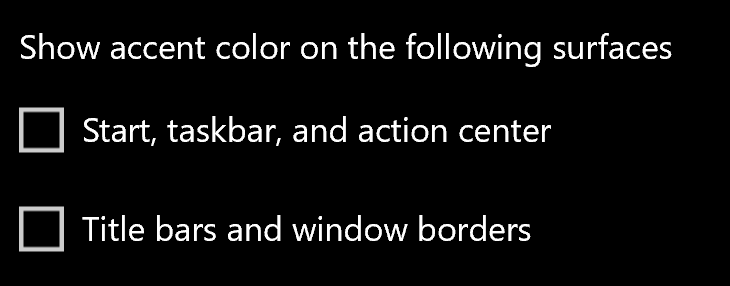
@shenzhiming88 I'm working on the "Follow the system" for the grid and as for explorer, it might be doing full custom rendering of the Window but it strange it doesn't respect user settings. If you want ScreenToGif's title bar follow the color just set the option in Windows as @NickeManarin suggested
image

<!-- gh-comment-id:855229721 --> @pawlos commented on GitHub (Jun 5, 2021): @shenzhiming88 I'm working on the "Follow the system" for the grid and as for explorer, it might be doing full custom rendering of the Window but it strange it doesn't respect user settings. If you want ScreenToGif's title bar follow the color just set the option in Windows as @NickeManarin suggested ![image](https://user-images.githubusercontent.com/1296768/120890876-c2301800-c605-11eb-904b-40235b7e477a.png)
Author
Owner

@DeepChirp commented on GitHub (Jun 5, 2021):

@pawlos
Hello!
There are many third-party applications that customize the title bar, such as IDM and VMWare. But I don't know how they are implemented.
image
image

<!-- gh-comment-id:855248579 --> @DeepChirp commented on GitHub (Jun 5, 2021): @pawlos Hello! There are many third-party applications that customize the title bar, such as IDM and VMWare. But I don't know how they are implemented. ![image](https://user-images.githubusercontent.com/66902050/120895022-bff1ac00-c64d-11eb-872f-f1d5d41936e2.png) ![image](https://user-images.githubusercontent.com/66902050/120895029-c97b1400-c64d-11eb-88eb-88edaa1723d2.png)
Author
Owner

@NickeManarin commented on GitHub (Jun 5, 2021):

@pawlos
Hello!
There are many third-party applications that customize the title bar, such as IDM and VMWare. But I don't know how they are implemented.

That often requires a custom window, which in turn as a tradeoff reduces the performance.
ScreenToGif has custom windows (the recorders).

<!-- gh-comment-id:855304303 --> @NickeManarin commented on GitHub (Jun 5, 2021): > @pawlos > Hello! > There are many third-party applications that customize the title bar, such as IDM and VMWare. But I don't know how they are implemented. That often requires a custom window, which in turn as a tradeoff reduces the performance. ScreenToGif has custom windows (the recorders).
Author
Owner

@Geeyun-JY3 commented on GitHub (Jun 21, 2021):

  1. That's up to your OS. Looks like you are not setting the title bar to follow any accent color.

So if I am not setting the title bar to follow any accent color, it would be always white? Shouldn't it follow the OS color theme (default app mode)? Chrome ’s title bar would be dark when default app mode is dark and users not setting the title bar to follow any accent color.

<!-- gh-comment-id:864883663 --> @Geeyun-JY3 commented on GitHub (Jun 21, 2021): > 1. That's up to your OS. Looks like you are not setting the title bar to follow any accent color. So if I am not setting the title bar to follow any accent color, it would be always white? Shouldn't it follow the OS color theme (default app mode)? Chrome ’s title bar would be dark when default app mode is dark and users not setting the title bar to follow any accent color.
Author
Owner

@Geeyun-JY3 commented on GitHub (Jun 29, 2021):

@NickeManarin

<!-- gh-comment-id:870559578 --> @Geeyun-JY3 commented on GitHub (Jun 29, 2021): @NickeManarin
Author
Owner

@NickeManarin commented on GitHub (Jun 29, 2021):

image

<!-- gh-comment-id:870561702 --> @NickeManarin commented on GitHub (Jun 29, 2021): ![image](https://user-images.githubusercontent.com/14798947/123798230-5c117a80-d8bd-11eb-9f95-94ea88aa32b1.png)
Author
Owner

@NickeManarin commented on GitHub (Jun 29, 2021):

image

<!-- gh-comment-id:870561955 --> @NickeManarin commented on GitHub (Jun 29, 2021): ![image](https://user-images.githubusercontent.com/14798947/123798292-6af82d00-d8bd-11eb-8af6-8a34075d1aba.png)
Author
Owner

@NickeManarin commented on GitHub (Jun 29, 2021):

Browsers such as Chrome rewrite the title bar (because they add support for tabs and other elements). ScreenToGif doesn't do that, so it follows the default settings.

<!-- gh-comment-id:870563199 --> @NickeManarin commented on GitHub (Jun 29, 2021): Browsers such as Chrome rewrite the title bar (because they add support for tabs and other elements). ScreenToGif doesn't do that, so it follows the default settings.
Author
Owner

@Geeyun-JY3 commented on GitHub (Jun 29, 2021):

Browsers such as Chrome rewrite the title bar (because they add support for tabs and other elements). ScreenToGif doesn't do that, so it follows the default settings.

So is there any consideration that ScreenToGif doesn't do that? Or actually https://github.com/NickeManarin/ScreenToGif/issues/910#issuecomment-855304303 has already explained it.(TBH I don't understand what https://github.com/NickeManarin/ScreenToGif/issues/910#issuecomment-855304303 means🤦‍♂️)

<!-- gh-comment-id:870586174 --> @Geeyun-JY3 commented on GitHub (Jun 29, 2021): > Browsers such as Chrome rewrite the title bar (because they add support for tabs and other elements). ScreenToGif doesn't do that, so it follows the default settings. So is there any consideration that ScreenToGif doesn't do that? Or actually https://github.com/NickeManarin/ScreenToGif/issues/910#issuecomment-855304303 has already explained it.(TBH I don't understand what https://github.com/NickeManarin/ScreenToGif/issues/910#issuecomment-855304303 means🤦‍♂️)
Author
Owner

@NickeManarin commented on GitHub (Jun 29, 2021):

I found one way to manually set the title bar color, without having to deal with a manual assembly of the title bar.

It is a hack and it needs to be applied for each window, so it may not be a good solution.

<!-- gh-comment-id:870778242 --> @NickeManarin commented on GitHub (Jun 29, 2021): I found one way to manually set the title bar color, without having to deal with a manual assembly of the title bar. It is a hack and it needs to be applied for each window, so it may not be a good solution.
Author
Owner

@Geeyun-JY3 commented on GitHub (Jul 1, 2021):

I found one way to manually set the title bar color, without having to deal with a manual assembly of the title bar.

It is a hack and it needs to be applied for each window, so it may not be a good solution.

Fine.

<!-- gh-comment-id:871941349 --> @Geeyun-JY3 commented on GitHub (Jul 1, 2021): > I found one way to manually set the title bar color, without having to deal with a manual assembly of the title bar. > > It is a hack and it needs to be applied for each window, so it may not be a good solution. Fine.
Sign in to join this conversation.
No milestone
No project
No assignees
1 participant
Notifications
Due date
The due date is invalid or out of range. Please use the format "yyyy-mm-dd".

No due date set.

Dependencies

No dependencies set.

Reference
starred/ScreenToGif#703
No description provided.