mirror of
https://github.com/NickeManarin/ScreenToGif.git
synced 2026-04-25 23:25:52 +03:00
[GH-ISSUE #833] Updating the app maintains the previous version entry in windows "Programs and Features" #657
Labels
No labels
copy cats
duplicated
future feature
pull-request
⬜ Accepted
⬜ Completed
⬜ Help Wanted 💪
⬜ In Progress
⬜ Missing Details
⬜ Pending
⬜ Waiting For Answer ⏳
🆕 feature preview
🔷 Bug 🐛
🔷 Out Of Scope
🔷 Out Of Scope
🔷 Question
🔷Enhancement
🔷Enhancement
🔷Invalid / External
🔷Knowledge Base
🔷Won't Fix
🕑 High
🕑 High
🕑 High
🕕 Medium
🕙 Low
🕛 Critical
No milestone
No project
No assignees
1 participant

Notifications
Due date
No due date set.
Dependencies
No dependencies set.
Reference
starred/ScreenToGif#657
Loading…
Add table
Add a link
Reference in a new issue
No description provided.
Delete branch "%!s()"
Deleting a branch is permanent. Although the deleted branch may continue to exist for a short time before it actually gets removed, it CANNOT be undone in most cases. Continue?
Originally created by @darkred on GitHub (Apr 21, 2021).
Original GitHub issue: https://github.com/NickeManarin/ScreenToGif/issues/833
I had ScreenToGif 2.28.0 installed via
ScreenToGif.2.28.Setup.msiinstalled in win10 x64 20h2.Today, I wanted to update to the new version, 2.28.1 .
So I tried:
ScreenToGif.2.28.1.Setupand running it,and in both cases,
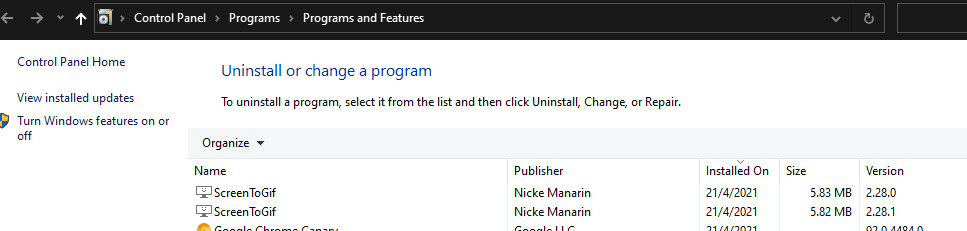
in windows "Programs and Features": the old
2.28.0entry remained and an additional2.28.1created:This shouldn't occur because the updated program still has the same
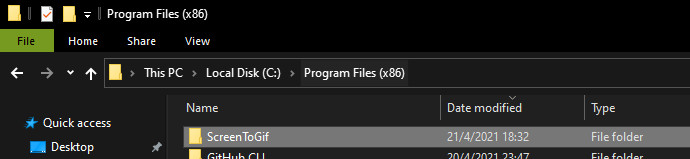
ScreenToGifdirectory:Thank you
@NickeManarin commented on GitHub (Apr 21, 2021):
Did you install with the option to "all users" ticked or not?
@darkred commented on GitHub (Apr 22, 2021):
There's only one local account in my Windows 10 installation,
Administrator[screenshot]And, during ScreenToGif install/update,
the only option related to "all users" was
Add the shortcut to all users, and yes, it was ticked (already, by default) :screenshots
@NickeManarin commented on GitHub (Apr 23, 2021):
Ok, this issue is related to a flag (ALLUSERS) used in the installer.
When the option to install the app to all users is ticked and later in an update is not ticked, it is treated as another separated app.
So it creates another entry in the App list.
One way to go would be to run a custom action removing the current version before installing it on top.
@NickeManarin commented on GitHub (May 23, 2021):
I'm going to close this issue because I'm tracking it via #721.
I have a working solution (it will be ready for v2.30.1) for stopping this issue, but you'll need to uninstall the broken version before installing the new version.
@NickeManarin commented on GitHub (May 25, 2021):
I managed to make it work, you don't need to uninstall manually the previous version.
The installer detects that a previous version was installed on the same folder, but with a different access mode (per-user / per-machine) and it uninstalls before installing the new version.
@darkred commented on GitHub (May 27, 2021):
Thank you for fixing this.