[GH-ISSUE #702] Other applications cannot use camera after install ScreenToGif #572

Closed
opened 2026-02-26 09:31:56 +03:00 by kerem · 11 comments
Owner

Originally created by @LucienZhang on GitHub (Aug 14, 2020).
Original GitHub issue: https://github.com/NickeManarin/ScreenToGif/issues/702

I installed ScreenToGif to my Win10 system, it works well. But other applications like "Camera App" or "Zoom" cannot use my camera anymore, the camera will keep rebooting when these applications try to use it. It might be the ScreenToGid didn't release the occupation of the camera when it quit. Please help.

Originally created by @LucienZhang on GitHub (Aug 14, 2020). Original GitHub issue: https://github.com/NickeManarin/ScreenToGif/issues/702 I installed ScreenToGif to my Win10 system, it works well. But other applications like "Camera App" or "Zoom" cannot use my camera anymore, the camera will keep rebooting when these applications try to use it. It might be the ScreenToGid didn't release the occupation of the camera when it quit. Please help.
kerem 2026-02-26 09:31:56 +03:00
Author
Owner

@NickeManarin commented on GitHub (Aug 14, 2020):

Only one app can use the camera at given time. I just tested in here and the Camera app was able to find and use the webcam after closing the Webcam recorder (not even closing the app itself).

Try restarting the computer.

<!-- gh-comment-id:674062625 --> @NickeManarin commented on GitHub (Aug 14, 2020): Only one app can use the camera at given time. I just tested in here and the Camera app was able to find and use the webcam after closing the Webcam recorder (not even closing the app itself). Try restarting the computer.
Author
Owner

@LucienZhang commented on GitHub (Aug 14, 2020):

Thanks for replying me, yes of course only one app can use the camera at given time. But I've tried:

  1. Restart my computer -> doesn't work
  2. Uninstall ScreenToGif and then restart my computer -> doesn't work
  3. Reinstall ScreenToGif to find any configuration -> the reinstalled ScreenToGif can still work well but other Apps don't work at all
  4. Ask Microsoft for a help, they told me it's related to the camera occupation of third party application. The solution is try to reinstall recover or reinstall Windows (what a funny solution)

I guess maybe ScreenToGif modified some key value in windows to keep the occupation by itself?

Thanks for your help!

<!-- gh-comment-id:674068631 --> @LucienZhang commented on GitHub (Aug 14, 2020): Thanks for replying me, yes of course only one app can use the camera at given time. But I've tried: 1. Restart my computer -> doesn't work 2. Uninstall ScreenToGif and then restart my computer -> doesn't work 3. Reinstall ScreenToGif to find any configuration -> the reinstalled ScreenToGif can still work well but other Apps don't work at all 4. Ask Microsoft for a help, they told me it's related to the camera occupation of third party application. The solution is try to reinstall recover or reinstall Windows (what a funny solution) I guess maybe ScreenToGif modified some key value in windows to keep the occupation by itself? Thanks for your help!
Author
Owner

@NickeManarin commented on GitHub (Aug 14, 2020):

Try this:

https://www.windowscentral.com/how-see-which-apps-are-using-your-webcam#:~:text=%20How%20to%20see%20which%20app%20is%20using,Click%20Kill%20Process.%208%20Click%20OK.%20More%20

I was able to find this when testing:

image

If you find any app using the webcam, kill the process.

Also, before that, check if ScreenToGif is not running, but minimized to the system tray.


Wait, you wrote that you already restarted the computer. So, this won't work.

<!-- gh-comment-id:674071064 --> @NickeManarin commented on GitHub (Aug 14, 2020): Try this: https://www.windowscentral.com/how-see-which-apps-are-using-your-webcam#:~:text=%20How%20to%20see%20which%20app%20is%20using,Click%20Kill%20Process.%208%20Click%20OK.%20More%20 I was able to find this when testing: ![image](https://user-images.githubusercontent.com/14798947/90253633-d78a4a80-de17-11ea-8f66-3dbae815cf96.png) If you find any app using the webcam, kill the process. Also, before that, check if ScreenToGif is not running, but minimized to the system tray. ----------- Wait, you wrote that you already restarted the computer. So, this won't work.
Author
Owner

@LucienZhang commented on GitHub (Aug 14, 2020):

Thanks for helping, I tried, but no, doesn't work. The process is clean, and actually, the camera app can access the camera for 0.1s repeatly.

When I open the Camera App the image shows up and the camera light is on for 0.1s. Then the camera will reboot, and keep rebooting forever.

Thank you so much for your help

And I tried to disable the camera device then enable it. Doesn't work

<!-- gh-comment-id:674074959 --> @LucienZhang commented on GitHub (Aug 14, 2020): Thanks for helping, I tried, but no, doesn't work. The process is clean, and actually, the camera app can access the camera for 0.1s repeatly. When I open the Camera App the image shows up and the camera light is on for 0.1s. Then the camera will reboot, and keep rebooting forever. Thank you so much for your help And I tried to disable the camera device then enable it. Doesn't work
Author
Owner

@NickeManarin commented on GitHub (Aug 14, 2020):

Let's see if there's any other non-destructive way to fix this.

  1. Have you tried to uninstall the camera driver and install it again?
  2. Have you tried to uninstall or disable your anti-virus?
  3. Have you checked if the camera is enabled (in some computers, you can disable the webcam, like in Lenovo's, with the Fn + F8 key)?
  4. You said that ScreenToGif works well. Do you mean that it can access the webcam normally?
  5. Have you tried to open the Event Viewer to check if any error is popping in there?
  6. Have you checked if you have permissions enabled in the Windows Settings app to other apps to access the webcam?
  7. Have you tried to use other apps that also can access the webcam (other than Camera and Zoom)?
  8. Have you checked if Windows Update is not overriding the driver of your webcam with a generic variant?
<!-- gh-comment-id:674078895 --> @NickeManarin commented on GitHub (Aug 14, 2020): Let's see if there's any other non-destructive way to fix this. 1. Have you tried to uninstall the camera driver and install it again? 2. Have you tried to uninstall or disable your anti-virus? 3. Have you checked if the camera is enabled (in some computers, you can disable the webcam, like in Lenovo's, with the Fn + F8 key)? 4. You said that ScreenToGif works well. Do you mean that it can access the webcam normally? 5. Have you tried to open the Event Viewer to check if any error is popping in there? 6. Have you checked if you have permissions enabled in the Windows Settings app to other apps to access the webcam? 7. Have you tried to use other apps that also can access the webcam (other than Camera and Zoom)? 8. Have you checked if Windows Update is not overriding the driver of your webcam with a generic variant?
Author
Owner

@LucienZhang commented on GitHub (Aug 14, 2020):

Thanks for help!

  1. Have you tried to uninstall the camera driver and install it again? -> no, I will try
  2. Have you tried to uninstall or disable your anti-virus? -> no, I will try
  3. Have you checked if the camera is enabled (in some computers, you can disable the webcam, like in Lenovo's, with the Fn + F8 key)? Yes, enabled
    image
  1. You said that ScreenToGif works well. Do you mean that it can access the webcam normally? -> yes, but only ScreenToGif works normally.
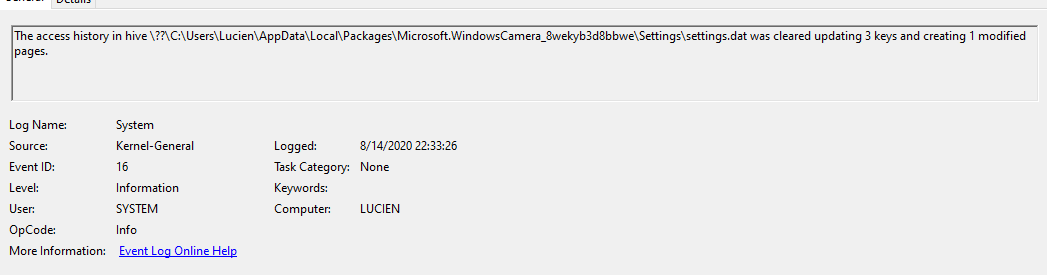
  2. Have you tried to open the Event Viewer to check if any error is popping in there?
    I just tried, and yes, there is an error, this is what I got when I run camera app
    image
    image
    image
  1. Have you checked if you have permissions enabled in the Windows Settings app to other apps to access the webcam?
    yes
  2. Have you tried to use other apps that also can access the webcam (other than Camera and Zoom)?
    Tried, no other apps can access the camera, including chrome online webcam test and other local apps
<!-- gh-comment-id:674084253 --> @LucienZhang commented on GitHub (Aug 14, 2020): Thanks for help! > > 1. Have you tried to uninstall the camera driver and install it again? -> no, I will try > 2. Have you tried to uninstall or disable your anti-virus? -> no, I will try > 3. Have you checked if the camera is enabled (in some computers, you can disable the webcam, like in Lenovo's, with the Fn + F8 key)? Yes, enabled ![image](https://user-images.githubusercontent.com/15074434/90255516-55ce0780-de7f-11ea-8055-cde64bd9fed3.png) > 4. You said that ScreenToGif works well. Do you mean that it can access the webcam normally? -> yes, but only ScreenToGif works normally. > 5. Have you tried to open the Event Viewer to check if any error is popping in there? I just tried, and yes, there is an error, this is what I got when I run camera app ![image](https://user-images.githubusercontent.com/15074434/90255887-e1479880-de7f-11ea-96cf-32f76e44a402.png) ![image](https://user-images.githubusercontent.com/15074434/90256053-181dae80-de80-11ea-956e-2723b2b04537.png) ![image](https://user-images.githubusercontent.com/15074434/90256093-2370da00-de80-11ea-911a-4b6a1745713d.png) > 6. Have you checked if you have permissions enabled in the Windows Settings app to other apps to access the webcam? yes > 7. Have you tried to use other apps that also can access the webcam (other than Camera and Zoom)? Tried, no other apps can access the camera, including chrome online webcam test and other local apps
Author
Owner

@LucienZhang commented on GitHub (Aug 14, 2020):

another information related to the camera is this:
image


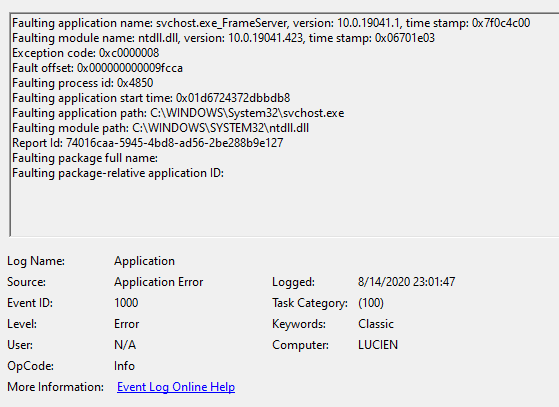
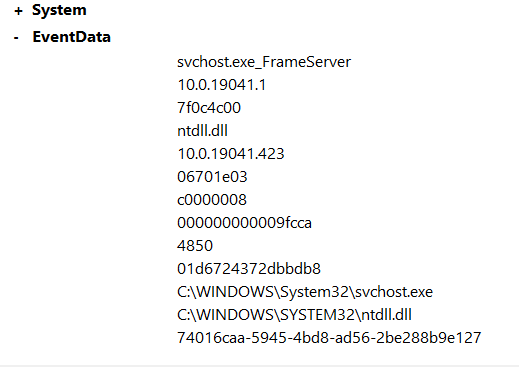
and from Application log, I got this when I run Camera App
image
image

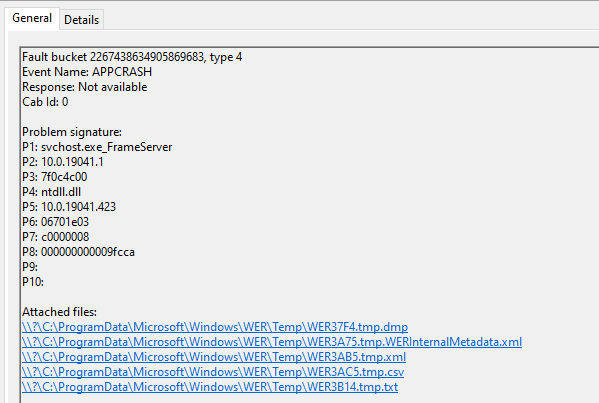
and this one:
image
image

<!-- gh-comment-id:674091681 --> @LucienZhang commented on GitHub (Aug 14, 2020): another information related to the camera is this: ![image](https://user-images.githubusercontent.com/15074434/90257295-f4f3fe80-de81-11ea-99a1-973ca23d0139.png) ----------------- and from Application log, I got this when I run Camera App ![image](https://user-images.githubusercontent.com/15074434/90257609-5f0ca380-de82-11ea-91b9-a4097dd06baa.png) ![image](https://user-images.githubusercontent.com/15074434/90257675-7055b000-de82-11ea-92dd-68676146fbec.png) and this one: ![image](https://user-images.githubusercontent.com/15074434/90257768-8ebbab80-de82-11ea-84f8-1ff0727578bf.png) ![image](https://user-images.githubusercontent.com/15074434/90257805-98ddaa00-de82-11ea-87bb-bffe55d55236.png)
Author
Owner

@NickeManarin commented on GitHub (Aug 14, 2020):

Hmm, Frame server...

Have you recently updated Windows 10?

Try disabling FrameServer by downloading the Zip from here (near Download Our One-Click Registry Hack):
https://www.howtogeek.com/267946/how-to-stop-your-webcam-from-freezing-and-crashing-on-windows-10/

Unzip and run the "Enable webcam workaround", 64 bits or 32 bits, depending on your machine.
I checked the registry file and it's safe.

It creates two entries to disable FrameServer.

<!-- gh-comment-id:674095083 --> @NickeManarin commented on GitHub (Aug 14, 2020): Hmm, Frame server... Have you recently updated Windows 10? Try disabling FrameServer by downloading the Zip from here (near **Download Our One-Click Registry Hack**): https://www.howtogeek.com/267946/how-to-stop-your-webcam-from-freezing-and-crashing-on-windows-10/ Unzip and run the "Enable webcam workaround", 64 bits or 32 bits, depending on your machine. I checked the registry file and it's safe. It creates two entries to disable FrameServer.
Author
Owner

@LucienZhang commented on GitHub (Aug 14, 2020):

It works! Thank you so so so so much!! You saved my computer!! Everything works fine now! Thank you!

<!-- gh-comment-id:674097374 --> @LucienZhang commented on GitHub (Aug 14, 2020): It works! Thank you so so so so much!! You saved my computer!! Everything works fine now! Thank you!
Author
Owner

@NickeManarin commented on GitHub (Aug 14, 2020):

Awesome. I'm glad it works now.

Well, the link that I provided explains well what is happening.
Also, explains why ScreenToGif still worked, it uses a video mode still supported.

<!-- gh-comment-id:674098209 --> @NickeManarin commented on GitHub (Aug 14, 2020): Awesome. I'm glad it works now. Well, the link that I provided explains well what is happening. Also, explains why ScreenToGif still worked, it uses a video mode still supported.
Author
Owner

@LucienZhang commented on GitHub (Aug 14, 2020):

Thanks, the incompatible "update" they made is really shocking, especially for an Anniversary.

<!-- gh-comment-id:674100029 --> @LucienZhang commented on GitHub (Aug 14, 2020): Thanks, the incompatible "update" they made is really shocking, especially for an Anniversary.
Sign in to join this conversation.
No milestone
No project
No assignees
1 participant
Notifications
Due date
The due date is invalid or out of range. Please use the format "yyyy-mm-dd".

No due date set.

Dependencies

No dependencies set.

Reference
starred/ScreenToGif#572
No description provided.