[GH-ISSUE #606] Screen size detection is wrong, actural 1920*1080 but show 1919*1079 #499

Closed
opened 2026-02-26 09:31:40 +03:00 by kerem · 16 comments
Owner

Originally created by @levid7 on GitHub (Mar 4, 2020).
Original GitHub issue: https://github.com/NickeManarin/ScreenToGif/issues/606

Originally assigned to: @NickeManarin on GitHub.

My screen is 19201080. However when I use screen mode to select, it show the screen is 19191079. How should I do to capture the full screen 1920*1080? Thanks.

Originally created by @levid7 on GitHub (Mar 4, 2020). Original GitHub issue: https://github.com/NickeManarin/ScreenToGif/issues/606 Originally assigned to: @NickeManarin on GitHub. My screen is 1920*1080. However when I use screen mode to select, it show the screen is 1919*1079. How should I do to capture the full screen 1920*1080? Thanks.
kerem 2026-02-26 09:31:40 +03:00
Author
Owner

@NickeManarin commented on GitHub (Mar 4, 2020):

Which recorder are you using? The new one?
If so, which selection mode are you using?
If the "region" mode, you can drag 1 pixel to the sides to actually get that one missing pixel.

Or you could simply select the "screen" mode.

<!-- gh-comment-id:594848695 --> @NickeManarin commented on GitHub (Mar 4, 2020): Which recorder are you using? The new one? If so, which selection mode are you using? If the "region" mode, you can drag 1 pixel to the sides to actually get that one missing pixel. Or you could simply select the "screen" mode.
Author
Owner

@levid7 commented on GitHub (Mar 5, 2020):

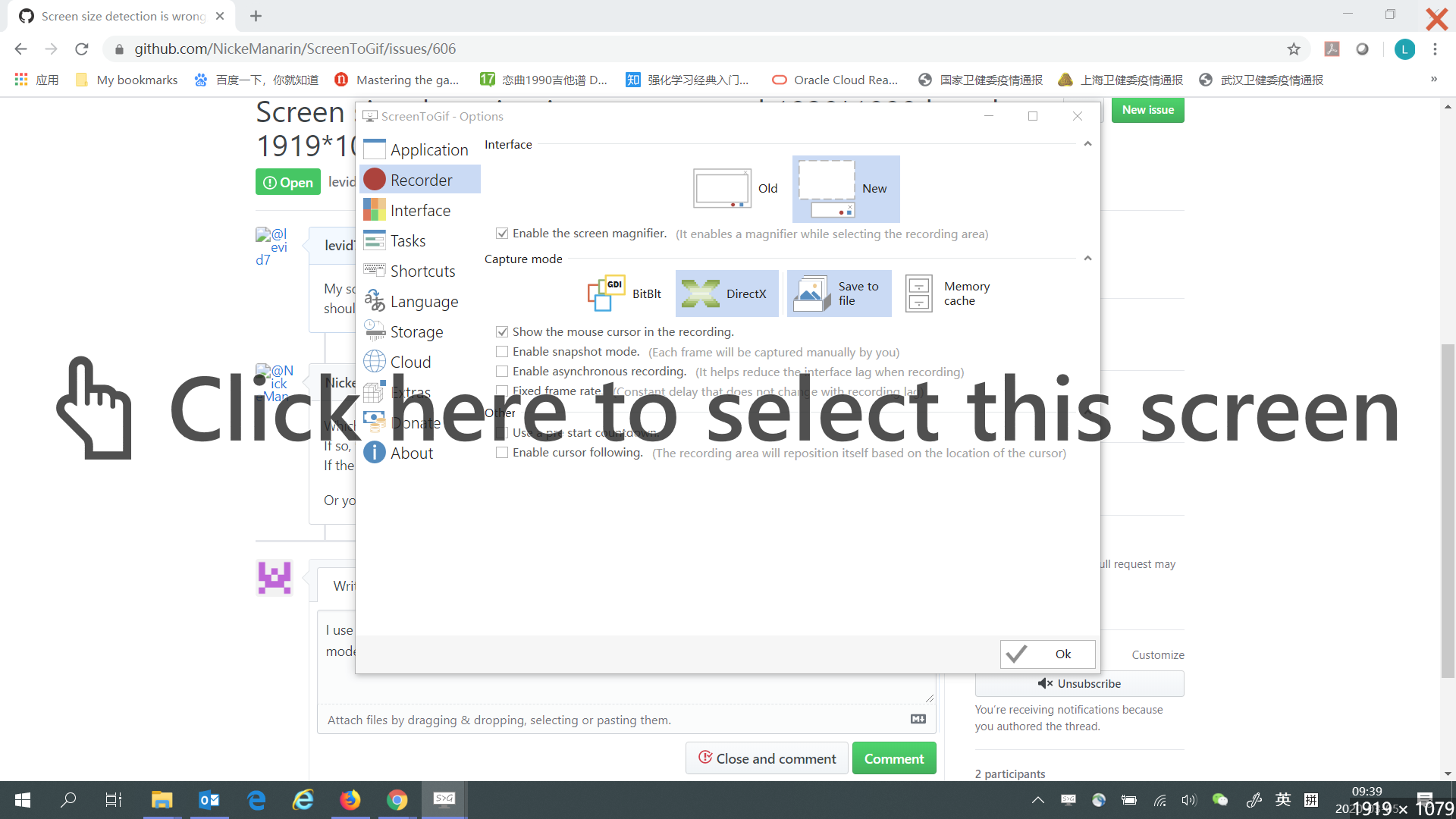
I use the new interface and DirectX capture mode. When choosing the screen size, I use the 'screen' mode, but it tells my screen is 1919x1079. Screenshot through PrtSc is attached here, which is 1920x1080.
Screen

<!-- gh-comment-id:594983028 --> @levid7 commented on GitHub (Mar 5, 2020): I use the new interface and DirectX capture mode. When choosing the screen size, I use the 'screen' mode, but it tells my screen is 1919x1079. Screenshot through PrtSc is attached here, which is 1920x1080. ![Screen](https://user-images.githubusercontent.com/32792075/75939540-7011bb80-5ec5-11ea-87fd-889802abb446.png)
Author
Owner

@NickeManarin commented on GitHub (Mar 5, 2020):

Are you using a high DPI screen?

<!-- gh-comment-id:594998343 --> @NickeManarin commented on GitHub (Mar 5, 2020): Are you using a high DPI screen?
Author
Owner

@levid7 commented on GitHub (Mar 5, 2020):

I don't know whether 1920x1080 is of high DPI. This resolution is my laptop screen resolution, Thinkpad X380 Yoga.

<!-- gh-comment-id:595011437 --> @levid7 commented on GitHub (Mar 5, 2020): I don't know whether 1920x1080 is of high DPI. This resolution is my laptop screen resolution, Thinkpad X380 Yoga.
Author
Owner

@the-j0k3r commented on GitHub (Mar 5, 2020):

DPI and resolution are separate things.

https://www.tenforums.com/tutorials/5990-change-dpi-scaling-level-displays-windows-10-a.html

Im going to guess that @NickeManarin wants to know if this setting has been changed. Default is 100% or 96DPI (DPI = Dots Per Inch) If you changed it the show us what the settings are now.

<!-- gh-comment-id:595036165 --> @the-j0k3r commented on GitHub (Mar 5, 2020): DPI and resolution are separate things. https://www.tenforums.com/tutorials/5990-change-dpi-scaling-level-displays-windows-10-a.html Im going to guess that @NickeManarin wants to know if this setting has been changed. Default is 100% or 96DPI (DPI = [Dots Per Inch](https://en.wikipedia.org/wiki/Dots_per_inch)) If you changed it the show us what the settings are now.
Author
Owner

@levid7 commented on GitHub (Mar 5, 2020):

O, I got it. Yes I have changed my screen DPI scale, it is 125%. When I change it back to 100%, the screen size indentification is right, 1920x1080.

<!-- gh-comment-id:595052673 --> @levid7 commented on GitHub (Mar 5, 2020): O, I got it. Yes I have changed my screen DPI scale, it is 125%. When I change it back to 100%, the screen size indentification is right, 1920x1080.
Author
Owner

@NickeManarin commented on GitHub (Mar 5, 2020):

What probably is happening is that the app is receiving the resolution scaled and when converting to 96DPI, it's not rounding correctly the values.

<!-- gh-comment-id:595336921 --> @NickeManarin commented on GitHub (Mar 5, 2020): What probably is happening is that the app is receiving the resolution scaled and when converting to 96DPI, it's not rounding correctly the values.
Author
Owner

@the-j0k3r commented on GitHub (Mar 5, 2020):

This is predictable, 96DPI = 100% \ 4 = 24DPI increments for each added 25% increase, up to 225% max DPI or 240DPI

Capture

That is until some user decides to use this

Capture

<!-- gh-comment-id:595441337 --> @the-j0k3r commented on GitHub (Mar 5, 2020): This is predictable, 96DPI = 100% \ 4 = 24DPI increments for each added 25% increase, up to 225% max DPI or 240DPI ![Capture](https://user-images.githubusercontent.com/31389848/76025278-eb5a8800-5f2c-11ea-9dc0-44ed6784288f.PNG) That is until some user decides to use this ![Capture](https://user-images.githubusercontent.com/31389848/76025143-9e76b180-5f2c-11ea-98d9-b2c5c62399eb.PNG)
Author
Owner

@levid7 commented on GitHub (May 17, 2020):

What probably is happening is that the app is receiving the resolution scaled and when converting to 96DPI, it's not rounding correctly the values.

Is there any chance to fix this issue?

<!-- gh-comment-id:629811414 --> @levid7 commented on GitHub (May 17, 2020): > What probably is happening is that the app is receiving the resolution scaled and when converting to 96DPI, it's not rounding correctly the values. Is there any chance to fix this issue?
Author
Owner

@NickeManarin commented on GitHub (Jul 1, 2020):

@levid7 I'm working with this right now. I actually redesigning that recorder, to work better with high DPI (and multiple screens) (the other already was update with a better support).

<!-- gh-comment-id:652574885 --> @NickeManarin commented on GitHub (Jul 1, 2020): @levid7 I'm working with this right now. I actually redesigning that recorder, to work better with high DPI (and multiple screens) (the other already was update with a better support).
Author
Owner

@levid7 commented on GitHub (Jul 6, 2020):

Great and thanks! Waiting for the update.

<!-- gh-comment-id:653991558 --> @levid7 commented on GitHub (Jul 6, 2020): Great and thanks! Waiting for the update.
Author
Owner

@SJT1988 commented on GitHub (Jul 22, 2020):

Ditto, same issue, frequently off by one pixel. Not messing with resolution

<!-- gh-comment-id:662212461 --> @SJT1988 commented on GitHub (Jul 22, 2020): Ditto, same issue, frequently off by one pixel. Not messing with resolution
Author
Owner

@NickeManarin commented on GitHub (Aug 8, 2020):

It's done. Since from now on, the recorder will support a multi-DPI set of screens, I'm displaying the actual size and the native size next to it.

image

If the screen has a scaling of x1.00, only the native size will be displayed.

image

I'm also working on some optional changes for the recorder UI, you'll be able to check some details about the current selected screen.

Size details

<!-- gh-comment-id:670977343 --> @NickeManarin commented on GitHub (Aug 8, 2020): It's done. Since from now on, the recorder will support a multi-DPI set of screens, I'm displaying the actual size and the native size next to it. ![image](https://user-images.githubusercontent.com/14798947/89720335-61b15980-d9a7-11ea-9416-b3553142dd71.png) If the screen has a scaling of x1.00, only the native size will be displayed. ![image](https://user-images.githubusercontent.com/14798947/89720350-8dccda80-d9a7-11ea-9ba1-463284615fb3.png) I'm also working on some optional changes for the recorder UI, you'll be able to check some details about the current selected screen. ![Size details](https://user-images.githubusercontent.com/14798947/89719473-14c98500-d99f-11ea-98cd-b13651df07ae.png)
Author
Owner

@SJT1988 commented on GitHub (Aug 9, 2020):

This is not my reported issue. My reported issue concerned the Cinemagraph
feature.

On Sat, Aug 8, 2020, 2:48 PM Nicke Manarin notifications@github.com wrote:

It's done. Since from now on, the recorder will support a multi-DPI set of
screens, I'm displaying the actual size and the native size next to it.

[image: image]
https://user-images.githubusercontent.com/14798947/89720335-61b15980-d9a7-11ea-9416-b3553142dd71.png

If the screen has a scaling of x1.00, only the native size will be
displayed.

[image: image]
https://user-images.githubusercontent.com/14798947/89720350-8dccda80-d9a7-11ea-9ba1-463284615fb3.png

I'm also working on some optional changes for the recorder UI, you'll be
able to check some details about the current selected screen.

[image: Size details]
https://user-images.githubusercontent.com/14798947/89719473-14c98500-d99f-11ea-98cd-b13651df07ae.png


You are receiving this because you commented.
Reply to this email directly, view it on GitHub
https://github.com/NickeManarin/ScreenToGif/issues/606#issuecomment-670977343,
or unsubscribe
https://github.com/notifications/unsubscribe-auth/AJ73BSKPVECQSUHUX545JD3R7XBY7ANCNFSM4LAXYTMQ
.

<!-- gh-comment-id:670989557 --> @SJT1988 commented on GitHub (Aug 9, 2020): This is not my reported issue. My reported issue concerned the Cinemagraph feature. On Sat, Aug 8, 2020, 2:48 PM Nicke Manarin <notifications@github.com> wrote: > It's done. Since from now on, the recorder will support a multi-DPI set of > screens, I'm displaying the actual size and the native size next to it. > > [image: image] > <https://user-images.githubusercontent.com/14798947/89720335-61b15980-d9a7-11ea-9416-b3553142dd71.png> > > If the screen has a scaling of x1.00, only the native size will be > displayed. > > [image: image] > <https://user-images.githubusercontent.com/14798947/89720350-8dccda80-d9a7-11ea-9ba1-463284615fb3.png> > > I'm also working on some optional changes for the recorder UI, you'll be > able to check some details about the current selected screen. > > [image: Size details] > <https://user-images.githubusercontent.com/14798947/89719473-14c98500-d99f-11ea-98cd-b13651df07ae.png> > > — > You are receiving this because you commented. > Reply to this email directly, view it on GitHub > <https://github.com/NickeManarin/ScreenToGif/issues/606#issuecomment-670977343>, > or unsubscribe > <https://github.com/notifications/unsubscribe-auth/AJ73BSKPVECQSUHUX545JD3R7XBY7ANCNFSM4LAXYTMQ> > . >
Author
Owner

@NickeManarin commented on GitHub (Aug 9, 2020):

@SJT1988 You received a notification about this issue because you added a comment, 18 days ago.

<!-- gh-comment-id:670990373 --> @NickeManarin commented on GitHub (Aug 9, 2020): @SJT1988 You received a notification about [this issue](https://github.com/NickeManarin/ScreenToGif/issues/606) because you added a comment, 18 days ago.
Author
Owner

@levid7 commented on GitHub (Aug 11, 2020):

Great! Waiting for version 2.27.

<!-- gh-comment-id:671748828 --> @levid7 commented on GitHub (Aug 11, 2020): Great! Waiting for version 2.27.
Sign in to join this conversation.
No milestone
No project
No assignees
1 participant
Notifications
Due date
The due date is invalid or out of range. Please use the format "yyyy-mm-dd".

No due date set.

Dependencies

No dependencies set.

Reference
starred/ScreenToGif#499
No description provided.