mirror of
https://github.com/NickeManarin/ScreenToGif.git
synced 2026-04-25 15:15:51 +03:00
[GH-ISSUE #393] Cannot work properly with multiple monitors. #325
Labels
No labels
copy cats
duplicated
future feature
pull-request
⬜ Accepted
⬜ Completed
⬜ Help Wanted 💪
⬜ In Progress
⬜ Missing Details
⬜ Pending
⬜ Waiting For Answer ⏳
🆕 feature preview
🔷 Bug 🐛
🔷 Out Of Scope
🔷 Out Of Scope
🔷 Question
🔷Enhancement
🔷Enhancement
🔷Invalid / External
🔷Knowledge Base
🔷Won't Fix
🕑 High
🕑 High
🕑 High
🕕 Medium
🕙 Low
🕛 Critical
No milestone
No project
No assignees
1 participant

Notifications
Due date
No due date set.
Dependencies
No dependencies set.
Reference
starred/ScreenToGif#325
Loading…
Add table
Add a link
Reference in a new issue
No description provided.
Delete branch "%!s()"
Deleting a branch is permanent. Although the deleted branch may continue to exist for a short time before it actually gets removed, it CANNOT be undone in most cases. Continue?
Originally created by @richex-cn on GitHub (Oct 26, 2018).
Original GitHub issue: https://github.com/NickeManarin/ScreenToGif/issues/393
@NickeManarin commented on GitHub (Oct 27, 2018):
Can you give me more details?
@richex-cn commented on GitHub (Oct 27, 2018):
Thank you very much for your reply.
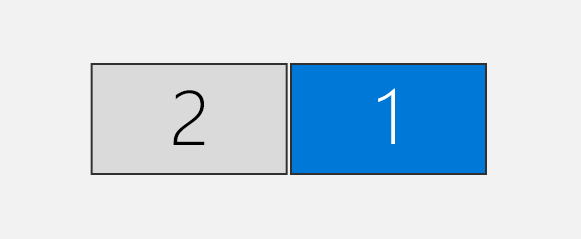
There are two monitors on my desk, which cannot select the secondary monitor area on my left when intercepting the area. It is recommended to test this situation on your computer.
The reason I found this problem was that I wanted the ScreenToGif to record on the left side of the monitor, so that it would not affect my right side of the monitor while doing other work. But I found I couldn't set up the recording area on the left monitor.
I'm not very good at English. If I don't understand something, I'm willing to cooperate with you to know more details.
My display Settings are like this:
System version:
Windows 10 1803
ScreenToGif 2.8.1
@NickeManarin commented on GitHub (Oct 28, 2018):
You are using a very old version of this software. Please update to the latest one (v2.14.1)
@richex-cn commented on GitHub (Oct 29, 2018):
I just tried it with the latest version. There is no problem. Thank you very much!