[GH-ISSUE #327] v2 Encoder Green Screen on Twitter #273

Closed
opened 2026-02-26 09:30:48 +03:00 by kerem · 12 comments
Owner

Originally created by @spottedmahn on GitHub (May 25, 2018).
Original GitHub issue: https://github.com/NickeManarin/ScreenToGif/issues/327

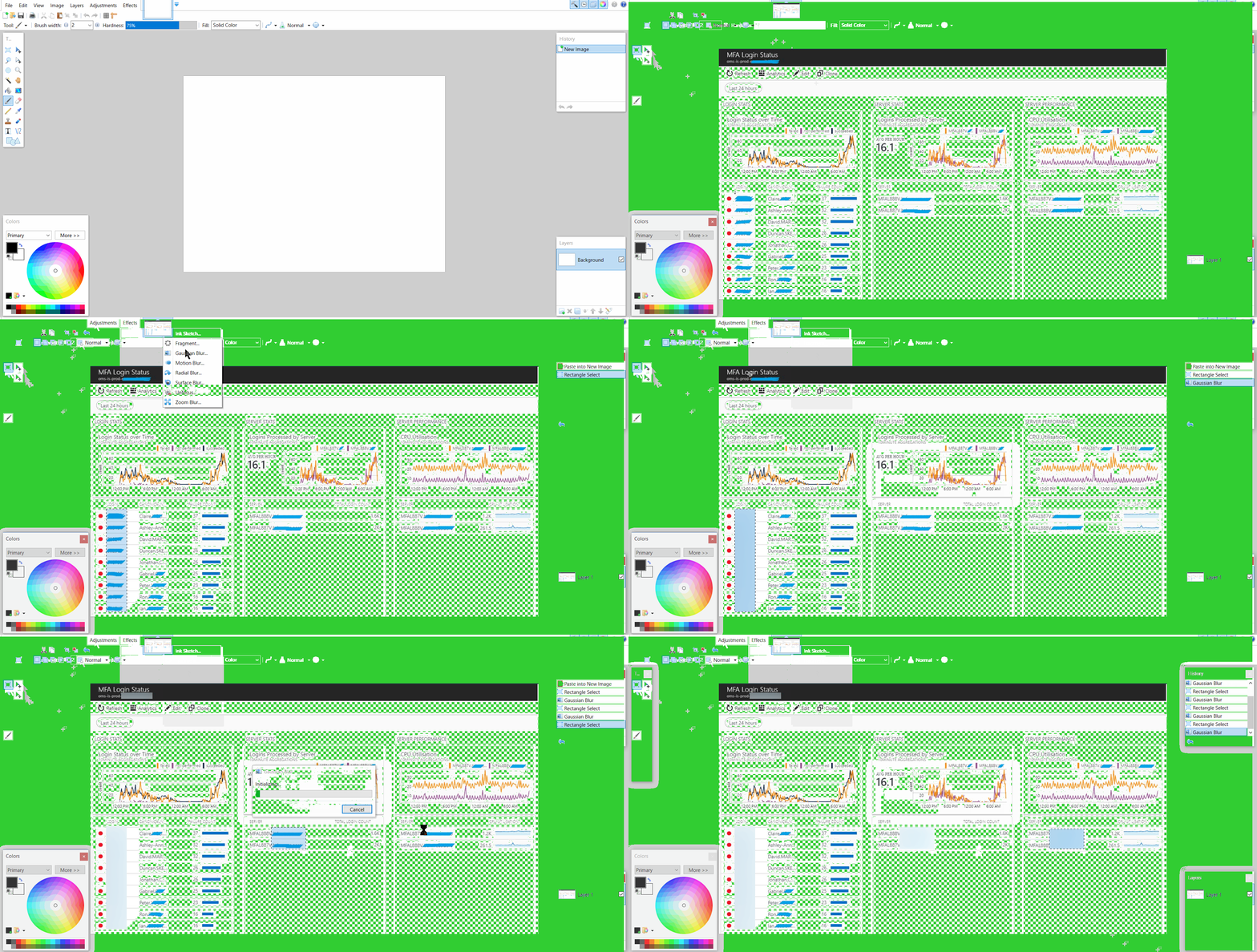
v2 Encoding
gaussin blur v2 encoder

image


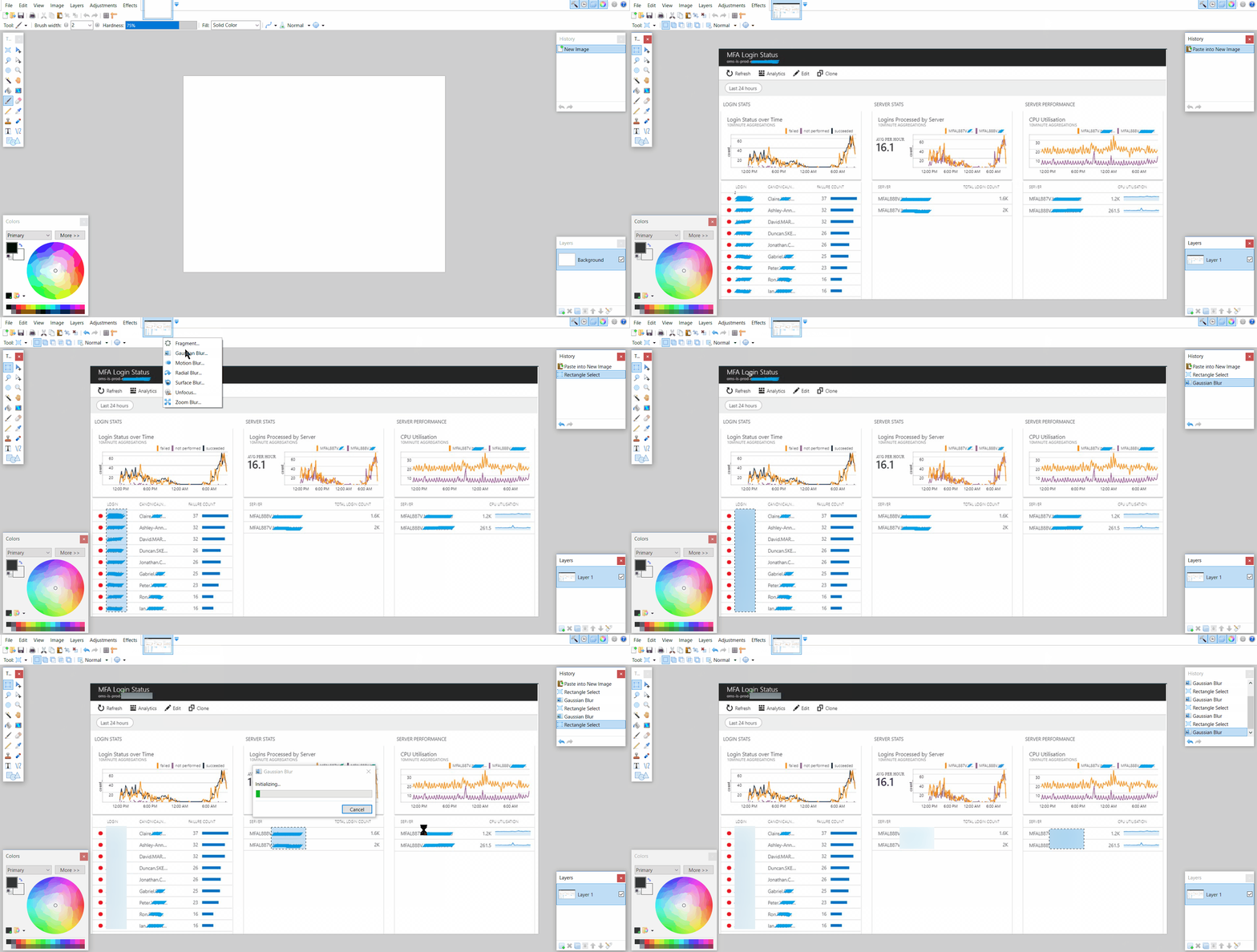
v1 Encoding
gaussin blur


Is that a browser problem or an encoding problem?

Originally created by @spottedmahn on GitHub (May 25, 2018). Original GitHub issue: https://github.com/NickeManarin/ScreenToGif/issues/327 **v2 Encoding** ![gaussin blur v2 encoder](https://user-images.githubusercontent.com/14079228/40549809-723cacc2-6006-11e8-89b5-073e8f6f388b.gif) ![image](https://user-images.githubusercontent.com/14079228/40549813-750578d0-6006-11e8-8774-8ec13531b995.png) --- **v1 Encoding** ![gaussin blur](https://user-images.githubusercontent.com/14079228/40549851-8a34cc88-6006-11e8-9f60-e1ad1b223f4c.gif) --- Is that a browser problem or an encoding problem?
kerem closed this issue 2026-02-26 09:30:49 +03:00
Author
Owner

@NickeManarin commented on GitHub (May 26, 2018):

Encoding. The V2 is guessing the wrong color when picking the color that will be treated as transparent. This happens when that color is present in a bunch of pixels on the source frame (It's probably the color whell at the bottom left corner).

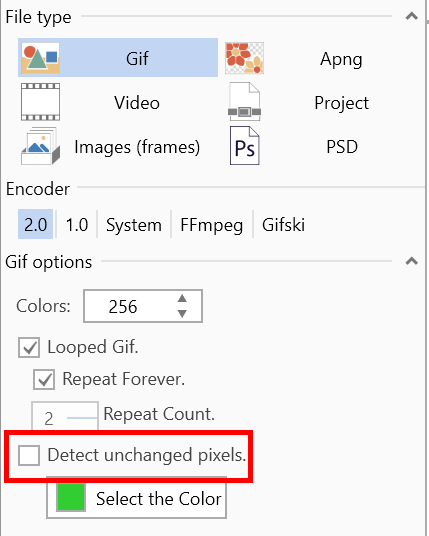
Here's where you can change that color to something like magenta:

Where to change

<!-- gh-comment-id:392222214 --> @NickeManarin commented on GitHub (May 26, 2018): Encoding. The V2 is guessing the wrong color when picking the color that will be treated as transparent. This happens when that color is present in a bunch of pixels on the source frame (It's probably the color whell at the bottom left corner). Here's where you can change that color to something like magenta: ![Where to change](https://user-images.githubusercontent.com/14798947/40570828-4cf68302-6065-11e8-8c0f-3bca40602eb2.png)
Author
Owner

@spottedmahn commented on GitHub (May 26, 2018):

I will try that and report back, thanks 🙏!

<!-- gh-comment-id:392223836 --> @spottedmahn commented on GitHub (May 26, 2018): I will try that and report back, thanks 🙏!
Author
Owner

@spottedmahn commented on GitHub (May 26, 2018):

Still no luck...

gaussin blur v2 encoder - magenta test

image

<!-- gh-comment-id:392287204 --> @spottedmahn commented on GitHub (May 26, 2018): Still no luck... ![gaussin blur v2 encoder - magenta test](https://user-images.githubusercontent.com/14079228/40580045-563b6dac-6104-11e8-903e-792bc039bc42.gif) ![image](https://user-images.githubusercontent.com/14079228/40580047-607b9b52-6104-11e8-8e8f-61fbadf52e36.png)
Author
Owner

@NickeManarin commented on GitHub (May 26, 2018):

Oh. :/
Can you share the project with me?

<!-- gh-comment-id:392287705 --> @NickeManarin commented on GitHub (May 26, 2018): Oh. :/ Can you share the project with me?
Author
Owner

@spottedmahn commented on GitHub (May 26, 2018):

Sure 😊

Gaussin Blur v2 Encoder - magenta test.stg

<!-- gh-comment-id:392287891 --> @spottedmahn commented on GitHub (May 26, 2018): Sure 😊 [Gaussin Blur v2 Encoder - magenta test.stg](https://1drv.ms/u/s!AmsBn7YVdmXPhfUkXBqQnJBrmHZN8Q)
Author
Owner

@NickeManarin commented on GitHub (May 27, 2018):

I was analyzing the recording. There's something strange happening.
Frame # 349 has a different dpi than frame 350.

I think that it's caused by the "Show mouse clicks" option that was turned on. I'll fix this issue.

Anyway, I was going to propose to hide the color wheel with some other color, like black or white. But then I found out the other bug above.

<!-- gh-comment-id:392381287 --> @NickeManarin commented on GitHub (May 27, 2018): I was analyzing the recording. There's something strange happening. Frame # 349 has a different dpi than frame 350. I think that it's caused by the "Show mouse clicks" option that was turned on. I'll fix this issue. Anyway, I was going to propose to hide the color wheel with some other color, like black or white. But then I found out the other bug above.
Author
Owner

@spottedmahn commented on GitHub (May 28, 2018):

I think that it's caused by the "Show mouse clicks" option that was turned on

Didn't know about that! Sounds like a cool 😎 feature!

Thanks for debugging it! 🥇

<!-- gh-comment-id:392542874 --> @spottedmahn commented on GitHub (May 28, 2018): >I think that it's caused by the "Show mouse clicks" option that was turned on Didn't know about that! Sounds like a cool 😎 feature! Thanks for debugging it! 🥇
Author
Owner

@spottedmahn commented on GitHub (May 28, 2018):

BTW, the DPI change must have something to do w/ my setup.

I have 3 monitors. 2 are ~22" 1080p. The other one is my 15" laptop monitor.

I was probably trying to record the full screen. Maybe from monitor 3:

image

The stop icon in ScreenToGif was probably in monitor 1.

<!-- gh-comment-id:392545844 --> @spottedmahn commented on GitHub (May 28, 2018): BTW, the DPI change must have something to do w/ my setup. I have 3 monitors. 2 are ~22" 1080p. The other one is my 15" laptop monitor. I was probably trying to record the full screen. Maybe from monitor 3: ![image](https://user-images.githubusercontent.com/14079228/40619735-3b5954de-6264-11e8-9cc3-81ebca5eb11a.png) The stop icon in ScreenToGif was probably in monitor 1.
Author
Owner

@spottedmahn commented on GitHub (Aug 16, 2018):

Hi @NickeManarin - FYI, I'm still seeing this problem w/ v2 encoder 😢

How can I help get this fixed? Thanks!

<!-- gh-comment-id:413574611 --> @spottedmahn commented on GitHub (Aug 16, 2018): Hi @NickeManarin - FYI, I'm still seeing this problem w/ v2 encoder 😢 How can I help get this fixed? Thanks!
Author
Owner

@ParticleCore commented on GitHub (Nov 15, 2019):

To get around this problem use a dummy color that is not present in the original video, otherwise the engine will get confused and mix the dummy color and the same color from the video which leads to the corrupted result.

If you cannot by any means use any color, for example the original post contains a color wheel, disable the use of the dummy color all together, but this will result in a file with a bigger size.

<!-- gh-comment-id:554416356 --> @ParticleCore commented on GitHub (Nov 15, 2019): To get around this problem use a dummy color that is not present in the original video, otherwise the engine will get confused and mix the dummy color and the same color from the video which leads to the corrupted result. If you cannot by any means use any color, for example the original post contains a color wheel, disable the use of the dummy color all together, but this will result in a file with a bigger size.
Author
Owner

@NickeManarin commented on GitHub (Nov 15, 2019):

@spottedmahn Oh, I totally forgot about this issue. I'm sorry, I can't keep up.

As explained by @ParticleCore, it's the same idea as before, try hiding any color that is marked as the chroma key.

<!-- gh-comment-id:554448986 --> @NickeManarin commented on GitHub (Nov 15, 2019): @spottedmahn Oh, I totally forgot about this issue. I'm sorry, I can't keep up. As explained by @ParticleCore, it's the same idea as before, try hiding any color that is marked as the chroma key.
Author
Owner

@spottedmahn commented on GitHub (Nov 18, 2019):

If you cannot by any means use any color, for example the original post contains a color wheel, disable the use of the dummy color altogether, but this will result in a file with a bigger size.

I see, thanks @ParticleCore 👍

for reference:
image

<!-- gh-comment-id:555098792 --> @spottedmahn commented on GitHub (Nov 18, 2019): >If you cannot by any means use any color, for example the original post contains a color wheel, disable the use of the dummy color altogether, but this will result in a file with a bigger size. I see, thanks @ParticleCore 👍 **for reference:** ![image](https://user-images.githubusercontent.com/14079228/69068002-09d65b00-09f2-11ea-8731-c70b0a6d1f20.png)
Sign in to join this conversation.
No milestone
No project
No assignees
1 participant
Notifications
Due date
The due date is invalid or out of range. Please use the format "yyyy-mm-dd".

No due date set.

Dependencies

No dependencies set.

Reference
starred/ScreenToGif#273
No description provided.