mirror of
https://github.com/NickeManarin/ScreenToGif.git
synced 2026-04-26 15:46:00 +03:00
[GH-ISSUE #323] Gifski encoding is failing when using non-latin characters #268
Labels
No labels
copy cats
duplicated
future feature
pull-request
⬜ Accepted
⬜ Completed
⬜ Help Wanted 💪
⬜ In Progress
⬜ Missing Details
⬜ Pending
⬜ Waiting For Answer ⏳
🆕 feature preview
🔷 Bug 🐛
🔷 Out Of Scope
🔷 Out Of Scope
🔷 Question
🔷Enhancement
🔷Enhancement
🔷Invalid / External
🔷Knowledge Base
🔷Won't Fix
🕑 High
🕑 High
🕑 High
🕕 Medium
🕙 Low
🕛 Critical
No milestone
No project
No assignees
1 participant

Notifications
Due date
No due date set.
Dependencies
No dependencies set.
Reference
starred/ScreenToGif#268
Loading…
Add table
Add a link
Reference in a new issue
No description provided.
Delete branch "%!s()"
Deleting a branch is permanent. Although the deleted branch may continue to exist for a short time before it actually gets removed, it CANNOT be undone in most cases. Continue?
Originally created by @u2shana on GitHub (May 18, 2018).
Original GitHub issue: https://github.com/NickeManarin/ScreenToGif/issues/323
how can i use gifski
@u2shana commented on GitHub (May 18, 2018):
WIN7 it work
@NickeManarin commented on GitHub (May 19, 2018):
Did you download the Gifski dll via the Options > Extras > "Download Gifski" button?
@u2shana commented on GitHub (May 19, 2018):
Yes,but it didn't work in win10
@NickeManarin commented on GitHub (May 19, 2018):
Can you show me a screenshot of the error?
@u2shana commented on GitHub (May 19, 2018):
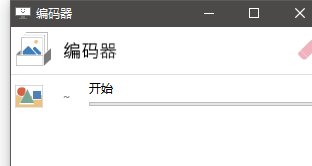
No error info,just stuck when encoding,and then the program disappear
@NickeManarin commented on GitHub (May 19, 2018):
Hmm, without an error message this will be hard to be solved.
From what I can see, it's stuck on the first step of the encoding, like something is blocking from even starting.
Please, check if the Dll file is not being blocked by some anti-virus. Also, check if it's not marked as "Downloaded from the internet" (If you right click on the DLL, open Properties, check if there's a button that says something like "Unblock").
@u2shana commented on GitHub (May 19, 2018):
Emmm,I used the same program and same gifski.dll in win10 1605.It encoding successed.
I'm sure the dll is not be block in my PC.
@u2shana commented on GitHub (May 19, 2018):
Oh,I change the cache folder in other path which don't contain chinese(because the default path contain a chinese user name).Then,the Gifgski work.
@NickeManarin commented on GitHub (May 19, 2018):
Oh, that explains it. Thanks :)
@Kristinita commented on GitHub (Jan 30, 2019):
1. Summary
Gifski doesn't work, if in path Non-ASCII symbols, not only Chinese.
See also.
2. Data
3. Steps to reproduce
I open project in ScreenToGIF →
Save as→Gif→Gifski.4. Expected behavior
If folder name:
D:\ScreenToGIFor
D:\Screen To GIF(use breaking spaces)GIF successfully created:
5. Non-expected behavior
Else folder for saving name:
D:\СкринТуГиф(all letters — Cyrillic)ScreenToGIF crash. No logs.
6. Environment
Extras→Options→Extras→GifskiThanks.
@clickwithclark commented on GitHub (May 6, 2019):
Saving gif with Gifski suddenly not working for me, here is the log of the error.
@NickeManarin commented on GitHub (May 6, 2019):
@clickwithclark Can you try downloading Gifski again? Using the download button from Options > Extras.
@clickwithclark commented on GitHub (May 6, 2019):
just did, just getting the error again.
@NickeManarin commented on GitHub (Nov 18, 2019):
@u2shana @Kristinita @clickwithclark
There's a new test version which should solve this bug.
Download here: https://github.com/NickeManarin/ScreenToGif/issues/551
Can you people test it?
In order to test it, you need to delete the old Gifski and download again via Options > Extras, while using the test version of ScreenToGif.
@JsBergbau commented on GitHub (Sep 19, 2021):
Had just a similiar issue. You have to download gifski in the settings dialog. Downloading it from Website and pointing to that path fails when trying to create the gif with this error: