[GH-ISSUE #319] Window appears offscreen #264

Closed
opened 2026-02-26 09:30:46 +03:00 by kerem · 13 comments
Owner

Originally created by @jameskraus on GitHub (May 2, 2018).
Original GitHub issue: https://github.com/NickeManarin/ScreenToGif/issues/319

If you use ScreenToGif on a second monitor, turn it off, disconnect the monitor and restart ScreenToGif then it will appear off screen. Unlike some offscreen programs, you can't use Alt+Space to get control of the Window. I can't find a way to get it to appear on screen again.

Originally created by @jameskraus on GitHub (May 2, 2018). Original GitHub issue: https://github.com/NickeManarin/ScreenToGif/issues/319 If you use ScreenToGif on a second monitor, turn it off, disconnect the monitor and restart ScreenToGif then it will appear off screen. Unlike some offscreen programs, you can't use Alt+Space to get control of the Window. I can't find a way to get it to appear on screen again.
kerem closed this issue 2026-02-26 09:30:46 +03:00
Author
Owner

@NickeManarin commented on GitHub (May 3, 2018):

Do you know which window is outside the bounds? (Startup window, recorders or the editor)

Also, is worth to check out if the display is truly disconnected. (Sometimes, after unplugging the monitor from a PC, Windows keeps the secondary screen active)

<!-- gh-comment-id:386179146 --> @NickeManarin commented on GitHub (May 3, 2018): Do you know which window is outside the bounds? (Startup window, recorders or the editor) Also, is worth to check out if the display is truly disconnected. (Sometimes, after unplugging the monitor from a PC, Windows keeps the secondary screen active)
Author
Owner

@jameskraus commented on GitHub (May 3, 2018):

It's the recorder window. No idea if it was "really" disconnected as far as
windows was concerned. Do you know what code handles opening/positioning
the Window on startup? I'd be willing to try for a PR if I knew where to
start.

On Wed, May 2, 2018, 10:50 PM Nicke Manarin notifications@github.com
wrote:

Do you know which window is outside the bounds? (Startup window, recorders
or the editor)

Also, is worthy to check if the display is truly disconnected. (Sometimes,
after unplugging the monitor from a PC, Windows keeps the secondary screen
active)


You are receiving this because you authored the thread.
Reply to this email directly, view it on GitHub
https://github.com/NickeManarin/ScreenToGif/issues/319#issuecomment-386179146,
or mute the thread
https://github.com/notifications/unsubscribe-auth/AAZVUZT0GF34Ko2S1eR_dUiBVKONz26aks5tunB3gaJpZM4TvWiX
.

<!-- gh-comment-id:386181238 --> @jameskraus commented on GitHub (May 3, 2018): It's the recorder window. No idea if it was "really" disconnected as far as windows was concerned. Do you know what code handles opening/positioning the Window on startup? I'd be willing to try for a PR if I knew where to start. On Wed, May 2, 2018, 10:50 PM Nicke Manarin <notifications@github.com> wrote: > Do you know which window is outside the bounds? (Startup window, recorders > or the editor) > > Also, is worthy to check if the display is truly disconnected. (Sometimes, > after unplugging the monitor from a PC, Windows keeps the secondary screen > active) > > — > You are receiving this because you authored the thread. > Reply to this email directly, view it on GitHub > <https://github.com/NickeManarin/ScreenToGif/issues/319#issuecomment-386179146>, > or mute the thread > <https://github.com/notifications/unsubscribe-auth/AAZVUZT0GF34Ko2S1eR_dUiBVKONz26aks5tunB3gaJpZM4TvWiX> > . >
Author
Owner

@NickeManarin commented on GitHub (May 3, 2018):

Assuming that you are not using the new recorder, look for UpdatePositioning() at line 1023.

Now that I noticed, I'm not happy with that code. I implemented a new method for positioning the window. It's being used on the Startup window.

<!-- gh-comment-id:386182259 --> @NickeManarin commented on GitHub (May 3, 2018): Assuming that you are not using the new recorder, look for [UpdatePositioning() at line 1023](https://github.com/NickeManarin/ScreenToGif/blob/9609a9470e40ba72083a7a361a7f776b2e067200/ScreenToGif/Windows/Recorder.xaml.cs#L1023). Now that I noticed, I'm not happy with that code. I implemented a new method for positioning the window. [It's being used on the Startup window](https://github.com/NickeManarin/ScreenToGif/blob/9609a9470e40ba72083a7a361a7f776b2e067200/ScreenToGif/Windows/Other/Startup.xaml.cs#L134).
Author
Owner

@NickeManarin commented on GitHub (Jun 25, 2018):

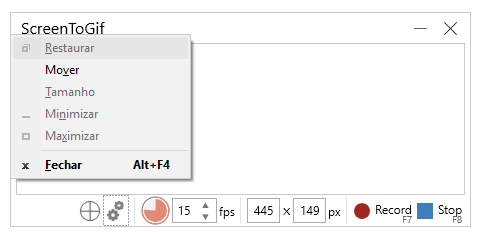
@jameskraus Which recorder are referring to? The new one or the old one (the one with a small interface or the one with a punctured rectangle)?

Because with the old one, you can press Alt + Space to control the window. See it (my OS has other lanaguage than English):
window

<!-- gh-comment-id:399810806 --> @NickeManarin commented on GitHub (Jun 25, 2018): @jameskraus Which recorder are referring to? The new one or the old one (the one with a small interface or the one with a punctured rectangle)? Because with the old one, you can press Alt + Space to control the window. See it (my OS has other lanaguage than English): ![window](https://user-images.githubusercontent.com/14798947/41826950-51ab84b4-7803-11e8-8ea8-f5974af2dbab.png)
Author
Owner

@jameskraus commented on GitHub (Jun 25, 2018):

@NickeManarin it's the old one. That might be a good enough solution to this problem. I haven't run into the problem again, so I haven't prioritized looking into it more.

I just read my original post in this issue and noticed I already addressed that point:

you can't use Alt+Space to get control of the Window

Well, it looks like that probably doesn't work. That said, I still haven't run into the bug again, so I'm not sure this is an issue worth prioritizing.

<!-- gh-comment-id:399956402 --> @jameskraus commented on GitHub (Jun 25, 2018): ~~@NickeManarin it's the old one. That might be a good enough solution to this problem. I haven't run into the problem again, so I haven't prioritized looking into it more.~~ I just read my original post in this issue and noticed I already addressed that point: > you can't use Alt+Space to get control of the Window Well, it looks like that probably doesn't work. That said, I still haven't run into the bug again, so I'm not sure this is an issue worth prioritizing.
Author
Owner

@NickeManarin commented on GitHub (Jun 27, 2018):

Oh, that's strange. I'm able to press Alt + Space select "Move" and use my arrow keys to move the window.

Anyway, with the next version of the app, the new code that positions the window will be available.

<!-- gh-comment-id:400500406 --> @NickeManarin commented on GitHub (Jun 27, 2018): Oh, that's strange. I'm able to press Alt + Space select "Move" and use my arrow keys to move the window. Anyway, with the next version of the app, the new code that positions the window will be available.
Author
Owner

@dimitar-a-dimitrov commented on GitHub (Jun 27, 2018):

Hi there! There is a much shorter way to ensure that the recorder window is visible.

<!-- gh-comment-id:400763450 --> @dimitar-a-dimitrov commented on GitHub (Jun 27, 2018): Hi there! There is a much shorter way to ensure that the recorder window is visible.
Author
Owner

@kayvanbree commented on GitHub (Jul 9, 2018):

I'm going to close #354 (duplicate). Can we get a fix for this? I can't record a screen because I can't find my recorder.

<!-- gh-comment-id:403490730 --> @kayvanbree commented on GitHub (Jul 9, 2018): I'm going to close #354 (duplicate). Can we get a fix for this? I can't record a screen because I can't find my recorder.
Author
Owner

@NickeManarin commented on GitHub (Jul 11, 2018):

@kayvanbree Yes. While the fix for this issue is not live yet, you could try deleting the settings file that is usually located inside %APPDATA%/ScreenToGif

<!-- gh-comment-id:404014815 --> @NickeManarin commented on GitHub (Jul 11, 2018): @kayvanbree Yes. While the fix for this issue is not live yet, you could try deleting the settings file that is usually located inside %APPDATA%/ScreenToGif
Author
Owner

@kayvanbree commented on GitHub (Jul 11, 2018):

@NickeManarin Still can't record fullscreen on my smaller screen (4k and 1080p monitor), but I can use the new UI again. Thanks!

<!-- gh-comment-id:404122776 --> @kayvanbree commented on GitHub (Jul 11, 2018): @NickeManarin Still can't record fullscreen on my smaller screen (4k and 1080p monitor), but I can use the new UI again. Thanks!
Author
Owner

@NickeManarin commented on GitHub (Aug 24, 2018):

@jameskraus @kayvanbree With the current version of the app, there`s some changes in the way that both of the recorders work.

Still, if a window keeps positioned outside the screen, you can right click the system tray icon of the app and open the troubleshooter to reset the its position.

<!-- gh-comment-id:415880907 --> @NickeManarin commented on GitHub (Aug 24, 2018): @jameskraus @kayvanbree With the current version of the app, there`s some changes in the way that both of the recorders work. Still, if a window keeps positioned outside the screen, you can right click the system tray icon of the app and open the troubleshooter to reset the its position.
Author
Owner

@kayvanbree commented on GitHub (Jan 18, 2019):

@NickeManarin, this issue can be closed right?

<!-- gh-comment-id:455496720 --> @kayvanbree commented on GitHub (Jan 18, 2019): @NickeManarin, this issue can be closed right?
Author
Owner

@jameskraus commented on GitHub (Jan 18, 2019):

Closing issue from @NickeManarin's response

<!-- gh-comment-id:455632193 --> @jameskraus commented on GitHub (Jan 18, 2019): Closing issue from @NickeManarin's response
Sign in to join this conversation.
No milestone
No project
No assignees
1 participant
Notifications
Due date
The due date is invalid or out of range. Please use the format "yyyy-mm-dd".

No due date set.

Dependencies

No dependencies set.

Reference
starred/ScreenToGif#264
No description provided.