mirror of
https://github.com/NickeManarin/ScreenToGif.git
synced 2026-04-25 07:05:54 +03:00
[GH-ISSUE #465] Cannot capture keystrokes on Visual Studio #1755
Labels
No labels
copy cats
duplicated
future feature
pull-request
⬜ Accepted
⬜ Completed
⬜ Help Wanted 💪
⬜ In Progress
⬜ Missing Details
⬜ Pending
⬜ Waiting For Answer ⏳
🆕 feature preview
🔷 Bug 🐛
🔷 Out Of Scope
🔷 Out Of Scope
🔷 Question
🔷Enhancement
🔷Enhancement
🔷Invalid / External
🔷Knowledge Base
🔷Won't Fix
🕑 High
🕑 High
🕑 High
🕕 Medium
🕙 Low
🕛 Critical
No milestone
No project
No assignees
1 participant

Notifications
Due date
No due date set.
Dependencies
No dependencies set.
Reference
starred/ScreenToGif#1755
Loading…
Add table
Add a link
Reference in a new issue
No description provided.
Delete branch "%!s()"
Deleting a branch is permanent. Although the deleted branch may continue to exist for a short time before it actually gets removed, it CANNOT be undone in most cases. Continue?
Originally created by @MithrilMan on GitHub (Mar 15, 2019).
Original GitHub issue: https://github.com/NickeManarin/ScreenToGif/issues/465
Hey nice project dude!
I'm using latest version 2.16,I tried this utility to capture a screen to show a colleague how to "find by reference", and I recorded me in a small area while I was pressing SHIFT+F12 in Visual Studio, then I went to the Image and clicked on Image, then KeyStroke and Apply and the program complained it didn't had keystrore
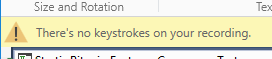
I tried even typing some test but no luck... then I tried to capture keys on notepad and it was working... so there must be something wrong with the capture utility that doesn't capture keys when using some program, any clue?
@NickeManarin commented on GitHub (Mar 15, 2019):
I was able to capture my Shift+F12 key strokes (with the older and with the newer recorder).
Maybe something else is blocking the capture, like a VS extension or the fact that VS was running with admin rights (try running StG with admin rights too, if that's the problem).
@MithrilMan commented on GitHub (Mar 15, 2019):
ah-ha!
that was the problem, thanks!
Is this by design or could be fixed?
anyway good job!
@NickeManarin commented on GitHub (Jul 16, 2019):
It's by design by Microsoft. I can't access a key or mouse events set to a window opened with admin rights if ScreenToGif itself is not launched too as admin.
So, the only way to fix it is to launch my app as admin too.