mirror of
https://github.com/NickeManarin/ScreenToGif.git
synced 2026-04-25 07:05:54 +03:00
[GH-ISSUE #392] More automatic tasks #1695
Labels
No labels
copy cats
duplicated
future feature
pull-request
⬜ Accepted
⬜ Completed
⬜ Help Wanted 💪
⬜ In Progress
⬜ Missing Details
⬜ Pending
⬜ Waiting For Answer ⏳
🆕 feature preview
🔷 Bug 🐛
🔷 Out Of Scope
🔷 Out Of Scope
🔷 Question
🔷Enhancement
🔷Enhancement
🔷Invalid / External
🔷Knowledge Base
🔷Won't Fix
🕑 High
🕑 High
🕑 High
🕕 Medium
🕙 Low
🕛 Critical
No milestone
No project
No assignees
1 participant

Notifications
Due date
No due date set.
Dependencies
No dependencies set.
Reference
starred/ScreenToGif#1695
Loading…
Add table
Add a link
Reference in a new issue
No description provided.
Delete branch "%!s()"
Deleting a branch is permanent. Although the deleted branch may continue to exist for a short time before it actually gets removed, it CANNOT be undone in most cases. Continue?
Originally created by @Xyolyp on GitHub (Oct 23, 2018).
Original GitHub issue: https://github.com/NickeManarin/ScreenToGif/issues/392
I would like to have an automatic task that inserts a progress bar in every GIF I record.
Additionaly I would like some sort of fully automated export that performs the automated tasks set up and then exports to a specific folder/file and overwrites if need (maybe as an option if it should always overwrite)
@zalmanlew commented on GitHub (Oct 23, 2018):
It'd be nice if you could "record" automated tasks (similar to Adobe Illustrator and Photoshop Actions)
@vatterspun commented on GitHub (Nov 21, 2018):
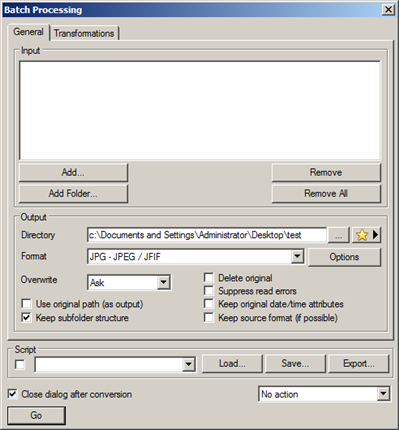
Some of the batch items requested might be managed by a separate screen/program/function that does batch operations to GIF files, similar to XNView program. This might be something people who don't need the full ScreenToGif editor might want to use.
XnView example screen 1:
XnView example screen 2:
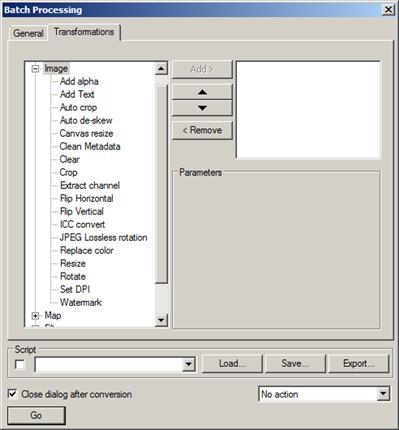
Some possible items could include:
These would stack so for example you could add a progress bar to a file that you've cut down to 32 colors and save to MP4.
Just a suggestion.
@andrew-davis commented on GitHub (Feb 15, 2019):
👍 Would be great if it was possible to create templates for the below list of things. Then they could be enabled, and applied in the automatic task section.
I use these in an identical manor frequently. Would be a great feature to be able to automate. Thanks.
@NickeManarin commented on GitHub (Sep 27, 2019):
I just added the Progress as an available task.
It will be available with 2.19, next week.
Scale delay is already available, @andrew-davis (as Delay update > Scale).
Title frame I'm not sure how could I implement.
Maybe let the user select the index based on a percentage?
Like insert title frame at 0% in order to insert at frame 0?
100% to insert at the latest position?
@NickeManarin commented on GitHub (Sep 27, 2019):
Resize could be done like this:
Fixed mode: Always resizes to a given size.
Maximum size mode: Sizes down all frames to match the maximum size, ignores smaller frames.
Minimum size mode: Sizes up all frames to match the minimum size, ignores bigger frames.
@NickeManarin commented on GitHub (Sep 27, 2019):
Watermark is other one that is not that simple to implement.
The scale could be based on the frame size (or maybe just the watermark size, or both).
The position could be set via alignments (left, center, right, top, middle, bottom) or via X/Y percentage?
X50% would center the watermark in the X axis.