mirror of
https://github.com/NickeManarin/ScreenToGif.git
synced 2026-04-26 07:35:54 +03:00
[GH-ISSUE #309] Capturing keystrokes #1621
Labels
No labels
copy cats
duplicated
future feature
pull-request
⬜ Accepted
⬜ Completed
⬜ Help Wanted 💪
⬜ In Progress
⬜ Missing Details
⬜ Pending
⬜ Waiting For Answer ⏳
🆕 feature preview
🔷 Bug 🐛
🔷 Out Of Scope
🔷 Out Of Scope
🔷 Question
🔷Enhancement
🔷Enhancement
🔷Invalid / External
🔷Knowledge Base
🔷Won't Fix
🕑 High
🕑 High
🕑 High
🕕 Medium
🕙 Low
🕛 Critical
No milestone
No project
No assignees
1 participant

Notifications
Due date
No due date set.
Dependencies
No dependencies set.
Reference
starred/ScreenToGif#1621
Loading…
Add table
Add a link
Reference in a new issue
No description provided.
Delete branch "%!s()"
Deleting a branch is permanent. Although the deleted branch may continue to exist for a short time before it actually gets removed, it CANNOT be undone in most cases. Continue?
Originally created by @user3323 on GitHub (Apr 3, 2018).
Original GitHub issue: https://github.com/NickeManarin/ScreenToGif/issues/309
Originally assigned to: @NickeManarin on GitHub.
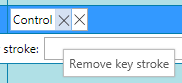
Two "remove" buttons:
1st remove button:
2nd remove button:
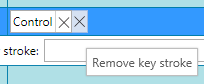
"Remove key stroke" or "Remove key stroke"? Hmmm... maybe "Remove key stroke"!
"Ctrl+C" issue.... what is that?
I didn't press "Ctrl+C" at all.
It is totally confusing text.
So, why is it displaying "Ctrl+C" for the all way long for my GIF ?
And how to remove it?
If "Ctrl+C" is just shown for testing font size etc., it is not good. I pressed, for example "Ctrl + Alt + Down"..... and "Ctrl + C" is much SHORTER than "Ctrl + Alt + Down" .... so when I'm testing "Ctrl+C" - width and height of my testing "Ctrl+C" - is OK, but then, when "Control + Alt + Down" appears - it is absolutely different!
Ctrl = Control ?
What is the need to give a fullname "Control" for Ctrl ?
It is absolutely redundant.
Ctrl should be Ctrl.
PS: let users replace "Down" with ↓ , "Up" with ↑ , etc....
Order of the keystrokes issue.
When I press "Ctrl" then "Alt" then "Down" --> I expect to see them in this exact order... but instead I get "Alt" then "Control" then "Down".
In some cases it matters.
Undo / Redo
After saving the layer of keystrokes onto gif, there is no way back!
How can I undo this?
And then redo it?
You know, "Ctrl+Z", "Ctrl+Y" thing...
@laiqun commented on GitHub (Apr 7, 2018):
the first is change keystroke ,the next is true of 'remove keystrokes',just display issue
@NickeManarin commented on GitHub (May 5, 2018):
I fixed it. Only one button is now being displayed.
It's just an example to see how it will look like.
I agree with this. I want to implement this kind of personalization, letting users configure how the keys are displayed.
This one will be difficult to implement. I only get a list of key modifiers (Control, Alt, Shift, etc) and the main key, but not when each one was pressed.
I could analize previous frames, looking for each pressed keys, but not sure if it's worth the effort.
Uhh, you can simply press Ctrl + Z to undo. It even let you undo your changes to the keystrokes (if you erased or added any other keys).