mirror of
https://github.com/NickeManarin/ScreenToGif.git
synced 2026-04-25 07:05:54 +03:00
[GH-ISSUE #246] 软件不兼容闪退 #1571
Labels
No labels
copy cats
duplicated
future feature
pull-request
⬜ Accepted
⬜ Completed
⬜ Help Wanted 💪
⬜ In Progress
⬜ Missing Details
⬜ Pending
⬜ Waiting For Answer ⏳
🆕 feature preview
🔷 Bug 🐛
🔷 Out Of Scope
🔷 Out Of Scope
🔷 Question
🔷Enhancement
🔷Enhancement
🔷Invalid / External
🔷Knowledge Base
🔷Won't Fix
🕑 High
🕑 High
🕑 High
🕕 Medium
🕙 Low
🕛 Critical
No milestone
No project
No assignees
1 participant

Notifications
Due date
No due date set.
Dependencies
No dependencies set.
Reference
starred/ScreenToGif#1571
Loading…
Add table
Add a link
Reference in a new issue
No description provided.
Delete branch "%!s()"
Deleting a branch is permanent. Although the deleted branch may continue to exist for a short time before it actually gets removed, it CANNOT be undone in most cases. Continue?
Originally created by @HChuitailang on GitHub (Jan 20, 2018).
Original GitHub issue: https://github.com/NickeManarin/ScreenToGif/issues/246
运行软件和win10 系统冲突,一直出现应用错误从而闪退 ,应该是不兼容导致的
@NickeManarin commented on GitHub (Jan 20, 2018):
Please, English only.
Translator gave me this: (still, I couldn't understand)
@laiqun commented on GitHub (Jan 22, 2018):
He say this software cant't run on win10
@HChuitailang commented on GitHub (Jan 22, 2018):
This software cant't run on win10 which is often wrong and is forced to close?.
@NickeManarin commented on GitHub (Jan 22, 2018):
Can you show us a screenshot of the error?
Since you have Windows 10, I assume it's not a problem with .Net Framework.
@hrxn commented on GitHub (Jan 22, 2018):
Works for me on Windows 10. ©®™
@HChuitailang commented on GitHub (Jan 22, 2018):
but MY software always be foced to close,it can't work
@NickeManarin commented on GitHub (Jan 22, 2018):
@HChuitailang I need more details.
Are you trying to use the Installer version of the ScreenToGif or the one that comes in a ZIP?
What kind of error happens? Does it close right after clicking to run? Do you see any message?
If you open the Event Viewer right after the app crash, open the Application category, do you see any entry related with ScreenToGif?
@HChuitailang commented on GitHub (Jan 23, 2018):
Thanks.
But Ihave tried to use both of them。That is the Installer version of the ScreenToGif or the one that comes in a ZIP.
Both are closed right after clicking to run, The information that I saw was like the screenshot which I sent for you .
When I opend the Event Viewer right after the app crash ,I haven’t seen any entry related with ScreenToGif ,but it‘s seems not incompatible with win 10.
I’m tride to installer net framework 4.6,but my computer-systerm have been installed in a higher version.
Then I have tried to research with Baidu ,but I can’t solve the errow.
This error occurred during the third time I used it suddenly。The first two times I have recorded the GIF picture in fact.
In fact I am a novice in computer technology,and my english is also very poor ,so I can not solve this problem.
发送自 Windows 10 版邮件应用
发件人: Nicke Manarin
发送时间: 2018年1月23日 6:21
收件人: NickeManarin/ScreenToGif
抄送: HChuitailang; Mention
主题: Re: [NickeManarin/ScreenToGif] 软件不兼容闪退 (#246)
@HChuitailang I need more details.
Are you trying to use the Installer version of the ScreenToGif or the one that comes in a ZIP?
What kind of error happens? Does it close right after clicking to run? Do you see any message?
If you open the Event Viewer right after the app crash, open the Application category, do you see any entry related with ScreenToGif?
—
You are receiving this because you were mentioned.
Reply to this email directly, view it on GitHub, or mute the thread.
@laiqun commented on GitHub (Jan 23, 2018):
@HChuitailang Can you upload a picture about that?
@HChuitailang commented on GitHub (Jan 23, 2018):
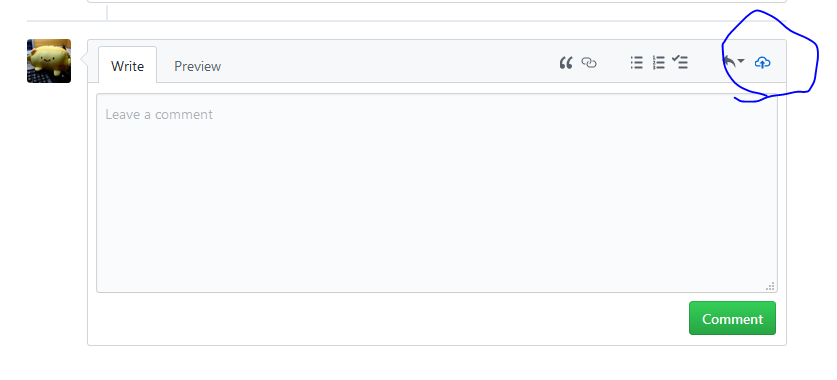
how to upload picture in Github?
@HChuitailang commented on GitHub (Jan 23, 2018):
@laiqun how to upload picture in Github?
@HChuitailang commented on GitHub (Jan 23, 2018):
The picture I hve sent the email to the author- NickeManarin/ScreenToGif
发送自 Windows 10 版邮件应用
发件人: LQ
发送时间: 2018年1月23日 10:47
收件人: NickeManarin/ScreenToGif
抄送: HChuitailang; Mention
主题: Re: [NickeManarin/ScreenToGif] 软件不兼容闪退 (#246)
@HChuitailang Can you upload a picture about that?
—
You are receiving this because you were mentioned.
Reply to this email directly, view it on GitHub, or mute the thread.
@HChuitailang commented on GitHub (Jan 23, 2018):
发送自 Windows 10 版邮件应用
发件人: LQ
发送时间: 2018年1月23日 10:47
收件人: NickeManarin/ScreenToGif
抄送: HChuitailang; Mention
主题: Re: [NickeManarin/ScreenToGif] 软件不兼容闪退 (#246)
@HChuitailang Can you upload a picture about that?
—
You are receiving this because you were mentioned.
Reply to this email directly, view it on GitHub, or mute the thread.
@HChuitailang commented on GitHub (Jan 23, 2018):
The picture i have sent email for the authors,and anther picture is the screenshot of all the software of my computer which i have installed before. I don't know if there is a problem of conflict.
@NickeManarin commented on GitHub (Jan 23, 2018):
I didn't receive your pictures/screenshots.
Did you send the image directly to nicke@outlook.com.br or did you replied to the email sent by Github?
@tw0517tw commented on GitHub (Jan 24, 2018):
@HChuitailang you can upload images here
@HChuitailang commented on GitHub (Jan 24, 2018):
@NickeManarin @laiqun @Hrxn @tw0517tw @hjoelr
My web site is not the same as yours.
@NickeManarin commented on GitHub (Jan 24, 2018):
@HChuitailang That's the Webcam recorder.
The crash happens right after opening that window? Or only after pressing to start the recording?
(If happens after opening the window, it's probably because something unexpected happened while loading the video devices)
If the Webcam recorder opens directly (and keeps crashing), but you don't want to open that window directly, here's how to fix it:
Open Windows Explorer > type
%APPDATA%\ScreenToGifon the address bar > press Enter to navigate > delete theSettings.Xamlfile.After that, you can open ScreenToGif normally and the Startup window will be the first one to be opened.
Usually, this kind of crash happens when the app tries to load a video device and fails to do so,
and it's usually a Logitech's webcam. Do you have a Logitech webcam?
Also, what's the name of two apps that I highlighted? (with a yellow marker)
