mirror of
https://github.com/NickeManarin/ScreenToGif.git
synced 2026-04-25 15:15:51 +03:00
[GH-ISSUE #48] Blur out areas of screen when editing? #1411
Labels
No labels
copy cats
duplicated
future feature
pull-request
⬜ Accepted
⬜ Completed
⬜ Help Wanted 💪
⬜ In Progress
⬜ Missing Details
⬜ Pending
⬜ Waiting For Answer ⏳
🆕 feature preview
🔷 Bug 🐛
🔷 Out Of Scope
🔷 Out Of Scope
🔷 Question
🔷Enhancement
🔷Enhancement
🔷Invalid / External
🔷Knowledge Base
🔷Won't Fix
🕑 High
🕑 High
🕑 High
🕕 Medium
🕙 Low
🕛 Critical
No milestone
No project
No assignees
1 participant

Notifications
Due date
No due date set.
Dependencies
No dependencies set.
Reference
starred/ScreenToGif#1411
Loading…
Add table
Add a link
Reference in a new issue
No description provided.
Delete branch "%!s()"
Deleting a branch is permanent. Although the deleted branch may continue to exist for a short time before it actually gets removed, it CANNOT be undone in most cases. Continue?
Originally created by @colinwurtz on GitHub (Dec 21, 2016).
Original GitHub issue: https://github.com/NickeManarin/ScreenToGif/issues/48
Originally assigned to: @NickeManarin on GitHub.
First of all, thanks for your work on this, it's great! Guessing this is an enhancement, but is there a way blur out certain regions of the screen in edit mode? Greenshot[0][1][2] has this ability and would be very useful in ScreenToGif.
Here's an example of what I mean:
By the way, when I tried to send feedback through the application it froze when I clicked send and I had kill it manually.
[0]https://github.com/greenshot/greenshot
[1]http://getgreenshot.org/help/#editor-obfuscate
[2]
github.com/greenshot/greenshot@6f30b68e57/Greenshot.Addon.Editor/Drawing/ObfuscateContainer.cs@NickeManarin commented on GitHub (Dec 22, 2016):
Thanks for the feedback :D
The only way to censor information could be with the FreeDrawing tool (you can select multiple frames to apply).
This feature is possible to implement, I'll add to my list.
Also, the Feedback tool takes a little bit to send because it relies in an e-mail service. Sometimes it does not even work because people try to access the e-mail and it gets blocked. Not sure why people do this. :/
@tilight commented on GitHub (Aug 8, 2017):
Push the blur function 👍
@spottedmahn commented on GitHub (Nov 1, 2017):
Hey @NickeManarin - where does feature site in the backlog? It sure would be handy.
Perhaps you can task it out and the community could help get this implemented?
@NickeManarin commented on GitHub (Nov 3, 2017):
Currently my priority is fixing the bugs that were reported by users during this week.
But afterwards I can start working on this feature.
I've started researching for some framework methods that could produce this result (but didn't find any), so I'm probably going to work with the same method that I developed for the old version of the app. It should be easy.
Edit: Typos.
@spottedmahn commented on GitHub (Nov 6, 2017):
@NickeManarin nice ⚡️ !
@NickeManarin commented on GitHub (Dec 2, 2017):
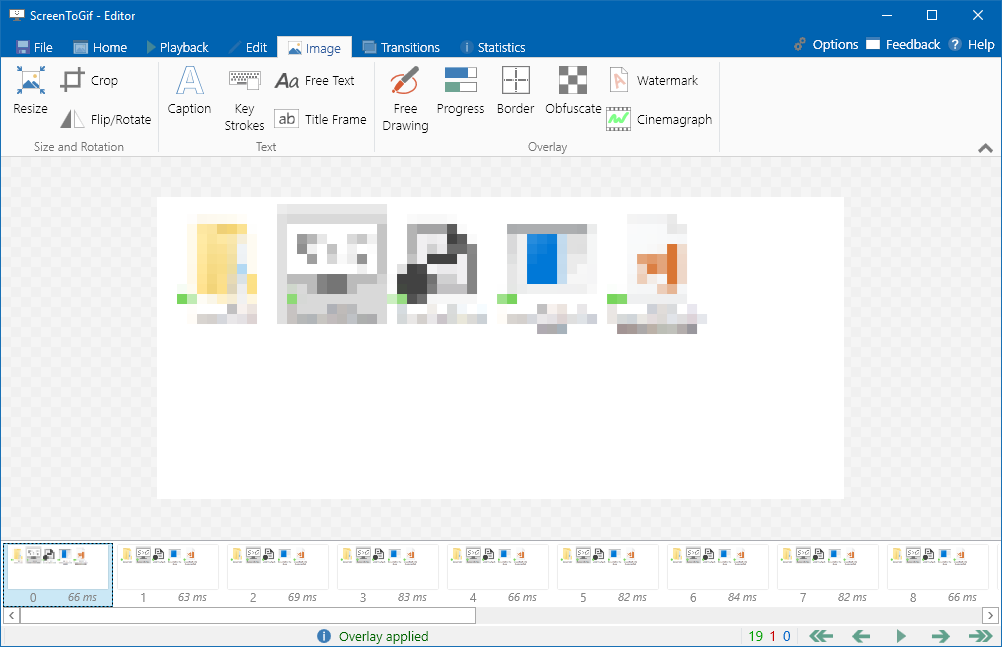
Done! The feature is called "Obfuscate" and it will be available with v2.11.
Select the rectangle that should be pixelated:

Apply:
@colinwurtz commented on GitHub (Dec 2, 2017):
Awesome, looks great! Thanks for all your work on this.
@spottedmahn commented on GitHub (Dec 4, 2017):
awesome 💥 thanks @NickeManarin !! 🎉
@dogancelik commented on GitHub (Nov 13, 2018):
I'd like to request (Gaussian) blur in addition to pixelization. (also mentioned in #194)