[PR #810] [MERGED] Slow play back fix (#134) #1218

Closed
opened 2026-02-26 09:34:03 +03:00 by kerem · 0 comments
Owner

📋 Pull Request Information

Original PR: https://github.com/NickeManarin/ScreenToGif/pull/810
Author: @mabakay
Created: 3/21/2021
Status: Merged
Merged: 4/11/2021
Merged by: @NickeManarin

Base: masterHead: work/playback/slowPlaybackFix


📝 Commits (4)

  • 5ce5f03 Slow play back fix (#134)
  • 3867967 Slow play back fix (UI was accessed from non UI thread)
  • 3221e7c Slow play back fix (drop frames setting added to playback options)
  • 6593ece Slow play back fix (important code comments)

📊 Changes

7 files changed (+101 additions, -40 deletions)

View changed files

📝 ScreenToGif/Resources/Localization/StringResources.en.xaml (+4 -1)
📝 ScreenToGif/Resources/Localization/StringResources.pl.xaml (+4 -1)
📝 ScreenToGif/Resources/Settings.xaml (+1 -0)
📝 ScreenToGif/Util/UserSettings.cs (+7 -1)
📝 ScreenToGif/Windows/Editor.xaml (+7 -2)
📝 ScreenToGif/Windows/Editor.xaml.cs (+76 -35)
📝 ScreenToGif/Windows/Options.xaml (+2 -0)

📄 Description

Preview playback has few problems.

  1. It uses System.Windows.Forms.Timer which has resolution about 16 ms and its multiples.
  2. Processing time of bitmap and displaying it on UI was not taken into account.

First means that if frame delay is 20 ms it will be shown not earlier than after 32 ms. Second means that loading image, attaching it to UI control and refreshing whole interface is effectively pausing timer interval.

I have implemented two changes.

  1. Got rid of System.Windows.Forms.Timer and replaced it with dedicated task executed by thread from domain thread pool when play command is invoked.
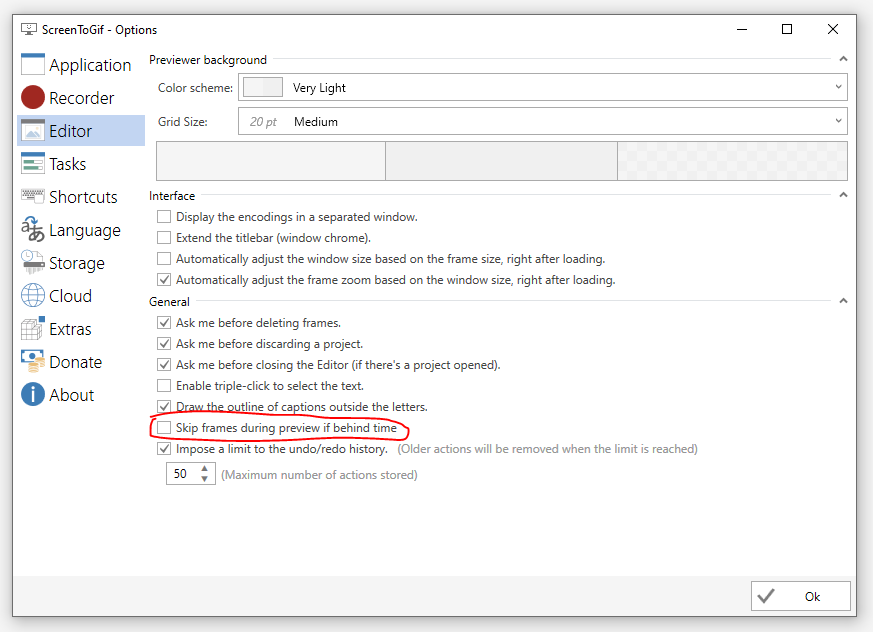
  2. Added option to skip frames while during preview if behind schedule.

On example project with 96 frames in 720p and 10 ms of delay per every frame average time (for 10 passes) of play from first to last frame for original code was 5,2s. After changing timer to dedicated thread time dropped to 3,3s. After checking option to drop frames behind I have got 0,98s for 96 * 10 ms = 960 ms as target time.

I did add this option to editor settings
image
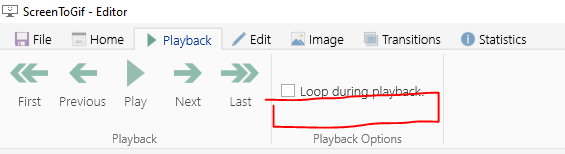
but now I see that there is probably more appropriate place here
image


🔄 This issue represents a GitHub Pull Request. It cannot be merged through Gitea due to API limitations.

## 📋 Pull Request Information **Original PR:** https://github.com/NickeManarin/ScreenToGif/pull/810 **Author:** [@mabakay](https://github.com/mabakay) **Created:** 3/21/2021 **Status:** ✅ Merged **Merged:** 4/11/2021 **Merged by:** [@NickeManarin](https://github.com/NickeManarin) **Base:** `master` ← **Head:** `work/playback/slowPlaybackFix` --- ### 📝 Commits (4) - [`5ce5f03`](https://github.com/NickeManarin/ScreenToGif/commit/5ce5f030e3d19a212b5a96cacf48623a11cc0db5) Slow play back fix (#134) - [`3867967`](https://github.com/NickeManarin/ScreenToGif/commit/38679674cee02a4660517ede9591ef7c66fb947e) Slow play back fix (UI was accessed from non UI thread) - [`3221e7c`](https://github.com/NickeManarin/ScreenToGif/commit/3221e7cca64e0ebdd7fc48e39f651978d1007a1a) Slow play back fix (drop frames setting added to playback options) - [`6593ece`](https://github.com/NickeManarin/ScreenToGif/commit/6593ece8e1cb34db4c44e15a2b371764b9f31fab) Slow play back fix (important code comments) ### 📊 Changes **7 files changed** (+101 additions, -40 deletions) <details> <summary>View changed files</summary> 📝 `ScreenToGif/Resources/Localization/StringResources.en.xaml` (+4 -1) 📝 `ScreenToGif/Resources/Localization/StringResources.pl.xaml` (+4 -1) 📝 `ScreenToGif/Resources/Settings.xaml` (+1 -0) 📝 `ScreenToGif/Util/UserSettings.cs` (+7 -1) 📝 `ScreenToGif/Windows/Editor.xaml` (+7 -2) 📝 `ScreenToGif/Windows/Editor.xaml.cs` (+76 -35) 📝 `ScreenToGif/Windows/Options.xaml` (+2 -0) </details> ### 📄 Description Preview playback has few problems. 1. It uses System.Windows.Forms.Timer which has resolution about 16 ms and its multiples. 2. Processing time of bitmap and displaying it on UI was not taken into account. First means that if frame delay is 20 ms it will be shown not earlier than after 32 ms. Second means that loading image, attaching it to UI control and refreshing whole interface is effectively pausing timer interval. I have implemented two changes. 1. Got rid of System.Windows.Forms.Timer and replaced it with dedicated task executed by thread from domain thread pool when play command is invoked. 2. Added option to skip frames while during preview if behind schedule. On example project with 96 frames in 720p and 10 ms of delay per every frame average time (for 10 passes) of play from first to last frame for original code was **5,2s**. After changing timer to dedicated thread time dropped to **3,3s**. After checking option to drop frames behind I have got **0,98s** for 96 * 10 ms = 960 ms as target time. I did add this option to editor settings ![image](https://user-images.githubusercontent.com/1766645/111915878-a0001280-8a78-11eb-8537-cc74c24e0b03.png) but now I see that there is probably more appropriate place here ![image](https://user-images.githubusercontent.com/1766645/111915907-c8880c80-8a78-11eb-979a-7ad65dab2193.png) --- <sub>🔄 This issue represents a GitHub Pull Request. It cannot be merged through Gitea due to API limitations.</sub>
kerem 2026-02-26 09:34:03 +03:00
Sign in to join this conversation.
No milestone
No project
No assignees
1 participant
Notifications
Due date
The due date is invalid or out of range. Please use the format "yyyy-mm-dd".

No due date set.

Dependencies

No dependencies set.

Reference
starred/ScreenToGif#1218
No description provided.