mirror of
https://github.com/quasar/Quasar.git
synced 2026-04-25 15:25:59 +03:00
[GH-ISSUE #923] Multiple sessions are opened on the same client machine #637
Labels
No labels
bug
bug
cant-reproduce
discussion
duplicate
easy
enhancement
help wanted
improvement
invalid
need more info
pull-request
question
wont-add
No milestone
No project
No assignees
1 participant

Notifications
Due date
No due date set.
Dependencies
No dependencies set.
Reference
starred/Quasar#637
Loading…
Add table
Add a link
Reference in a new issue
No description provided.
Delete branch "%!s()"
Deleting a branch is permanent. Although the deleted branch may continue to exist for a short time before it actually gets removed, it CANNOT be undone in most cases. Continue?
Originally created by @mirrorsedger on GitHub (Feb 7, 2021).
Original GitHub issue: https://github.com/quasar/Quasar/issues/923
Describe the bug
Running the client.exe on a machine more than once (sometimes just once) can create multiple sessions connected to the server.
If there is more than one connection, the one that works will be assigned ADMIN privileges whereas the rest will just be USER. The connections with USER will connect to the server but will be uncontrollable by Quasar Server and will only report their connection status.
To Reproduce
I believe simply running the client more than once can reproduce this bug.
Expected behavior
The client should check if an instance of Quasar is already running on the machine before executing another instance.
Screenshots
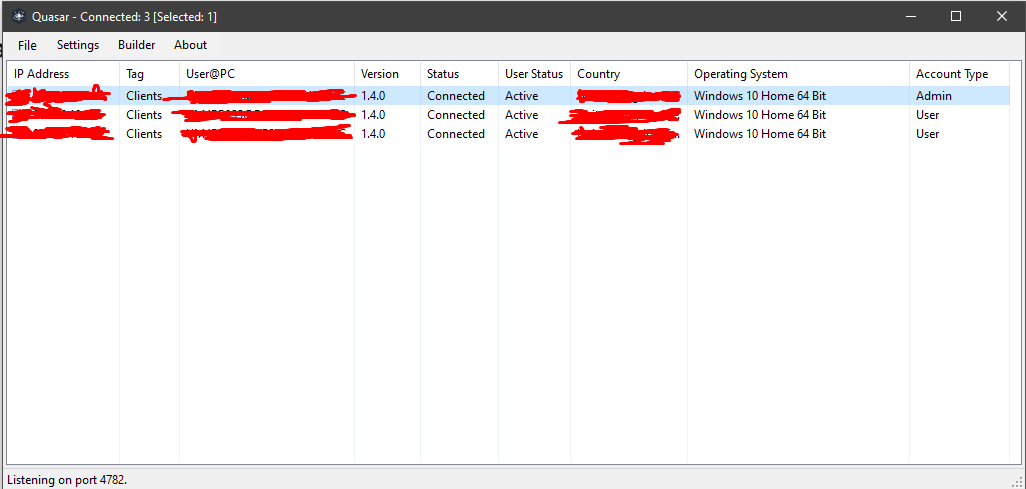
These 3 clients are the same machine:
@BurntDog commented on GitHub (Feb 7, 2021):
Never had this happen. Are you using the same or different Mutex?
@mirrorsedger commented on GitHub (Feb 7, 2021):
I believe it was a Mutex issue after all. However, the server doesn't let you uninstall or disconnect from the extra connections once you have them open. Perhaps this could be fixed.
@BurntDog commented on GitHub (Feb 7, 2021):
Have you tried deleting old clients thru server file manager? I don't think this is a bug issue more of why there is the mutex to avoid such things.
@mirrorsedger commented on GitHub (Feb 8, 2021):
I just ran the same file with the same mutex multiple times in a row and it kept adding new clients to my server list.
@BurntDog commented on GitHub (Feb 8, 2021):
Hmm, was under the impression that the mutex would prevent that. I will have to see if making the client run one instance only should solve that.
@BurntDog commented on GitHub (Feb 8, 2021):
Looking at the code that is what the mutex should do, however testing it and watching the files run in process hacker I see client get killed but, it leaves a instance of cmd.exe doing a ping and that second client keeps restarting. I never get a connection in server but, that still shouldn't happen. I guess a fix is still needed.
@BurntDog commented on GitHub (Feb 8, 2021):
OK, here's what I'm thinking. The mutex does stop the second client from running and the reason for the cmd.exe/ping then second client restart may have something to do with how/if you update client the new will need to run and if it has same mutex will only connect after you disconnect/uninstall from old/existing client. @MaxXor would need to confirm this I could be wrong.
And no I never got more then one connection, not sure why you are.
@MaxXor commented on GitHub (Feb 8, 2021):
@ClearlyDev @BurntDog Thanks 👍