mirror of
https://github.com/quasar/Quasar.git
synced 2026-04-25 15:25:59 +03:00
[GH-ISSUE #916] Compilation issue in visual studio 2017 #632
Labels
No labels
bug
bug
cant-reproduce
discussion
duplicate
easy
enhancement
help wanted
improvement
invalid
need more info
pull-request
question
wont-add
No milestone
No project
No assignees
1 participant

Notifications
Due date
No due date set.
Dependencies
No dependencies set.
Reference
starred/Quasar#632
Loading…
Add table
Add a link
Reference in a new issue
No description provided.
Delete branch "%!s()"
Deleting a branch is permanent. Although the deleted branch may continue to exist for a short time before it actually gets removed, it CANNOT be undone in most cases. Continue?
Originally created by @tajiknomi on GitHub (Jan 23, 2021).
Original GitHub issue: https://github.com/quasar/Quasar/issues/916
I'm trying to compile the solution but VS-17 doesn't load the Quasar.Client & Quasar.Server. Here is the screenshot
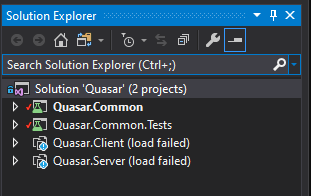
By right-clicking on the solution and executing the "Restore Nuget packages", VS says "All packages are already installed and there is nothing to restore"
Whats the issue ?
@BurntDog commented on GitHub (Jan 23, 2021):
You need to use Visual Studio 2019.. then Restore Nuget packages in Visual Studio 2019, should compile with no issues
@tajiknomi commented on GitHub (Jan 23, 2021):
Thanks for the reply. I will install VS-19 and get back here if i get an issue.
@tajiknomi commented on GitHub (Feb 3, 2021):
I've loaded the project solution in VS-19, same problem
@BurntDog commented on GitHub (Feb 3, 2021):
What errors are showing? Look at bottom of IDE, it should tell you.
@tajiknomi commented on GitHub (Feb 3, 2021):
There are no errors, The problem is , Quasar.Client and Quasar.Server doesn't load.
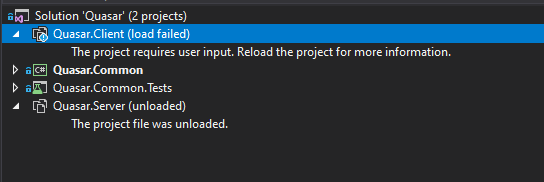
When i build the project, Only these files exist in the Debug folder
When i try to load the above project, VS prompt me with this
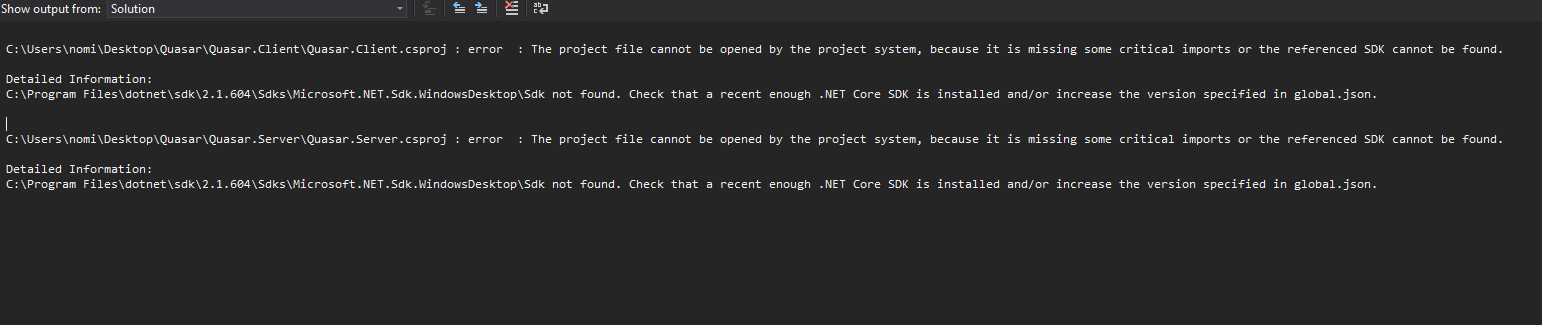
Which version of SDK should i install ? I think my dot-net framework is old
@tajiknomi commented on GitHub (Feb 3, 2021):
The problem is resolved after updating VS.
thank you.