[GH-ISSUE #624] No available UPnP device found #378

Closed
opened 2026-02-27 15:50:07 +03:00 by kerem · 18 comments
Owner

Originally created by @paul2048 on GitHub (Oct 10, 2017).
Original GitHub issue: https://github.com/quasar/Quasar/issues/624

I made sure:

  • firewall is not blocking Quasar;
  • TCP and UDP ports are added to exceptions of firewall;
  • my router has UPnP enabled;
  • no-IP's provided IP/localhost was used to create the executable;
  • no-IP's DUC is running;

capture

I am using Windows 10 pro 64-bit.

Originally created by @paul2048 on GitHub (Oct 10, 2017). Original GitHub issue: https://github.com/quasar/Quasar/issues/624 ### I made sure: - firewall is not blocking Quasar; - TCP and UDP ports are added to exceptions of firewall; - my router has UPnP enabled; - _no-IP's provided IP_/_localhost_ was used to create the executable; - no-IP's DUC is running; ![capture](https://user-images.githubusercontent.com/23298862/31389841-e7c2e0a8-adda-11e7-9189-875a37d10f3c.PNG) I am using Windows 10 pro 64-bit.
kerem 2026-02-27 15:50:07 +03:00
Author
Owner

@MaxXor commented on GitHub (Oct 10, 2017):

Hm, can you keep the checkbox for UPnP and automatic listening checked, press save and restart Quasar. Can you check in your router firewall if the port forwarding is being added correctly?

btw only TCP incoming port (in your case 1177) is required.

<!-- gh-comment-id:335581785 --> @MaxXor commented on GitHub (Oct 10, 2017): Hm, can you keep the checkbox for UPnP and automatic listening checked, press save and restart Quasar. Can you check in your router firewall if the port forwarding is being added correctly? btw only TCP incoming port (in your case 1177) is required.
Author
Owner

@paul2048 commented on GitHub (Oct 10, 2017):

I kept the UPnP checked, left automatic listening checked, pressed save and restarted Quasar (in the bottom left corner says: "Listening to port 1177").
Do you meant to check this:
fiew
? If not, how can I do it? I looked on the internet for about 30 minutes and I couldn't find anything.

<!-- gh-comment-id:335595137 --> @paul2048 commented on GitHub (Oct 10, 2017): I kept the UPnP checked, left automatic listening checked, pressed save and restarted Quasar (in the bottom left corner says: "Listening to port 1177"). Do you meant to check this: ![fiew](https://user-images.githubusercontent.com/23298862/31408016-b38f0520-ae0f-11e7-9e92-5ef284cd55b5.PNG) ? If not, how can I do it? I looked on the internet for about 30 minutes and I couldn't find anything.
Author
Owner

@MaxXor commented on GitHub (Oct 10, 2017):

This is the local firewall and has nothing to do with UPnP, it's set up correctly for Quasar (on port 1177). UPnP allows Quasar to automatically forward the port in your router firewall. What's the problem exactly? You get no external connections?

<!-- gh-comment-id:335598090 --> @MaxXor commented on GitHub (Oct 10, 2017): This is the local firewall and has nothing to do with UPnP, it's set up correctly for Quasar (on port 1177). UPnP allows Quasar to automatically forward the port in your router firewall. What's the problem exactly? You get no external connections?
Author
Owner

@paul2048 commented on GitHub (Oct 10, 2017):

I transfered the built executable to my second laptop, ran it, the proccess runs in the background but I get no client on my first laptop.

<!-- gh-comment-id:335600408 --> @paul2048 commented on GitHub (Oct 10, 2017): I transfered the built executable to my second laptop, ran it, the proccess runs in the background but I get no client on my first laptop.
Author
Owner

@abdullah2993 commented on GitHub (Oct 10, 2017):

@VeryKnave almost all routers have a UPnP table you can check if your modem/routers show the entry for quasar on that port?

<!-- gh-comment-id:335629213 --> @abdullah2993 commented on GitHub (Oct 10, 2017): @VeryKnave almost all routers have a UPnP table you can check if your modem/routers show the entry for quasar on that port?
Author
Owner

@paul2048 commented on GitHub (Oct 11, 2017):

I've made some test.

first laptop -> Windows 10 64-bit
second laptop -> Windows 7 32-bit

  • I tried QuasarRAT on my second laptop (the same port: 1177) and the UPnP message didn't displayed. I sent the build executable from my second laptop to my first laptop and it still didn't worked.
  • I tried running the executable from the laptop that it was created on. It worked on both laptops so I can control only "my own laptop".
  • It works only if I add localhost as a connection host in the builder, but still only on the laptop that is listening. If I have only the no-ip provided host as a connection host in builder, it wouldn't even work on the laptop that is listening.

@Abdullah2993 How can I check that?

<!-- gh-comment-id:335815450 --> @paul2048 commented on GitHub (Oct 11, 2017): I've made some test. first laptop -> Windows 10 64-bit second laptop -> Windows 7 32-bit - I tried QuasarRAT on my _second laptop_ (the same port: 1177) and the UPnP message didn't displayed. I sent the build executable from my _second laptop_ to my _first laptop_ and it still didn't worked. - I tried running the executable from the laptop that it was created on. It worked on both laptops so I can control only "my own laptop". - It works only if I add **localhost** as a connection host in the builder, but still only on the laptop that is listening. If I have only the **no-ip** provided host as a connection host in builder, it wouldn't even work on the laptop that is listening. @Abdullah2993 How can I check that?
Author
Owner

@MaxXor commented on GitHub (Oct 11, 2017):

What IP do you enter in the builder? Your local IP or external IP (visible by http://whatismyip.org/)

<!-- gh-comment-id:335836217 --> @MaxXor commented on GitHub (Oct 11, 2017): What IP do you enter in the builder? Your local IP or external IP (visible by http://whatismyip.org/)
Author
Owner

@paul2048 commented on GitHub (Oct 11, 2017):

@MaxXor I enter the domain name provided by no-IP (name.zapto.org), so the external IP. Does it make any difference?

EDIT: I tested with the "raw" IP and it seems like there is no difference.

<!-- gh-comment-id:335877767 --> @paul2048 commented on GitHub (Oct 11, 2017): @MaxXor I enter the domain name provided by no-IP (`name`.zapto.org), so the external IP. Does it make any difference? EDIT: I tested with the "raw" IP and it seems like there is no difference.
Author
Owner

@MaxXor commented on GitHub (Oct 11, 2017):

No, do you know how to forward the port in your router?

<!-- gh-comment-id:335918151 --> @MaxXor commented on GitHub (Oct 11, 2017): No, do you know how to forward the port in your router?
Author
Owner

@paul2048 commented on GitHub (Oct 11, 2017):

I am not sure. This is what I did:
capture
The internal and external IPs are correct. It still doesn't work.

EDIT: I also tried leaving "Remote host" blank.

<!-- gh-comment-id:335930476 --> @paul2048 commented on GitHub (Oct 11, 2017): I am not sure. This is what I did: ![capture](https://user-images.githubusercontent.com/23298862/31463048-6d6b0e0e-aed7-11e7-92e5-cc34bf2e202a.PNG) The internal and external IPs are correct. It still doesn't work. EDIT: I also tried leaving "Remote host" blank.
Author
Owner

@abdullah2993 commented on GitHub (Oct 11, 2017):

@VeryKnave leave remote host empty. After that run something like netcat on port 1177 and use http://canyouseeme.org/ to verify the port is open

<!-- gh-comment-id:335944341 --> @abdullah2993 commented on GitHub (Oct 11, 2017): @VeryKnave leave remote host empty. After that run something like netcat on port `1177` and use http://canyouseeme.org/ to verify the port is open
Author
Owner

@paul2048 commented on GitHub (Oct 12, 2017):

@Abdullah2993 Okay, I left it empty. What command should I use or how should I do it on Windows?

<!-- gh-comment-id:336212935 --> @paul2048 commented on GitHub (Oct 12, 2017): @Abdullah2993 Okay, I left it empty. What command should I use or how should I do it on Windows?
Author
Owner

@abdullah2993 commented on GitHub (Oct 12, 2017):

@VeryKnave just download the netcat binary

<!-- gh-comment-id:336239142 --> @abdullah2993 commented on GitHub (Oct 12, 2017): @VeryKnave just download the `netcat` binary
Author
Owner

@paul2048 commented on GitHub (Oct 13, 2017):

I tried this command: nc -vv -z -w3 <my external ip> <port>.

capture
I listened with Quasar on port 1177 while running the commands.

Also http://canyouseeme.org/ and other online port checkers seem to not identify port 80 and any other ports as open.
capture2

I don't understand what I am doing wrong.

<!-- gh-comment-id:336454112 --> @paul2048 commented on GitHub (Oct 13, 2017): I tried this command: `nc -vv -z -w3 <my external ip> <port>`. ![capture](https://user-images.githubusercontent.com/23298862/31548255-f1243b1a-b032-11e7-9a0d-c4d16d404360.PNG) I listened with Quasar on port 1177 while running the commands. Also http://canyouseeme.org/ and other online port checkers seem to not identify port 80 and any other ports as open. ![capture2](https://user-images.githubusercontent.com/23298862/31548459-869fd578-b033-11e7-9b28-3e0c5ad2478a.PNG) I don't understand what I am doing wrong.
Author
Owner

@MaxXor commented on GitHub (Oct 13, 2017):

Your router or windows firewall is blocking the port. Or maybe even your ISP doesn't allow open ports.

<!-- gh-comment-id:336529477 --> @MaxXor commented on GitHub (Oct 13, 2017): Your router or windows firewall is blocking the port. Or maybe even your ISP doesn't allow open ports.
Author
Owner

@abdullah2993 commented on GitHub (Oct 16, 2017):

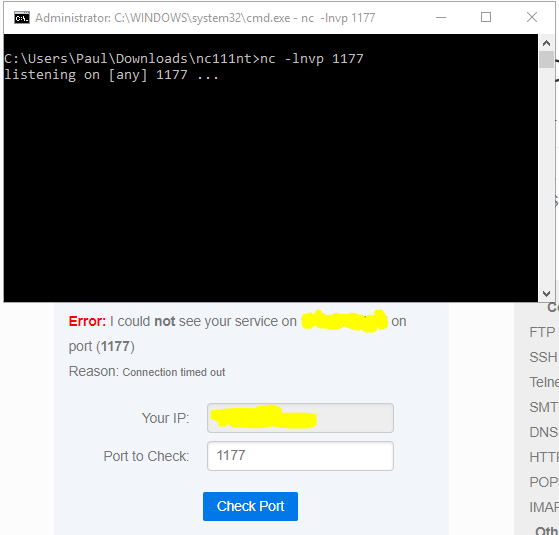
without running quasar. run nc -lnvp 1177 and check for port 1177 from canyouseem.org

<!-- gh-comment-id:336791535 --> @abdullah2993 commented on GitHub (Oct 16, 2017): without running quasar. run `nc -lnvp 1177` and check for port `1177` from canyouseem.org
Author
Owner

@paul2048 commented on GitHub (Oct 16, 2017):

I did it, but it still doesn't work.
capture

I have tried another 3 or 4 different RATs and none of them were working on my Windows laptops.
I have tried a single RAT on my Linux (dual-boot) and it worked.

Also, I deleted Quasar and downloaded it again and the "No available UPnP device found" message does not pop anymore.

<!-- gh-comment-id:336867649 --> @paul2048 commented on GitHub (Oct 16, 2017): I did it, but it still doesn't work. ![capture](https://user-images.githubusercontent.com/23298862/31611059-37ed334c-b283-11e7-9702-036dc9281293.PNG) I have tried another 3 or 4 different RATs and none of them were working on my Windows laptops. I have tried a single RAT on my Linux (dual-boot) and it worked. Also, I deleted Quasar and downloaded it again and the "No available UPnP device found" message does not pop anymore.
Author
Owner

@Asferget commented on GitHub (Apr 28, 2018):

How do you Use The https://gyazo.com/f4186adf05fbe1850109c8a314b1ebbd

<!-- gh-comment-id:385184002 --> @Asferget commented on GitHub (Apr 28, 2018): How do you Use The https://gyazo.com/f4186adf05fbe1850109c8a314b1ebbd
Sign in to join this conversation.
No milestone
No project
No assignees
1 participant
Notifications
Due date
The due date is invalid or out of range. Please use the format "yyyy-mm-dd".

No due date set.

Dependencies

No dependencies set.

Reference
starred/Quasar#378
No description provided.