[GH-ISSUE #973] iOS Simulators Setup Revert Back to Unsetup State #970

Closed
opened 2026-03-03 19:23:25 +03:00 by kerem · 5 comments
Owner

Originally created by @weitieda on GitHub (Sep 2, 2021).
Original GitHub issue: https://github.com/ProxymanApp/Proxyman/issues/973

Originally assigned to: @NghiaTranUIT on GitHub.

Proxyman version? (Ex. Proxyman 1.4.3)

2.32.0 (23200)

macOS Version? (Ex. mac 10.14)

11.15.2

Steps to reproduce

With Xcode and Proxyman open, connect Pulse Secure VPN, Proxyman is able to monitor traffic.. Then install "iOS Simulators Setup"

  1. Installed Root Proxyman Certificate to this Mac (installed and trusted)
  2. click "Installed and Trust" -> success
  3. Reboot -> success -> Simulator relaunch -> "iOS Simulators Setup" still show the un-setup state and in Xcode, launch app, failed observe traffic and in "iOS Simulators Setup"

(Sometimes Proxyman does able to monitor traffic even "iOS Simulators Setup" show un-setup state; but it's unstable, most time fail to monitor traffic; but in simulator, I'm able to see certificate is installed)

PS: pretty strange, I found it able to catch requests to bugsnag.com but unable to catch request to my company's server

Expected behavior

Should we only need to setup simulator once?

Screenshots (optional)

image image
Originally created by @weitieda on GitHub (Sep 2, 2021). Original GitHub issue: https://github.com/ProxymanApp/Proxyman/issues/973 Originally assigned to: @NghiaTranUIT on GitHub. ### Proxyman version? (Ex. Proxyman 1.4.3) 2.32.0 (23200) ### macOS Version? (Ex. mac 10.14) 11.15.2 ### Steps to reproduce With Xcode and Proxyman open, connect Pulse Secure VPN, Proxyman is able to monitor traffic.. Then install "iOS Simulators Setup" 1. Installed Root Proxyman Certificate to this Mac (installed and trusted) 2. click "Installed and Trust" -> success 3. Reboot -> success -> Simulator relaunch -> "iOS Simulators Setup" still show the un-setup state and in Xcode, launch app, failed observe traffic and in "iOS Simulators Setup" (Sometimes Proxyman does able to monitor traffic even "iOS Simulators Setup" show un-setup state; but it's unstable, most time fail to monitor traffic; but in simulator, I'm able to see certificate is installed) PS: pretty strange, I found it able to catch requests to `bugsnag.com` but unable to catch request to my company's server ### Expected behavior Should we only need to setup simulator once? ### Screenshots (optional) <img width="721" alt="image" src="https://user-images.githubusercontent.com/35972055/131903235-1b84c55e-8eed-466d-8c18-617b72530898.png"> <img width="380" alt="image" src="https://user-images.githubusercontent.com/35972055/131913883-3ac92262-fbab-422d-9c97-1f2cd8a81e28.png">
kerem closed this issue 2026-03-03 19:23:25 +03:00
Author
Owner

@NghiaTranUIT commented on GitHub (Sep 3, 2021):

Thanks for your report @weitieda

Reboot -> success -> Simulator relaunch -> "iOS Simulators Setup" still show the un-setup state and in Xcode, launch app, failed observe traffic and in "iOS Simulators Setup"

The reason why the state is reset is that there is no way to know whether or not the certificate is installed and trusted in your iOS Simulator.

It's a limitation of simctl CLI from Apple. It allows Proxyman to install & trust automatically to iOS Simulators (which we've implemented), but no command to check the status. As a result, Proxyman will reset the check status.


As you've encountered the problem with your Pulse Secure VPN, I believe it's the root of the problem.

In general, Proxyman or other web debugging proxy (Charles, Fiddler) might not work with these VPNs. To fix it, we have to set an HTTP/HTTP Proxy to Pulse Secure VPN.

I googled and fortunately, there is a way to set HTTP Proxy to Proxyman from your VPN app.

HTTP/HTTP Proxy should be:

  • IP = 127.0.0.1
  • Port = 9090

Reference

<!-- gh-comment-id:912260103 --> @NghiaTranUIT commented on GitHub (Sep 3, 2021): Thanks for your report @weitieda > Reboot -> success -> Simulator relaunch -> "iOS Simulators Setup" still show the un-setup state and in Xcode, launch app, failed observe traffic and in "iOS Simulators Setup" The reason why the state is reset is that there is no way to know whether or not the certificate is installed and trusted in your iOS Simulator. It's a limitation of `simctl` CLI from Apple. It allows Proxyman to install & trust automatically to iOS Simulators (which we've implemented), but no command to check the status. As a result, Proxyman will reset the check status. ------------- As you've encountered the problem with your Pulse Secure VPN, I believe it's the root of the problem. In general, Proxyman or other web debugging proxy (Charles, Fiddler) might not work with these VPNs. To fix it, we have to set an HTTP/HTTP Proxy to Pulse Secure VPN. I googled and fortunately, there is a way to set HTTP Proxy to Proxyman from your VPN app. - https://docs.pulsesecure.net/WebHelp/PCS/9.1R1/AG/Content/PCS/PCS_AdminGuide_9.1R1/VPN_Tunneling_Proxy_Support.htm - https://docs.pulsesecure.net/WebHelp/PCS/8.3R1/Content/PCS/PCS_AdminGuide_8.3/Specifying_Web_Proxy_Servers.htm HTTP/HTTP Proxy should be: - IP = 127.0.0.1 - Port = 9090 ## Reference - https://docs.proxyman.io/troubleshooting/proxyman-does-not-work-with-vpn-apps#4-pulse-secure-and-global-protect-vpn
Author
Owner

@NghiaTranUIT commented on GitHub (Sep 3, 2021):

If you don't mind, please open your VPN app, and try to intercept https://google.com from Safari or Google Chrome on your Macbook. To see if Proxyman can capture it when the VPN is opened 👍

If it's work. It means Proxyman works fine with your VPN.
If not, we need config HTTP proxy in your VPN in order to make it work 😄

<!-- gh-comment-id:912260740 --> @NghiaTranUIT commented on GitHub (Sep 3, 2021): If you don't mind, please open your VPN app, and try to intercept https://google.com from Safari or Google Chrome on your Macbook. To see if Proxyman can capture it when the VPN is opened 👍 If it's work. It means Proxyman works fine with your VPN. If not, we need config HTTP proxy in your VPN in order to make it work 😄
Author
Owner

@weitieda commented on GitHub (Oct 27, 2021):

hi @NghiaTranUIT, thanks for your reply and sorry to bring up this again.

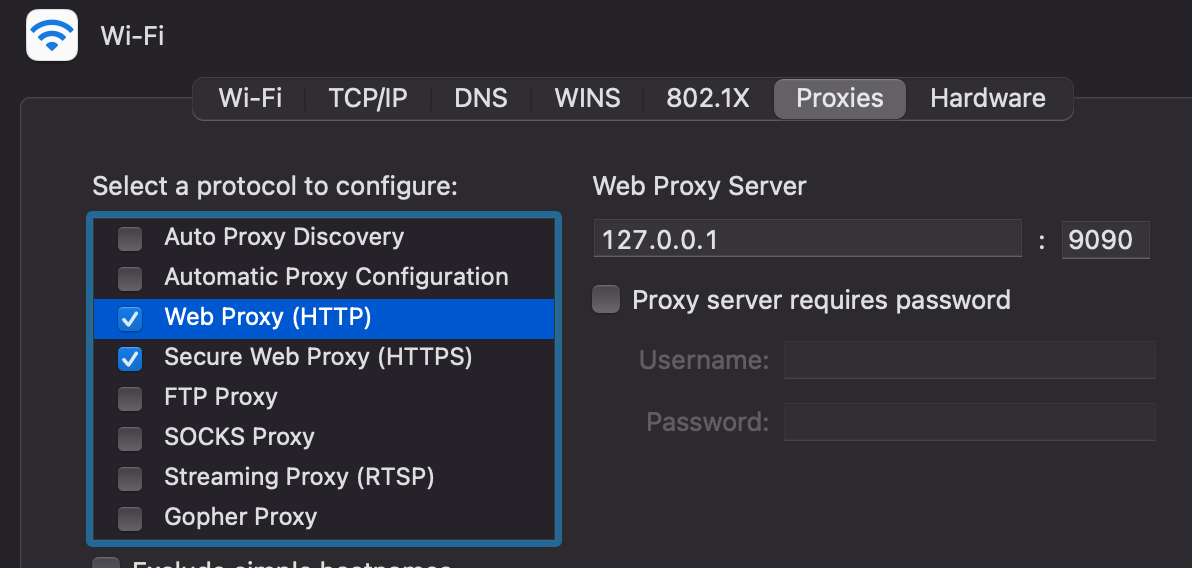
Just verified - when VPN connected, ProxyMan is able to catch traffic in Chrome, but still can't catch traffic in iOS simulator. it can catch few bugsnug request sometimes.

also checked my proxy, it should be correct.
image

btw, Charles did work with PulseVPN but I still prefer using ProxyMan, it's much better.

anything else I could try? thanks

<!-- gh-comment-id:952430044 --> @weitieda commented on GitHub (Oct 27, 2021): hi @NghiaTranUIT, thanks for your reply and sorry to bring up this again. Just verified - when VPN connected, ProxyMan is able to catch traffic in Chrome, but still can't catch traffic in iOS simulator. it can catch few bugsnug request sometimes. also checked my proxy, it should be correct. <img width="596" alt="image" src="https://user-images.githubusercontent.com/35972055/138978837-15807502-6fe7-4110-a69f-c6328e509cc3.png"> btw, Charles did work with PulseVPN but I still prefer using ProxyMan, it's much better. anything else I could try? thanks
Author
Owner

@NghiaTranUIT commented on GitHub (Oct 27, 2021):

@weitieda Thanks for the hint that Proxyman can capture HTTPS Traffic from Google Chrome even though the VPN is on.

To be honest, I'm not sure how to fix it because the problem is from the VPN.

You might try:

  1. Quit iOS Simulators and open again. The connection from iOS devices might go through Proxyman.
  2. If it doesn't work, you can check out Atlantis Framework. It will capture all HTTP/HTTPS Traffic from your iOS device/simulator without installing any certificate. It works well regardless of the VPN status.
<!-- gh-comment-id:952455648 --> @NghiaTranUIT commented on GitHub (Oct 27, 2021): @weitieda Thanks for the hint that Proxyman can capture HTTPS Traffic from Google Chrome even though the VPN is on. To be honest, I'm not sure how to fix it because the problem is from the VPN. You might try: 1. Quit iOS Simulators and open again. The connection from iOS devices might go through Proxyman. 2. If it doesn't work, you can check out [Atlantis Framework](https://github.com/ProxymanApp/atlantis). It will capture all HTTP/HTTPS Traffic from your iOS device/simulator without installing any certificate. It works well regardless of the VPN status.
Author
Owner

@weitieda commented on GitHub (Oct 27, 2021):

Ok. thanks : )

<!-- gh-comment-id:952554149 --> @weitieda commented on GitHub (Oct 27, 2021): Ok. thanks : )
Sign in to join this conversation.
No milestone
No project
No assignees
1 participant
Notifications
Due date
The due date is invalid or out of range. Please use the format "yyyy-mm-dd".

No due date set.

Dependencies

No dependencies set.

Reference
starred/Proxyman#970
No description provided.