mirror of
https://github.com/ProxymanApp/Proxyman.git
synced 2026-04-26 08:35:53 +03:00
[GH-ISSUE #958] Improve scripting console #955
Labels
No labels
Discussion
Feature request
In Progress...
Plugins
Waiting response
Windows
Windows
bug
duplicate
enhancement
feature
good first issue
iOS
macOS 10.11
question
wontfix
✅ Done
No milestone
No project
No assignees
1 participant

Notifications
Due date
No due date set.
Dependencies
No dependencies set.
Reference
starred/Proxyman#955
Loading…
Add table
Add a link
Reference in a new issue
No description provided.
Delete branch "%!s()"
Deleting a branch is permanent. Although the deleted branch may continue to exist for a short time before it actually gets removed, it CANNOT be undone in most cases. Continue?
Originally created by @florentmorin on GitHub (Aug 11, 2021).
Original GitHub issue: https://github.com/ProxymanApp/Proxyman/issues/958
Originally assigned to: @NghiaTranUIT on GitHub.
Scripting is excellent, but console is too small.
Proxyman version? (Ex. Proxyman 1.4.3)
Proxyman 2.31.0
macOS Version? (Ex. mac 10.14)
Mac 11
Steps to reproduce
Create a wonderful script that made request body more understandable.
Displaying result with many
console.log().Current behavior
A small console.
Expected behavior
A big fullscreen console to show result while debugging.
@NghiaTranUIT commented on GitHub (Aug 12, 2021):
Thanks for your report @florentmorin.
I suppose that I would introduce a Toggle that brings the Console Log View to the Right Side (Vertical) or Bottom Side. Therefore, the Console Log can display more content by leveraging empty space of the Editor View 👍
@NghiaTranUIT commented on GitHub (Aug 12, 2021):
Hey @florentmorin let try this beta build: https://proxyman.s3.us-east-2.amazonaws.com/beta/Proxyman_2.31.0_Sidebar_for_console_log.dmg
You can toggle the Console Log, to dock on a Bottom (default) or the Right bar, so it can display more content 👍
@florentmorin commented on GitHub (Aug 12, 2021):
Perfect 👍
@JasonBoy commented on GitHub (Mar 2, 2023):
@NghiaTranUIT I was wondering
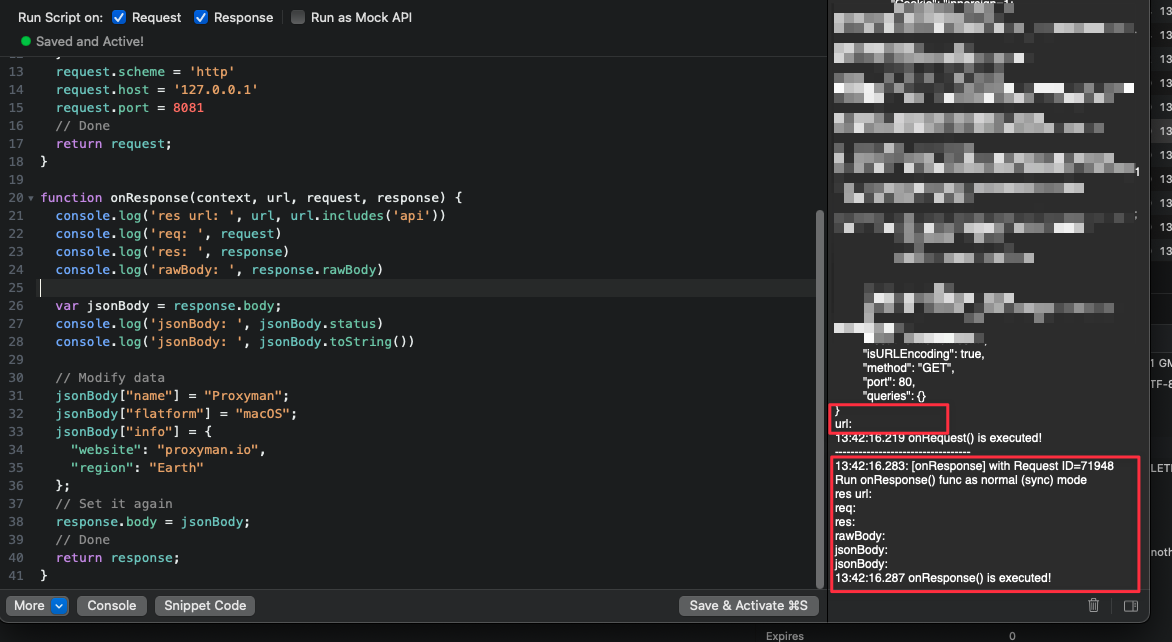
console.log(arg)can only log the first argument? when I tryconsole.log('url:', url), i cannot see the real url, maybe this could also be improved:@NghiaTranUIT commented on GitHub (Mar 2, 2023):
Hey sorry for the problem, it's because
console.log()is not a native API, it's a custom API from Swift-bridge.For now, it only accepts 1 arg. You can use:
@JasonBoy commented on GitHub (Mar 2, 2023):
ok, thanks