[GH-ISSUE #841] does not track specific url without L2TP VPN #837

Closed
opened 2026-03-03 19:22:18 +03:00 by kerem · 4 comments
Owner

Originally created by @SajjadKharrazi on GitHub (Mar 30, 2021).
Original GitHub issue: https://github.com/ProxymanApp/Proxyman/issues/841

Originally assigned to: @NghiaTranUIT on GitHub.

Proxyman version: 2.22.0
macOS Version: 11.2.2

hi
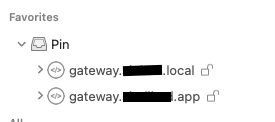
i have pined these two url:
Screen Shot 2021-03-30 at 16 09 57
.local is http and .app is https
(.local is not my local network, its remote)

i have two app for these URLs in my iOS simulator (iPhone 11). ( .local for stage, .app for production)
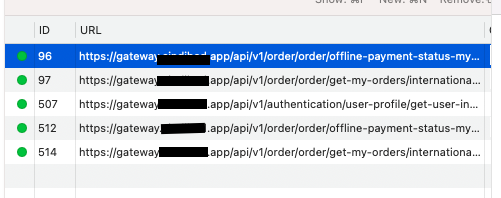
when i run my production app, Proxyman track its traffic very well and show everything ( .app url )
Screen Shot 2021-03-30 at 16 15 54

problem is there: when i run my stage version, Proxyman does not track anything. ( .local url )
also i changed my Production base url endpoint to the .local but it still did not make a difference.

but when i connect my L2TP VPN, Surprisingly Proxyman show everything traffic from .local url
i also have a Cisco VPN, when i connect it, it does not show traffic Again. This only happens for L2TP protocol.

Screen Shot 2021-03-30 at 16 24 39

Originally created by @SajjadKharrazi on GitHub (Mar 30, 2021). Original GitHub issue: https://github.com/ProxymanApp/Proxyman/issues/841 Originally assigned to: @NghiaTranUIT on GitHub. Proxyman version: 2.22.0 macOS Version: 11.2.2 hi i have pined these two url: ![Screen Shot 2021-03-30 at 16 09 57](https://user-images.githubusercontent.com/7239983/112983202-a4ac8100-9172-11eb-9710-e46351403ff4.png) .local is `http` and .app is `https` (.local is not my local network, its remote) i have two app for these URLs in my iOS simulator (iPhone 11). ( .local for stage, .app for production) when i run my `production` app, Proxyman track its traffic very well and show everything ( .app url ) ![Screen Shot 2021-03-30 at 16 15 54](https://user-images.githubusercontent.com/7239983/112983752-4af88680-9173-11eb-9d6b-f43eca59a6c0.png) problem is there: when i run my stage version, Proxyman does not track anything. ( .local url ) also i changed my Production base url endpoint to the `.local` but it still did not make a difference. but when i connect my L2TP VPN, Surprisingly Proxyman show everything traffic from `.local` url i also have a Cisco VPN, when i connect it, it does not show traffic Again. This only happens for L2TP protocol. ![Screen Shot 2021-03-30 at 16 24 39](https://user-images.githubusercontent.com/7239983/112984757-85165800-9174-11eb-808d-d28acc65d484.png)
kerem 2026-03-03 19:22:18 +03:00
  • closed this issue
  • added the
    Done
    label
Author
Owner

@SajjadKharrazi commented on GitHub (Mar 30, 2021):

it also happens with Remote devices:

image

<!-- gh-comment-id:810163019 --> @SajjadKharrazi commented on GitHub (Mar 30, 2021): it also happens with Remote devices: ![image](https://user-images.githubusercontent.com/7239983/112985287-3e752d80-9175-11eb-8131-11ba317b9c18.png)
Author
Owner

@NghiaTranUIT commented on GitHub (Mar 30, 2021):

Hey @SajjadKharrazi, Proxyman doesn't track *.local because it might be in the by-pass proxy list.

By defaul, System Proxy will ignore all *.local traffic. Please remove it from System Preference -> Network -> WiFi -> Proxies tab

Screen_Shot_2020-04-26_at_09_40_48

The reason why Proxyman can captures *.local when the L2TP VPN is on because the by-pass proxy list is not in effect 😄

Please help me to remove it, and check again 🌮

Ref: https://docs.proxyman.io/troubleshooting/.local-doesnt-appear-in-proxyman

<!-- gh-comment-id:810235239 --> @NghiaTranUIT commented on GitHub (Mar 30, 2021): Hey @SajjadKharrazi, Proxyman doesn't track *.local because it might be in the by-pass proxy list. By defaul, System Proxy will ignore all *.local traffic. Please remove it from System Preference -> Network -> WiFi -> Proxies tab <img width="780" alt="Screen_Shot_2020-04-26_at_09_40_48" src="https://user-images.githubusercontent.com/5878421/112995121-1dbcd000-9195-11eb-86c3-ce11d1d8663e.png"> The reason why Proxyman can captures *.local when the L2TP VPN is on because the by-pass proxy list is not in effect 😄 Please help me to remove it, and check again 🌮 Ref: https://docs.proxyman.io/troubleshooting/.local-doesnt-appear-in-proxyman
Author
Owner

@SajjadKharrazi commented on GitHub (Mar 30, 2021):

tnx. it works for me

i want to tell you that i am using Proxyman from at least 6 months ago and i dont have this problem. it happens from 2 days ago
i think it is better to locate this setting in app settings itself. it took me two days 😬

<!-- gh-comment-id:810301296 --> @SajjadKharrazi commented on GitHub (Mar 30, 2021): tnx. it works for me i want to tell you that i am using Proxyman from at least 6 months ago and i dont have this problem. it happens from 2 days ago i think it is better to locate this setting in app settings itself. it took me two days 😬
Author
Owner

@NghiaTranUIT commented on GitHub (Mar 30, 2021):

Maybe the config is updated after you upgrade the OS 😄

I will consider to add this config to Proxyman app 👍

<!-- gh-comment-id:810322797 --> @NghiaTranUIT commented on GitHub (Mar 30, 2021): Maybe the config is updated after you upgrade the OS 😄 I will consider to add this config to Proxyman app 👍
Sign in to join this conversation.
No milestone
No project
No assignees
1 participant
Notifications
Due date
The due date is invalid or out of range. Please use the format "yyyy-mm-dd".

No due date set.

Dependencies

No dependencies set.

Reference
starred/Proxyman#837
No description provided.