[GH-ISSUE #695] JSON response should auto be prettified #690

Open
opened 2026-03-03 19:21:01 +03:00 by kerem · 4 comments
Owner

Originally created by @CyberMew on GitHub (Nov 15, 2020).
Original GitHub issue: https://github.com/ProxymanApp/Proxyman/issues/695

Originally assigned to: @NghiaTranUIT on GitHub.

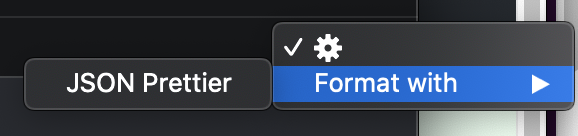
Currently I have to do this manually every time:
image
Can I have an option to automatically execute this on my response if it detected a valid json? Doesn't make sense not to do this automatically or have another Body tab with this (Charles has this I think), and yet provide no option to 'undo' the JSON prettier.

Originally created by @CyberMew on GitHub (Nov 15, 2020). Original GitHub issue: https://github.com/ProxymanApp/Proxyman/issues/695 Originally assigned to: @NghiaTranUIT on GitHub. Currently I have to do this manually every time: ![image](https://user-images.githubusercontent.com/4715911/99190489-bb44d380-27a1-11eb-9a11-f802fa7094d3.png) Can I have an option to automatically execute this on my response if it detected a valid json? Doesn't make sense not to do this automatically or have another Body tab with this (Charles has this I think), and yet provide no option to 'undo' the JSON prettier.
Author
Owner

@NghiaTranUIT commented on GitHub (Nov 16, 2020):

You can add a JSON Tab (it will automatically prettify the content) 👍

Screen_Shot_2020-11-16_at_08_39_14 Screen_Shot_2020-11-16_at_08_39_18
<!-- gh-comment-id:727684098 --> @NghiaTranUIT commented on GitHub (Nov 16, 2020): You can add a JSON Tab (it will automatically prettify the content) 👍 <img width="710" alt="Screen_Shot_2020-11-16_at_08_39_14" src="https://user-images.githubusercontent.com/5878421/99204155-5613d100-27e7-11eb-8f77-6f993f3f18a7.png"> <img width="612" alt="Screen_Shot_2020-11-16_at_08_39_18" src="https://user-images.githubusercontent.com/5878421/99204150-514f1d00-27e7-11eb-8f7f-bf7813434ebb.png">
Author
Owner

@NghiaTranUIT commented on GitHub (Nov 16, 2020):

The Body Tab actually tries to prettify the body content if the Content-Type is application/json.

From what you show up, you have to manually select Format with -> JSON, it means that the Content-Type is not a application/json, so it doesn't prettify it automatically.

You can fix it by:

  1. Add JSON tab (as I show you in the previous comment), it will force prettify all content if possible
  2. Change the Content-Type to application/json from the Request or Response 👍
<!-- gh-comment-id:727695972 --> @NghiaTranUIT commented on GitHub (Nov 16, 2020): The Body Tab actually tries to prettify the body content if the Content-Type is `application/json`. From what you show up, you have to manually select Format with -> JSON, it means that the Content-Type is not a `application/json`, so it doesn't prettify it automatically. You can fix it by: 1. Add JSON tab (as I show you in the previous comment), it will force prettify all content if possible 2. Change the Content-Type to `application/json` from the Request or Response 👍
Author
Owner

@NghiaTranUIT commented on GitHub (Nov 17, 2020):

Ah, I see. You're using Breakpoint tool 👍

I'm going to support "Auto" now 😄

<!-- gh-comment-id:728736776 --> @NghiaTranUIT commented on GitHub (Nov 17, 2020): Ah, I see. You're using Breakpoint tool 👍 I'm going to support "Auto" now 😄
Author
Owner

@NghiaTranUIT commented on GitHub (Nov 17, 2020):

All done @CyberMew 👍

Checkout this beta: https://proxyman.s3.us-east-2.amazonaws.com/beta/Proxyman_2.12.0_Auto_Prettify_JSON_Breakpoint.dmg

From now, the body breakpoint will try to prettify the JSON body if possible 👍

Screen Shot 2020-11-17 at 19 57 38 Screen Shot 2020-11-17 at 19 49 48
<!-- gh-comment-id:728924278 --> @NghiaTranUIT commented on GitHub (Nov 17, 2020): All done @CyberMew 👍 Checkout this beta: https://proxyman.s3.us-east-2.amazonaws.com/beta/Proxyman_2.12.0_Auto_Prettify_JSON_Breakpoint.dmg From now, the body breakpoint will try to prettify the JSON body if possible 👍 <img width="2416" alt="Screen Shot 2020-11-17 at 19 57 38" src="https://user-images.githubusercontent.com/5878421/99395295-cb2ff500-2912-11eb-91bf-f9e26037f6a2.png"> <img width="2416" alt="Screen Shot 2020-11-17 at 19 49 48" src="https://user-images.githubusercontent.com/5878421/99395316-d1be6c80-2912-11eb-86f9-1d7e5a74a680.png">
Sign in to join this conversation.
No milestone
No project
No assignees
1 participant
Notifications
Due date
The due date is invalid or out of range. Please use the format "yyyy-mm-dd".

No due date set.

Dependencies

No dependencies set.

Reference
starred/Proxyman#690
No description provided.