[GH-ISSUE #683] Map remote not working for localhost #678

Open
opened 2026-03-03 19:20:53 +03:00 by kerem · 10 comments
Owner

Originally created by @phhoef on GitHub (Nov 11, 2020).
Original GitHub issue: https://github.com/ProxymanApp/Proxyman/issues/683

Proxyman version? (Ex. Proxyman 1.4.3)

Version 2.12.0 (21200)

macOS Version? (Ex. mac 10.14)

macOS Catalina 10.15.7

Steps to reproduce

Add remote mapping:
Rule: *
Method: Any
Use Wildcard

Map to:
any remote host

Expected behavior

all requests are forwarded to the remote host.

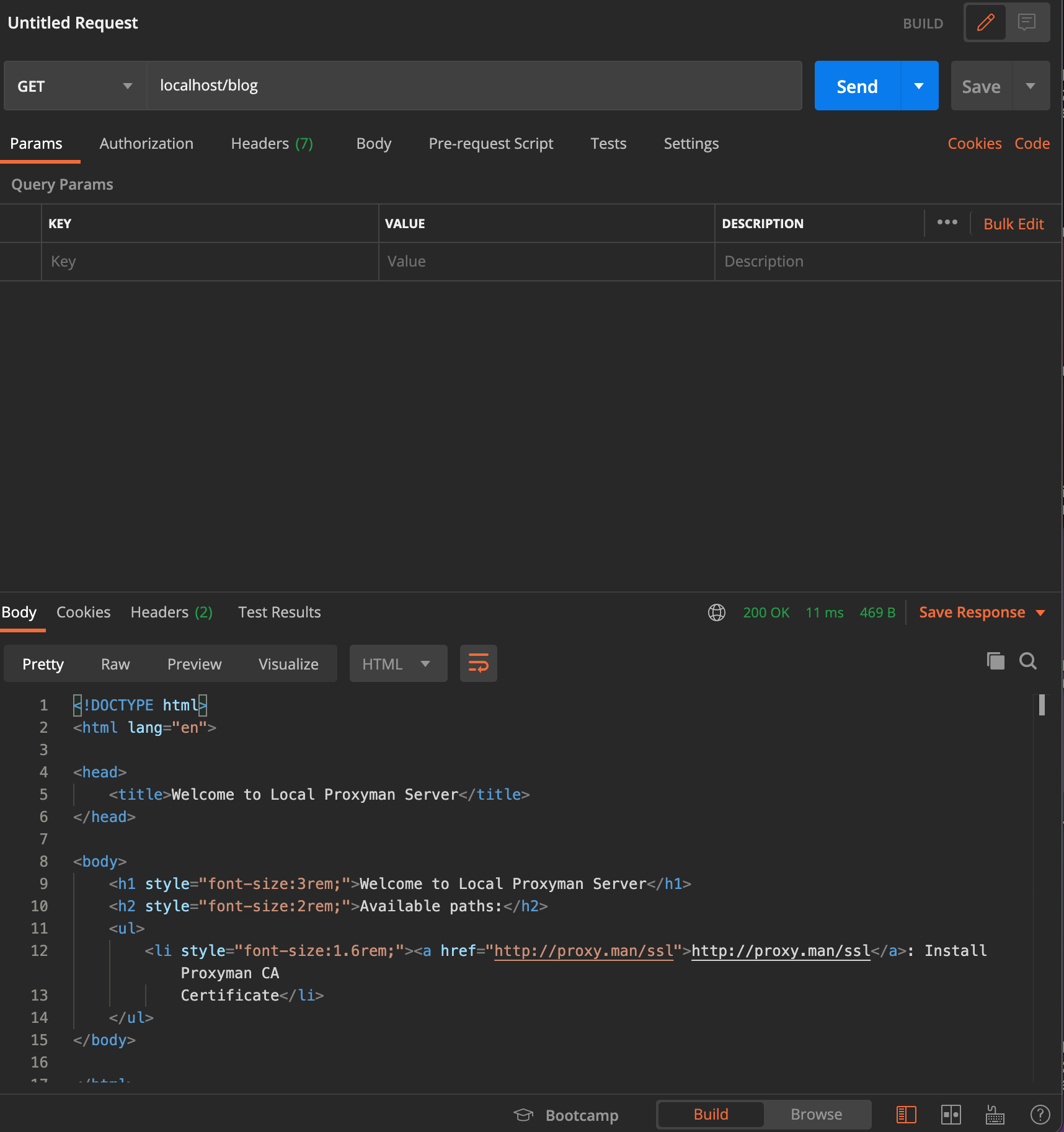
When firing a request with Postman against localhost on the listening port of Proxyman, I see the request in the list, but the mapping is not working. Proxyman returns the Welcome page and that's it.

Originally created by @phhoef on GitHub (Nov 11, 2020). Original GitHub issue: https://github.com/ProxymanApp/Proxyman/issues/683 ### Proxyman version? (Ex. Proxyman 1.4.3) Version 2.12.0 (21200) ### macOS Version? (Ex. mac 10.14) macOS Catalina 10.15.7 ### Steps to reproduce Add remote mapping: Rule: * Method: Any Use Wildcard Map to: any remote host ### Expected behavior all requests are forwarded to the remote host. When firing a request with Postman against localhost on the listening port of Proxyman, I see the request in the list, but the mapping is not working. Proxyman returns the Welcome page and that's it.
Author
Owner

@NghiaTranUIT commented on GitHub (Nov 12, 2020):

Can you verify that if you can see the "X-Proxyman-Map-Remote" key in the Response?

I tested exactly your scenario, but it works fine. I can see this header and the response is from the Remote. Please beware that the URL is still a localhost, but the response is actually from the Remote Server.

Screen Shot 2020-11-12 at 10 11 45 Screen_Shot_2020-11-12_at_10_11_36
<!-- gh-comment-id:725801944 --> @NghiaTranUIT commented on GitHub (Nov 12, 2020): Can you verify that if you can see the "X-Proxyman-Map-Remote" key in the Response? I tested exactly your scenario, but it works fine. I can see this header and the response is from the Remote. Please beware that the URL is still a `localhost`, but the response is actually from the Remote Server. <img width="1120" alt="Screen Shot 2020-11-12 at 10 11 45" src="https://user-images.githubusercontent.com/5878421/98890992-c95bd100-24cf-11eb-9c57-6d7d446ab0e6.png"> <img width="1792" alt="Screen_Shot_2020-11-12_at_10_11_36" src="https://user-images.githubusercontent.com/5878421/98891001-ceb91b80-24cf-11eb-8f40-6600bc1c18c8.png">
Author
Owner

@phhoef commented on GitHub (Nov 14, 2020):

Hallo @NghiaTranUIT, sorry I missed your reply on this thread...
No, I do not see the new header.
Maybe one difference is, that you've enabled "override proxy". I am directly sending the request from postman to Proxyman and I was expecting, that it will be forwarded based on the map-to-remote-rule. Is that assumption wrong?

Please find attached a screenshot.
Bildschirmfoto 2020-11-14 um 09 18 20
Bildschirmfoto 2020-11-14 um 09 19 24
Bildschirmfoto 2020-11-14 um 09 19 31

<!-- gh-comment-id:727166399 --> @phhoef commented on GitHub (Nov 14, 2020): Hallo @NghiaTranUIT, sorry I missed your reply on this thread... No, I do not see the new header. Maybe one difference is, that you've enabled "override proxy". I am directly sending the request from postman to Proxyman and I was expecting, that it will be forwarded based on the map-to-remote-rule. Is that assumption wrong? Please find attached a screenshot. <img width="1081" alt="Bildschirmfoto 2020-11-14 um 09 18 20" src="https://user-images.githubusercontent.com/32458104/99143040-bb868700-265a-11eb-9341-de6c39eb9d97.png"> <img width="1266" alt="Bildschirmfoto 2020-11-14 um 09 19 24" src="https://user-images.githubusercontent.com/32458104/99143043-c04b3b00-265a-11eb-93d3-ac5738ba6054.png"> <img width="858" alt="Bildschirmfoto 2020-11-14 um 09 19 31" src="https://user-images.githubusercontent.com/32458104/99143045-c17c6800-265a-11eb-8a8a-c6c39989bc12.png">
Author
Owner

@NghiaTranUIT commented on GitHub (Nov 15, 2020):

Maybe one difference is, that you've enabled "override proxy". I am directly sending the request from postman to Proxyman and I was expecting, that it will be forwarded based on the map-to-remote-rule. Is that assumption wrong?

It's not related. If I disable the macOS Proxy Overriden and use Postman to send directly to Proxyman. The result is the same.


I see the problem.

You're to map to HTTP (not HTTPS) with port 443.

Since it's invalid (443 is reserved for HTTPS), Proxyman returns "Welcome to Local Proxyman Server", it's our local server to serve the Certificate Key for remote devices (It means, you can install Proxyman Certificate from iOS devices when accessing to http://proxy.man/ssl or http://proxy.man)

I tested to map http://localhost/blog to https://proxyman.io/blog and it works fine 😄

Screen_Shot_2020-11-15_at_09_14_46 Screen Shot 2020-11-15 at 09 14 28
<!-- gh-comment-id:727296778 --> @NghiaTranUIT commented on GitHub (Nov 15, 2020): > Maybe one difference is, that you've enabled "override proxy". I am directly sending the request from postman to Proxyman and I was expecting, that it will be forwarded based on the map-to-remote-rule. Is that assumption wrong? It's not related. If I disable the macOS Proxy Overriden and use Postman to send directly to Proxyman. The result is the same. -------- I see the problem. You're to map to HTTP (not HTTPS) with port 443. Since it's invalid (443 is reserved for HTTPS), Proxyman returns "Welcome to Local Proxyman Server", it's our local server to serve the Certificate Key for remote devices (It means, you can install Proxyman Certificate from iOS devices when accessing to `http://proxy.man/ssl` or `http://proxy.man`) I tested to map `http://localhost/blog` to `https://proxyman.io/blog` and it works fine 😄 <img width="2416" alt="Screen_Shot_2020-11-15_at_09_14_46" src="https://user-images.githubusercontent.com/5878421/99161290-62cef100-2723-11eb-9c2d-e17eed73dc0e.png"> <img width="870" alt="Screen Shot 2020-11-15 at 09 14 28" src="https://user-images.githubusercontent.com/5878421/99161291-6793a500-2723-11eb-8dae-0cdad45edb52.png">
Author
Owner

@NghiaTranUIT commented on GitHub (Nov 15, 2020):

One more thing, the reason why you couldn't see X-Proxyman-Map-Remote from your test, it because of the invalid Map URL (HTTP with port 443), so Local Server handles it, instead of Map Remote Tool 👍

Please change HTTPS and it should work 😄

<!-- gh-comment-id:727296877 --> @NghiaTranUIT commented on GitHub (Nov 15, 2020): One more thing, the reason why you couldn't see X-Proxyman-Map-Remote from your test, it because of the invalid Map URL (HTTP with port 443), so Local Server handles it, instead of Map Remote Tool 👍 Please change HTTPS and it should work 😄
Author
Owner

@phhoef commented on GitHub (Nov 15, 2020):

Thanks for pointing this out and sorry for my mistake.
In the first place, I tried to forward to another server running not on https and I modified the rule for this test. Unfortunately, I misconfigured the remote mapping.

That said, I changed it to https and gave it another try: The result is the same.
Please find the screenshots attached. Do I need to restart proxyman/do anything else to take the changes effect?

Bildschirmfoto 2020-11-15 um 08 47 57 Bildschirmfoto 2020-11-15 um 08 44 32 Bildschirmfoto 2020-11-15 um 08 47 28
<!-- gh-comment-id:727530195 --> @phhoef commented on GitHub (Nov 15, 2020): Thanks for pointing this out and sorry for my mistake. In the first place, I tried to forward to another server running not on https and I modified the rule for this test. Unfortunately, I misconfigured the remote mapping. That said, I changed it to https and gave it another try: The result is the same. Please find the screenshots attached. Do I need to restart proxyman/do anything else to take the changes effect? <img width="1081" alt="Bildschirmfoto 2020-11-15 um 08 47 57" src="https://user-images.githubusercontent.com/32458104/99179558-49c44100-271f-11eb-8b11-3745f3d416c9.png"> <img width="1266" alt="Bildschirmfoto 2020-11-15 um 08 44 32" src="https://user-images.githubusercontent.com/32458104/99179541-2600fb00-271f-11eb-9840-aeac6b6053bc.png"> <img width="861" alt="Bildschirmfoto 2020-11-15 um 08 47 28" src="https://user-images.githubusercontent.com/32458104/99179554-387b3480-271f-11eb-9d50-f5209da7fe81.png">
Author
Owner

@NghiaTranUIT commented on GitHub (Nov 15, 2020):

Thanks. I see the problem. You're listening at port 80, not 9090 or another number that is not 80 or 443

  1. Please go to Preference -> Proxy port -> change to 9090
  2. Open Postman, set Proxy to 9090
Screen Shot 2020-11-15 at 15 24 56 3. Make the same request. The remote Map tool should be applied. 4. I'm able to reproduce your bug if I set port 80.

For the reason why Remote Tools doesn't work port 80 on Proxyman. I have an if statement to redirect the traffic to Proxyman's local server. It's incorrect behavior. I should work in your scenario. I will fix it 👍

<!-- gh-comment-id:727534130 --> @NghiaTranUIT commented on GitHub (Nov 15, 2020): Thanks. I see the problem. You're listening at port `80`, not 9090 or another number that is not 80 or 443 1. Please go to Preference -> Proxy port -> change to 9090 2. Open Postman, set Proxy to 9090 <img width="742" alt="Screen Shot 2020-11-15 at 15 24 56" src="https://user-images.githubusercontent.com/5878421/99180207-e524d880-2756-11eb-8eec-a8db922b3f8e.png"> 3. Make the same request. The remote Map tool should be applied. 4. I'm able to reproduce your bug if I set port 80. -------------- For the reason why Remote Tools doesn't work port 80 on Proxyman. I have an `if` statement to redirect the traffic to Proxyman's local server. It's incorrect behavior. I should work in your scenario. I will fix it 👍
Author
Owner

@phhoef commented on GitHub (Nov 15, 2020):

Can you please explain why port 80 is a problem?
I am not sure, if this is the problem for several reasons:

  • Is see the request incoming to proxyman. So, the routing should be correct. It's working with another reverse proxy tool (Reversee).
  • I switched off the system's proxy setting as I am directly firing my requests against the proxyman server.
  • Using the system's proxy is actually not really a solution for my problem, just for the test scenario we're using.
    I would like to debug requests from an external application arriving on my public ip. The Sophos XG is forwarding it to my local machine/proxyman and I would like to route it to another external server, that actually can handle these requests.

Traffic flow is:
External application --9090--> Sophos XG --80--> proxyman --90--> external server

Great to hear, that you could figure out the problem of the remote mapping :-)

<!-- gh-comment-id:727540153 --> @phhoef commented on GitHub (Nov 15, 2020): Can you please explain why port 80 is a problem? I am not sure, if this is the problem for several reasons: * Is see the request incoming to proxyman. So, the routing should be correct. It's working with another reverse proxy tool (Reversee). * I switched off the system's proxy setting as I am directly firing my requests against the proxyman server. * Using the system's proxy is actually not really a solution for my problem, just for the test scenario we're using. I would like to debug requests from an external application arriving on my public ip. The Sophos XG is forwarding it to my local machine/proxyman and I would like to route it to another external server, that actually can handle these requests. Traffic flow is: `External application --9090--> Sophos XG --80--> proxyman --90--> external server` Great to hear, that you could figure out the problem of the remote mapping :-)
Author
Owner

@NghiaTranUIT commented on GitHub (Nov 15, 2020):

yes, It's a bug 😄 I'm not aware that some users will try to set 80 for a listening port.

I will try to remove this Redirection logic, and send you a build soon. Maybe your problem could be fixed 👍

<!-- gh-comment-id:727544616 --> @NghiaTranUIT commented on GitHub (Nov 15, 2020): yes, It's a bug 😄 I'm not aware that some users will try to set 80 for a listening port. I will try to remove this Redirection logic, and send you a build soon. Maybe your problem could be fixed 👍
Author
Owner

@NghiaTranUIT commented on GitHub (Nov 15, 2020):

You can fix it by

  • Using port 80 as you wish
  • Not using the localhost (in Postman). Please set a alias domain in /ect/host or using 127.0.0.1. It should work 👍
  • Map to a different domain rather than proxyman.io at port 80, since it's reserved for Proxyman local server.
Screen Shot 2020-11-15 at 17 38 29 Screen Shot 2020-11-15 at 17 38 35
<!-- gh-comment-id:727549564 --> @NghiaTranUIT commented on GitHub (Nov 15, 2020): You can fix it by - Using port 80 as you wish - Not using the localhost (in Postman). Please set a alias domain in `/ect/host` or using `127.0.0.1`. It should work 👍 - Map to a different domain rather than proxyman.io at port 80, since it's reserved for Proxyman local server. <img width="2416" alt="Screen Shot 2020-11-15 at 17 38 29" src="https://user-images.githubusercontent.com/5878421/99182770-9d5b7c80-2769-11eb-9f65-b867f07dce05.png"> <img width="1648" alt="Screen Shot 2020-11-15 at 17 38 35" src="https://user-images.githubusercontent.com/5878421/99182777-a64c4e00-2769-11eb-9ff5-2bfd60631629.png">
Author
Owner

@phhoef commented on GitHub (Nov 15, 2020):

Thanks for your help, using 127.0.0.1 in combination with the remote map is working.

<!-- gh-comment-id:727552489 --> @phhoef commented on GitHub (Nov 15, 2020): Thanks for your help, using `127.0.0.1` in combination with the remote map is working.
Sign in to join this conversation.
No milestone
No project
No assignees
1 participant
Notifications
Due date
The due date is invalid or out of range. Please use the format "yyyy-mm-dd".

No due date set.

Dependencies

No dependencies set.

Reference
starred/Proxyman#678
No description provided.