[GH-ISSUE #612] Enable scripts to be implemented in the GUI #610

Open
opened 2026-03-03 19:20:19 +03:00 by kerem · 8 comments
Owner

Originally created by @StanFaas on GitHub (Sep 3, 2020).
Original GitHub issue: https://github.com/ProxymanApp/Proxyman/issues/612

Originally assigned to: @NghiaTranUIT on GitHub.

Proxyman version? (Ex. Proxyman 1.4.3)

2.5.3 (20530)

macOS Version? (Ex. mac 10.14)

10.15.6

Feature request

Instead of only replacing/adding to requests and responses, it would be nice to inspect them respectively and show the result in a pane that is attached to the GUI.
For example, if I write a plugin that is observing the requests and responses for a regex pattern and the person that uses my script changes the const pattern = "" to const pattern = "*file*", it would be nice to have every occurrence reflected in the GUI for fast assessment of the target.

My main purpose for using a proxy is security testing, so finding and reflecting certain patterns in the GUI would be very useful for me.

I hope I provided you with enough information to understand what I mean. If not, let me know and I'll elaborate.

Thanks for this amazing product, keep on going!

-Stan

Originally created by @StanFaas on GitHub (Sep 3, 2020). Original GitHub issue: https://github.com/ProxymanApp/Proxyman/issues/612 Originally assigned to: @NghiaTranUIT on GitHub. ### Proxyman version? (Ex. Proxyman 1.4.3) 2.5.3 (20530) ### macOS Version? (Ex. mac 10.14) 10.15.6 ### Feature request Instead of only replacing/adding to requests and responses, it would be nice to inspect them respectively and show the result in a pane that is attached to the GUI. For example, if I write a plugin that is observing the requests and responses for a regex pattern and the person that uses my script changes the `const pattern = ""` to `const pattern = "*file*"`, it would be nice to have every occurrence reflected in the GUI for fast assessment of the target. My main purpose for using a proxy is security testing, so finding and reflecting certain patterns in the GUI would be very useful for me. I hope I provided you with enough information to understand what I mean. If not, let me know and I'll elaborate. Thanks for this amazing product, keep on going! -Stan
Author
Owner

@NghiaTranUIT commented on GitHub (Sep 3, 2020):

Hi, I re-read your explanation couple time but I'm still not sure what should I do 🤔

Do you mean that you need to filter out the flow with regex quickly? Then it's possible in the Secondary Filter Panel

Screen Shot 2020-09-03 at 19 48 01
<!-- gh-comment-id:686465827 --> @NghiaTranUIT commented on GitHub (Sep 3, 2020): Hi, I re-read your explanation couple time but I'm still not sure what should I do 🤔 Do you mean that you need to filter out the flow with regex quickly? Then it's possible in the Secondary Filter Panel <img width="497" alt="Screen Shot 2020-09-03 at 19 48 01" src="https://user-images.githubusercontent.com/5878421/92116719-650cf900-ee1e-11ea-9491-c78e3cf07ff3.png">
Author
Owner

@StanFaas commented on GitHub (Sep 3, 2020):

Sorry it was a little bit of a short introduction to what I'd like to be implemented.
So coming from Burp Suite Pro, I'd basically like to have a feature where users can write scripts that can have their own part in the GUI. Where the script dictates what the use sees and what they can do with the requests and responses based on certain parameters given to the script.
The example that I provided can be very well done with the current filter functionality, but I'm more looking for a way to have the less tech savvy users have a way to give input to the script/plugin so that they also can use it and also have the output of the plugin be reflected in the GUI. So that they can easily read it and take action on it accordingly.
With this I think you're providing a user friendly way of using plugins and scripts to be implemented.

<!-- gh-comment-id:686470548 --> @StanFaas commented on GitHub (Sep 3, 2020): Sorry it was a little bit of a short introduction to what I'd like to be implemented. So coming from Burp Suite Pro, I'd basically like to have a feature where users can write scripts that can have their own part in the GUI. Where the script dictates what the use sees and what they can do with the requests and responses based on certain parameters given to the script. The example that I provided can be very well done with the current filter functionality, but I'm more looking for a way to have the less tech savvy users have a way to give input to the script/plugin so that they also can use it and also have the output of the plugin be reflected in the GUI. So that they can easily read it and take action on it accordingly. With this I think you're providing a user friendly way of using plugins and scripts to be implemented.
Author
Owner

@NghiaTranUIT commented on GitHub (Sep 3, 2020):

I might understand your mean, but I'd be great if you can share with me the screenshot of this feature that you used to use on Burp Suite Pro 😄

<!-- gh-comment-id:686472290 --> @NghiaTranUIT commented on GitHub (Sep 3, 2020): I might understand your mean, but I'd be great if you can share with me the screenshot of this feature that you used to use on Burp Suite Pro 😄
Author
Owner

@StanFaas commented on GitHub (Sep 3, 2020):

Yes sure :-)
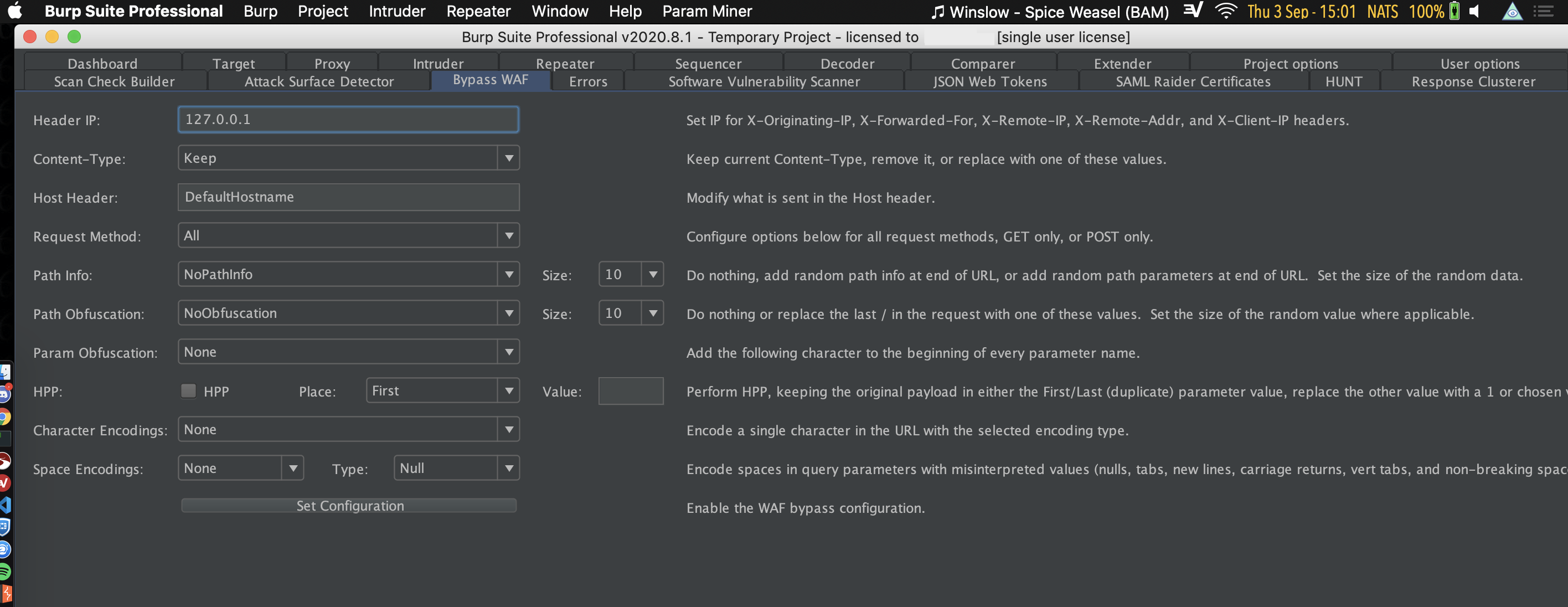
burp-extension-example
So for example, here is a extension that is activated for my Burp Suite Pro session. It has parameters that I can change as a user and will use those parameters in my requests. In this specific case I can try and bypass certain WAFs (not relevant) because the code is now using the parameters that I've changed in the requests that I do.
Because of this extra view, the user only has to go to the GUI and change some input fields, and the script (in the background) will use those user defined variables to alter the requests or responses. I hope that's a clear explanation. If not, let me know :-)

<!-- gh-comment-id:686475632 --> @StanFaas commented on GitHub (Sep 3, 2020): Yes sure :-) <img width="1416" alt="burp-extension-example" src="https://user-images.githubusercontent.com/20415276/92118216-76daa600-edf6-11ea-8907-860cb0e80199.png"> So for example, here is a extension that is activated for my Burp Suite Pro session. It has parameters that I can change as a user and will use those parameters in my requests. In this specific case I can try and bypass certain WAFs (not relevant) because the code is now using the parameters that I've changed in the requests that I do. Because of this extra view, the user only has to go to the GUI and change some input fields, and the script (in the background) will use those user defined variables to alter the requests or responses. I hope that's a clear explanation. If not, let me know :-)
Author
Owner

@NghiaTranUIT commented on GitHub (Sep 3, 2020):

I see. I suppose the Environment Variables feature could solve your case.

For instance, in your script, you have

func onRequest() {
    const regex = {{ regex_variable }}
    ......
}

Then, less savvy users can open Environment Variable Window as a GUI, the can edit the value on the TextField instead of editing directly in the script.

Does it sound good? 🤔

<!-- gh-comment-id:686483247 --> @NghiaTranUIT commented on GitHub (Sep 3, 2020): I see. I suppose the Environment Variables feature could solve your case. For instance, in your script, you have ```js func onRequest() { const regex = {{ regex_variable }} ...... } ``` Then, less savvy users can open Environment Variable Window as a GUI, the can edit the value on the TextField instead of editing directly in the script. Does it sound good? 🤔
Author
Owner

@StanFaas commented on GitHub (Sep 3, 2020):

Yes for the settings part that would be awesome!
However another part of this request is also to get back results in the GUI for easy assessment.
An example of this would be like the below screenshot:
burp-response-assessment

In the above example, the script is gathering responses that match the variables that the user wants to get back and displays them in the GUI. So that the user can assess them and act upon those.
What do you think?

<!-- gh-comment-id:686489689 --> @StanFaas commented on GitHub (Sep 3, 2020): Yes for the settings part that would be awesome! However another part of this request is also to get back results in the GUI for easy assessment. An example of this would be like the below screenshot: <img width="1392" alt="burp-response-assessment" src="https://user-images.githubusercontent.com/20415276/92120701-ab9c2c80-edf9-11ea-9721-191adbbd5716.png"> In the above example, the script is gathering responses that match the variables that the user wants to get back and displays them in the GUI. So that the user can assess them and act upon those. What do you think?
Author
Owner

@NghiaTranUIT commented on GitHub (Sep 3, 2020):

Thanks for all screenshot. I now understand what you mean in the first place 😄 I will push this out after the Environment Variables feature is released 👍

<!-- gh-comment-id:686502279 --> @NghiaTranUIT commented on GitHub (Sep 3, 2020): Thanks for all screenshot. I now understand what you mean in the first place 😄 I will push this out after the Environment Variables feature is released 👍
Author
Owner

@StanFaas commented on GitHub (Sep 3, 2020):

Thanks a lot! 👍 I appreciate your patience for my poor explanation 😄

<!-- gh-comment-id:686503628 --> @StanFaas commented on GitHub (Sep 3, 2020): Thanks a lot! 👍 I appreciate your patience for my poor explanation 😄
Sign in to join this conversation.
No milestone
No project
No assignees
1 participant
Notifications
Due date
The due date is invalid or out of range. Please use the format "yyyy-mm-dd".

No due date set.

Dependencies

No dependencies set.

Reference
starred/Proxyman#610
No description provided.