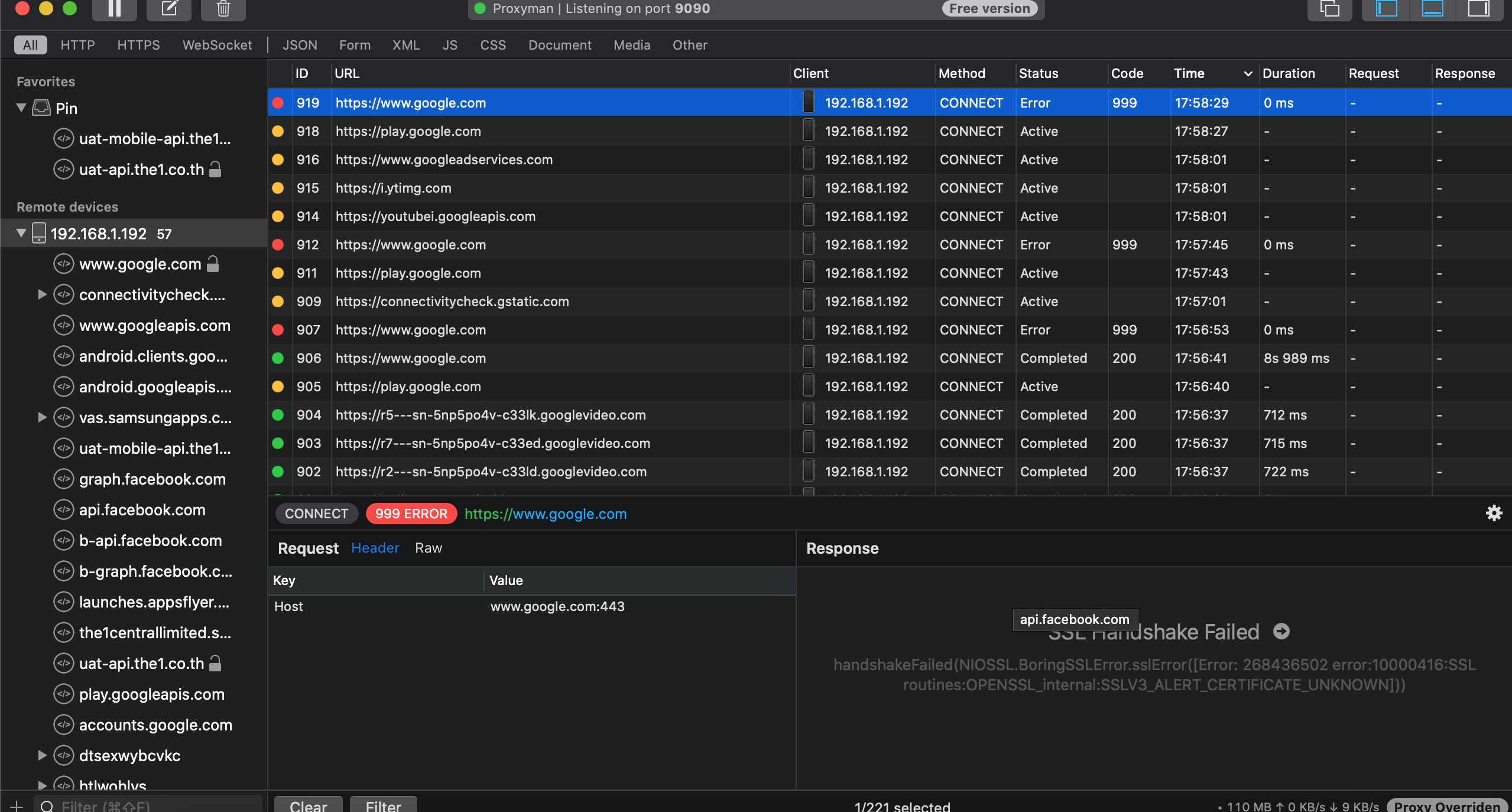
[GH-ISSUE #609] SSL Handshake Failed handshakeFailed (NIOSSL.BoringSSLError.sslError ([Error: 268436502 error: 10000416: SSL routines: OPENSSL_internal: SSLV3_ALERT_CERTIFICATE_UNKNOWN])) #607

Closed
opened 2026-03-03 19:20:17 +03:00 by kerem · 13 comments
Owner

Originally created by @chornerman on GitHub (Aug 31, 2020).
Original GitHub issue: https://github.com/ProxymanApp/Proxyman/issues/609

Proxyman version? (Ex. Proxyman 1.4.3)

2.5.3

macOS Version? (Ex. mac 10.14)

10.15.6

Steps to reproduce

  1. Connect Android device with the same network as laptop (Android device and laptop both have certificate installed, and already set the Wifi proxy, also I already added network_security_config.xml in the manifest file of the application, and it has exact same code as the tutorial)
  2. Open the app that enabled HTTPS response

Expected behavior

Show response correctly with no error

Screenshots (optional)

Screen Shot 2563-08-31 at 16 14 00
Originally created by @chornerman on GitHub (Aug 31, 2020). Original GitHub issue: https://github.com/ProxymanApp/Proxyman/issues/609 ### Proxyman version? (Ex. Proxyman 1.4.3) 2.5.3 ### macOS Version? (Ex. mac 10.14) 10.15.6 ### Steps to reproduce 1. Connect Android device with the same network as laptop (Android device and laptop both have certificate installed, and already set the Wifi proxy, also I already added network_security_config.xml in the manifest file of the application, and it has exact same code as the tutorial) 2. Open the app that enabled HTTPS response ### Expected behavior Show response correctly with no error ### Screenshots (optional) <img width="630" alt="Screen Shot 2563-08-31 at 16 14 00" src="https://user-images.githubusercontent.com/13492460/91703842-0557e900-eba5-11ea-87b1-7a5da05f6db4.png">
kerem 2026-03-03 19:20:17 +03:00
Author
Owner

@NghiaTranUIT commented on GitHub (Aug 31, 2020):

Hi @chornerman, can you help me to verify that you've config in res/xml/network_security_config.xml and manifest.xml? Step 3-4 in Android Doc https://docs.proxyman.io/debug-devices/android-device 🤔

and make sure that it's your Android app, since it's impossible to intercept the HTTPS Traffic from apps that you don't control

<!-- gh-comment-id:683665987 --> @NghiaTranUIT commented on GitHub (Aug 31, 2020): Hi @chornerman, can you help me to verify that you've config in res/xml/network_security_config.xml and manifest.xml? Step 3-4 in Android Doc https://docs.proxyman.io/debug-devices/android-device 🤔 and make sure that it's your Android app, since it's impossible to intercept the HTTPS Traffic from apps that you don't control
Author
Owner

@chornerman commented on GitHub (Aug 31, 2020):

Thanks, @NghiaTranUIT for a really fast reply 🙏
Here is my network_security_config.xml code

<?xml version="1.0" encoding="utf-8"?>
<network-security-config>
    <base-config cleartextTrafficPermitted="true">
        <trust-anchors>
            <certificates src="system" />
        </trust-anchors>
    </base-config>

    <domain-config>
        <domain includeSubdomains="true">some_url
        </domain>
        <trust-anchors>
            <certificates src="user" />
            <certificates src="system" />
        </trust-anchors>
    </domain-config>
</network-security-config>

and I added this line to the manifest inside the application tag

android:networkSecurityConfig="@xml/network_security_config"

<!-- gh-comment-id:683667798 --> @chornerman commented on GitHub (Aug 31, 2020): Thanks, @NghiaTranUIT for a really fast reply 🙏 Here is my `network_security_config.xml `code ``` <?xml version="1.0" encoding="utf-8"?> <network-security-config> <base-config cleartextTrafficPermitted="true"> <trust-anchors> <certificates src="system" /> </trust-anchors> </base-config> <domain-config> <domain includeSubdomains="true">some_url </domain> <trust-anchors> <certificates src="user" /> <certificates src="system" /> </trust-anchors> </domain-config> </network-security-config> ``` and I added this line to the manifest inside the application tag `android:networkSecurityConfig="@xml/network_security_config"`
Author
Owner

@NghiaTranUIT commented on GitHub (Aug 31, 2020):

Hi, there are many reasons why you might not intercept from your Android:

  1. Look like you're missing network-security-config tag. From your code, it only has base-config and domain-config. You can checkout the Android Doc
<network-security-config>
    <debug-overrides>
        <trust-anchors>
            <!-- Trust user added CAs while debuggable only -->
            <certificates src="user" />
            <certificates src="system" />
        </trust-anchors>
    </debug-overrides>
</network-security-config>
  1. Is your app using SSL-Pining? If yes, please disable it.
<!-- gh-comment-id:683673823 --> @NghiaTranUIT commented on GitHub (Aug 31, 2020): Hi, there are many reasons why you might not intercept from your Android: 1. Look like you're missing `network-security-config` tag. From your code, it only has `base-config` and `domain-config`. You can checkout the Android Doc ```xml <network-security-config> <debug-overrides> <trust-anchors> <!-- Trust user added CAs while debuggable only --> <certificates src="user" /> <certificates src="system" /> </trust-anchors> </debug-overrides> </network-security-config> ``` 2. Is your app using SSL-Pining? If yes, please disable it.
Author
Owner

@chornerman commented on GitHub (Aug 31, 2020):

Now my network-security-config code looks like this

<?xml version="1.0" encoding="utf-8"?>
<network-security-config>
    <debug-overrides>
        <trust-anchors>
            <!-- Trust user added CAs while debuggable only -->
            <certificates src="user" />
            <certificates src="system" />
        </trust-anchors>
    </debug-overrides>

    <base-config cleartextTrafficPermitted="true">
        <trust-anchors>
            <certificates src="system" />
        </trust-anchors>
    </base-config>

    <domain-config>
        <domain includeSubdomains="true">some_url
        </domain>
        <trust-anchors>
            <certificates src="user" />
            <certificates src="system" />
        </trust-anchors>
    </domain-config>
</network-security-config>

and it's still doesn't work 😢

<!-- gh-comment-id:683677818 --> @chornerman commented on GitHub (Aug 31, 2020): Now my `network-security-config` code looks like this ``` <?xml version="1.0" encoding="utf-8"?> <network-security-config> <debug-overrides> <trust-anchors> <!-- Trust user added CAs while debuggable only --> <certificates src="user" /> <certificates src="system" /> </trust-anchors> </debug-overrides> <base-config cleartextTrafficPermitted="true"> <trust-anchors> <certificates src="system" /> </trust-anchors> </base-config> <domain-config> <domain includeSubdomains="true">some_url </domain> <trust-anchors> <certificates src="user" /> <certificates src="system" /> </trust-anchors> </domain-config> </network-security-config> ``` and it's still doesn't work 😢
Author
Owner

@NghiaTranUIT commented on GitHub (Aug 31, 2020):

Can you share with me what the Android emulator is? and the Android Version. I would like to download and try to reproduce in my machine 😄

I will send you a sample Android project that works, then you can reapplying in your project 👍

<!-- gh-comment-id:683678520 --> @NghiaTranUIT commented on GitHub (Aug 31, 2020): Can you share with me what the Android emulator is? and the Android Version. I would like to download and try to reproduce in my machine 😄 I will send you a sample Android project that works, then you can reapplying in your project 👍
Author
Owner

@chornerman commented on GitHub (Aug 31, 2020):

I use a physical device, Samsung Galaxy S10e with Android 10
I also try with Xioami Redmi Note 7 Android 10 as well and got the same problem

<!-- gh-comment-id:683679484 --> @chornerman commented on GitHub (Aug 31, 2020): I use a physical device, Samsung Galaxy S10e with Android 10 I also try with Xioami Redmi Note 7 Android 10 as well and got the same problem
Author
Owner

@NghiaTranUIT commented on GitHub (Aug 31, 2020):

I checked Pixel XL Emulator (Android Studio) with Android 29, and it worked fine. I'm able to see the traffic from https://www.google.com

Screen Shot 2020-08-31 at 16 56 26

Config

  • Set Proxy in Wifi Setting
  • open proxy.man/ssl in Google Chrome and install the certifciate
  • res/xml/network_security_config.xml
<?xml version="1.0" encoding="utf-8"?>
<network-security-config>
    <!--Set application-wide security config using base-config tag.-->
    <!--Set domain-specific security config using domain-config tags. -->
    <!--See https://developer.android.com/training/articles/security-config.html for more information.-->
    <debug-overrides>
        <trust-anchors>
            <!-- Trust user added CAs while debuggable only -->
            <certificates src="system" />
            <certificates src="user" />
        </trust-anchors>
    </debug-overrides>
    <base-config cleartextTrafficPermitted="true">
        <trust-anchors>
            <certificates src="system" />
        </trust-anchors>
    </base-config>

    <domain-config>
        <domain includeSubdomains="true">www.google.com</domain>
        <trust-anchors>
            <certificates src="user"/>
            <certificates src="system"/>
        </trust-anchors>
    </domain-config>
</network-security-config>
  • manifest.xml
<manifest
    xmlns:android="http://schemas.android.com/apk/res/android"
    package="com.example.android.networkconnect"
    android:versionCode="1"
    android:versionName="1.0">

    <!-- Min/target SDK versions (<uses-sdk>) managed by build.gradle -->
    <uses-permission android:name="android.permission.INTERNET" />
    <uses-permission android:name="android.permission.ACCESS_NETWORK_STATE" />

    <application
        android:label="@string/app_name"
        android:icon="@drawable/ic_launcher"
        android:theme="@style/Theme.Sample"
        android:allowBackup="true"
        android:networkSecurityConfig="@xml/network_security_config">
        <activity
            android:name="com.example.android.networkconnect.MainActivity"
            android:label="@string/app_name"
            android:uiOptions="splitActionBarWhenNarrow">

            <intent-filter>
                <action android:name="android.intent.action.MAIN" />
                <category android:name="android.intent.category.LAUNCHER" />
            </intent-filter>
        </activity>
    </application>
</manifest>

Can you try to run this project on your physical device?

<!-- gh-comment-id:683685837 --> @NghiaTranUIT commented on GitHub (Aug 31, 2020): I checked Pixel XL Emulator (Android Studio) with Android 29, and it worked fine. I'm able to see the traffic from `https://www.google.com` <img width="1678" alt="Screen Shot 2020-08-31 at 16 56 26" src="https://user-images.githubusercontent.com/5878421/91708117-0db32280-ebab-11ea-9e3d-f5dd1c0dce3d.png"> ------------------ ### Config - Set Proxy in Wifi Setting - open `proxy.man/ssl` in Google Chrome and install the certifciate - res/xml/network_security_config.xml ```xml <?xml version="1.0" encoding="utf-8"?> <network-security-config> <!--Set application-wide security config using base-config tag.--> <!--Set domain-specific security config using domain-config tags. --> <!--See https://developer.android.com/training/articles/security-config.html for more information.--> <debug-overrides> <trust-anchors> <!-- Trust user added CAs while debuggable only --> <certificates src="system" /> <certificates src="user" /> </trust-anchors> </debug-overrides> <base-config cleartextTrafficPermitted="true"> <trust-anchors> <certificates src="system" /> </trust-anchors> </base-config> <domain-config> <domain includeSubdomains="true">www.google.com</domain> <trust-anchors> <certificates src="user"/> <certificates src="system"/> </trust-anchors> </domain-config> </network-security-config> ``` - manifest.xml ```xml <manifest xmlns:android="http://schemas.android.com/apk/res/android" package="com.example.android.networkconnect" android:versionCode="1" android:versionName="1.0"> <!-- Min/target SDK versions (<uses-sdk>) managed by build.gradle --> <uses-permission android:name="android.permission.INTERNET" /> <uses-permission android:name="android.permission.ACCESS_NETWORK_STATE" /> <application android:label="@string/app_name" android:icon="@drawable/ic_launcher" android:theme="@style/Theme.Sample" android:allowBackup="true" android:networkSecurityConfig="@xml/network_security_config"> <activity android:name="com.example.android.networkconnect.MainActivity" android:label="@string/app_name" android:uiOptions="splitActionBarWhenNarrow"> <intent-filter> <action android:name="android.intent.action.MAIN" /> <category android:name="android.intent.category.LAUNCHER" /> </intent-filter> </activity> </application> </manifest> ``` - Download Project: [NetworkConnect.zip](https://github.com/ProxymanApp/Proxyman/files/5149670/NetworkConnect.zip) ---------- Can you try to run this project on your physical device?
Author
Owner

@chornerman commented on GitHub (Aug 31, 2020):

Sorry for a late response, it's not work either
Screen Shot 2563-08-31 at 18 00 21

<!-- gh-comment-id:683709819 --> @chornerman commented on GitHub (Aug 31, 2020): Sorry for a late response, it's not work either <img width="1279" alt="Screen Shot 2563-08-31 at 18 00 21" src="https://user-images.githubusercontent.com/13492460/91713379-de54e380-ebb3-11ea-8260-57ecc16b2a43.png">
Author
Owner

@NghiaTranUIT commented on GitHub (Sep 1, 2020):

That's strange. I'm not sure what causes the bug on your Samsung machine 🤔

Can you try to run your project on Android Studio? and Do you app have SSL-Pining?

<!-- gh-comment-id:684482613 --> @NghiaTranUIT commented on GitHub (Sep 1, 2020): That's strange. I'm not sure what causes the bug on your Samsung machine 🤔 Can you try to run your project on Android Studio? and Do you app have SSL-Pining?
Author
Owner

@chornerman commented on GitHub (Sep 1, 2020):

Yes, I can run it on Android Studio and the app doesn't have SSL-Pinning

<!-- gh-comment-id:684557950 --> @chornerman commented on GitHub (Sep 1, 2020): Yes, I can run it on Android Studio and the app doesn't have SSL-Pinning
Author
Owner

@NghiaTranUIT commented on GitHub (Sep 1, 2020):

so I'm not sure how to fix it since it works fine in your Android Emulator. Maybe Samsung devices need extra steps in order to trust Proxyman Certificate 🤔

The error means that your device doesn't trust the Proxyman Certificate.

<!-- gh-comment-id:684584894 --> @NghiaTranUIT commented on GitHub (Sep 1, 2020): so I'm not sure how to fix it since it works fine in your Android Emulator. Maybe Samsung devices need extra steps in order to trust Proxyman Certificate 🤔 The error means that your device doesn't trust the Proxyman Certificate.
Author
Owner

@chornerman commented on GitHub (Sep 1, 2020):

I try reinstalling the certification on my Samsung device and it's work as expected this time.
Thank you @NghiaTranUIT 😄

<!-- gh-comment-id:684615072 --> @chornerman commented on GitHub (Sep 1, 2020): I try reinstalling the certification on my Samsung device and it's work as expected this time. Thank you @NghiaTranUIT 😄
Author
Owner

@NghiaTranUIT commented on GitHub (Sep 1, 2020):

Happy coding 🙌

<!-- gh-comment-id:684616782 --> @NghiaTranUIT commented on GitHub (Sep 1, 2020): Happy coding 🙌
Sign in to join this conversation.
No milestone
No project
No assignees
1 participant
Notifications
Due date
The due date is invalid or out of range. Please use the format "yyyy-mm-dd".

No due date set.

Dependencies

No dependencies set.

Reference
starred/Proxyman#607
No description provided.