[GH-ISSUE #451] Can't get map remote to work #446

Open
opened 2026-03-03 19:18:52 +03:00 by kerem · 7 comments
Owner

Originally created by @josh-burton on GitHub (Mar 25, 2020).
Original GitHub issue: https://github.com/ProxymanApp/Proxyman/issues/451

Originally assigned to: @NghiaTranUIT on GitHub.

Proxyman version?

1.19.0

macOS Version?

10.15.3

Steps to reproduce

Try to map remote a request from an IP address, e.g. http://10.1.2.3:8080/path/here

The map remote simply has no effect. This does work on Charles proxy fine.

Expected behavior

The request can be mapped to a different remote address

Screenshots (optional)

Originally created by @josh-burton on GitHub (Mar 25, 2020). Original GitHub issue: https://github.com/ProxymanApp/Proxyman/issues/451 Originally assigned to: @NghiaTranUIT on GitHub. ### Proxyman version? 1.19.0 ### macOS Version? 10.15.3 ### Steps to reproduce Try to map remote a request from an IP address, e.g. http://10.1.2.3:8080/path/here The map remote simply has no effect. This does work on Charles proxy fine. ### Expected behavior The request can be mapped to a different remote address ### Screenshots (optional)
Author
Owner

@NghiaTranUIT commented on GitHub (Mar 26, 2020):

Hey @athornz , can you elaborate? Because I couldn't reproduce the bug 🤔

  1. is http://10.1.2.3:8080 valid URL or invalid URL for testing?
  2. What's your Map Remote config?

Here is my testing scenario:

  1. Make a request from to localhost server (http://localhost:3000) and select Map Remote
    Screen Shot 2020-03-26 at 08 59 14

  2. Config the Remote server, which is my production endpoint
    Screen Shot 2020-03-26 at 08 59 40

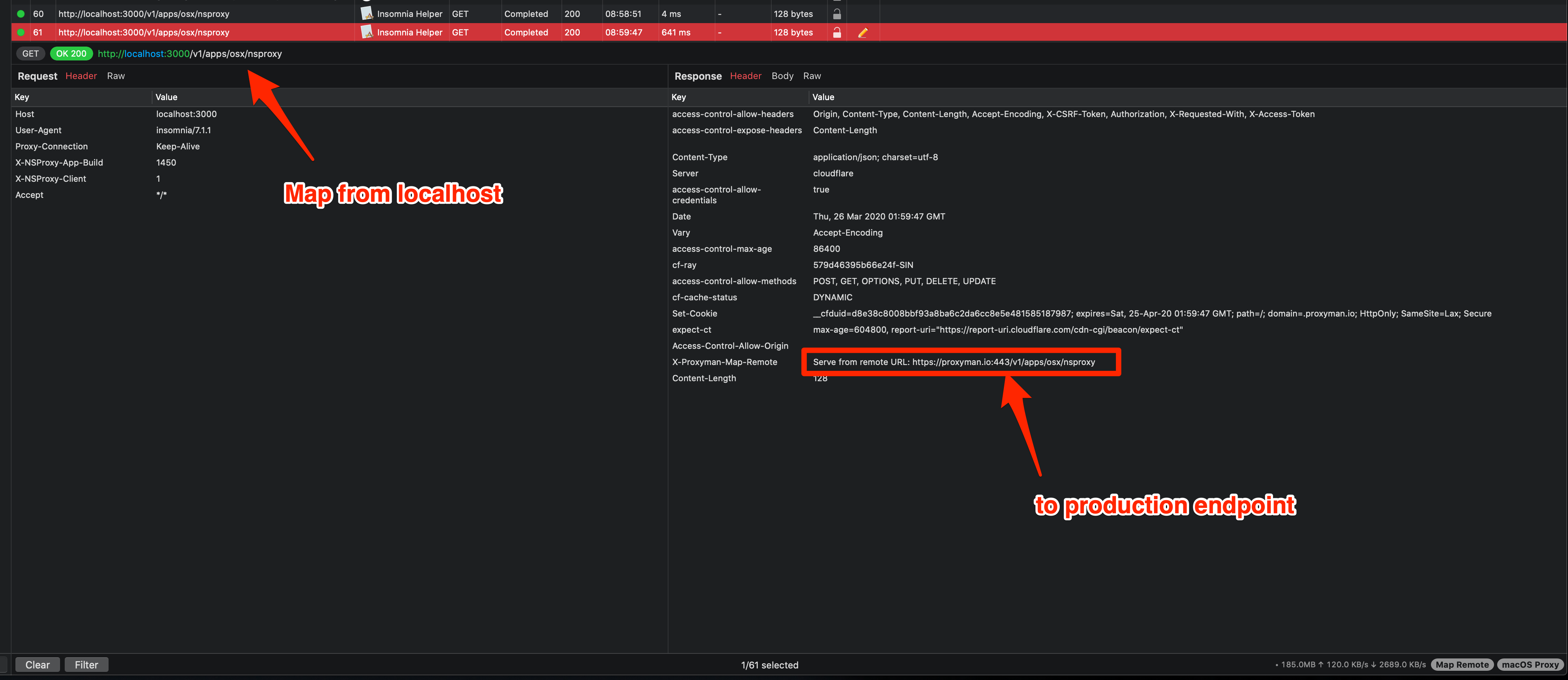
  3. Check the result, the response is now severed from the production.
    Screen_Shot_2020-03-26_at_08_59_56

Result: It works as expected

<!-- gh-comment-id:604185889 --> @NghiaTranUIT commented on GitHub (Mar 26, 2020): Hey @athornz , can you elaborate? Because I couldn't reproduce the bug 🤔 1. is `http://10.1.2.3:8080` valid URL or invalid URL for testing? 2. What's your Map Remote config? Here is my testing scenario: 1. Make a request from to localhost server (http://localhost:3000) and select Map Remote <img width="1251" alt="Screen Shot 2020-03-26 at 08 59 14" src="https://user-images.githubusercontent.com/5878421/77602608-77fed180-6f40-11ea-88d7-013c31eecce2.png"> 2. Config the Remote server, which is my production endpoint <img width="1648" alt="Screen Shot 2020-03-26 at 08 59 40" src="https://user-images.githubusercontent.com/5878421/77602685-a381bc00-6f40-11ea-9d78-b5c0abcf82c4.png"> 3. Check the result, the response is now severed from the production. <img width="2036" alt="Screen_Shot_2020-03-26_at_08_59_56" src="https://user-images.githubusercontent.com/5878421/77602731-c6ac6b80-6f40-11ea-88ce-9a72499c9ad9.png"> **Result**: It works as expected
Author
Owner

@mhstnsc commented on GitHub (Jul 8, 2020):

i also have issues on macos. I mapped localhost to mylocalhost.com

I want to redirect just the path so from

mylocalhost.com:3000/api/bla to mylocalhost.com:4000/api/bla

The port 3000 is already taken by service. I can see proxyman adding the header but it does not really do the request so i get a 404

<!-- gh-comment-id:655366075 --> @mhstnsc commented on GitHub (Jul 8, 2020): i also have issues on macos. I mapped localhost to mylocalhost.com I want to redirect just the path so from mylocalhost.com:3000/api/bla to mylocalhost.com:4000/api/bla The port 3000 is already taken by service. I can see proxyman adding the header but it does not really do the request so i get a 404
Author
Owner

@NghiaTranUIT commented on GitHub (Jul 8, 2020):

Thanks for the report. Can you confirm which Proxyman version are you using @mhstnsc?

<!-- gh-comment-id:655391413 --> @NghiaTranUIT commented on GitHub (Jul 8, 2020): Thanks for the report. Can you confirm which Proxyman version are you using @mhstnsc?
Author
Owner

@mhstnsc commented on GitHub (Jul 8, 2020):

Version 2.1.1 (20110) Free version

<!-- gh-comment-id:655396021 --> @mhstnsc commented on GitHub (Jul 8, 2020): Version 2.1.1 (20110) Free version
Author
Owner

@mhstnsc commented on GitHub (Jul 8, 2020):

I run in debug mode. What are these strange hostnames?

❌[ERROR] outChannel connect failure:NIOConnectionError(host: "ttacqwthcfn", port: 80, dnsAError: Optional(NIO.SocketAddressError.unknown(host: "ttacqwthcfn", port: 80)), dnsAAAAError: Optional(NIO.SocketAddressError.unknown(host: "ttacqwthcfn", port: 80)), connectionErrors: [])
❌[ERROR] outChannel connect failure:NIOConnectionError(host: "sygwwoakkjprlp", port: 80, dnsAError: Optional(NIO.SocketAddressError.unknown(host: "sygwwoakkjprlp", port: 80)), dnsAAAAError: Optional(NIO.SocketAddressError.unknown(host: "sygwwoakkjprlp", port: 80)), connectionErrors: [])
❌[ERROR] outChannel connect failure:NIOConnectionError(host: "uzrwltpzkgcvzs", port: 80, dnsAError: Optional(NIO.SocketAddressError.unknown(host: "uzrwltpzkgcvzs", port: 80)), dnsAAAAError: Optional(NIO.SocketAddressError.unknown(host: "uzrwltpzkgcvzs", port: 80)), connectionErrors: [])
<!-- gh-comment-id:655397882 --> @mhstnsc commented on GitHub (Jul 8, 2020): I run in debug mode. What are these strange hostnames? ``` ❌[ERROR] outChannel connect failure:NIOConnectionError(host: "ttacqwthcfn", port: 80, dnsAError: Optional(NIO.SocketAddressError.unknown(host: "ttacqwthcfn", port: 80)), dnsAAAAError: Optional(NIO.SocketAddressError.unknown(host: "ttacqwthcfn", port: 80)), connectionErrors: []) ❌[ERROR] outChannel connect failure:NIOConnectionError(host: "sygwwoakkjprlp", port: 80, dnsAError: Optional(NIO.SocketAddressError.unknown(host: "sygwwoakkjprlp", port: 80)), dnsAAAAError: Optional(NIO.SocketAddressError.unknown(host: "sygwwoakkjprlp", port: 80)), connectionErrors: []) ❌[ERROR] outChannel connect failure:NIOConnectionError(host: "uzrwltpzkgcvzs", port: 80, dnsAError: Optional(NIO.SocketAddressError.unknown(host: "uzrwltpzkgcvzs", port: 80)), dnsAAAAError: Optional(NIO.SocketAddressError.unknown(host: "uzrwltpzkgcvzs", port: 80)), connectionErrors: []) ```
Author
Owner

@NghiaTranUIT commented on GitHub (Jul 8, 2020):

It's definitely not from Proxyman. Can you double-check which client that those requests come from?

<!-- gh-comment-id:655398999 --> @NghiaTranUIT commented on GitHub (Jul 8, 2020): It's definitely not from Proxyman. Can you double-check which client that those requests come from?
Author
Owner

@NghiaTranUIT commented on GitHub (Jul 8, 2020):

I tried to reproduce but no luck. It still works as expected

Remote Map from http://localhost:3000/v1/apps/osx/nsproxy to http://proxyman.dev:4000/v1/apps/osx/nsproxy

Screen Shot 2020-07-08 at 16 39 12 Screen_Shot_2020-07-08_at_16_39_38

@mhstnsc Can you share with me how you config the Map Remote?

If you get the X-Proxyman-Map-Remote, can you verify that it's correct by executing curl -v <X-Proxyman-Map-Remote-Path-Here> to see the actual result

<!-- gh-comment-id:655415331 --> @NghiaTranUIT commented on GitHub (Jul 8, 2020): I tried to reproduce but no luck. It still works as expected Remote Map from `http://localhost:3000/v1/apps/osx/nsproxy` to `http://proxyman.dev:4000/v1/apps/osx/nsproxy` <img width="1648" alt="Screen Shot 2020-07-08 at 16 39 12" src="https://user-images.githubusercontent.com/5878421/86903633-d0e22680-c139-11ea-8d00-12873dbdee93.png"> <img width="2032" alt="Screen_Shot_2020-07-08_at_16_39_38" src="https://user-images.githubusercontent.com/5878421/86904372-d3914b80-c13a-11ea-910a-969ff2b5e026.png"> @mhstnsc Can you share with me how you config the Map Remote? If you get the `X-Proxyman-Map-Remote`, can you verify that it's correct by executing `curl -v <X-Proxyman-Map-Remote-Path-Here>` to see the actual result
Sign in to join this conversation.
No milestone
No project
No assignees
1 participant
Notifications
Due date
The due date is invalid or out of range. Please use the format "yyyy-mm-dd".

No due date set.

Dependencies

No dependencies set.

Reference
starred/Proxyman#446
No description provided.