[GH-ISSUE #447] Reverse proxy #444

Open
opened 2026-03-03 19:18:50 +03:00 by kerem · 23 comments
Owner

Originally created by @hauleth on GitHub (Mar 23, 2020).
Original GitHub issue: https://github.com/ProxymanApp/Proxyman/issues/447

Originally assigned to: @NghiaTranUIT on GitHub.

Recently I needed to capture requests coming from application that bypasses proxy and instead I wanted to transparently capture and log all requests. In the end I have used mitmproxy in reverse mode. I can see how such feature could be useful in Proxyman as well.

Originally created by @hauleth on GitHub (Mar 23, 2020). Original GitHub issue: https://github.com/ProxymanApp/Proxyman/issues/447 Originally assigned to: @NghiaTranUIT on GitHub. Recently I needed to capture requests coming from application that bypasses proxy and instead I wanted to transparently capture and log all requests. In the end I have used [mitmproxy in reverse mode](https://docs.mitmproxy.org/stable/concepts-modes/#reverse-proxy). I can see how such feature could be useful in Proxyman as well.
Author
Owner

@NghiaTranUIT commented on GitHub (Mar 24, 2020):

Hey, Thanks for this feature request.

I did a little research on what the reverse Proxy is and how to implement it. By the end, It's possible to support it and it's slightly similar to what I did on Map Remote tool. I will support it in the next couple releases after a multiple filters feature 👍

<!-- gh-comment-id:602958974 --> @NghiaTranUIT commented on GitHub (Mar 24, 2020): Hey, Thanks for this feature request. I did a little research on what the reverse Proxy is and how to implement it. By the end, It's possible to support it and it's slightly similar to what I did on Map Remote tool. I will support it in the next couple releases after a multiple filters feature 👍
Author
Owner

@NghiaTranUIT commented on GitHub (Apr 5, 2020):

Move from Backlog to 1.24.0. It's quite trivial to implement it 🤚

<!-- gh-comment-id:609434014 --> @NghiaTranUIT commented on GitHub (Apr 5, 2020): Move from Backlog to 1.24.0. It's quite trivial to implement it 🤚
Author
Owner

@luckman212 commented on GitHub (Oct 31, 2020):

@NghiaTranUIT Was this implemented? Sorry if it's a dumb question... I'm using Version 2.10.0 (21000) from Setapp...

<!-- gh-comment-id:719887749 --> @luckman212 commented on GitHub (Oct 31, 2020): @NghiaTranUIT Was this implemented? Sorry if it's a dumb question... I'm using Version 2.10.0 (21000) from Setapp...
Author
Owner

@NghiaTranUIT commented on GitHub (Oct 31, 2020):

Sorry @luckman212 but we haven't implemented it and it's still in our backlog. I will collect more requests for this feature before implementing it 👍

<!-- gh-comment-id:719892839 --> @NghiaTranUIT commented on GitHub (Oct 31, 2020): Sorry @luckman212 but we haven't implemented it and it's still in our backlog. I will collect more requests for this feature before implementing it 👍
Author
Owner

@simonknittel commented on GitHub (Mar 8, 2021):

Would also love to see this. I need to debug an application which can't change proxy settings but change the URL itself. A revserse proxy should help with this.

<!-- gh-comment-id:792855804 --> @simonknittel commented on GitHub (Mar 8, 2021): Would also love to see this. I need to debug an application which can't change proxy settings but change the URL itself. A revserse proxy should help with this.
Author
Owner

@NghiaTranUIT commented on GitHub (Mar 8, 2021):

@simonknittel If you can change the URL, you might change to localhost.proxyman.io, which is points to 127.0.0.1 in our DNS Cloudflare. As a result, Proxyman can capture the traffic as usual 👍

For instance, localhost.proxyman.io:8000 is the same as localhost:8000

Ref: https://docs.proxyman.io/troubleshooting/couldnt-see-any-request-from-localhost-server#3-solutions

<!-- gh-comment-id:792859579 --> @NghiaTranUIT commented on GitHub (Mar 8, 2021): @simonknittel If you can change the URL, you might change to `localhost.proxyman.io`, which is points to 127.0.0.1 in our DNS Cloudflare. As a result, Proxyman can capture the traffic as usual 👍 For instance, `localhost.proxyman.io:8000` is the same as localhost:8000 Ref: https://docs.proxyman.io/troubleshooting/couldnt-see-any-request-from-localhost-server#3-solutions
Author
Owner

@simonknittel commented on GitHub (Mar 8, 2021):

Thanks for the hint. However, my target server is not localhost nor any other server on my machine.

Example: From within the application a request will call example.com/some/path. I can change the hostname incl. the path, but the request still needs to go to the real server, after it passed through the proxy.

I would need something like this: All requests to rule1.reverse.proxyman.io will go through Proxyman and then to example.com/some/path

<!-- gh-comment-id:792868095 --> @simonknittel commented on GitHub (Mar 8, 2021): Thanks for the hint. However, my target server is not localhost nor any other server on my machine. Example: From within the application a request will call example.com/some/path. I can change the hostname incl. the path, but the request still needs to go to the real server, after it passed through the proxy. I would need something like this: All requests to rule1.reverse.proxyman.io will go through Proxyman and then to example.com/some/path
Author
Owner

@NghiaTranUIT commented on GitHub (Mar 8, 2021):

You’re right. I will push this feature on the next meeting to see if we can implement it soon. Currently, network throttling is the biggest feature that we’re working on 👍

<!-- gh-comment-id:792872704 --> @NghiaTranUIT commented on GitHub (Mar 8, 2021): You’re right. I will push this feature on the next meeting to see if we can implement it soon. Currently, network throttling is the biggest feature that we’re working on 👍
Author
Owner

@msivers commented on GitHub (May 13, 2021):

Would love to see reverse proxy capability implemented (as per the likes of NGINX Reverse Proxy). Would be a huge addition to the feature list (and would also help work around the notable iOS WKWebview lack of http proxy support).

Is there an ETA for this?

<!-- gh-comment-id:840609024 --> @msivers commented on GitHub (May 13, 2021): Would love to see reverse proxy capability implemented (as per the likes of NGINX Reverse Proxy). Would be a huge addition to the feature list (and would also help work around the notable iOS WKWebview lack of http proxy support). Is there an ETA for this?
Author
Owner

@NghiaTranUIT commented on GitHub (May 13, 2021):

Thanks for pushing this feature. I will push this feature request to Proxyman team next week and see if we can allocate resource to implement this feature 👍 If it's reasonable, the ETA after 2-3 weeks after it kicks start.

Just wondering, if you run WKWebView on iOS Simulator: Is Proxyman able to capture the traffic? 🤔

<!-- gh-comment-id:840610706 --> @NghiaTranUIT commented on GitHub (May 13, 2021): Thanks for pushing this feature. I will push this feature request to Proxyman team next week and see if we can allocate resource to implement this feature 👍 If it's reasonable, the ETA after 2-3 weeks after it kicks start. Just wondering, if you run WKWebView on iOS Simulator: Is Proxyman able to capture the traffic? 🤔
Author
Owner

@mattneub commented on GitHub (May 29, 2021):

For instance, localhost.proxyman.io:8000 is the same as localhost:8000

The trouble is that localhost.proxyman.io is not a reverse proxy. It's just a DNS munger. A reverse proxy is a web server acting as a man in the middle. This is what is needed to intercept communication from apps that do http without regard for proxy settings. localhost.proxyman.io doesn't help with that.

<!-- gh-comment-id:850895376 --> @mattneub commented on GitHub (May 29, 2021): > > For instance, `localhost.proxyman.io:8000` is the same as localhost:8000 The trouble is that localhost.proxyman.io is not a reverse proxy. It's just a DNS munger. A reverse proxy is a web server acting as a man in the middle. This is what is needed to intercept communication from apps that do http without regard for proxy settings. localhost.proxyman.io doesn't help with that.
Author
Owner

@NghiaTranUIT commented on GitHub (Jun 1, 2021):

Thanks. I understand the problem. We're working on this feature. Please stay tuned 😄

<!-- gh-comment-id:852028153 --> @NghiaTranUIT commented on GitHub (Jun 1, 2021): Thanks. I understand the problem. We're working on this feature. Please stay tuned 😄
Author
Owner

@NghiaTranUIT commented on GitHub (Jun 27, 2021):

Hello @mattneub @hauleth @msivers @simonknittel @luckman212 @m-rots @Yuto-M

Good news that Reverse Proxy is finally implemented 🎉 😄

If you guys don't mind, please check out this beta build: https://proxyman.s3.us-east-2.amazonaws.com/beta/Proxyman_2.28.0_Reverse_Proxy.dmg

What's new:

  • Reverse Proxy feature: You can connect to Proxyman local port, and it will forward your traffic to the remote host. You can open this tool from Tools Menu -> Reverse Proxy.
  • Import Reverse Proxy Setting from Charles Proxy
  • Preserve Host in Header
  • Automatically select available port when creating a new entry
  • Able to use Breakpoint, Map Local, Scripting for Reverse Proxy traffic 💯

Benefit

Reverse Proxy allows Proxyman can capture traffic from your app, which doesn't have any option to override the HTTP Proxy.

How to use

  1. Create new rule (For instance, LocalPort = 10000, RemoteHost = httpbin.org, RemotePort = 443)
  2. From your client app, connect to http://localhost:10000
  3. Proxyamn will forward the traffic to httpbin.org:443 and return the correct response 👍
  4. Inspect the traffic from Proxyman app.

Screenshots

Screen Shot 2021-06-26 at 17 05 45 Screen Shot 2021-06-26 at 17 05 42

Please let me know it there is any bugs. I'm happy to fix it 👍

<!-- gh-comment-id:869088201 --> @NghiaTranUIT commented on GitHub (Jun 27, 2021): Hello @mattneub @hauleth @msivers @simonknittel @luckman212 @m-rots @Yuto-M Good news that Reverse Proxy is finally implemented 🎉 😄 If you guys don't mind, please check out this beta build: https://proxyman.s3.us-east-2.amazonaws.com/beta/Proxyman_2.28.0_Reverse_Proxy.dmg ### What's new: - Reverse Proxy feature: You can connect to Proxyman local port, and it will forward your traffic to the remote host. You can open this tool from Tools Menu -> Reverse Proxy. - Import Reverse Proxy Setting from Charles Proxy - Preserve Host in Header - Automatically select available port when creating a new entry - Able to use Breakpoint, Map Local, Scripting for Reverse Proxy traffic 💯 ### Benefit Reverse Proxy allows Proxyman can capture traffic from your app, which doesn't have any option to override the HTTP Proxy. ### How to use 1. Create new rule (For instance, LocalPort = 10000, RemoteHost = httpbin.org, RemotePort = 443) 2. From your client app, connect to http://localhost:10000 3. Proxyamn will forward the traffic to httpbin.org:443 and return the correct response 👍 4. Inspect the traffic from Proxyman app. ### Screenshots <img width="1108" alt="Screen Shot 2021-06-26 at 17 05 45" src="https://user-images.githubusercontent.com/5878421/123530607-94cb1b80-d726-11eb-931b-929670d6aa4d.png"> <img width="1108" alt="Screen Shot 2021-06-26 at 17 05 42" src="https://user-images.githubusercontent.com/5878421/123530611-9a286600-d726-11eb-98b3-91711b8036e8.png"> ----------- Please let me know it there is any bugs. I'm happy to fix it 👍
Author
Owner

@mattneub commented on GitHub (Jun 28, 2021):

Sorry, the interface is lovely, but I'm not seeing any evidence that this is working. I am trying to route to local rails server on localhost:3000. I tried port 10000 (with my app pointed to 127.0.0.1:10000), remote host localhost or else 127.0.0.1 or else localhost.proxyman.io, remote port 3000, but I see no evidence that any communication is even reaching the rails server, and no response appears within proxyman. — I know that this can work because it works with Charles.

<!-- gh-comment-id:869360306 --> @mattneub commented on GitHub (Jun 28, 2021): Sorry, the interface is lovely, but I'm not seeing any evidence that this is working. I am trying to route to local rails server on localhost:3000. I tried port 10000 (with my app pointed to 127.0.0.1:10000), remote host localhost or else 127.0.0.1 or else localhost.proxyman.io, remote port 3000, but I see no evidence that any communication is even reaching the rails server, and no response appears within proxyman. — I know that this _can_ work because it works with Charles.
Author
Owner

@NghiaTranUIT commented on GitHub (Jun 28, 2021):

Thanks for letting me know. I'm trying to reproduce your issue @mattneub 👍

<!-- gh-comment-id:869367878 --> @NghiaTranUIT commented on GitHub (Jun 28, 2021): Thanks for letting me know. I'm trying to reproduce your issue @mattneub 👍
Author
Owner

@NghiaTranUIT commented on GitHub (Jun 28, 2021):

I'm not sure but I could not reproduce your issue @mattneub 😿

Attempt 1: Use a simple Sinatra server

  1. Prepare a simple ruby server at localhost:4567
require 'sinatra'

get '/' do
  'Hello world!'
end
  1. Setup the Reverse Proxy like the screenshot
    Screen_Shot_2021-06-28_at_12_50_05

=> I'm able to make a request to http://127.0.0.1:10000, and Proxyman forwards to localhost:4567 (Sinatra Server)

  1. Open 127.0.0.1:10000 by Safari or Firefox also works too

  • Update 1: Preserve Host in Header is unchecked.
  • Update 2: I found a minor bug. Even though the request is http://127.0.0.1:10000 from curl, Proxyman displays it as an HTTPS request (https://127.0.0.1:4567) (See the screenshot)
<!-- gh-comment-id:869382213 --> @NghiaTranUIT commented on GitHub (Jun 28, 2021): I'm not sure but I could not reproduce your issue @mattneub 😿 ### Attempt 1: Use a simple Sinatra server 1. Prepare a simple ruby server at localhost:4567 ```ruby require 'sinatra' get '/' do 'Hello world!' end ``` 2. Setup the Reverse Proxy like the screenshot <img width="2279" alt="Screen_Shot_2021-06-28_at_12_50_05" src="https://user-images.githubusercontent.com/5878421/123587014-d257a380-d80f-11eb-8424-7c4745625d40.png"> => I'm able to make a request to `http://127.0.0.1:10000`, and Proxyman forwards to `localhost:4567` (Sinatra Server) 3. Open `127.0.0.1:10000` by Safari or Firefox also works too ---------- - **Update 1**: Preserve Host in Header is unchecked. - **Update 2**: I found a minor bug. Even though the request is `http://127.0.0.1:10000` from curl, Proxyman displays it as an HTTPS request (https://127.0.0.1:4567) (See the screenshot)
Author
Owner

@NghiaTranUIT commented on GitHub (Jun 28, 2021):

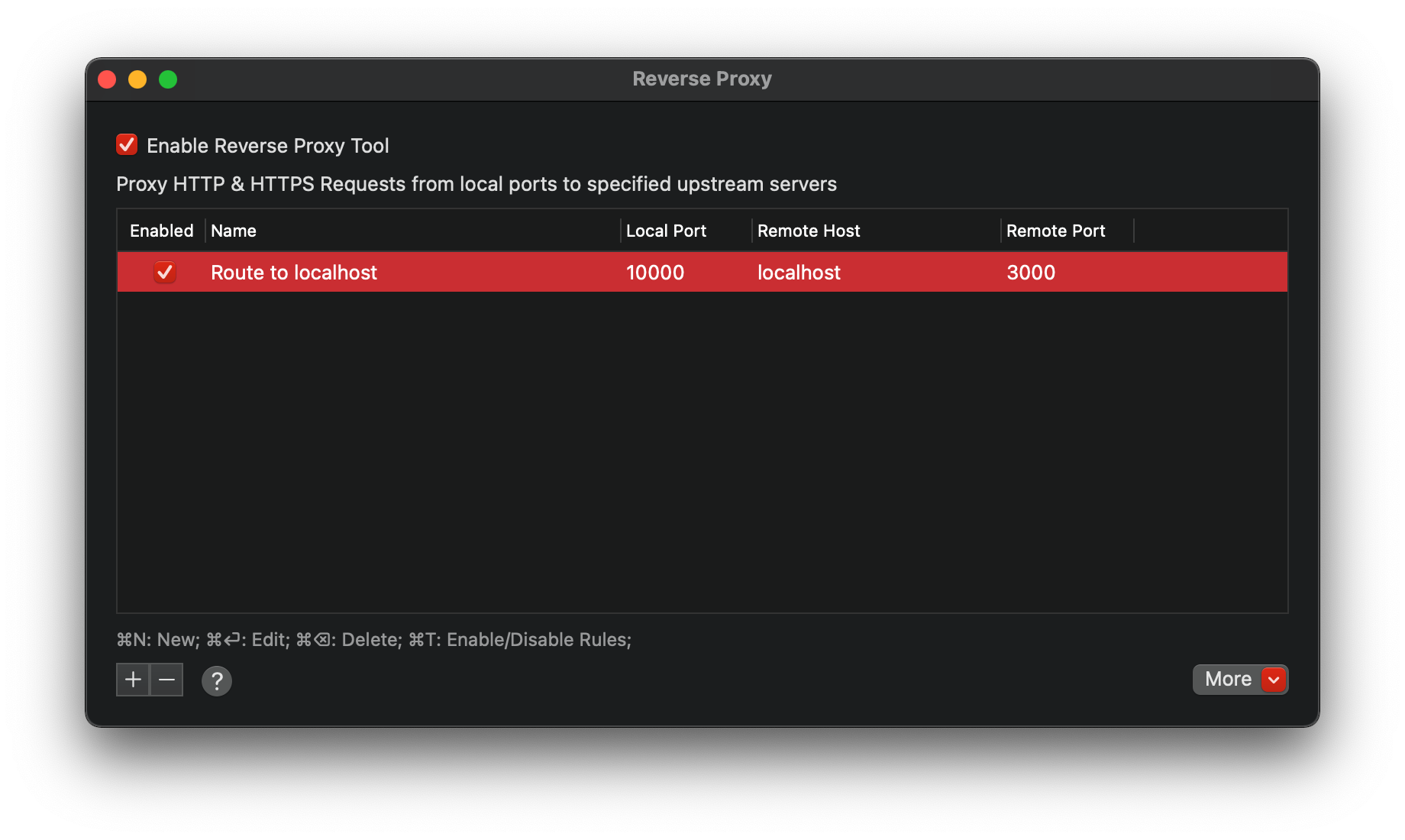
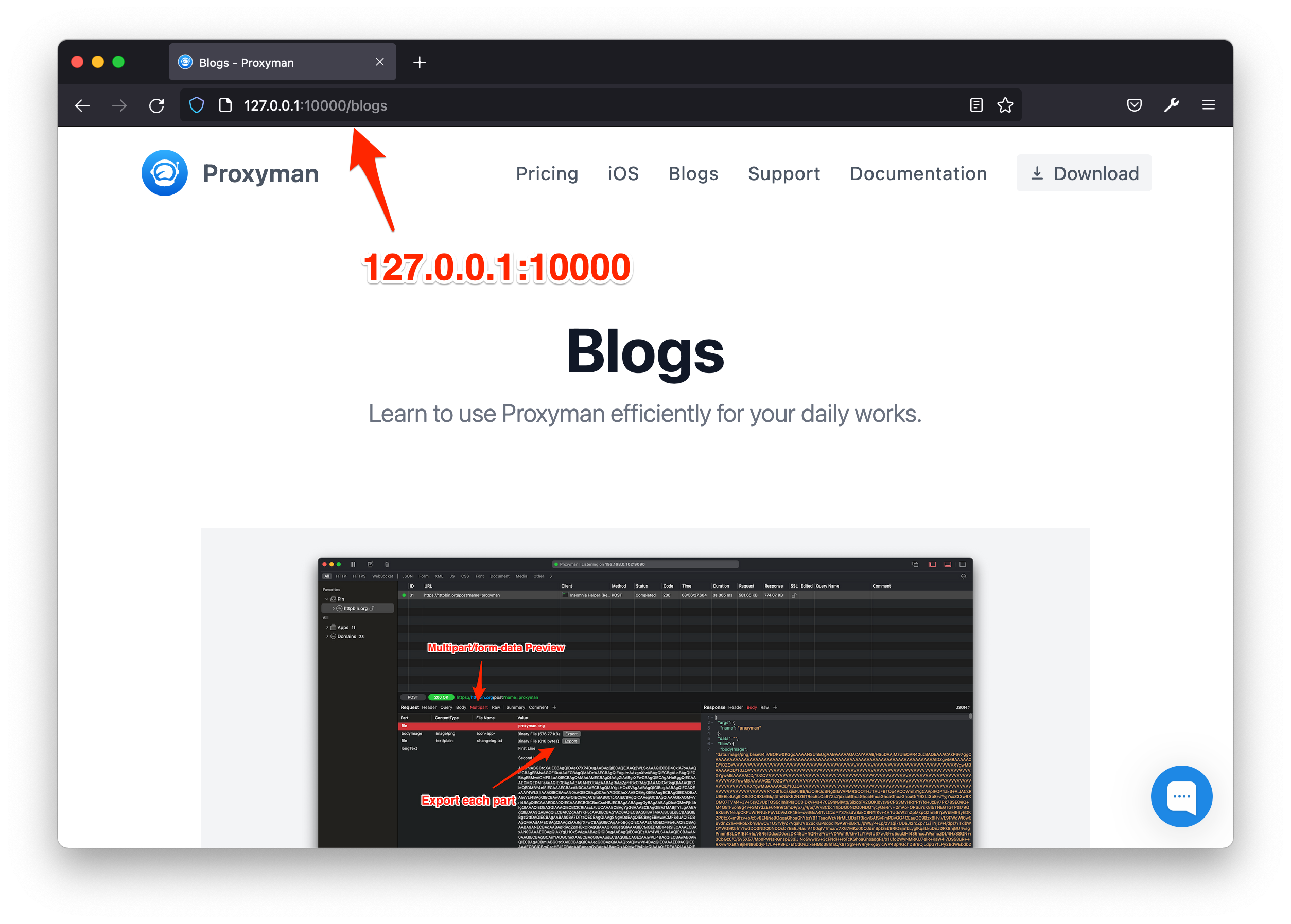
Attempt 2 - Use my gogin local server at port 3000

  1. Start my local server at port 3000

  2. Setup the reverse proxy entry (Local Port = 10000, RemoteHost = localhost, RemotePort = 3000, PreserveHost = OFF)
    Screen Shot 2021-06-28 at 12 39 15

  3. Open 127.0.0.1:10000 in Firefox
    Screen_Shot_2021-06-28_at_12_40_08

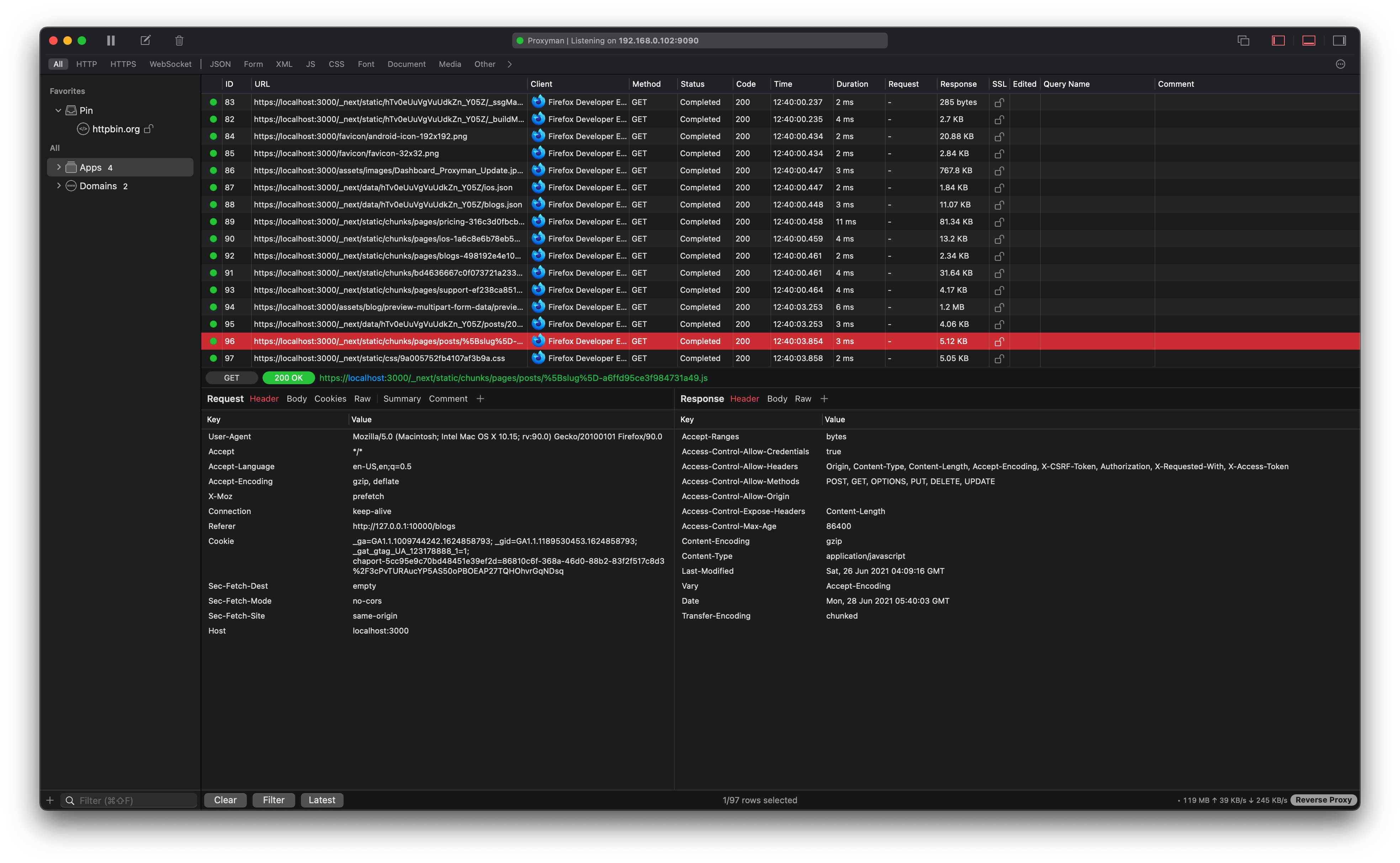
=> Proxyman is able to log this Reverse traffic.
Screen Shot 2021-06-28 at 12 40 15

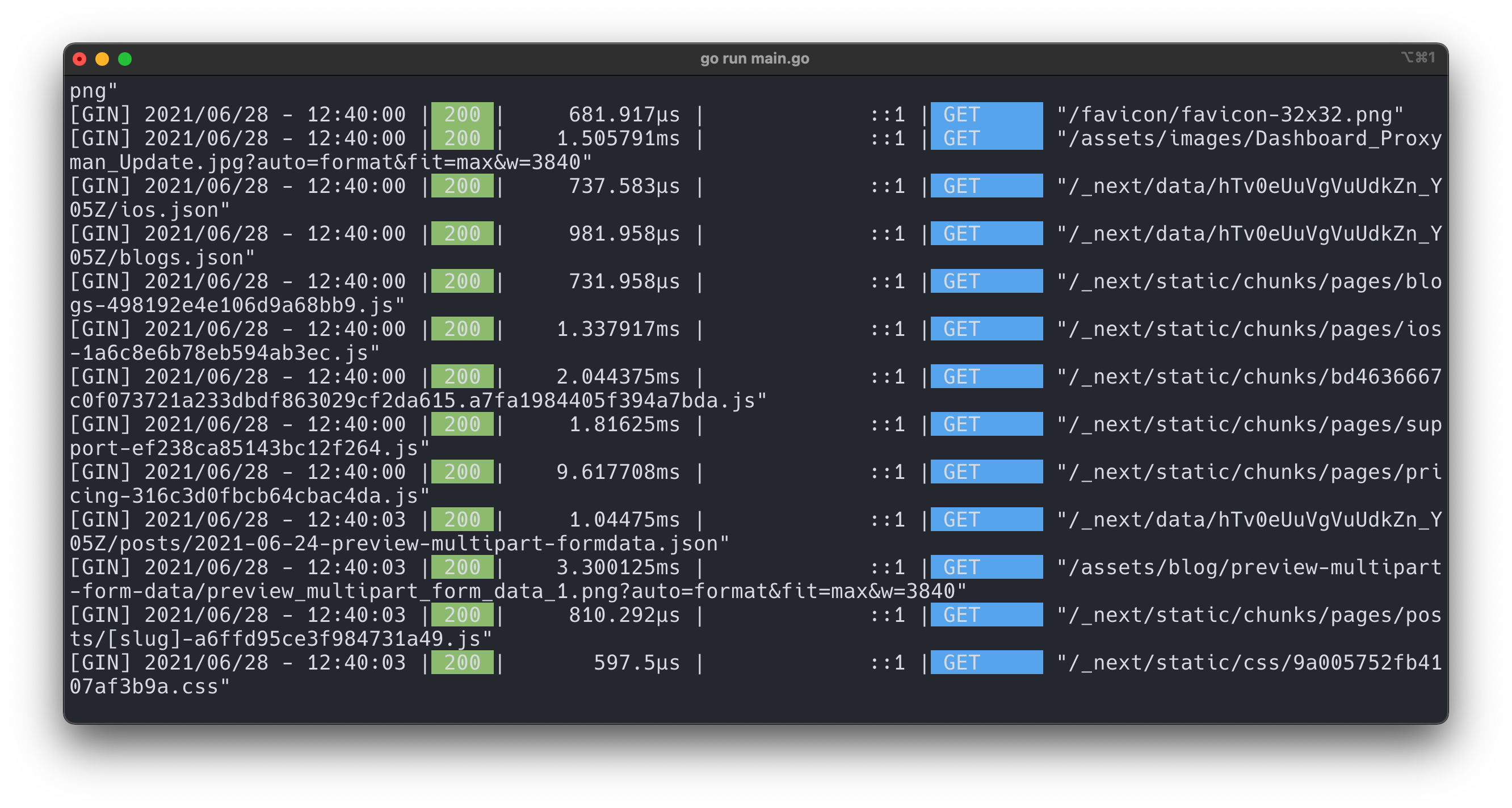
=> My gogin servers received these requests
Screen Shot 2021-06-28 at 12 40 25

<!-- gh-comment-id:869392036 --> @NghiaTranUIT commented on GitHub (Jun 28, 2021): ### Attempt 2 - Use my gogin local server at port 3000 1. Start my local server at port 3000 2. Setup the reverse proxy entry (Local Port = 10000, RemoteHost = localhost, RemotePort = 3000, PreserveHost = OFF) <img width="920" alt="Screen Shot 2021-06-28 at 12 39 15" src="https://user-images.githubusercontent.com/5878421/123588647-47c47380-d812-11eb-842d-f5f96a14f000.png"> 3. Open `127.0.0.1:10000` in Firefox <img width="1254" alt="Screen_Shot_2021-06-28_at_12_40_08" src="https://user-images.githubusercontent.com/5878421/123588969-c15c6180-d812-11eb-8aca-7e86ae3cb4fa.png"> => Proxyman is able to log this Reverse traffic. <img width="1968" alt="Screen Shot 2021-06-28 at 12 40 15" src="https://user-images.githubusercontent.com/5878421/123589088-e8b32e80-d812-11eb-8653-376260064b5a.png"> => My gogin servers received these requests <img width="1332" alt="Screen Shot 2021-06-28 at 12 40 25" src="https://user-images.githubusercontent.com/5878421/123589041-d89b4f00-d812-11eb-99c6-17f8ecf17756.png">
Author
Owner

@NghiaTranUIT commented on GitHub (Jun 28, 2021):

@mattneub if you don't mind, please

  1. Try to setup a Reverse Proxy Entry again (LocalPort = 10000, RemoteHost = localhost, RemotePort = 3000, PreverseHost = OFF)
  2. Start your local server
  3. Make a request http://127.0.0.1:10000 by using curl
$ curl -v "http://127.0.0.1:10000"

And see if it works or not.

Thank you in advance @mattneub 🙇

<!-- gh-comment-id:869393339 --> @NghiaTranUIT commented on GitHub (Jun 28, 2021): @mattneub if you don't mind, please 1. Try to setup a Reverse Proxy Entry again (LocalPort = 10000, RemoteHost = localhost, RemotePort = 3000, PreverseHost = OFF) 2. Start your local server 3. Make a request `http://127.0.0.1:10000` by using curl ```bash $ curl -v "http://127.0.0.1:10000" ``` And see if it works or not. Thank you in advance @mattneub 🙇
Author
Owner

@mattneub commented on GitHub (Jun 28, 2021):

Yes, that works for me too — from the browser (Safari or whatever). I'll continue trying to make this more reproducible!

<!-- gh-comment-id:869398546 --> @mattneub commented on GitHub (Jun 28, 2021): Yes, that works for me too — from the browser (Safari or whatever). I'll continue trying to make this more reproducible!
Author
Owner

@NghiaTranUIT commented on GitHub (Jun 28, 2021):

Thanks 🎉 Feel free to reach out to me. I'm ready to fix the bug 😄

<!-- gh-comment-id:869401593 --> @NghiaTranUIT commented on GitHub (Jun 28, 2021): Thanks 🎉 Feel free to reach out to me. I'm ready to fix the bug 😄
Author
Owner

@mattneub commented on GitHub (Jun 28, 2021):

I'm sorry, I don't know how to tell you how to reproduce. All I can say is that I have this app running on the Xcode Simulator. If I tell it to connect to Charles, Charles passes the messages on to my local rails server. But if I tell it to connect to Proxyman, it seems to see no server at all and no messages are passed to my local rails server.

<!-- gh-comment-id:869991868 --> @mattneub commented on GitHub (Jun 28, 2021): I'm sorry, I don't know how to tell you how to reproduce. All I can say is that I have this app running on the Xcode Simulator. If I tell it to connect to Charles, Charles passes the messages on to my local rails server. But if I tell it to connect to Proxyman, it seems to see no server at all and no messages are passed to my local rails server.
Author
Owner

@mattneub commented on GitHub (Jun 29, 2021):

OK, I've got it working! I changed Proxyman's reverse proxy port to 53004, to match what Charles was using.

Screen Shot 2021-06-29 at 2 37 50 PM

Using http://127.0.0.1:53004/ my app running on the Simulator now passes thru Proxyman to the rails server at localhost 3000.

I should add that this app is actually a Xamarin app developed out of Visual Studio. When running on the Android emulator, the URL needs to be http://10.0.2.2:53004/ because of the Android Emulator's peculiar virtual router.

<!-- gh-comment-id:870185772 --> @mattneub commented on GitHub (Jun 29, 2021): OK, I've got it working! I changed Proxyman's reverse proxy port to 53004, to match what Charles was using. <img width="443" alt="Screen Shot 2021-06-29 at 2 37 50 PM" src="https://user-images.githubusercontent.com/838939/123728652-b6273580-d8e7-11eb-813c-b9d5fcd3153f.png"> Using `http://127.0.0.1:53004/` my app running on the Simulator now passes thru Proxyman to the rails server at localhost 3000. I should add that this app is actually a Xamarin app developed out of Visual Studio. When running on the Android emulator, the URL needs to be `http://10.0.2.2:53004/` because of the Android Emulator's peculiar virtual router.
Author
Owner

@NghiaTranUIT commented on GitHub (Jun 29, 2021):

Glad to know it works for you 🎉

I wonder why port 10000 doesn't work in the first place 🤔 I thought that we have to install & trust the Proxyman Certificate in your Simulator, but it's not the case.

<!-- gh-comment-id:870186549 --> @NghiaTranUIT commented on GitHub (Jun 29, 2021): Glad to know it works for you 🎉 I wonder why port 10000 doesn't work in the first place 🤔 I thought that we have to install & trust the Proxyman Certificate in your Simulator, but it's not the case.
Sign in to join this conversation.
No milestone
No project
No assignees
1 participant
Notifications
Due date
The due date is invalid or out of range. Please use the format "yyyy-mm-dd".

No due date set.

Dependencies

No dependencies set.

Reference
starred/Proxyman#444
No description provided.