[GH-ISSUE #435] Installing certificate on iOS device doesn't work -- the request hangs #432

Open
opened 2026-03-03 19:18:44 +03:00 by kerem · 13 comments
Owner

Originally created by @japostoles on GitHub (Mar 10, 2020).
Original GitHub issue: https://github.com/ProxymanApp/Proxyman/issues/435

Originally assigned to: @NghiaTranUIT on GitHub.

Proxyman version? (Ex. Proxyman 1.4.3)

Version 1.18.1 (11810)

macOS Version? (Ex. mac 10.14)

10.14.6 (18G87)

Steps to reproduce

  1. Install Proxyman fresh
  2. Install and trust root certificate via Certificates menu
  3. Load iOS help screen by selecting "Install certificate on iOS devices"
  4. Follow the instructions, when accessing proxy.man/ssl on the device, the request hangs. I can see the request in proxyman and it stays active and never completes. The certificate is never served to the phone.

Expected behavior

The application delivers the certificate to the iOS device for installation.

Originally created by @japostoles on GitHub (Mar 10, 2020). Original GitHub issue: https://github.com/ProxymanApp/Proxyman/issues/435 Originally assigned to: @NghiaTranUIT on GitHub. ### Proxyman version? (Ex. Proxyman 1.4.3) Version 1.18.1 (11810) ### macOS Version? (Ex. mac 10.14) 10.14.6 (18G87) ### Steps to reproduce 1. Install Proxyman fresh 2. Install and trust root certificate via Certificates menu 3. Load iOS help screen by selecting "Install certificate on iOS devices" 4. Follow the instructions, when accessing proxy.man/ssl on the device, the request hangs. I can see the request in proxyman and it stays active and never completes. The certificate is never served to the phone. ### Expected behavior The application delivers the certificate to the iOS device for installation.
Author
Owner

@NghiaTranUIT commented on GitHub (Mar 11, 2020):

Hey @japostoles, there are various problems why we couldn't access to http://proxy.man/ssl
We collect some solution from other users, who encountered the same issue with you.

The most likely problem is the Firewall setting that Proxyman receives any incoming connections.

Screen_Shot_2020-03-10_at_20_46_17

Troubleshooting: https://docs.proxyman.io/troubleshooting/my-ios-devices-couldnt-connect-to-proxyman-via-proxy
Ticket: https://github.com/ProxymanApp/Proxyman/issues/434

<!-- gh-comment-id:597406101 --> @NghiaTranUIT commented on GitHub (Mar 11, 2020): Hey @japostoles, there are various problems why we couldn't access to http://proxy.man/ssl We collect some solution from other users, who encountered the same issue with you. The most likely problem is the Firewall setting that Proxyman receives any incoming connections. <img width="1115" alt="Screen_Shot_2020-03-10_at_20_46_17" src="https://user-images.githubusercontent.com/5878421/76374971-39c9b580-6377-11ea-93a7-ccefe41c0aad.png"> Troubleshooting: https://docs.proxyman.io/troubleshooting/my-ios-devices-couldnt-connect-to-proxyman-via-proxy Ticket: https://github.com/ProxymanApp/Proxyman/issues/434
Author
Owner

@japostoles commented on GitHub (Mar 11, 2020):

I am able to connect to the proxy fine. I can see the domains I'm accessing, as well as the device under the Remote tab. What I cannot do, however, is get the certificate in order to enable SSL. When I browse to http://proxy.man/ssl, the device hangs -- the connections shows up in Proxyman as ACTIVE, but the request never completes, so the device never gets the SSL cert.

<!-- gh-comment-id:597811916 --> @japostoles commented on GitHub (Mar 11, 2020): I am able to connect to the proxy fine. I can see the domains I'm accessing, as well as the device under the Remote tab. What I cannot do, however, is get the certificate in order to enable SSL. When I browse to http://proxy.man/ssl, the device hangs -- the connections shows up in Proxyman as ACTIVE, but the request never completes, so the device never gets the SSL cert.
Author
Owner

@NghiaTranUIT commented on GitHub (Mar 12, 2020):

Hey, I understand your situation now.

I just test around with the latest Proxyman 1.18.1, iOS 13.4 and macOS 10.15.3 and it works.

What iOS version are you in?

To workaround, you can Export by Proxyman Preference -> Export certificate then sending it via email to your iOS device. Then opening it and tap on the attachment. iPhone will prompt the Certificate installation. It skip the steps http://proxy.man/ssl

Meanwhile, I will investigate it 👍

<!-- gh-comment-id:597966312 --> @NghiaTranUIT commented on GitHub (Mar 12, 2020): Hey, I understand your situation now. I just test around with the latest Proxyman 1.18.1, iOS 13.4 and macOS 10.15.3 and it works. What iOS version are you in? To workaround, you can Export by Proxyman Preference -> Export certificate then sending it via email to your iOS device. Then opening it and tap on the attachment. iPhone will prompt the Certificate installation. It skip the steps http://proxy.man/ssl Meanwhile, I will investigate it 👍
Author
Owner

@NghiaTranUIT commented on GitHub (Mar 12, 2020):

One more things @japostoles :

Can you help me to test this scenario:

  1. Open Proxyman app
  2. Open Firefox. Make sure to change the Proxy config in Firefox to Use System Proxy if possible
  3. Make sure we see all requests from Firefox in Proxyman
  4. Open proxy.man/ssl
  5. Check if the installation prompt appears
Screen_Shot_2020-03-12_at_09_10_55
  • If it appears, it means the link is correct and it's working.
  • If not, something is not good and I'm investigating it 👍
<!-- gh-comment-id:597971822 --> @NghiaTranUIT commented on GitHub (Mar 12, 2020): One more things @japostoles : Can you help me to test this scenario: 1. Open Proxyman app 2. Open Firefox. Make sure to change the Proxy config in Firefox to **Use System Proxy** if possible 3. Make sure we see all requests from Firefox in Proxyman 4. Open proxy.man/ssl 5. Check if the installation prompt appears <img width="1040" alt="Screen_Shot_2020-03-12_at_09_10_55" src="https://user-images.githubusercontent.com/5878421/76480620-d9537a80-6441-11ea-942d-5da939dde967.png"> ------------- - If it appears, it means the link is correct and it's working. - If not, something is not good and I'm investigating it 👍
Author
Owner

@japostoles commented on GitHub (Mar 12, 2020):

What iOS version are you in?

I'm on 13.3.1 in terms of iOS

<!-- gh-comment-id:598343512 --> @japostoles commented on GitHub (Mar 12, 2020): > What iOS version are you in? I'm on 13.3.1 in terms of iOS
Author
Owner

@japostoles commented on GitHub (Mar 12, 2020):

Can you help me to test this scenario:

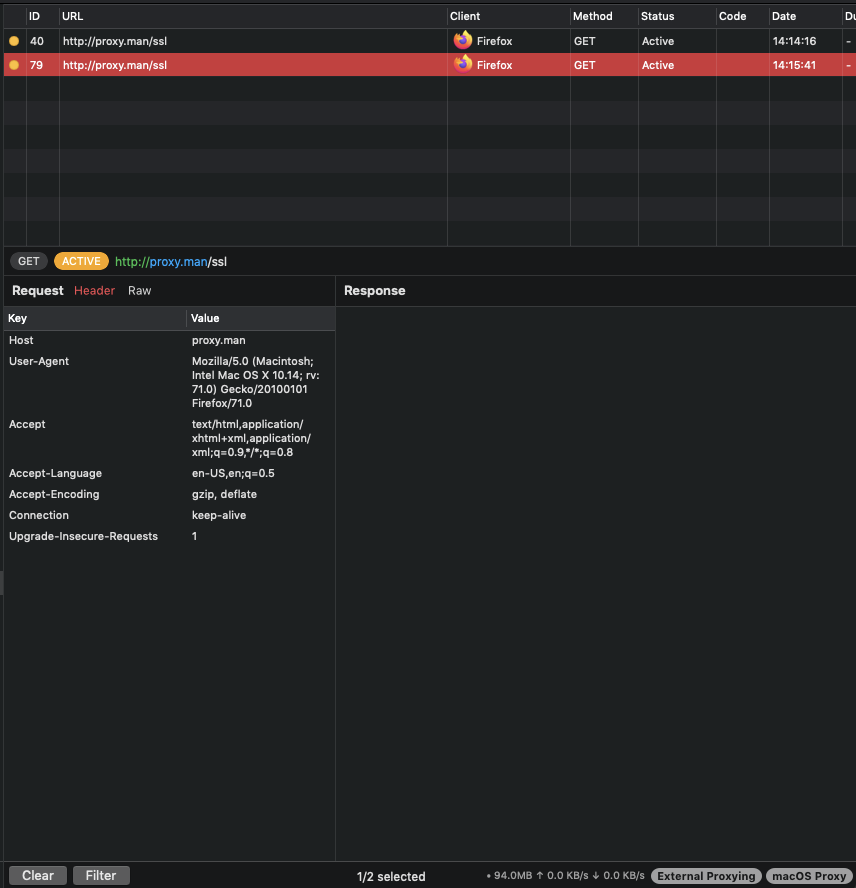
I tried the above the other day, but I did it again just now, and the request hangs similar to what happens when trying to connect via the device.

I can see all the other network activity, but for some reason proxy.man/ssl connects and never completes the request.. it doesn't even appear to timeout or close.

Here's a screenshot of the request through the eyes of proxyman:
image

<!-- gh-comment-id:598345238 --> @japostoles commented on GitHub (Mar 12, 2020): > Can you help me to test this scenario: I tried the above the other day, but I did it again just now, and the request hangs similar to what happens when trying to connect via the device. I can see all the other network activity, but for some reason proxy.man/ssl connects and never completes the request.. it doesn't even appear to timeout or close. Here's a screenshot of the request through the eyes of proxyman: ![image](https://user-images.githubusercontent.com/235242/76554314-0ddc2c00-646c-11ea-89b1-219fff1691ca.png)
Author
Owner

@japostoles commented on GitHub (Mar 12, 2020):

Just an FYI, the workaround worked and I was able to install the certificate manually

<!-- gh-comment-id:598347415 --> @japostoles commented on GitHub (Mar 12, 2020): Just an FYI, the workaround worked and I was able to install the certificate manually
Author
Owner

@NghiaTranUIT commented on GitHub (Mar 13, 2020):

Thank you for detail report. I'm investigating it now. It looks like Proxyman local server (serve proxy.man/ssl) has a problem on 10.14.6 OSX. I'm on it now 👍

<!-- gh-comment-id:598493426 --> @NghiaTranUIT commented on GitHub (Mar 13, 2020): Thank you for detail report. I'm investigating it now. It looks like Proxyman local server (serve proxy.man/ssl) has a problem on 10.14.6 OSX. I'm on it now 👍
Author
Owner

@NghiaTranUIT commented on GitHub (Mar 25, 2020):

Hey @japostoles can you help me to turn OFF "External Proxy" and upgrade to the latest build (1.19.0) and check whether or not you're able to get the cert via http://proxy.man/ssl ?

<!-- gh-comment-id:603625951 --> @NghiaTranUIT commented on GitHub (Mar 25, 2020): Hey @japostoles can you help me to turn OFF "External Proxy" and upgrade to the latest build (1.19.0) and check whether or not you're able to get the cert via `http://proxy.man/ssl` ?
Author
Owner

@japostoles commented on GitHub (Mar 25, 2020):

Hello!

I can confirm that I am able to download the cert if External Proxy is off.

image

<!-- gh-comment-id:603645625 --> @japostoles commented on GitHub (Mar 25, 2020): Hello! I can confirm that I am able to download the cert if External Proxy is off. ![image](https://user-images.githubusercontent.com/235242/77504290-544f6480-6e36-11ea-9d05-50489a68ae0a.png)
Author
Owner

@NghiaTranUIT commented on GitHub (Mar 25, 2020):

Thanks, 👍 Look like it is a problem with macOS 10.14.6. I tested on 10.15.3 by setting up the External Proxy to Charles, and I'm still able to get the certificate via http://proxy.man/ssl.

I will investigate it 👍

<!-- gh-comment-id:603663139 --> @NghiaTranUIT commented on GitHub (Mar 25, 2020): Thanks, 👍 Look like it is a problem with macOS 10.14.6. I tested on 10.15.3 by setting up the External Proxy to Charles, and I'm still able to get the certificate via `http://proxy.man/ssl`. I will investigate it 👍
Author
Owner

@gskold-thumbtack commented on GitHub (Aug 24, 2023):

Just wanted to chime in that this is happening on Android as well when attempting to hit http://proxy.man/ssl from the Chrome browser on my device.

Pixel 3a / Android 12

<!-- gh-comment-id:1692166942 --> @gskold-thumbtack commented on GitHub (Aug 24, 2023): Just wanted to chime in that this is happening on Android as well when attempting to hit `http://proxy.man/ssl` from the Chrome browser on my device. Pixel 3a / Android 12
Author
Owner

@NghiaTranUIT commented on GitHub (Aug 25, 2023):

@gskold-thumbtack There are many reasons why this issue takes place, it can be:

  • Your firewall settings
  • You're using a VPN on your Android app
  • Your Mac + Android are not on the same network
  • Proxy Config doesn't match.

You should check this troubleshooting to diagnose it.

In general, this ticket was resolved in 2020.

<!-- gh-comment-id:1692622457 --> @NghiaTranUIT commented on GitHub (Aug 25, 2023): @gskold-thumbtack There are many reasons why this issue takes place, it can be: - Your firewall settings - You're using a VPN on your Android app - Your Mac + Android are not on the same network - Proxy Config doesn't match. You should check this [troubleshooting](https://docs.proxyman.io/troubleshooting/my-ios-devices-couldnt-connect-to-proxyman-via-proxy) to diagnose it. In general, this ticket was resolved in 2020.
Sign in to join this conversation.
No milestone
No project
No assignees
1 participant
Notifications
Due date
The due date is invalid or out of range. Please use the format "yyyy-mm-dd".

No due date set.

Dependencies

No dependencies set.

Reference
starred/Proxyman#432
No description provided.