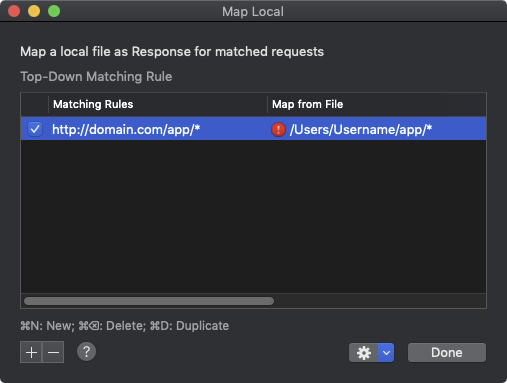
[GH-ISSUE #224] Remap response from File #222

Open
opened 2026-03-03 19:16:21 +03:00 by kerem · 12 comments
Owner

Originally created by @NghiaTranUIT on GitHub (Jul 17, 2019).
Original GitHub issue: https://github.com/ProxymanApp/Proxyman/issues/224

Originally assigned to: @NghiaTranUIT on GitHub.

🐶 Brief

It's better to support simple version of entire remap feature, which remap response from file.

👑 Criteria

  • Simple UI for selecting file for particular domain/paths
  • Able to map the response from file to those flows
  • Add Menu context to quick remap from file
  • Show history of selection files (Same Open history)
  • Able to quick enable/disable re-map from file on particular domain/path
Originally created by @NghiaTranUIT on GitHub (Jul 17, 2019). Original GitHub issue: https://github.com/ProxymanApp/Proxyman/issues/224 Originally assigned to: @NghiaTranUIT on GitHub. ## 🐶 Brief It's better to support simple version of entire remap feature, which remap response from `file`. ## 👑 Criteria - [x] Simple UI for selecting file for particular domain/paths - [x] Able to map the response from file to those flows - [x] Add Menu context to quick remap from file - [x] Show history of selection files (Same Open history) - [x] Able to quick enable/disable re-map from file on particular domain/path
Author
Owner

@factotvm commented on GitHub (Jul 18, 2019):

I want to say that when this is complete, I will have the features I need to evaluate Proxyman for my day-to-day work. 👍

<!-- gh-comment-id:512918188 --> @factotvm commented on GitHub (Jul 18, 2019): I want to say that when this is complete, I will have the features I need to evaluate Proxyman for my day-to-day work. 👍
Author
Owner

@NghiaTranUIT commented on GitHub (Jul 19, 2019):

Thank @factotvm, it's guarantee that this remap from file will release in next version. Stay tuned :D

If you're encountering any problem during using Proxyman for your day-to-day work. Pls shot me an issues 👍

<!-- gh-comment-id:513072656 --> @NghiaTranUIT commented on GitHub (Jul 19, 2019): Thank @factotvm, it's guarantee that this remap from file will release in next version. Stay tuned :D If you're encountering any problem during using Proxyman for your day-to-day work. Pls shot me an issues 👍
Author
Owner

@fishcharlie commented on GitHub (Jul 26, 2019):

it's guarantee that this remap from file will release in next version

@NghiaTranUIT I appreciate your hard work on this. But please refrain from making promises that won't be kept. It's much better to under promise and over deliver.

This feature is turning into Apple's AirPower product. Except I'm very confident this feature will happen.

Really excited for this, but due to the fact that it was requested SO long ago and still hasn't been implemented, the least you can do is not get everyone's hopes up without delivering. This feature is fundamental to a lot of people's day to day work as @factotvm mentioned.

<!-- gh-comment-id:515557613 --> @fishcharlie commented on GitHub (Jul 26, 2019): > it's guarantee that this remap from file will release in next version @NghiaTranUIT I appreciate your hard work on this. But please refrain from making promises that won't be kept. It's much better to under promise and over deliver. This feature is turning into Apple's AirPower product. Except I'm very confident this feature will happen. Really excited for this, but due to the fact that it was requested SO long ago and still hasn't been implemented, the least you can do is not get everyone's hopes up without delivering. This feature is fundamental to a lot of people's day to day work as @factotvm mentioned.
Author
Owner

@NghiaTranUIT commented on GitHub (Jul 27, 2019):

@fishcharlie I promise since I've worked on this feature for couples weeks. It sounds easy but not strait-forward in term of the complexity of implementation and i'm trying my best.

Sorry for being later since I had another features to make Proxyman to be stable. And now, it's perfect time to continue doing the Remap 🌮 🎉

<!-- gh-comment-id:515642285 --> @NghiaTranUIT commented on GitHub (Jul 27, 2019): @fishcharlie I promise since I've worked on this feature for couples weeks. It sounds easy but not strait-forward in term of the complexity of implementation and i'm trying my best. Sorry for being later since I had another features to make Proxyman to be stable. And now, it's perfect time to continue doing the Remap 🌮 🎉
Author
Owner

@NghiaTranUIT commented on GitHub (Aug 1, 2019):

Hey @fishcharlie and @factotvm

Here is the BETA for this Remap Local https://www.dropbox.com/s/ftmzhw2pf29x08m/Proxyman_1.4.6-map-local-feature.dmg?dl=0

Let me know if you're happy with it, since I spent a lot of effort to redesign the UIUX and refactor the Core too.

Let give it a try 👍 I will rollout officially in this weekend 🌮 🎉

Matching Rule

Basically, I understand the complexity of Charles Proxy in order to setup the Rule for Remap when there are a lot of textfields to fills, such as: HTTP/HTTPS, Domain, Path, Query, ... and many different rules in their documents.

Therefore, I would minimize the number of steps by introducing the URL (wildcard support) and the check "Include subdirectories". From what I'm testing, it could cover 90% all cases, and the UX could become better.

For instances:

URL Include subdirectories Matching URLs
api.proxyman.io ON api.proxyman.io, http://api.proxyman.io, https://api.proxyman.io, api.proxyman.io/v1/data, https://api.proxyman.io/v2/login, ...
api.proxyman.io/v1/* ON api.proxyman.io/v1/data, https://api.proxyman.io/v1/login, ...
* /v1/ * ON api.proxyman.io/v1/data, https://producthunt.io/v1/login, ...
api.proxyman.io/v?/login ON api.proxyman.io/v1/login, api.proxyman.io/v2/login, ...
https://api.proxyman.io/v1/login?username=nghia OFF Only https://api.proxyman.io/v1/login?username=nghia

Therefore, if we know how Wildcard works, it will works :D

How to use

  1. You can open in Tool Menu -> Map Local and create your rule
  2. Right-click on domain or flows -> Tool -> Map Local -> It will fill the entry automatically

How it works

  • If the URL is matching with a specific rule, and the File is valid -> It will replace the body response with the content of file. (The headers are remained)
  • If the Include subdirectories is ON. All sub-paths of the URL will be matched, but it must match the Rule first.
  • Automatically override the content-type if the file is png, image, gif, or json, ...
  • Remove the content-encoding in reponse header, since I haven't support gzip encoding for remap body yet.

Screenshots

Screen Shot 2019-08-01 at 21 37 51 Screen Shot 2019-08-01 at 21 37 42 Screen Shot 2019-08-01 at 21 37 25
<!-- gh-comment-id:517331332 --> @NghiaTranUIT commented on GitHub (Aug 1, 2019): Hey @fishcharlie and @factotvm Here is the BETA for this Remap Local https://www.dropbox.com/s/ftmzhw2pf29x08m/Proxyman_1.4.6-map-local-feature.dmg?dl=0 Let me know if you're happy with it, since I spent a lot of effort to redesign the UIUX and refactor the Core too. Let give it a try 👍 I will rollout officially in this weekend 🌮 🎉 ### Matching Rule Basically, I understand the complexity of Charles Proxy in order to setup the Rule for Remap when there are a lot of textfields to fills, such as: HTTP/HTTPS, Domain, Path, Query, ... and many different rules in their documents. Therefore, I would minimize the number of steps by introducing the URL (wildcard support) and the check "Include subdirectories". From what I'm testing, it could cover 90% all cases, and the UX could become better. For instances: | URL | Include subdirectories | Matching URLs | | ------------- |:-------------:| -----:| | api.proxyman.io | ON | api.proxyman.io, http://api.proxyman.io, https://api.proxyman.io, api.proxyman.io/v1/data, https://api.proxyman.io/v2/login, ... | | api.proxyman.io/v1/* | ON | api.proxyman.io/v1/data, https://api.proxyman.io/v1/login, ... | | * /v1/ * | ON | api.proxyman.io/v1/data, https://producthunt.io/v1/login, ... | | api.proxyman.io/v?/login | ON | api.proxyman.io/v1/login, api.proxyman.io/v2/login, ... | | https://api.proxyman.io/v1/login?username=nghia | OFF | Only https://api.proxyman.io/v1/login?username=nghia | Therefore, if we know how Wildcard works, it will works :D ### How to use 1. You can open in Tool Menu -> Map Local and create your rule 2. Right-click on domain or flows -> Tool -> Map Local -> It will fill the entry automatically ### How it works - If the URL is matching with a specific rule, and the File is valid -> It will replace the body response with the content of file. (The headers are remained) - If the `Include subdirectories` is ON. All sub-paths of the URL will be matched, but it must match the Rule first. - Automatically override the content-type if the file is png, image, gif, or json, ... - Remove the content-encoding in reponse header, since I haven't support gzip encoding for remap body yet. ### Screenshots <img width="920" alt="Screen Shot 2019-08-01 at 21 37 51" src="https://user-images.githubusercontent.com/5878421/62303260-fdaba980-b4a5-11e9-8cc8-69254f965284.png"> <img width="920" alt="Screen Shot 2019-08-01 at 21 37 42" src="https://user-images.githubusercontent.com/5878421/62303262-fdaba980-b4a5-11e9-819d-6c2619ae8ea7.png"> <img width="552" alt="Screen Shot 2019-08-01 at 21 37 25" src="https://user-images.githubusercontent.com/5878421/62303263-fe444000-b4a5-11e9-8fb0-4274a91f12cf.png">
Author
Owner

@Jazper commented on GitHub (Aug 4, 2019):

Thank you NghiaTranUIT for a great work!
But. Is it possible to remap to local folder?
Like
image

<!-- gh-comment-id:517970176 --> @Jazper commented on GitHub (Aug 4, 2019): Thank you NghiaTranUIT for a great work! But. Is it possible to remap to local folder? Like ![image](https://user-images.githubusercontent.com/2332291/62418986-82095280-b687-11e9-9d46-05625473a47b.png)
Author
Owner

@NghiaTranUIT commented on GitHub (Aug 4, 2019):

Hey @Jazper It's cool idea to be able map an entire local folder, but there is a situation.

For example:

  • The local folder has 10 files (It could be a text files, images, ...)
  • There is one URL matched the rule.

Another scenario is that if we have 10 files in this folder, but we have 3 matched URLs (wildcard). Which file is for which URL?

The general question is: What specific file should we use 🤔 ?

<!-- gh-comment-id:517972192 --> @NghiaTranUIT commented on GitHub (Aug 4, 2019): Hey @Jazper It's cool idea to be able map an entire local folder, but there is a situation. For example: - The local folder has 10 files (It could be a text files, images, ...) - There is one URL matched the rule. Another scenario is that if we have 10 files in this folder, but we have 3 matched URLs (wildcard). Which file is for which URL? The general question is: What specific file should we use 🤔 ?
Author
Owner

@NghiaTranUIT commented on GitHub (Aug 4, 2019):

It'd be great if you can elaborate what your current workflow is, then I could come up an idea to help you 😄

<!-- gh-comment-id:517972227 --> @NghiaTranUIT commented on GitHub (Aug 4, 2019): It'd be great if you can elaborate what your current workflow is, then I could come up an idea to help you 😄
Author
Owner

@Jazper commented on GitHub (Aug 4, 2019):

You can see how it is implemented in Charles or Fiddler. For example:
Map: http://domain/app/* to local app/*
Local folder has: app/image.jpg, app/js/script.js
And responses:
http://domain/app/image.jpg to local app/image.jpg
http://domain/app/js/script.js to local app/js/script.js
If no matches
http://domain/app/file.ext to remote http://domain/app/file.ext

I have many files in my project. More than 1000. And it would be great if I could replace all with one rule.

Another scenario is that if we have 10 files in this folder, but we have 3 matched URLs (wildcard). Which file is for which URL?

You can prioritize rules from top to bottom in the list.

<!-- gh-comment-id:517981601 --> @Jazper commented on GitHub (Aug 4, 2019): You can see how it is implemented in Charles or Fiddler. For example: Map: `http://domain/app/*` to local `app/*` Local folder has: `app/image.jpg`, `app/js/script.js` And responses: `http://domain/app/image.jpg` to local `app/image.jpg` `http://domain/app/js/script.js` to local `app/js/script.js` If no matches `http://domain/app/file.ext` to remote `http://domain/app/file.ext` I have many files in my project. More than 1000. And it would be great if I could replace all with one rule. > Another scenario is that if we have 10 files in this folder, but we have 3 matched URLs (wildcard). Which file is for which URL? You can prioritize rules from top to bottom in the list.
Author
Owner

@NghiaTranUIT commented on GitHub (Aug 5, 2019):

Thank for the detail answer @Jazper, I just created this ticket https://github.com/ProxymanApp/Proxyman/issues/239 and it is going to ship in Proxyman 1.8.0 👍

<!-- gh-comment-id:518090821 --> @NghiaTranUIT commented on GitHub (Aug 5, 2019): Thank for the detail answer @Jazper, I just created this ticket https://github.com/ProxymanApp/Proxyman/issues/239 and it is going to ship in Proxyman 1.8.0 👍
Author
Owner

@Jazper commented on GitHub (Aug 5, 2019):

Thank you @NghiaTranUIT for your work! :)

<!-- gh-comment-id:518112893 --> @Jazper commented on GitHub (Aug 5, 2019): Thank you @NghiaTranUIT for your work! :)
Author
Owner

@NghiaTranUIT commented on GitHub (Feb 3, 2020):

Hey there @Jazper and @armiakrajowa, here is the BETA for this "Map Local from local directory"

https://proxyman.s3.us-east-2.amazonaws.com/beta/Proxyman_1.15.0_Map_Local_From_Local_Directory.dmg

Sorry for being late since there are other high priority tasks too 😄

Basically, you can select a local directly and it will map like you mention in https://github.com/ProxymanApp/Proxyman/issues/224#issuecomment-517981601

Quick Look

New Map Local v2 UI

Screen Shot 2020-02-03 at 22 44 22

Guidline

Screen Shot 2020-02-03 at 22 44 30

Debug header key

Screen_Shot_2020-02-03_at_22_49_44
<!-- gh-comment-id:581479839 --> @NghiaTranUIT commented on GitHub (Feb 3, 2020): Hey there @Jazper and @armiakrajowa, here is the BETA for this "Map Local from local directory" https://proxyman.s3.us-east-2.amazonaws.com/beta/Proxyman_1.15.0_Map_Local_From_Local_Directory.dmg Sorry for being late since there are other high priority tasks too 😄 Basically, you can select a local directly and it will map like you mention in https://github.com/ProxymanApp/Proxyman/issues/224#issuecomment-517981601 ## Quick Look ### New Map Local v2 UI <img width="1692" alt="Screen Shot 2020-02-03 at 22 44 22" src="https://user-images.githubusercontent.com/5878421/73667607-1906a400-46d7-11ea-882a-f5be664a6f0d.png"> ### Guidline <img width="1770" alt="Screen Shot 2020-02-03 at 22 44 30" src="https://user-images.githubusercontent.com/5878421/73667636-258afc80-46d7-11ea-9666-f5dd5387db3f.png"> ### Debug header key <img width="2032" alt="Screen_Shot_2020-02-03_at_22_49_44" src="https://user-images.githubusercontent.com/5878421/73667901-96321900-46d7-11ea-8043-5cf0aae10415.png">
Sign in to join this conversation.
No milestone
No project
No assignees
1 participant
Notifications
Due date
The due date is invalid or out of range. Please use the format "yyyy-mm-dd".

No due date set.

Dependencies

No dependencies set.

Reference
starred/Proxyman#222
No description provided.