mirror of
https://github.com/ProxymanApp/Proxyman.git
synced 2026-04-26 16:45:57 +03:00
[GH-ISSUE #1626] [Question] How to toggle programmatically? #1620
Labels
No labels
Discussion
Feature request
In Progress...
Plugins
Waiting response
Windows
Windows
bug
duplicate
enhancement
feature
good first issue
iOS
macOS 10.11
question
wontfix
✅ Done
No milestone
No project
No assignees
1 participant

Notifications
Due date
No due date set.
Dependencies
No dependencies set.
Reference
starred/Proxyman#1620
Loading…
Add table
Add a link
Reference in a new issue
No description provided.
Delete branch "%!s()"
Deleting a branch is permanent. Although the deleted branch may continue to exist for a short time before it actually gets removed, it CANNOT be undone in most cases. Continue?
Originally created by @raxityo on GitHub (May 4, 2023).
Original GitHub issue: https://github.com/ProxymanApp/Proxyman/issues/1626
Originally assigned to: @NghiaTranUIT on GitHub.
Description
I frequently toggle the Proxyman proxy from the Menu manually by unchecking
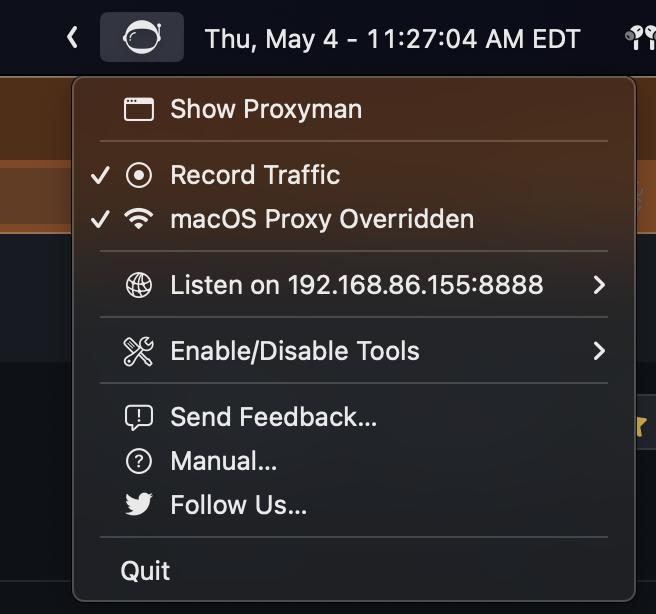
macOS Proxy Overriddenitem from this menu:I can toggle the proxy On/Off using
networksetupby executing the following:It does the job of actually toggling the proxy settings, but the Proxyman app and the Menubar icon do not change according to the updated state.
Is there a better way of talking to Proxyman outside of the UI? Either from the command line or from AppleScript?
Ideally, I would use a Siri Shortcut or RayCast extension to talk to Proxyman and assign a keyboard shortcut for that action.
Thanks a bunch! 🙏
@NghiaTranUIT commented on GitHub (May 5, 2023):
Hey, you can manually override/rever the system HTTP Proxy by using
networksetupcommand line. However, unfortunately, Proxyman app doesn't listen to the change of the system.Currently, Proxyman supports a CLI with basic actions: Export/Import or Activate the license key.
I guess I can write a quick code to help you enable/disable the System Proxy.
For example:
If the app is opening, it can listen to the change from Proxyman's CLI and update the UI.
You can run this command line by Terminal or AppScript as you mention.
Let me know if it works for you, then I can do it 👍
@raxityo commented on GitHub (May 5, 2023):
Adding that to the CLI would be perfect. Thank you!
@raxityo commented on GitHub (May 5, 2023):
@NghiaTranUIT I was wondering if you were thinking about exposing the current state of the proxy as the
networksetupdoes. If not, nbd, I can usenetworksetupto query the status.eg:
output from
networksetup:@NghiaTranUIT commented on GitHub (May 12, 2023):
@raxityo let's try this Beta build: https://download.proxyman.io/beta/Proxyman_4.7.1_Support_Proxy_CLI.dmg
You can enable/disable the macOS Proxy Overridden:
It's hard to support the
statusbecause there is no easy way for two-way communication (between the CLI and the main app)@raxityo commented on GitHub (May 12, 2023):
Thanks @NghiaTranUIT! works great!
In case anyone finds it useful, I use this simple script to toggle:
It can be used in the Shortcuts app, Raycast Extension, or any other productivity tools.
@JasonBoy commented on GitHub (May 23, 2023):
After upgrade to v4.8, no such command:

@NghiaTranUIT commented on GitHub (May 23, 2023):
Sorry @JasonBoy and @raxityo, this update doesn't include to the latest build. It's my fault 😢
Please use this Beta build, which is updated from the latest build 4.8.0: https://download.proxyman.io/beta/Proxyman_4.8.0_Fix_missing_proxyman-cli.dmg
@JasonBoy commented on GitHub (May 23, 2023):
@NghiaTranUIT Just curious, any plan in the future that we can toggle/create rules for
Map Remote、Map localand other tools from the cli ?so that we can toggle them quickly from Alfred or Raycast 😆@NghiaTranUIT commented on GitHub (May 24, 2023):
Good idea, but how can you toggle the rule? Like this one 🤔
@JasonBoy commented on GitHub (May 25, 2023):
Yeah, something like this 👍 , maybe also plus
onoroffrule@voloshink commented on GitHub (Sep 24, 2024):
Would really love to have the ability to toggle specific rules with the CLI. I have to toggle specific map locals/ map remotes as part of my workflow all the time and it would be super nice to be able to just do it via raycast or something like it. 👍
@ALMLK1996 commented on GitHub (Oct 30, 2024):
كيف يعمل؟
يقوم Proxyman لنظام التشغيل iOS بإنشاء VPN محلي على أجهزتك، ثم يقوم بتبريك جميع حركة المرور من أجهزة iOS الخاصة بك إلى خادم Man-In-The-Middle المحلي.
ما هي البيانات التي يستخدمها Proxyman؟
بيانات طلب واستجابة HTTP/HTTPS
يلتقط Proxyman بيانات HTTP/HTTPS وفك تشفيرها (بما في ذلك الرؤوس والجسم وعنوان URL والمضيف وما إلى ذلك) لعرضها في نص عادي
لإنشاء شهادة جذر موقعة ذاتيا. لا يستخدم Proxyman الشهادات التي تم إنشاؤها مسبقا أو المشتركة.
يسجل Proxyman بيانات الطلب/الاستجابة ويخزنها في قاعدة بيانات SQLite المحلية في أجهزة iOS الخاصة بك.
لا يرسل Proxyman بياناتك إلى أي خوادم بعيدة أو أطراف ثالثة.
تظل بياناتك دائما خاصة بك.
إذا كان لديك ترخيص macOS صالح، فيمكنك إلغاء قفل Premium Proxyman لنظام التشغيل iOS. يمكن استرداد مقعد واحد لجهازي iOS.
للتنشيط، يرجى تنزيل Proxyman لنظام التشغيل iOS (AppStore) -> فتح المزيد من علامات التبويب (في شريط علامات التبويب السفلي الأيمن) -> FaceID ورمز المرور -> فتح -> أدخل مفتاح الترخيص الخاص بك.