mirror of
https://github.com/ProxymanApp/Proxyman.git
synced 2026-04-25 16:15:55 +03:00
[GH-ISSUE #162] Proxyman blocks Dropbox #159
Labels
No labels
Discussion
Feature request
In Progress...
Plugins
Waiting response
Windows
Windows
bug
duplicate
enhancement
feature
good first issue
iOS
macOS 10.11
question
wontfix
✅ Done
No milestone
No project
No assignees
1 participant

Notifications
Due date
No due date set.
Dependencies
No dependencies set.
Reference
starred/Proxyman#159
Loading…
Add table
Add a link
Reference in a new issue
No description provided.
Delete branch "%!s()"
Deleting a branch is permanent. Although the deleted branch may continue to exist for a short time before it actually gets removed, it CANNOT be undone in most cases. Continue?
Originally created by @DeLoeribas on GitHub (Jun 6, 2019).
Original GitHub issue: https://github.com/ProxymanApp/Proxyman/issues/162
Which Proxyman version are you using? (Ex. Proxyman 0.5 (200))
Version 1.4.1 (1410)
What OS Version are you using? (Ex. mac 10.13)
macOS Mojave 10.14.5
Steps to reproduce this issue
Proxyman gives a status code or 999 for a Connect method to https://bolt.dropbox.com
Screenshots (optional)
@NghiaTranUIT commented on GitHub (Jun 7, 2019):
Hey @DeLoeribas
Dropbox has the built-in SSL-Pinning mechanism to prevent all 3rd-party MITM (man in the middle) apps like Proxyman, Fiddler by using their own Dropbox certificate when verifying the source of requests and response.
Therefore, Proxyman is unable to intercept the data of https://bolt.dropbox.com and result in the 999 error code.
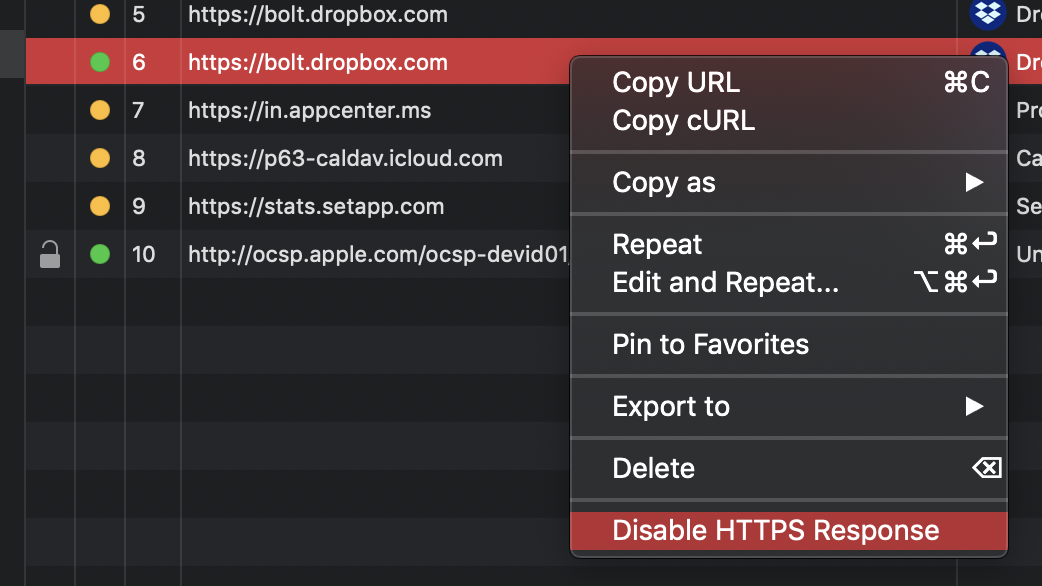
I would recommend that we shouldn't "Enable HTTPS Response" for Dropbox's domains.
If we enabled, we could disable it by righ-click on the app/domain, and select Disable.
Let me know if you need more help 😄