[GH-ISSUE #1575] Android Studio SSL Proxy Not Working #1568

Closed
opened 2026-03-03 19:52:31 +03:00 by kerem · 12 comments
Owner

Originally created by @AlanCPSC on GitHub (Mar 13, 2023).
Original GitHub issue: https://github.com/ProxymanApp/Proxyman/issues/1575

Description

I am unable to successfully set up SSL proxying for the Mac and Android Studio Emulator.

After exhausting all suggestions available on the website, I am now out of any further ideas.

Steps to Reproduce

  1. Install certificate on this Mac...
  2. Install certificate on this Emulator...
  3. Update res/xml/network_security_config.xml
  4. Update AndroidManifest.xml

Current Behavior

  • When proxyman is running Mac Chrome HTTP works
  • When proxyman is running Mac Chrome HTTPS works
  • When proxyman is running Emulator Chrome HTTP works
  • When proxyman is running Emulator Chrome HTTPS DOES NOT works

Expected Behavior

  • When proxyman is running Mac Chrome HTTP works
  • When proxyman is running Mac Chrome HTTPS works
  • When proxyman is running Emulator Chrome HTTP works
  • When proxyman is running Emulator Chrome HTTPS works

Environment

  • App version: Proxyman 4.4.0
  • macOS version: macOS Ventura 13.1
problem_screenshot
Originally created by @AlanCPSC on GitHub (Mar 13, 2023). Original GitHub issue: https://github.com/ProxymanApp/Proxyman/issues/1575 ## Description I am unable to successfully set up SSL proxying for the Mac and Android Studio Emulator. After exhausting all suggestions available on the website, I am now out of any further ideas. ## Steps to Reproduce 1. Install certificate on this Mac... 2. Install certificate on this Emulator... 3. Update res/xml/network_security_config.xml 4. Update AndroidManifest.xml ## Current Behavior * When proxyman is running Mac Chrome HTTP works * When proxyman is running Mac Chrome HTTPS works * When proxyman is running Emulator Chrome HTTP works * When proxyman is running Emulator Chrome HTTPS **DOES NOT** works ## Expected Behavior * When proxyman is running Mac Chrome HTTP works * When proxyman is running Mac Chrome HTTPS works * When proxyman is running Emulator Chrome HTTP works * When proxyman is running Emulator Chrome HTTPS works ## Environment - App version: Proxyman 4.4.0 - macOS version: macOS Ventura 13.1 <img width="1359" alt="problem_screenshot" src="https://user-images.githubusercontent.com/22120384/224614157-ec41a58f-48c2-4d71-8085-e28f9614f9cb.png">
kerem 2026-03-03 19:52:31 +03:00
  • closed this issue
  • added the
    bug
    label
Author
Owner

@AlanCPSC commented on GitHub (Mar 13, 2023):

Despite restarting multiple times and attempting to reinstall the certificates, no progress has been made.

Does anyone have any suggestions on how to effectively address this problem? 🤔

<!-- gh-comment-id:1465530381 --> @AlanCPSC commented on GitHub (Mar 13, 2023): Despite restarting multiple times and attempting to reinstall the certificates, no progress has been made. Does anyone have any suggestions on how to effectively address this problem? 🤔
Author
Owner

@AlanCPSC commented on GitHub (Mar 13, 2023):

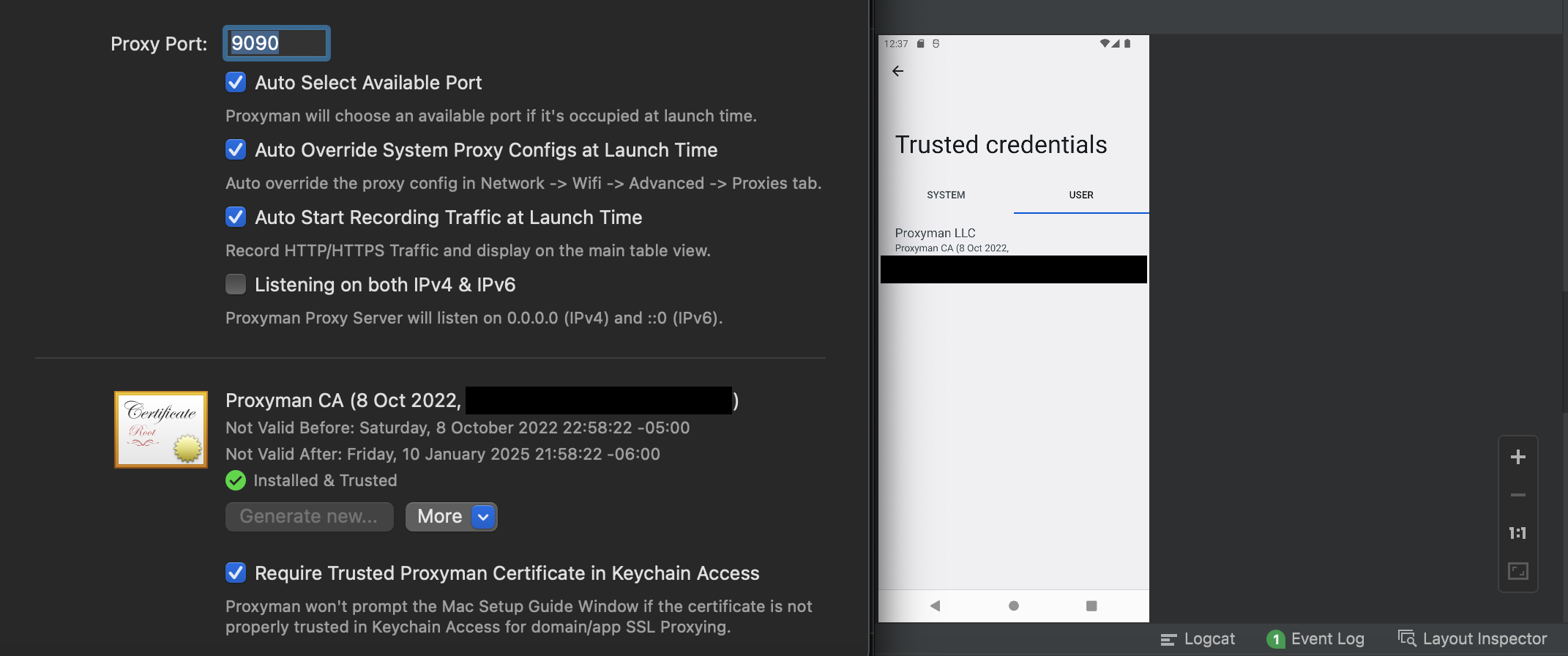
Here is screenshot proof that I have configured certificate on both Mac & Emulator:
screenshot_proof

Here is screenshot error that I get each time I try to make a https request on Emulator:
screenshot_error

<!-- gh-comment-id:1465546721 --> @AlanCPSC commented on GitHub (Mar 13, 2023): Here is screenshot proof that I have configured certificate on both Mac & Emulator: <img width="1071" alt="screenshot_proof" src="https://user-images.githubusercontent.com/22120384/224617130-12519a08-d001-4a65-9e55-7b0f28d2b148.png"> Here is screenshot error that I get each time I try to make a https request on Emulator: <img width="488" alt="screenshot_error" src="https://user-images.githubusercontent.com/22120384/224617095-925fa091-39e5-4c90-8680-89085a6aeac1.png">
Author
Owner

@NghiaTranUIT commented on GitHub (Mar 13, 2023):

@AlanCPSC Can you try using the Automatic Script for Android Emulator 🤔

To make sure that it's installed & trusted properly.

The Emulator must not be an Google Play version.

<!-- gh-comment-id:1465556558 --> @NghiaTranUIT commented on GitHub (Mar 13, 2023): @AlanCPSC Can you try using the [Automatic Script for Android Emulator](https://docs.proxyman.io/debug-devices/android-device/automatic-script-for-android-emulator) 🤔 To make sure that it's installed & trusted properly. The Emulator must not be an Google Play version.
Author
Owner

@AlanCPSC commented on GitHub (Mar 13, 2023):

@NghiaTranUIT. I already installed it using the Automatic Script for Android Emulator.

I am able to connect inside the Android Emulator when I turn OFF SSL proxying:
screenshot_success

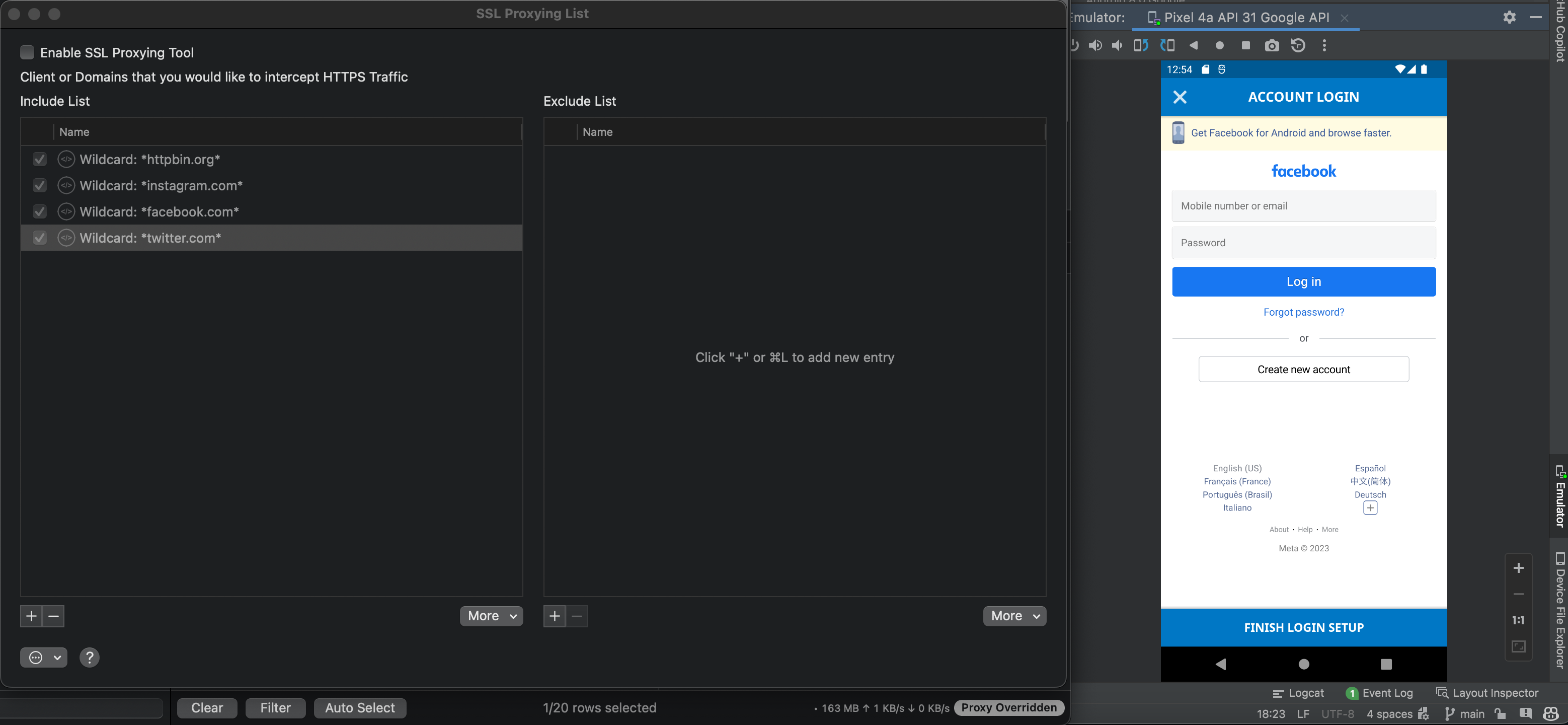
I am NOT able to connect inside the Android Emulator when I turn ON SSL proxying:
screenshot_failure

<!-- gh-comment-id:1465557833 --> @AlanCPSC commented on GitHub (Mar 13, 2023): @NghiaTranUIT. I already installed it using the [Automatic Script for Android Emulator](https://docs.proxyman.io/debug-devices/android-device/automatic-script-for-android-emulator). I am able to connect inside the Android Emulator when I turn OFF SSL proxying: <img width="1558" alt="screenshot_success" src="https://user-images.githubusercontent.com/22120384/224619221-cb49db5c-cdcd-4c3b-b1a9-764375cbe16f.png"> I am NOT able to connect inside the Android Emulator when I turn ON SSL proxying: <img width="1556" alt="screenshot_failure" src="https://user-images.githubusercontent.com/22120384/224619261-e22cc857-fbf3-4b39-8d99-ae25d209cf79.png">
Author
Owner

@NghiaTranUIT commented on GitHub (Mar 13, 2023):

Do you have access to the Source code of your app? (Facebook Login)

It seems you're trying to intercept these famous apps (Facebook, Google, IG), and they're protected by SSL Pinning.

<!-- gh-comment-id:1465559817 --> @NghiaTranUIT commented on GitHub (Mar 13, 2023): Do you have access to the Source code of your app? (Facebook Login) It seems you're trying to intercept these famous apps (Facebook, Google, IG), and they're protected by SSL Pinning.
Author
Owner

@AlanCPSC commented on GitHub (Mar 13, 2023):

But I have the same problem with EVERY https request. Including benign apps like https://httpbin.org/get.

Additionally, I am able to intercept these famous apps on MacOS Chrome. Just not through the Android Emulator.

<!-- gh-comment-id:1465563525 --> @AlanCPSC commented on GitHub (Mar 13, 2023): But I have the same problem with EVERY https request. Including benign apps like [https://httpbin.org/get](https://httpbin.org/get). Additionally, I am able to intercept these famous apps on MacOS Chrome. Just not through the Android Emulator.
Author
Owner

@NghiaTranUIT commented on GitHub (Mar 13, 2023):

Can you try on this sample code: https://github.com/ProxymanApp/OKHTTP-Android-Sample

It's already added the res/xml/network_security_config.xml and AndroidManifest.xml

If you can intercept the HTTPS traffic from this app, it means you setup properly. The problem maybe from your app.

<!-- gh-comment-id:1465571105 --> @NghiaTranUIT commented on GitHub (Mar 13, 2023): Can you try on this sample code: https://github.com/ProxymanApp/OKHTTP-Android-Sample It's already added the res/xml/network_security_config.xml and AndroidManifest.xml If you can intercept the HTTPS traffic from this app, it means you setup properly. The problem maybe from your app.
Author
Owner

@NghiaTranUIT commented on GitHub (Mar 13, 2023):

Please note that Android Security is higher and trickier than the iOS app. You have to be the owner of your apps, which allows you to modify the res/xml/network_security_config.xml and AndroidManifest.xml files.

These files need to define the domain that you're owing too. It's not possible to intercept HTTPS traffic from Social website.

<!-- gh-comment-id:1465572240 --> @NghiaTranUIT commented on GitHub (Mar 13, 2023): Please note that Android Security is higher and trickier than the iOS app. You have to be the owner of your apps, which allows you to modify the `res/xml/network_security_config.xml` and `AndroidManifest.xml` files. These files need to define the domain that you're owing too. It's not possible to intercept HTTPS traffic from Social website.
Author
Owner

@AlanCPSC commented on GitHub (Mar 13, 2023):

@NghiaTranUIT

I discovered what was going on. Proxyman does not work with Mozilla's GeckoView for some reason.

I am not sure why, but when I switch back to using a standard Android WebView, I can intercept all SSL traffic again.

<!-- gh-comment-id:1466820636 --> @AlanCPSC commented on GitHub (Mar 13, 2023): @NghiaTranUIT I discovered what was going on. Proxyman does not work with [Mozilla's GeckoView](https://firefox-source-docs.mozilla.org/mobile/android/geckoview/consumer/geckoview-quick-start.html) for some reason. I am not sure why, but when I switch back to using a standard Android WebView, I can intercept all SSL traffic again.
Author
Owner

@AlanCPSC commented on GitHub (Mar 13, 2023):

Also regarding the claim "It's not possible to intercept HTTPS traffic from Social website."

I actually can - I just have to do it on a standard WebView. See the following screenshot:

screenshot_webview

If you fine folks can look into supporting Mozilla's GeckoView in the future, that would be wonderful.

<!-- gh-comment-id:1466829506 --> @AlanCPSC commented on GitHub (Mar 13, 2023): Also regarding the claim "It's not possible to intercept HTTPS traffic from Social website." I actually can - I just have to do it on a standard WebView. See the following screenshot: <img width="1392" alt="screenshot_webview" src="https://user-images.githubusercontent.com/22120384/224811918-9b828fb8-1187-4e27-bc98-e8ff7a0c305a.png"> If you fine folks can look into supporting Mozilla's GeckoView in the future, that would be wonderful.
Author
Owner

@NghiaTranUIT commented on GitHub (Mar 14, 2023):

@AlanCPSC Firefox or Mozilla GeckoView required you to add Proxyman Certificate to their trust store.

Mozilla doesn't provide the UI to add the certificate, the above link is a workaround.

<!-- gh-comment-id:1467156729 --> @NghiaTranUIT commented on GitHub (Mar 14, 2023): @AlanCPSC Firefox or Mozilla GeckoView required you to add Proxyman Certificate to their trust store. - Firefox on macOS: https://docs.proxyman.io/debug-devices/firefox - Mozilla on Android: https://blog.jeroenhd.nl/article/firefox-for-android-using-a-custom-certificate-authority Mozilla doesn't provide the UI to add the certificate, the above link is a workaround.
Author
Owner

@AlanCPSC commented on GitHub (Mar 15, 2023):

@NghiaTranUIT Found the following additional threads regarding this issue:

Closing this issue since the problem does not appear to be related to Proxyman. Thank you for your help.

<!-- gh-comment-id:1469309484 --> @AlanCPSC commented on GitHub (Mar 15, 2023): @NghiaTranUIT Found the following additional threads regarding this issue: * [Bug 1553265 - No way to bypass certificate error pages, such as self-signed certs](https://bugzilla.mozilla.org/show_bug.cgi?id=1553265) * [Bug 868370 - Provide a way to import user certificates from PKCS#12/PFX files](https://bugzilla.mozilla.org/show_bug.cgi?id=868370) Closing this issue since the problem does not appear to be related to Proxyman. Thank you for your help.
Sign in to join this conversation.
No milestone
No project
No assignees
1 participant
Notifications
Due date
The due date is invalid or out of range. Please use the format "yyyy-mm-dd".

No due date set.

Dependencies

No dependencies set.

Reference
starred/Proxyman#1568
No description provided.