[GH-ISSUE #1492] In Breakpoint window in Raw tab - Body not showed #1485

Open
opened 2026-03-03 19:51:52 +03:00 by kerem · 4 comments
Owner

Originally created by @Drovosek01 on GitHub (Jan 11, 2023).
Original GitHub issue: https://github.com/ProxymanApp/Proxyman/issues/1492

Originally assigned to: @NghiaTranUIT on GitHub.

Description

If I view information about outgoing requests in the main window of the application, then the "Raw" tab displays all the information about the received data - headers, response status, response body, etc.

I was analyzing the Dragonframe 5.0.9 application and configured breakpoints for all urls matching *dragonframe*.

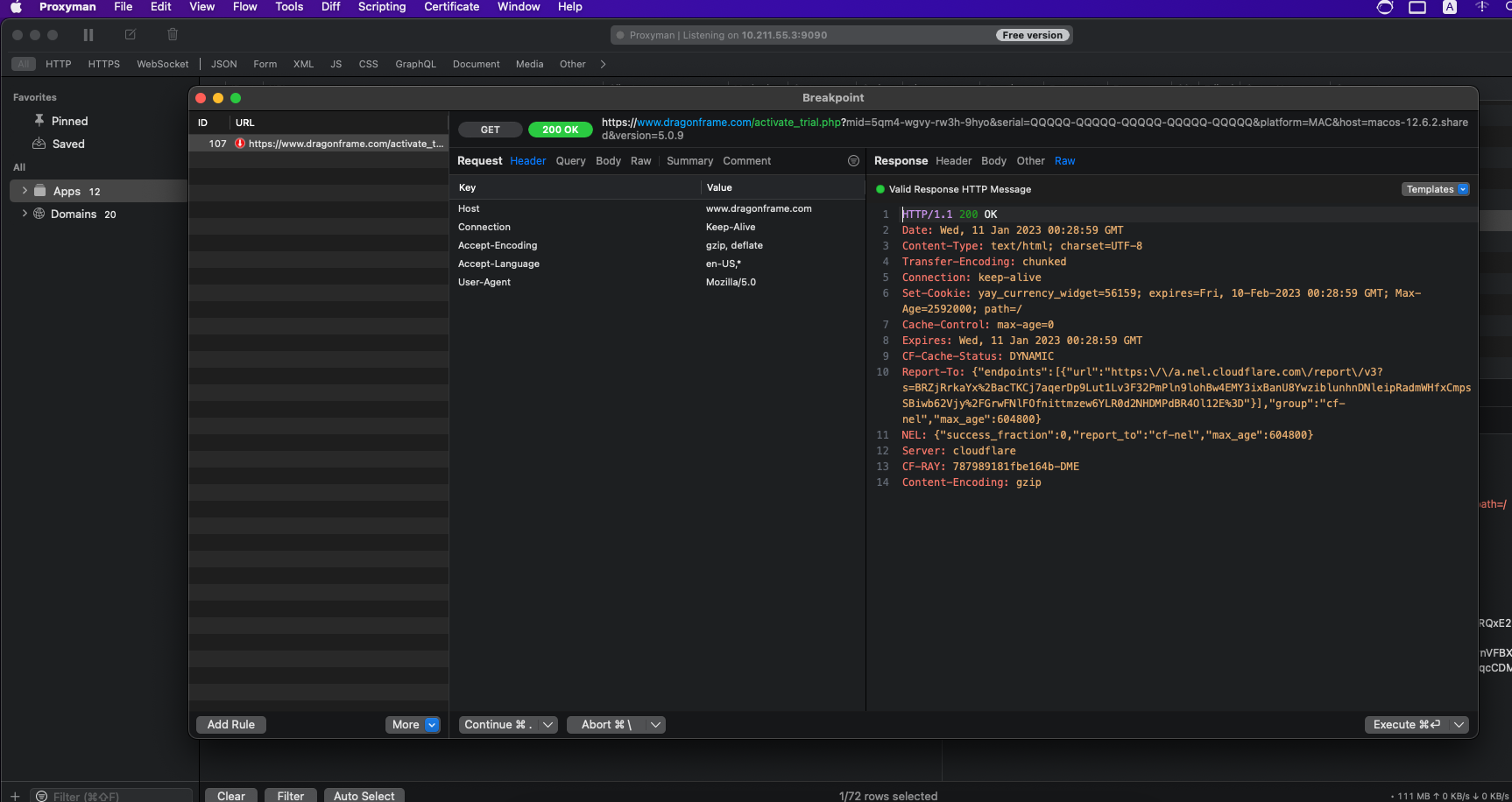
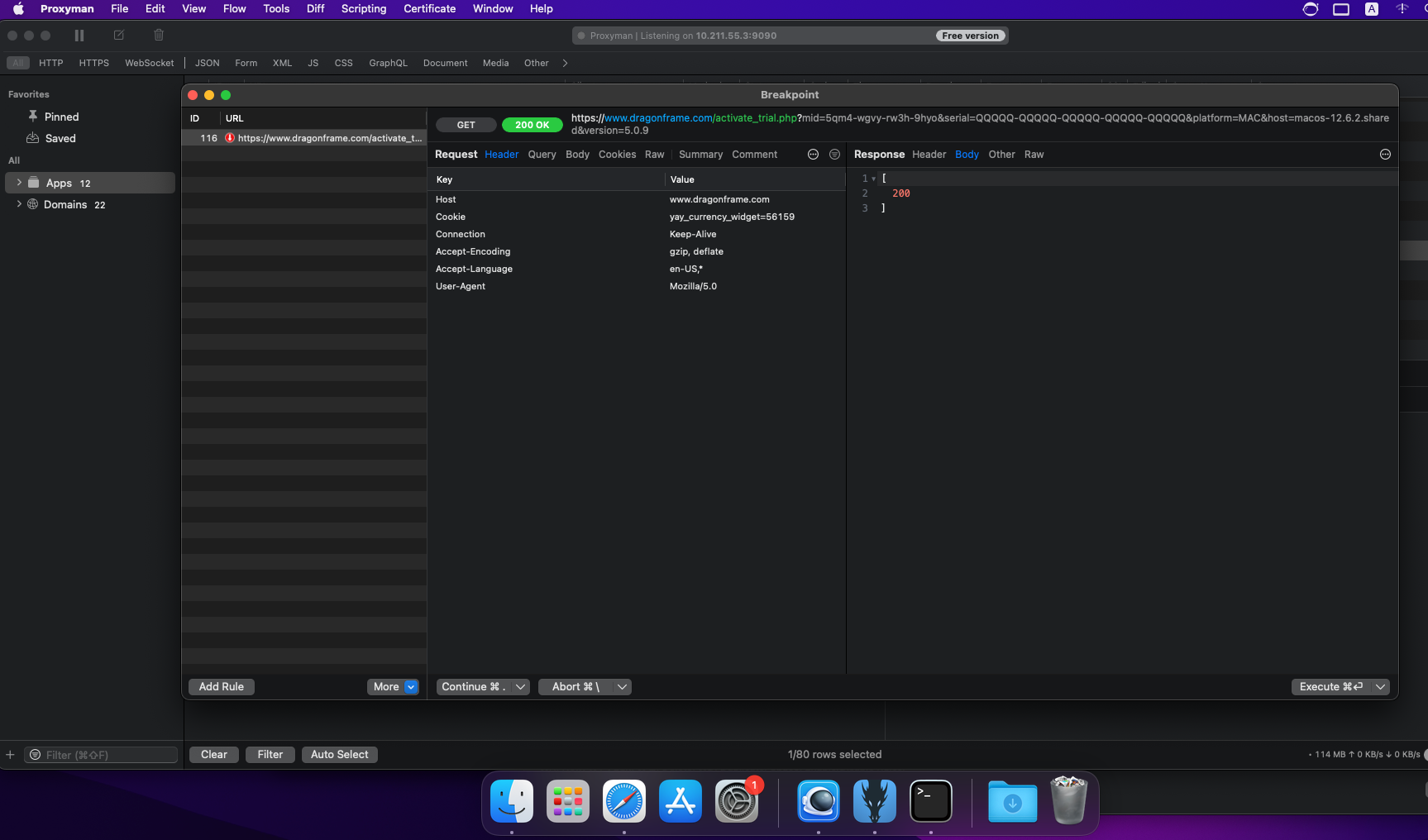
The problem is that in the Breakpoint window when receiving a response from the server, if I open the "Raw" tab, I don't see the response body, but if I open the "Body" tab, the response body is there

Steps to Reproduce

  1. Install Dragonframe 5.0.9 - https://www.dragonframe.com/download/Dragonframe_5.0.9.pkg
  2. In Proxyman enable SSL Proxying for app Dragonframe
  3. Set Breakpoint for request and response for url pattern *dragonframe*
  4. Start Dragonframe and write serial number for trial mode QQQQQ-QQQQQ-QQQQQ-QQQQQ-QQQQQ
  5. Press Activate button
  6. Execute request in Breakpoint window in Proxyman
  7. Look on Raw tab and Body tab for response

Raw tab
image

Body tab
image

Environment

  • App version: Version 3.15.0 (31500)
  • macOS version: macOS Monterey 12.6.2 Intel (inside Parallels Desktop 18.1.1)
Originally created by @Drovosek01 on GitHub (Jan 11, 2023). Original GitHub issue: https://github.com/ProxymanApp/Proxyman/issues/1492 Originally assigned to: @NghiaTranUIT on GitHub. ## Description If I view information about outgoing requests in the main window of the application, then the "Raw" tab displays all the information about the received data - headers, response status, response body, etc. I was analyzing the Dragonframe 5.0.9 application and configured breakpoints for all urls matching `*dragonframe*`. The problem is that in the Breakpoint window when receiving a response from the server, if I open the "Raw" tab, I don't see the response body, but if I open the "Body" tab, the response body is there ## Steps to Reproduce 1. Install Dragonframe 5.0.9 - https://www.dragonframe.com/download/Dragonframe_5.0.9.pkg 2. In Proxyman enable SSL Proxying for app Dragonframe 3. Set Breakpoint for request and response for url pattern `*dragonframe*` 4. Start Dragonframe and write serial number for trial mode `QQQQQ-QQQQQ-QQQQQ-QQQQQ-QQQQQ` 5. Press Activate button 6. Execute request in Breakpoint window in Proxyman 7. Look on Raw tab and Body tab for response Raw tab ![image](https://user-images.githubusercontent.com/29478700/211690415-eae56206-ad2c-4538-8631-4e99968a594c.png) Body tab ![image](https://user-images.githubusercontent.com/29478700/211691381-961a31c6-6aa5-48ce-a2d7-e83268a441b5.png) ## Environment - App version: Version 3.15.0 (31500) - macOS version: macOS Monterey 12.6.2 Intel (inside Parallels Desktop 18.1.1)
Author
Owner

@NghiaTranUIT commented on GitHub (Jan 11, 2023):

It's our intention. We don't show the Raw Body in the Raw Tab since the Body might not be a text. It can be a Binary, Image, etc, which causes a lot of trouble when parsing the Body.

Currently, the Raw Tab only allows editing the First Line of the HTTP Message and the header data.

To modify the Body, please select the Body tab since it's better.

<!-- gh-comment-id:1378086123 --> @NghiaTranUIT commented on GitHub (Jan 11, 2023): It's our intention. We don't show the Raw Body in the Raw Tab since the Body might not be a `text`. It can be a Binary, Image, etc, which causes a lot of trouble when parsing the Body. Currently, the Raw Tab only allows editing the First Line of the HTTP Message and the header data. To modify the Body, please select the Body tab since it's better.
Author
Owner

@Drovosek01 commented on GitHub (Jan 11, 2023):

Currently, the Raw Tab only allows editing the First Line of the HTTP Message and the header data.

So... why body showed in Raw tab if I look Raw tab in general window Proxyman?

image

image

<!-- gh-comment-id:1378140624 --> @Drovosek01 commented on GitHub (Jan 11, 2023): > Currently, the Raw Tab only allows editing the First Line of the HTTP Message and the header data. So... why body showed in Raw tab if I look Raw tab in general window Proxyman? ![image](https://user-images.githubusercontent.com/29478700/211699341-e776f36c-7cd1-4cf5-9ffd-a2cc27e45659.png) ![image](https://user-images.githubusercontent.com/29478700/211699400-0dab0d89-c532-422a-9544-4db1ea5a73c9.png)
Author
Owner

@NghiaTranUIT commented on GitHub (Jan 11, 2023):

Thanks. I admit that it's a shortcoming of the Breakpoint Raw Tab.

I will open a ticket to support modifying the Text-based Body in the Breakpoint's Raw Tab 👍

<!-- gh-comment-id:1378142074 --> @NghiaTranUIT commented on GitHub (Jan 11, 2023): Thanks. I admit that it's a shortcoming of the Breakpoint Raw Tab. I will open a ticket to support modifying the Text-based Body in the Breakpoint's Raw Tab 👍
Author
Owner

@NghiaTranUIT commented on GitHub (Jan 23, 2023):

I decided to postpone this feature until we get more requests from another user 👍

The reason is: There are many edge cases that can cause confusion when supporting the Body in The Raw Tab (Breakpoint Mode).

  • For example, the request/response body format is non-text-based.
  • The user can switch between the non-text-based to text-base, ...
  • Potential bug when parsing the Raw Messages

Solution Current: To modify the Body, just use the Body Tab because it's born for it 👍

<!-- gh-comment-id:1399698028 --> @NghiaTranUIT commented on GitHub (Jan 23, 2023): I decided to postpone this feature until we get more requests from another user 👍 The reason is: There are many edge cases that can cause confusion when supporting the Body in The Raw Tab (Breakpoint Mode). - For example, the request/response body format is non-text-based. - The user can switch between the non-text-based to text-base, ... - Potential bug when parsing the Raw Messages Solution Current: To modify the Body, just use the Body Tab because it's born for it 👍
Sign in to join this conversation.
No milestone
No project
No assignees
1 participant
Notifications
Due date
The due date is invalid or out of range. Please use the format "yyyy-mm-dd".

No due date set.

Dependencies

No dependencies set.

Reference
starred/Proxyman#1485
No description provided.