mirror of
https://github.com/ProxymanApp/Proxyman.git
synced 2026-04-27 17:15:49 +03:00
[GH-ISSUE #1368] WebSockets not being captured from Mac Safari #1363
Labels
No labels
Discussion
Feature request
In Progress...
Plugins
Waiting response
Windows
Windows
bug
duplicate
enhancement
feature
good first issue
iOS
macOS 10.11
question
wontfix
✅ Done
No milestone
No project
No assignees
1 participant

Notifications
Due date
No due date set.
Dependencies
No dependencies set.
Reference
starred/Proxyman#1363
Loading…
Add table
Add a link
Reference in a new issue
No description provided.
Delete branch "%!s()"
Deleting a branch is permanent. Although the deleted branch may continue to exist for a short time before it actually gets removed, it CANNOT be undone in most cases. Continue?
Originally created by @leearmstrong on GitHub (Sep 21, 2022).
Original GitHub issue: https://github.com/ProxymanApp/Proxyman/issues/1368
Description
I have a website that loads a wss:// connection. This does not show up in Proxyman but the web page loads fine, alongside the underlying WebSockets connection. I have explicitly added the wss:// domain to the SSL Proxying list but see nothing in Proxyman
Environment
@NghiaTranUIT commented on GitHub (Sep 21, 2022):
By default, the WSS traffic doesn't appear until we add SSL Proxying on the domain. If you don't mind, please find a domain that you think it's a WSS, then enable SSL Proxying on it.
For example:
wss://my_domain.commy_domainand Enable SSL Proxying@leearmstrong commented on GitHub (Sep 22, 2022):
Hello,
I already had
my_domainas a wildcard and it wasn't working. I explicitly added the SubDomain to the list and it still does not work sadly.I have just tried Chrome and it works ok there but not Safari
@NghiaTranUIT commented on GitHub (Sep 22, 2022):
My educated guess is that WS/WSS traffic, which is called from Safari, doesn't go through the HTTP Proxy by default. It just works fine with Google Chrome / Firefox.
Not sure how to force Safari to use HTTP Proxy for the WebSocket traffic.
@dizel3d commented on GitHub (Nov 23, 2022):
If you disable NSURLSession Websocket experimental feature, it will work.
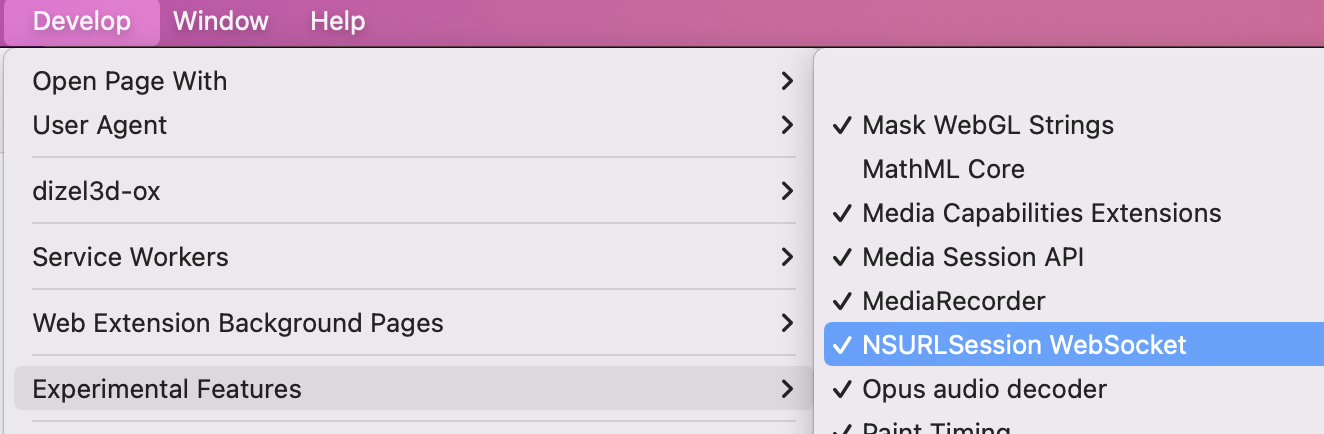
@ben-bourdin451 commented on GitHub (Jul 3, 2023):
Although this does bypass the issue it's not really a solution since this setting is enabled by default in the latest versions of Safari and disabling the setting actually modifies the behaviour of Safair & WS connection. Point being that OP is probably (as am I) trying to debug an issue with this setting enabled.
@NghiaTranUIT you mention here that we can debug WS traffic 'out of the box' on Safari however it seems that no longer holds true. Can you verify that you are able to replicate this issue? Easiest way I found to verify this is to navigate to a known website that uses WS (e.g. slack) with the
NSURLSession Websocketenabled.If you have any other suggestions on how to inspect WS traffic in Safari, perhaps asides from using a source build, please share 🙏
@NghiaTranUIT commented on GitHub (Jul 3, 2023):
@ben-bourdin451 It's a known issue for all NSURLSessionWebsocket on iOS, macOS, and Web Safari too.
NSURLSessionWebSocketdoesn't go through the HTTP Proxy.As I mention, Proxyman can work if it's a WS from Chrome or Firefox, but not Safari.
Can you open a ticket on Apple Support to ask them how to debug WS on Safari? I'd like to follow their suggestion to make it happen on Proxyman. For now, I don't have solution.
@NghiaTranUIT commented on GitHub (Jul 3, 2023):
@ben-bourdin451 I guess there is a solution but I haven't tried it yet. By using Proxifier (https://www.proxifier.com/), it will force all traffic to go through an HTTP Proxy. I guess Websocket from Safari will work too.