[GH-ISSUE #1344] Proxyman converts escaped characters into real ones and breaks JSON correctness #1339

Open
opened 2026-03-03 19:50:38 +03:00 by kerem · 10 comments
Owner

Originally created by @ACATTAN on GitHub (Sep 1, 2022).
Original GitHub issue: https://github.com/ProxymanApp/Proxyman/issues/1344

Originally assigned to: @NghiaTranUIT on GitHub.

Proxyman version? (Ex. Proxyman 1.4.3)

3.8.0

macOS Version? (Ex. mac 10.14)

12.5

Steps to reproduce

When sending a valid JSON which contains an escaped special character (e.g. \u000b), Proxyman converts it to its real value (0x0B) and forwards it this way to the server. This creates an invalid JSON at the server side.

If for example you send this request to the server (directly, without going through the proxy):

curl --request POST 'http://172.25.16.71:9094/v1/events' \
--header 'Content-Type: application/json' \
--data-raw '{
  "report": {
      "text":"hello\u000bworld!"
  }
}'

then the server gets it as-is, with the exact 6 characters - backslash, u, 0, 0, 0, b in the text field.

However, if you send the exact same request via Proxyman:

curl -x 'http://127.0.0.1:9090' --request POST 'http://172.25.16.71:9094/v1/events' \
--header 'Content-Type: application/json' \
--data-raw '{
  "report": {
      "text":"hello\u000bworld!"
  }
}'

then the \u000b is converted to 0x0B, which is wrong.

Expected behavior

Proxyman should forward the JSON request as-is without modifying \u000b into it real character, because if it does so - the validity of the JSON is broken.

This bug is btw rather important to us as it prevents some messages from being correctly parsed by our servers. Thanks 😄

Originally created by @ACATTAN on GitHub (Sep 1, 2022). Original GitHub issue: https://github.com/ProxymanApp/Proxyman/issues/1344 Originally assigned to: @NghiaTranUIT on GitHub. ### Proxyman version? (Ex. Proxyman 1.4.3) 3.8.0 ### macOS Version? (Ex. mac 10.14) 12.5 ### Steps to reproduce When sending a valid JSON which contains an escaped special character (e.g. \u000b), Proxyman converts it to its real value (0x0B) and forwards it this way to the server. This creates an invalid JSON at the server side. If for example you send this request to the server (directly, without going through the proxy): ``` curl --request POST 'http://172.25.16.71:9094/v1/events' \ --header 'Content-Type: application/json' \ --data-raw '{ "report": { "text":"hello\u000bworld!" } }' ``` then the server gets it as-is, with the exact 6 characters - backslash, u, 0, 0, 0, b in the text field. However, if you send the exact same request via Proxyman: ``` curl -x 'http://127.0.0.1:9090' --request POST 'http://172.25.16.71:9094/v1/events' \ --header 'Content-Type: application/json' \ --data-raw '{ "report": { "text":"hello\u000bworld!" } }' ``` then the \u000b is converted to 0x0B, which is wrong. ### Expected behavior Proxyman should forward the JSON request as-is without modifying \u000b into it real character, because if it does so - the validity of the JSON is broken. This bug is btw rather important to us as it prevents some messages from being correctly parsed by our servers. Thanks 😄
Author
Owner

@NghiaTranUIT commented on GitHub (Sep 1, 2022):

Thanks. It's an interesting issue that I'm not aware of when implementing the cURL.

Since it blocks your current workflow, I will prioritize this bug ticket over the filter ticket, which you open yesterday 👍

Fixing it and send you a Beta build soon 💯

<!-- gh-comment-id:1234475327 --> @NghiaTranUIT commented on GitHub (Sep 1, 2022): Thanks. It's an interesting issue that I'm not aware of when implementing the cURL. Since it blocks your current workflow, I will prioritize this bug ticket over the filter ticket, which you open yesterday 👍 Fixing it and send you a Beta build soon 💯
Author
Owner

@ACATTAN commented on GitHub (Sep 1, 2022):

Thanks so much!
Just to clarify - I sent you a cURL example just to clarify the issue, but the real traffic was from an iPhone, through Proxyman, to our servers. The iPhone sent "\u000b" as a string inside a JSON body, and Proxyman converted the \u000b string into the real ascii character 0x0B (vertical tab), and that's the issue. It should have left the \u000b string untouched.
Thanks again!

<!-- gh-comment-id:1234522958 --> @ACATTAN commented on GitHub (Sep 1, 2022): Thanks so much! Just to clarify - I sent you a cURL example just to clarify the issue, but the real traffic was from an iPhone, through Proxyman, to our servers. The iPhone sent "\u000b" as a string inside a JSON body, and Proxyman converted the \u000b string into the real ascii character 0x0B (vertical tab), and that's the issue. It should have left the \u000b string untouched. Thanks again!
Author
Owner

@NghiaTranUIT commented on GitHub (Sep 2, 2022):

I tried to reproduce the bug, but no luck 🤔

Log Server

const express = require("express");
const app = express();
const port = 3000;
// app.use(express.json()) 

app.use(
    express.json({
      limit: '5mb',
      verify: (req, res, buf) => {
        req.rawBody = buf.toString();
      },
    })
  );

app.get("/", (req, res) => {
  res.send("Hello World!");
});

app.post("/hexdata", (req, res) => {
    console.log('--- Hex data is called!');

    const body = req.body;
    console.log('Body = ', body);
    console.log('Raw Body = ', req.rawBody);
    res.json(body);
});

app.listen(port, () => {
  console.log(`Example app listening on port ${port}`);
});

=> I use rawBody which pares the request body without changing any data.

Test case 1: (No Proxy mode) Send a cURL with an escape string in the body

Screen_Shot_2022-09-02_at_08_48_04

  • Confirm that the request body is intact on the Server Log

Test case 2: (Proxy to Proxyman) Send a cURL with an escape string in the body

Screen_Shot_2022-09-02_at_08_49_10

=> Not sure, but the body is still intact. I don't see that Proxyman has modified the body.

Test case 2: (Proxy to Proxyman) Use Insomnia to send a request with an escape string in the body

Screen Shot 2022-09-02 at 08 59 37

=> Result is the same. The body still displays "data": "hello\u000bworld!"

Screen Shot 2022-09-02 at 08 59 57
<!-- gh-comment-id:1234982848 --> @NghiaTranUIT commented on GitHub (Sep 2, 2022): I tried to reproduce the bug, but no luck 🤔 ### Log Server - Github: https://github.com/NghiaTranUIT/simple-server-testing - Code: ```js const express = require("express"); const app = express(); const port = 3000; // app.use(express.json()) app.use( express.json({ limit: '5mb', verify: (req, res, buf) => { req.rawBody = buf.toString(); }, }) ); app.get("/", (req, res) => { res.send("Hello World!"); }); app.post("/hexdata", (req, res) => { console.log('--- Hex data is called!'); const body = req.body; console.log('Body = ', body); console.log('Raw Body = ', req.rawBody); res.json(body); }); app.listen(port, () => { console.log(`Example app listening on port ${port}`); }); ``` => I use rawBody which pares the request body without changing any data. ### Test case 1: (No Proxy mode) Send a cURL with an escape string in the body ![Screen_Shot_2022-09-02_at_08_48_04](https://user-images.githubusercontent.com/5878421/188042406-6a41351b-bdd0-4e2a-9d6d-11492dc7e767.jpg) - Confirm that the request body is intact on the Server Log ### Test case 2: (Proxy to Proxyman) Send a cURL with an escape string in the body ![Screen_Shot_2022-09-02_at_08_49_10](https://user-images.githubusercontent.com/5878421/188042542-93870e65-1383-4618-bed2-97f618eb14bd.jpg) => Not sure, but the body is still intact. I don't see that Proxyman has modified the body. ### Test case 2: (Proxy to Proxyman) Use Insomnia to send a request with an escape string in the body <img width="1302" alt="Screen Shot 2022-09-02 at 08 59 37" src="https://user-images.githubusercontent.com/5878421/188042714-ac518f4d-da1d-4ad1-a9d2-7d1acd9995bc.png"> => Result is the same. The body still displays `"data": "hello\u000bworld!"` <img width="389" alt="Screen Shot 2022-09-02 at 08 59 57" src="https://user-images.githubusercontent.com/5878421/188042739-d67e02f7-0169-48bc-92d3-d5f052a5b267.png">
Author
Owner

@NghiaTranUIT commented on GitHub (Sep 2, 2022):

Just wondering: Do you use any debugging tools? Map Local, Breakpoint, Scripting 🤔 The request body can be modified by these tools.

If you don't mind, what server you're using? Is it ExpressJS, Python, Go, or something. I would like to use the same server to reproduce it.

<!-- gh-comment-id:1234983674 --> @NghiaTranUIT commented on GitHub (Sep 2, 2022): Just wondering: Do you use any debugging tools? Map Local, Breakpoint, Scripting 🤔 The request body can be modified by these tools. If you don't mind, what server you're using? Is it ExpressJS, Python, Go, or something. I would like to use the same server to reproduce it.
Author
Owner

@ACATTAN commented on GitHub (Sep 2, 2022):

Hey @NghiaTranUIT thanks a lot for looking into it!
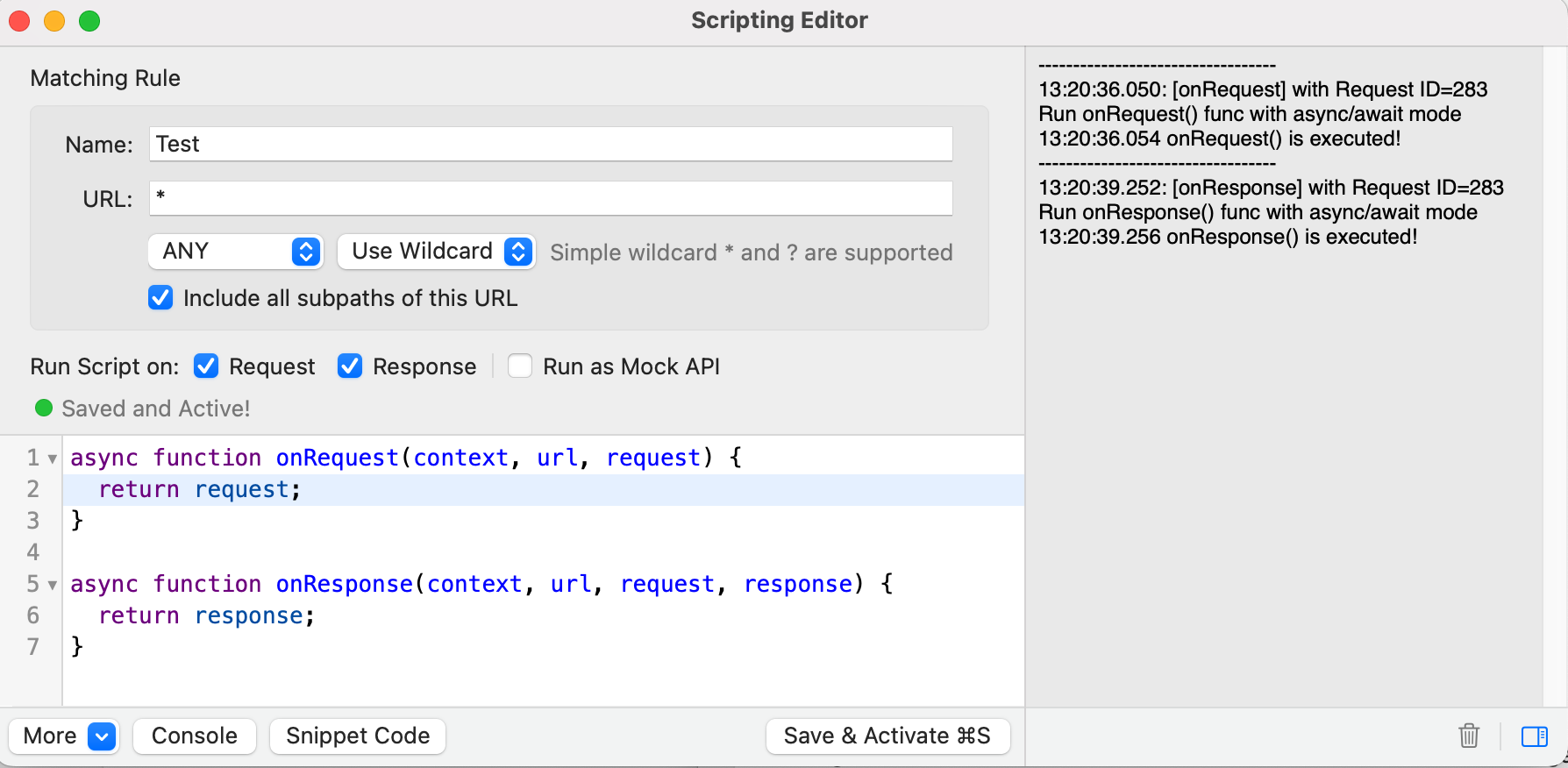
I understand now when it happens. It happens only if the scripting engine of Proxyman is activated. I.e. if there's no script catching the request - then it goes through as-is. However, it's enough to have a script that does nothing - just implements the onRequest and onResponse methods - the issue occurs. I guess that when there's a script - Proxyman actually decodes the message and re-encodes it, and that's when the issue occurs.

I used this script, targeted at any URL:
image

When this script is active - the issue happens.

(regarding your question about the server - I used our own Java-based server so I can't send that one to you, but I think it doesn't matter. I think that once you activate a script as I just described you'll be able to reproduce the issue).
Thanks again!

<!-- gh-comment-id:1235332029 --> @ACATTAN commented on GitHub (Sep 2, 2022): Hey @NghiaTranUIT thanks a lot for looking into it! I understand now when it happens. It happens only if the scripting engine of Proxyman is activated. I.e. if there's no script catching the request - then it goes through as-is. However, it's enough to have a script that does nothing - just implements the onRequest and onResponse methods - the issue occurs. I guess that when there's a script - Proxyman actually decodes the message and re-encodes it, and that's when the issue occurs. I used this script, targeted at any URL: ![image](https://user-images.githubusercontent.com/11505149/188119656-065d956f-20a1-439c-abad-dbdb1264c00c.png) When this script is active - the issue happens. (regarding your question about the server - I used our own Java-based server so I can't send that one to you, but I think it doesn't matter. I think that once you activate a script as I just described you'll be able to reproduce the issue). Thanks again!
Author
Owner

@NghiaTranUIT commented on GitHub (Sep 2, 2022):

Thanks for the hint. I'm able to reproduce the bug 🙌 it's from the Scripting.

<!-- gh-comment-id:1235533322 --> @NghiaTranUIT commented on GitHub (Sep 2, 2022): Thanks for the hint. I'm able to reproduce the bug 🙌 it's from the Scripting.
Author
Owner

@NghiaTranUIT commented on GitHub (Sep 3, 2022):

If you don't mind, @ACATTAN please use this beta build: https://proxyman.s3.us-east-2.amazonaws.com/beta/Proxyman_3.8.0_Fix_Unicode_encoding_in_scripting.dmg

It works fine on my test cases. Please let me know the result 👍

<!-- gh-comment-id:1236144500 --> @NghiaTranUIT commented on GitHub (Sep 3, 2022): If you don't mind, @ACATTAN please use this beta build: https://proxyman.s3.us-east-2.amazonaws.com/beta/Proxyman_3.8.0_Fix_Unicode_encoding_in_scripting.dmg It works fine on my test cases. Please let me know the result 👍
Author
Owner

@ACATTAN commented on GitHub (Sep 3, 2022):

Sure, thanks! I will try it tomorrow and let you know.

<!-- gh-comment-id:1236196157 --> @ACATTAN commented on GitHub (Sep 3, 2022): Sure, thanks! I will try it tomorrow and let you know.
Author
Owner

@ACATTAN commented on GitHub (Sep 4, 2022):

Hey @NghiaTranUIT I tried the version and it looks fine.
I noticed that when the character \u000b is passed through the proxy, it is converted to \\v, but this is OK, as \\v is just a different representation of the same character (vertical tab). When trying \u000c - it remained \u000c. So that's fine.

Btw, on a different (and a bit related note) - when JSON requests go through scripting, the order of the JSON gets changed randomly. I.e. if the request contains for example {"a":1, "b":2}, it may reach the server as {"b":2, "a":1}. I understand it's probably because you read it into a Dictionary where order doesn't matter. For the server's software it normally doesn't matter too. But for a person going over requests - instead of seeing them in a consistent order, the fields inside the JSON are randomly mixed up, which is a bit confusing. Charles for example doesn't change the order of the original JSON, since its re-writes are based on string manipulations (regex) and not on parsing into a dictionary. Maybe it's complex/impossible to change this behavior, but anyway I wanted to mention that 🙏

<!-- gh-comment-id:1236337601 --> @ACATTAN commented on GitHub (Sep 4, 2022): Hey @NghiaTranUIT I tried the version and it looks fine. I noticed that when the character` \u000b` is passed through the proxy, it is converted to `\\v`, but this is OK, as `\\v` is just a different representation of the same character (vertical tab). When trying `\u000c` - it remained `\u000c`. So that's fine. Btw, on a different (and a bit related note) - when JSON requests go through scripting, the order of the JSON gets changed randomly. I.e. if the request contains for example `{"a":1, "b":2}`, it may reach the server as `{"b":2, "a":1}`. I understand it's probably because you read it into a Dictionary where order doesn't matter. For the server's software it normally doesn't matter too. But for a person going over requests - instead of seeing them in a consistent order, the fields inside the JSON are randomly mixed up, which is a bit confusing. Charles for example doesn't change the order of the original JSON, since its re-writes are based on string manipulations (regex) and not on parsing into a dictionary. Maybe it's complex/impossible to change this behavior, but anyway I wanted to mention that 🙏
Author
Owner

@NghiaTranUIT commented on GitHub (Sep 4, 2022):

I noticed that when the character \u000b is passed through the proxy, it is converted to \v, but this is OK, as \v is just a different representation of the same character (vertical tab). When trying \u000c - it remained \u000c. So that's fine.

Thanks for letting me know 🎉

I understand it's probably because you read it into a Dictionary where order doesn't matter.

It's a known issue. The dictionary on Swift doesn't maintain the order. As a result, the key-order is messed up when it serializes into Data. This issue only happens when using the Scripting.

We don't use Regex like Charles since it's easier for users when manipulating the JS Object.

If the request/response is not modified by the Scripting, the order of the JSON Body is intact.

<!-- gh-comment-id:1236339216 --> @NghiaTranUIT commented on GitHub (Sep 4, 2022): > I noticed that when the character \u000b is passed through the proxy, it is converted to \\v, but this is OK, as \\v is just a different representation of the same character (vertical tab). When trying \u000c - it remained \u000c. So that's fine. Thanks for letting me know 🎉 > I understand it's probably because you read it into a Dictionary where order doesn't matter. It's a known issue. The dictionary on Swift doesn't maintain the order. As a result, the key-order is messed up when it serializes into Data. This issue only happens when using the Scripting. We don't use Regex like Charles since it's easier for users when manipulating the JS Object. If the request/response is not modified by the Scripting, the order of the JSON Body is intact.
Sign in to join this conversation.
No milestone
No project
No assignees
1 participant
Notifications
Due date
The due date is invalid or out of range. Please use the format "yyyy-mm-dd".

No due date set.

Dependencies

No dependencies set.

Reference
starred/Proxyman#1339
No description provided.