[GH-ISSUE #1303] Android: Devices not accepting/installing proxyman-generated certificates #1297

Closed
opened 2026-03-03 19:50:11 +03:00 by kerem · 11 comments
Owner

Originally created by @carstenhag on GitHub (Jul 22, 2022).
Original GitHub issue: https://github.com/ProxymanApp/Proxyman/issues/1303

Originally assigned to: @NghiaTranUIT on GitHub.

I recently switched from a 2019 intel MacBook to a new m1 MacBook. With the intel one is was on Proxyman 3.6.1 and everything worked fine. Now I am setting up the m1 one and on the mac everything works, but the devices don't seem to like the certificates anymore.

Tried to google for the issue, as I thought it's the device's fault, but couldn't find much info at all.

Proxyman version? (Ex. Proxyman 1.4.3)

3.7.0

macOS Version? (Ex. mac 10.14)

macOS 12.3

Steps to reproduce

  1. Generate CA certificate on mac
  2. Point android devices to the mac in use
  3. Open proxy.man/ssl and download the file
  4. Get a message that the certificate from "null" must be installed via settings
  5. Open settings, select certificate, get error that it could not be installed

Devices

Tried this both on a Samsung A70 (Android 11) and an OnePlus8 (Android 11).

Expected behavior

Certificate is installed

Screenshots (optional)

Bildschirmfoto 2022-07-22 um 08 48 51
Bildschirmfoto 2022-07-22 um 08 50 15

Originally created by @carstenhag on GitHub (Jul 22, 2022). Original GitHub issue: https://github.com/ProxymanApp/Proxyman/issues/1303 Originally assigned to: @NghiaTranUIT on GitHub. I recently switched from a 2019 intel MacBook to a new m1 MacBook. With the intel one is was on Proxyman 3.6.1 and everything worked fine. Now I am setting up the m1 one and on the mac everything works, but the devices don't seem to like the certificates anymore. Tried to google for the issue, as I thought it's the device's fault, but couldn't find much info at all. ### Proxyman version? (Ex. Proxyman 1.4.3) 3.7.0 ### macOS Version? (Ex. mac 10.14) macOS 12.3 ### Steps to reproduce 1. Generate CA certificate on mac 2. Point android devices to the mac in use 3. Open proxy.man/ssl and download the file 4. Get a message that the certificate from "null" must be installed via settings 5. Open settings, select certificate, get error that it could not be installed ### Devices Tried this both on a Samsung A70 (Android 11) and an OnePlus8 (Android 11). ### Expected behavior Certificate is installed ### Screenshots (optional) ![Bildschirmfoto 2022-07-22 um 08 48 51](https://user-images.githubusercontent.com/3776997/180381057-f29ff0c6-244b-4636-b64d-54ab43c579c6.png) ![Bildschirmfoto 2022-07-22 um 08 50 15](https://user-images.githubusercontent.com/3776997/180381072-0cf0619a-77b0-4c86-b02c-cc23c2010c1e.png)
kerem closed this issue 2026-03-03 19:50:11 +03:00
Author
Owner

@NghiaTranUIT commented on GitHub (Jul 22, 2022):

Can you verify that:

Open settings, select certificate, get error that it could not be installed

It means: Settings app -> Security -> Encryption & Credentials -> Install a Certificate -> Selec "CA Certificate" -> Select Proxyman CA Certificate in your storage. ?

Reference: https://docs.proxyman.io/debug-devices/android-device#android-setup-guide

<!-- gh-comment-id:1192248059 --> @NghiaTranUIT commented on GitHub (Jul 22, 2022): Can you verify that: ``` Open settings, select certificate, get error that it could not be installed ``` It means: Settings app -> Security -> Encryption & Credentials -> Install a Certificate -> Selec "CA Certificate" -> Select Proxyman CA Certificate in your storage. ? Reference: https://docs.proxyman.io/debug-devices/android-device#android-setup-guide
Author
Owner

@carstenhag commented on GitHub (Jul 22, 2022):

Yes, exactly that.

<!-- gh-comment-id:1192249544 --> @carstenhag commented on GitHub (Jul 22, 2022): Yes, exactly that.
Author
Owner

@carstenhag commented on GitHub (Jul 22, 2022):

Getting the same error (but only in a toast) by running this ADB command:
adb shell am start -n com.android.certinstaller/.CertInstallerMain -a android.intent.action.VIEW -t application/x-x509-ca-cert -d file:///storage/self/primary/Download/proxyman-ca.pem.crt

<!-- gh-comment-id:1192250726 --> @carstenhag commented on GitHub (Jul 22, 2022): Getting the same error (but only in a toast) by running this ADB command: `adb shell am start -n com.android.certinstaller/.CertInstallerMain -a android.intent.action.VIEW -t application/x-x509-ca-cert -d file:///storage/self/primary/Download/proxyman-ca.pem.crt`
Author
Owner

@NghiaTranUIT commented on GitHub (Jul 22, 2022):

Thanks. Since I don't have physical android device, I'm downloading Android 11 Emulator and test again

<!-- gh-comment-id:1192251748 --> @NghiaTranUIT commented on GitHub (Jul 22, 2022): Thanks. Since I don't have physical android device, I'm downloading Android 11 Emulator and test again
Author
Owner

@carstenhag commented on GitHub (Jul 22, 2022):

Will also try it out on an emulator. This is the certificate that the device downloaded https://drive.google.com/file/d/1u1kCY9Kd2rLo74O0XTuBxv5z9Xg23n2_/view?usp=sharing

<!-- gh-comment-id:1192252646 --> @carstenhag commented on GitHub (Jul 22, 2022): Will also try it out on an emulator. This is the certificate that the device downloaded https://drive.google.com/file/d/1u1kCY9Kd2rLo74O0XTuBxv5z9Xg23n2_/view?usp=sharing
Author
Owner

@NghiaTranUIT commented on GitHub (Jul 22, 2022):

The certificate looks ok, I don't see any "null" field. Going to investigate now

<!-- gh-comment-id:1192253612 --> @NghiaTranUIT commented on GitHub (Jul 22, 2022): The certificate looks ok, I don't see any "null" field. Going to investigate now
Author
Owner

@NghiaTranUIT commented on GitHub (Jul 22, 2022):

@carstenhag if you use Android Emulator, can you use the Automatic Script in the Certificate menu -> Install on Android -> Emulator -> Override?

<!-- gh-comment-id:1192254150 --> @NghiaTranUIT commented on GitHub (Jul 22, 2022): @carstenhag if you use Android Emulator, can you use the Automatic Script in the Certificate menu -> Install on Android -> Emulator -> Override?
Author
Owner

@NghiaTranUIT commented on GitHub (Jul 22, 2022):

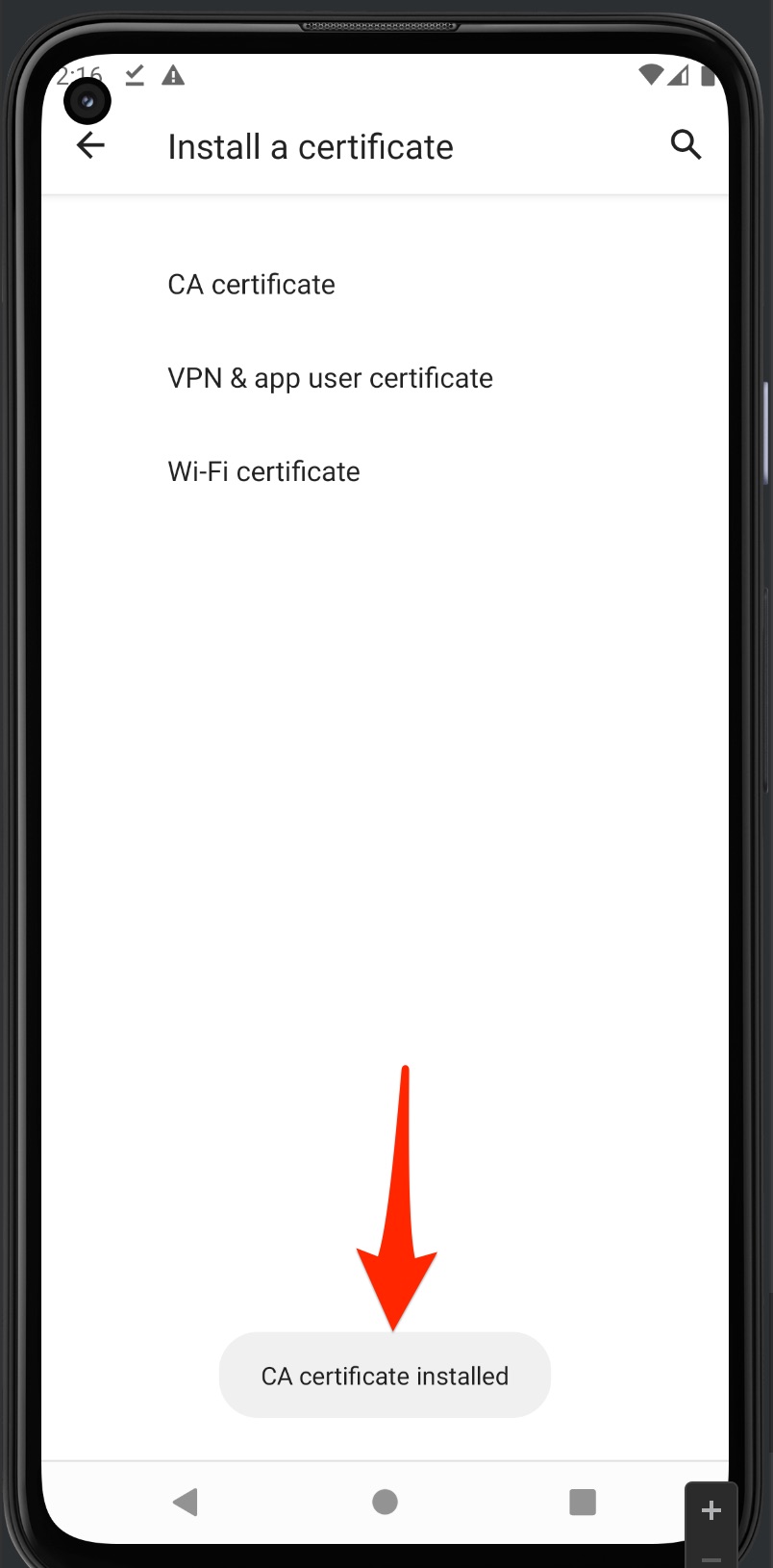
@carstenhag I could not reproduce it. I'm able to manually install the certificate in Android 11 Emulator Screen_Shot_2022-07-22_at_14_16_02

<!-- gh-comment-id:1192265224 --> @NghiaTranUIT commented on GitHub (Jul 22, 2022): @carstenhag I could not reproduce it. I'm able to manually install the certificate in Android 11 Emulator ![Screen_Shot_2022-07-22_at_14_16_02](https://user-images.githubusercontent.com/5878421/180385519-7da84167-b6e6-4435-8838-b523fd3df9a3.jpg)
Author
Owner

@NghiaTranUIT commented on GitHub (Jul 22, 2022):

Maybe reset the certificate (Tool -> Reset all certificate) might work?

<!-- gh-comment-id:1192265414 --> @NghiaTranUIT commented on GitHub (Jul 22, 2022): Maybe reset the certificate (Tool -> Reset all certificate) might work?
Author
Owner

@carstenhag commented on GitHub (Jul 22, 2022):

Found the issue. I was trying to install it as "VPN or App certificate", but the correct option is "CA certificate". Sorry for the trouble :)

<!-- gh-comment-id:1192292298 --> @carstenhag commented on GitHub (Jul 22, 2022): Found the issue. I was trying to install it as "VPN or App certificate", but the correct option is "CA certificate". Sorry for the trouble :)
Author
Owner

@carstenhag commented on GitHub (Jul 22, 2022):

Actually it would be great if you could add this to the troubleshooting page :)

<!-- gh-comment-id:1192298724 --> @carstenhag commented on GitHub (Jul 22, 2022): Actually it would be great if you could add this to the troubleshooting page :)
Sign in to join this conversation.
No milestone
No project
No assignees
1 participant
Notifications
Due date
The due date is invalid or out of range. Please use the format "yyyy-mm-dd".

No due date set.

Dependencies

No dependencies set.

Reference
starred/Proxyman#1297
No description provided.