mirror of
https://github.com/ProxymanApp/Proxyman.git
synced 2026-04-26 00:25:56 +03:00
[GH-ISSUE #1242] Scripting always logs a warning about missing onResoponse while it's there #1236
Labels
No labels
Discussion
Feature request
In Progress...
Plugins
Waiting response
Windows
Windows
bug
duplicate
enhancement
feature
good first issue
iOS
macOS 10.11
question
wontfix
✅ Done
No milestone
No project
No assignees
1 participant

Notifications
Due date
No due date set.
Dependencies
No dependencies set.
Reference
starred/Proxyman#1236
Loading…
Add table
Add a link
Reference in a new issue
No description provided.
Delete branch "%!s()"
Deleting a branch is permanent. Although the deleted branch may continue to exist for a short time before it actually gets removed, it CANNOT be undone in most cases. Continue?
Originally created by @nikhil-thakkar on GitHub (May 20, 2022).
Original GitHub issue: https://github.com/ProxymanApp/Proxyman/issues/1242
Originally assigned to: @NghiaTranUIT on GitHub.
Proxyman version? (Ex. Proxyman 1.4.3)
3.5.0
macOS Version? (Ex. mac 10.14)
12.3.1
Steps to reproduce
`const file = require("@users/49933F43.order_status.json");
// Addons List: https://docs.proxyman.io/scripting/addons
const { sayHello } = require("@addons/HelloWorld.js");
/// This func is called if the Request Checkbox is Enabled. You can modify the Request Data here before the request hits to the server
/// e.g. Add/Update/Remove: host, scheme, port, path, headers, queries, comment, color and body (json, form, plain-text, base64 encoded string)
///
/// Action Menu -> Import File to import a JSON file and use in the script. Or Import directly with request.bodyFilePath = "~/Desktop/myfile.json" (Applied for Response too)
/// Use global object
sharedStateto share data between Requests/Response from different scripts (e.g. sharedState.data = "My-Data")///
function onRequest(context, url, request) {
// console.log(request);
console.log(url);
// Update or Add new headers
// request.headers["X-New-Headers"] = "My-Value";
// Update or Add new queries
// request.queries["name"] = "Proxyman";
// Body
// var body = request.body;
// body["new-key"] = "new-value"
// request.body = body;
// Done
return request;
}
/// This func is called if the Response Checkbox is Enabled. You can modify the Response Data here before it goes to the client
/// e.g. Add/Update/Remove: headers, statusCode, comment, color and body (json, plain-text, base64 encoded string)
///
function onResponse(context, url, request, response) {
//console.log(response);
// Update or Add new headers
// response.headers["Content-Type"] = "application/json";
// Update status Code
// response.statusCode = 500;
// Update Body
// var body = response.body;
// body["new-key"] = "Proxyman";
// response.body = body;
// Or map a local file as a body
// response.bodyFilePath = "~/Desktop/myfile.json"
// Done
response.body = file;
response.statusCode = 200;
return response;
}`
Expected behavior
onResponse should be called
Screenshots (optional)
@NghiaTranUIT commented on GitHub (May 20, 2022):
It seems that the Response doesn't have the Content-Type: "application/json"; so Proxyman doesn't know how to parse the JSON Body.
@nikhil-thakkar please update with this code:
@nikhil-thakkar commented on GitHub (May 20, 2022):
Thanks for the quick feedback. The content-type was there. I just commented it out for testing other scenarios. But unfortunately the issue persists :(
@NghiaTranUIT commented on GitHub (May 20, 2022):
It seems to be a bug. If you don't mind, please use this code:
Make sure you replace
~/Desktop/my_response.json";with your JSON file.and delete this line:
Ref: https://docs.proxyman.io/scripting/snippet-code#map-a-local-file-to-responses-body-like-map-local-tool-proxyman-2.25.0+
@NghiaTranUIT commented on GitHub (May 20, 2022):
I tested with the Import JSON file and it works fine.
-> Can you verify that your file `order_status.json is the correct JSON?
@nikhil-thakkar commented on GitHub (May 20, 2022):
@NghiaTranUIT Thanks again for helping me on this one. Here is the screenshot of where the json is stored and here are the contents
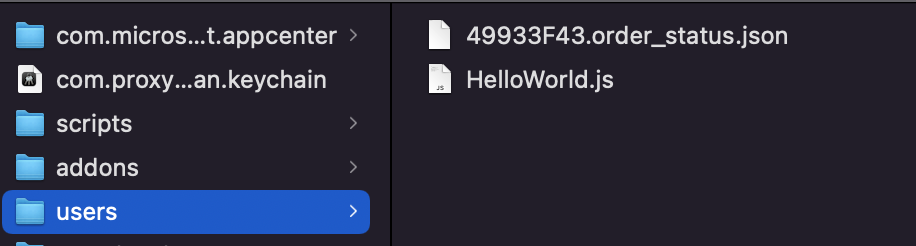
{ "id": "kfj90", "status": "Pending" }@NghiaTranUIT commented on GitHub (May 21, 2022):
@nikhil-thakkar let's try this build: https://proxyman.s3.us-east-2.amazonaws.com/beta/Proxyman_3.5.0_fix_script_undefined.dmg
I fixed a small bug, which causes the
TypeError: undefined is not a function👍@nikhil-thakkar commented on GitHub (May 21, 2022):
Thanks for the quick fix @NghiaTranUIT . I keep both the versions when installing the one you provided. And tried both. Unfortunately the issue still persists.
Not sure what's going wrong.
Can you point me in Proxyman internal logs so that I can take a look at the code to understand whether it's my fault?
@NghiaTranUIT commented on GitHub (May 23, 2022):
@nikhil-thakkar I suppose that your original request has some problem. If you don't mind, please export the request (without running via the Script) and share with me at support@proxyman.io
I'd like to check whether the Body is matched with Request/Response Header Content-Type or not.
@nikhil-thakkar commented on GitHub (Jun 15, 2022):
@NghiaTranUIT Sorry for the delayed response. For the time being I have put this on back burner and looking into other things. I will re-open the ticket if the issue persists and/or share the request with you.