[GH-ISSUE #1034] Cannot connect to internet when Proxyman is not open #1029

Open
opened 2026-03-03 19:23:53 +03:00 by kerem · 43 comments
Owner

Originally created by @dennisvera on GitHub (Oct 15, 2021).
Original GitHub issue: https://github.com/ProxymanApp/Proxyman/issues/1034

Originally assigned to: @NghiaTranUIT on GitHub.

Proxyman version? (Ex. Proxyman 1.4.3)

version 2.34.1 (23410)Version 2.34.1 (23410)

macOS Version? (Ex. mac 10.14)

big sur 11.5.2

Steps to reproduce

  • quit proxyman
  • launch google chrome (google.com)

Expected behavior

google.com opens up

Screenshots (optional)

Screen Shot 2021-10-15 at 11 25 38 AM
Originally created by @dennisvera on GitHub (Oct 15, 2021). Original GitHub issue: https://github.com/ProxymanApp/Proxyman/issues/1034 Originally assigned to: @NghiaTranUIT on GitHub. ### Proxyman version? (Ex. Proxyman 1.4.3) version 2.34.1 (23410)Version 2.34.1 (23410) ### macOS Version? (Ex. mac 10.14) big sur 11.5.2 ### Steps to reproduce - quit proxyman - launch google chrome (google.com) ### Expected behavior google.com opens up ### Screenshots (optional) <img width="829" alt="Screen Shot 2021-10-15 at 11 25 38 AM" src="https://user-images.githubusercontent.com/14085160/137512976-4e921475-de02-4eb0-9268-7132e1a750ea.png">
Author
Owner

@NghiaTranUIT commented on GitHub (Oct 15, 2021):

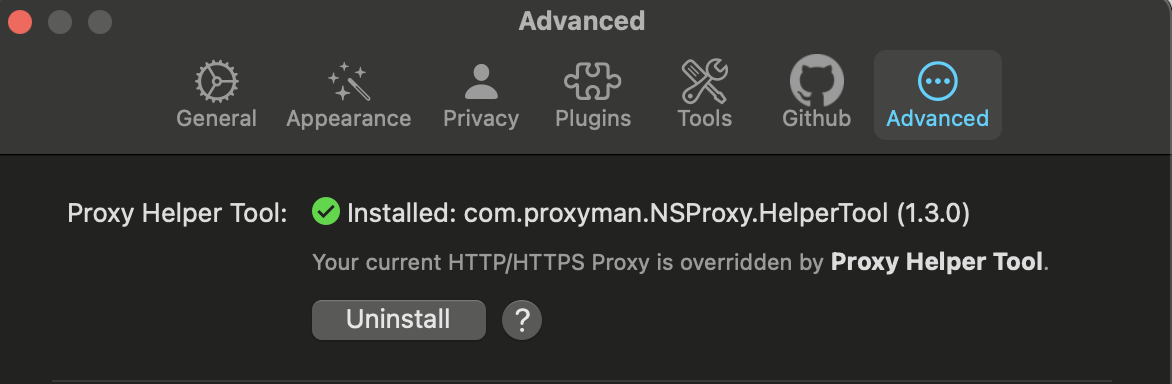
Hey @dennisvera, it seems that you haven't installed the Helper Tool in Preference -> Advanced 🤔

You could not access the Internet after quitting Proxyman, which indicates that Proxyman could not revert the HTTP Proxy properly.

Please try to install the Helper Tool 👍

<!-- gh-comment-id:944393154 --> @NghiaTranUIT commented on GitHub (Oct 15, 2021): Hey @dennisvera, it seems that you haven't installed the Helper Tool in Preference -> Advanced 🤔 You could not access the Internet after quitting Proxyman, which indicates that Proxyman could not revert the HTTP Proxy properly. Please try to install the Helper Tool 👍
Author
Owner

@dennisvera commented on GitHub (Oct 15, 2021):

I appreciate the quick response! it looks like i had already installed the helper tools. will unistall and reinstall!
Screen Shot 2021-10-15 at 11 31 57 AM

<!-- gh-comment-id:944396752 --> @dennisvera commented on GitHub (Oct 15, 2021): I appreciate the quick response! it looks like i had already installed the helper tools. will unistall and reinstall! <img width="586" alt="Screen Shot 2021-10-15 at 11 31 57 AM" src="https://user-images.githubusercontent.com/14085160/137513908-b89a2388-939b-413f-a04a-8c47f1ccae85.png">
Author
Owner

@NghiaTranUIT commented on GitHub (Oct 15, 2021):

Do you use Cloudflare WRAP? If yes, please update the lasted build. WRAP has a bug that conflicts with all web debugging Proxy recently.

<!-- gh-comment-id:944397746 --> @NghiaTranUIT commented on GitHub (Oct 15, 2021): Do you use Cloudflare WRAP? If yes, please update the lasted build. WRAP has a bug that conflicts with all web debugging Proxy recently.
Author
Owner

@dennisvera commented on GitHub (Oct 15, 2021):

I do not have Cloudflare installed. I tried unistalling > reinstalling...did not work

<!-- gh-comment-id:944400627 --> @dennisvera commented on GitHub (Oct 15, 2021): I do not have Cloudflare installed. I tried unistalling > reinstalling...did not work
Author
Owner

@dennisvera commented on GitHub (Oct 15, 2021):

I am loosing lots of work time, all of last night and alll of this morning

<!-- gh-comment-id:944401077 --> @dennisvera commented on GitHub (Oct 15, 2021): I am loosing lots of work time, all of last night and alll of this morning
Author
Owner

@NghiaTranUIT commented on GitHub (Oct 15, 2021):

Sorry for this inconvenience 😞

To fix it, when you could not access the Internet, please open System Preference -> Network -> Wifi -> Advanced -> Proxies Tab -> Uncheck the HTTP and HTTPS Proxy -> Apply.

<!-- gh-comment-id:944401918 --> @NghiaTranUIT commented on GitHub (Oct 15, 2021): Sorry for this inconvenience 😞 To fix it, when you could not access the Internet, please open System Preference -> Network -> Wifi -> Advanced -> Proxies Tab -> Uncheck the HTTP and HTTPS Proxy -> Apply.
Author
Owner

@NghiaTranUIT commented on GitHub (Oct 15, 2021):

I'm not sure what causes the problem. I'm investigating. Please let me know this trick resolves your problem.

<!-- gh-comment-id:944403515 --> @NghiaTranUIT commented on GitHub (Oct 15, 2021): I'm not sure what causes the problem. I'm investigating. Please let me know this trick resolves your problem.
Author
Owner

@dennisvera commented on GitHub (Oct 15, 2021):

that worked for me. thank you 🙏
now, Is there anything i need to worry about having the HTTP and HTTPS Proxy (unchecked)

<!-- gh-comment-id:944406782 --> @dennisvera commented on GitHub (Oct 15, 2021): that worked for me. thank you 🙏 now, Is there anything i need to worry about having the HTTP and HTTPS Proxy (unchecked)
Author
Owner

@NghiaTranUIT commented on GitHub (Oct 15, 2021):

Basically, when your open Proxyman, the Helper Tool will automatically override the HTTP/HTTPS Proxy to Proxyman (127.0.0.1:9090) and revert it when you quit the app.

However, Proxyman might not revert the HTTP Proxy if it's checked before Proxyman is overridden. It's useful for users, who are currently using a different Proxy before opening Proxyman.

Your issue, I guess that you open other proxy apps (like Charles Proxy), then open Proxyman. Then quit both apps. Proxyman will persist the HTTP/HTTPS Check -> You could not access the Internet.

<!-- gh-comment-id:944409602 --> @NghiaTranUIT commented on GitHub (Oct 15, 2021): Basically, when your open Proxyman, the Helper Tool will automatically override the HTTP/HTTPS Proxy to Proxyman (127.0.0.1:9090) and revert it when you quit the app. However, Proxyman might not revert the HTTP Proxy if it's checked before Proxyman is overridden. It's useful for users, who are currently using a different Proxy before opening Proxyman. Your issue, I guess that you open other proxy apps (like Charles Proxy), then open Proxyman. Then quit both apps. Proxyman will persist the HTTP/HTTPS Check -> You could not access the Internet.
Author
Owner

@dennisvera commented on GitHub (Oct 15, 2021):

Thanks for the background on this, helpful! that is very likely the scenario as I had recently opened Charles as well. I will test it all again without opening Charles and see if it all works as expected (internet still works after quitting Proxyman.

Thank you for the quick response, much appreciated!

<!-- gh-comment-id:944412168 --> @dennisvera commented on GitHub (Oct 15, 2021): Thanks for the background on this, helpful! that is very likely the scenario as I had recently opened Charles as well. I will test it all again without opening Charles and see if it all works as expected (internet still works after quitting Proxyman. Thank you for the quick response, much appreciated!
Author
Owner

@NghiaTranUIT commented on GitHub (Oct 15, 2021):

You're welcome 👍

<!-- gh-comment-id:944413983 --> @NghiaTranUIT commented on GitHub (Oct 15, 2021): You're welcome 👍
Author
Owner

@dennisvera commented on GitHub (Oct 15, 2021):

Confirming HTTP/HTTPS properly checks/unchecks when Proxyman launches/quits

<!-- gh-comment-id:944414322 --> @dennisvera commented on GitHub (Oct 15, 2021): Confirming HTTP/HTTPS properly checks/unchecks when Proxyman launches/quits
Author
Owner

@DavidAPears commented on GitHub (Apr 20, 2022):

Thanks for this:

"To fix it, when you could not access the Internet, please open System Preference -> Network -> Wifi -> Advanced -> Proxies Tab -> Uncheck the HTTP and HTTPS Proxy -> Apply."

I was stuck with no internet access until I found your comment.

<!-- gh-comment-id:1103482484 --> @DavidAPears commented on GitHub (Apr 20, 2022): Thanks for this: "To fix it, when you could not access the Internet, please open System Preference -> Network -> Wifi -> Advanced -> Proxies Tab -> Uncheck the HTTP and HTTPS Proxy -> Apply." I was stuck with no internet access until I found your comment.
Author
Owner

@NghiaTranUIT commented on GitHub (Apr 20, 2022):

Sorry for this inconvenience @DavidAPears. Proxyman should automatically revert the proxy when you close the app or the app unexpectedly crashed.

However, the helper tool must be installed.

Can you verify that the helper tool is installed? @DavidAPears

https://github.com/ProxymanApp/Proxyman/issues/1034#issuecomment-944396752

<!-- gh-comment-id:1103702879 --> @NghiaTranUIT commented on GitHub (Apr 20, 2022): Sorry for this inconvenience @DavidAPears. Proxyman should automatically revert the proxy when you close the app or the app unexpectedly crashed. However, the helper tool must be installed. Can you verify that the helper tool is installed? @DavidAPears https://github.com/ProxymanApp/Proxyman/issues/1034#issuecomment-944396752
Author
Owner

@tilwinjoy commented on GitHub (Sep 8, 2022):

Hello, I'm using AnyConnect VPN and have the same problem below is the two scenarios:

Steps:

  1. Connect to VPN using AnyConnect
    At this point, the Web Proxy settings are unchecked

  2. Open Proxyman
    Proxyman enables the Web Proxy settings (checked)
    At this point:

    • Proxyman is not able to capture any traffic
    • Internet works
  3. Close Proxyman
    Internet works


Steps:

  1. Ensure the Web Proxy settings are unchecked

  2. Open Proxyman
    Proxyman enables the Web Proxy settings (checked)

  3. Connect to VPN using AnyConnect
    The Web Proxy settings remain checked

    At this point:

    • Proxyman is able to capture any traffic
    • Internet works
  4. Close Proxyman
    Proxyman disables the Web Proxy settings (unchecked)
    Internet no longer works.


It looks like either:

  • if web Proxy settings is enabled when AnyConnect connects, it boots up accordingly and requires it to maintain internet connection. If we disable the web proxy, we have to reboot the VPN as well
  • When Proxyman closes, even if it unchecks the Web Proxy settings, it doesn't shutdown the Proxyserver/release the HTTP traffic properly (idk how Proxyman works)

Current work around:

  • Open Proxyman first (mandatory)
  • After closing Proxyman, either enable Web Proxy settings back manually or reconnect VPN (AnyConnect)
<!-- gh-comment-id:1240145474 --> @tilwinjoy commented on GitHub (Sep 8, 2022): Hello, I'm using AnyConnect VPN and have the same problem below is the two scenarios: ### Steps: 1. Connect to VPN using AnyConnect At this point, the Web Proxy settings are unchecked 2. Open Proxyman Proxyman enables the Web Proxy settings (checked) At this point: * **Proxyman is not able to capture any traffic** * Internet works 3. Close Proxyman Internet works ---- ### Steps: 1. Ensure the Web Proxy settings are unchecked 2. Open Proxyman Proxyman enables the Web Proxy settings (checked) 3. Connect to VPN using AnyConnect The Web Proxy settings remain checked At this point: * Proxyman is able to capture any traffic * Internet works 3. Close Proxyman Proxyman disables the Web Proxy settings (unchecked) **Internet no longer works.** --- It looks like either: * if web Proxy settings is enabled when AnyConnect connects, it boots up accordingly and requires it to maintain internet connection. If we disable the web proxy, we have to reboot the VPN as well * When Proxyman closes, even if it unchecks the Web Proxy settings, it doesn't shutdown the Proxyserver/release the HTTP traffic properly (idk how Proxyman works) ---- Current work around: * Open Proxyman first (mandatory) * After closing Proxyman, either enable Web Proxy settings back manually or reconnect VPN (AnyConnect)
Author
Owner

@xjiaxiang commented on GitHub (Oct 8, 2022):

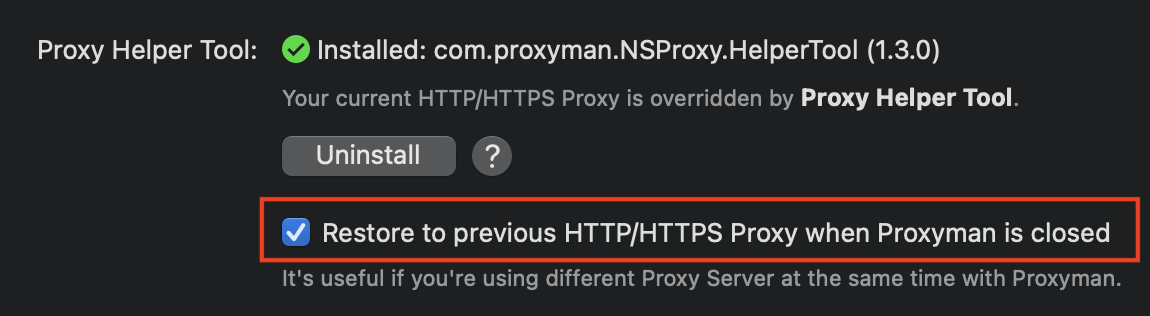
I solved it by check the option.
截屏2022-10-08 22 36 30

<!-- gh-comment-id:1272334017 --> @xjiaxiang commented on GitHub (Oct 8, 2022): I solved it by check the option. <img width="575" alt="截屏2022-10-08 22 36 30" src="https://user-images.githubusercontent.com/10457315/194712888-60191504-4be4-42da-b47c-14a2bc0a086f.png">
Author
Owner

@NghiaTranUIT commented on GitHub (Oct 10, 2022):

It's not the correct solution @SaiRS. This feature is helpful if you're using another Proxy simultaneously with Proxyman.

By default, Proxyman will revert all Proxy Config when closing the app. However, if you're using a different Proxy, you might not access the Internet. Enables this feature, Proxyman tries to restore to the original state.

<!-- gh-comment-id:1272726356 --> @NghiaTranUIT commented on GitHub (Oct 10, 2022): It's not the correct solution @SaiRS. This feature is helpful if you're using another Proxy simultaneously with Proxyman. By default, Proxyman will revert all Proxy Config when closing the app. However, if you're using a different Proxy, you might not access the Internet. Enables this feature, Proxyman tries to restore to the original state.
Author
Owner

@kauanslr commented on GitHub (Mar 4, 2023):

Hey Guys, how your doing?

I'm tried to use the last version of Windows app with my physical android device and i'm get the same problem: i just can't use my phone.

All of my wi-fi network stops, 4G network don't work properly too (only websockets are working whatsapp, discord)

And i just followed the steps on screen:

  • Configure Proxy on the network of the device
  • Install the auto generated certificate CA
  • ... work
  • Remove the proxy configuration
  • Delete the CA

The Wi-fi networks don't connect to any site, BUT when i powerup my computer and start proxyman the app capture all of my mobile traffic.

At this exact time i'm trying to factory restore mobile to fix this.

Proxyman: 1.4.0

<!-- gh-comment-id:1454697640 --> @kauanslr commented on GitHub (Mar 4, 2023): Hey Guys, how your doing? I'm tried to use the last version of Windows app with my physical android device and i'm get the same problem: i just can't use my phone. All of my wi-fi network stops, 4G network don't work properly too (only websockets are working whatsapp, discord) And i just followed the steps on screen: - Configure Proxy on the network of the device - Install the auto generated certificate CA - ... work - Remove the proxy configuration - Delete the CA The Wi-fi networks don't connect to any site, BUT when i powerup my computer and start proxyman the app capture all of my mobile traffic. At this exact time i'm trying to factory restore mobile to fix this. Proxyman: 1.4.0
Author
Owner

@NghiaTranUIT commented on GitHub (Mar 4, 2023):

@kauanslr to fix it, you just need to turn off the HTTP Proxy on your Wifi Setting (on your Android device).

When you config the HTTP Proxy on your Android, by pointing to your IP, at port 9090. Please make sure the Proxyman app is opening. If you close the Proxyman app, you should revert the HTTP Proxy on your Android too 👍

Otherwise, you could not access to the Internet.

<!-- gh-comment-id:1454698183 --> @NghiaTranUIT commented on GitHub (Mar 4, 2023): @kauanslr to fix it, you just need to turn off the HTTP Proxy on your Wifi Setting (on your Android device). When you config the HTTP Proxy on your Android, by pointing to your IP, at port 9090. Please make sure the Proxyman app is opening. If you close the Proxyman app, you should revert the HTTP Proxy on your Android too 👍 Otherwise, you could not access to the Internet.
Author
Owner

@kauanslr commented on GitHub (Mar 4, 2023):

Hey @NghiaTranUIT thanks for the flash like response 🚀
Yep, i've turned off the Proxy config on my wi-fi settings, but it keep connecting to proxyman.

Last night i've restored the device network config to default and it does not worked too

<!-- gh-comment-id:1454700306 --> @kauanslr commented on GitHub (Mar 4, 2023): Hey @NghiaTranUIT thanks for the flash like response 🚀 Yep, i've turned off the Proxy config on my wi-fi settings, but it keep connecting to proxyman. Last night i've restored the device network config to default and it does not worked too
Author
Owner

@kauanslr commented on GitHub (Mar 4, 2023):

Yep, just a facory reset and everything is working. I think this can be a Android bug (?????? why i cant disable a proxy config, Google)

<!-- gh-comment-id:1454704637 --> @kauanslr commented on GitHub (Mar 4, 2023): Yep, just a facory reset and everything is working. I think this can be a Android bug (?????? why i cant disable a proxy config, Google)
Author
Owner

@NghiaTranUIT commented on GitHub (Mar 4, 2023):

Yep, i've turned off the Proxy config on my wi-fi settings, but it keep connecting to proxyman.

If you turn it off on your Android, but it still connects to Proxyman, it's definately a bug from Android OS.

<!-- gh-comment-id:1454730200 --> @NghiaTranUIT commented on GitHub (Mar 4, 2023): > Yep, i've turned off the Proxy config on my wi-fi settings, but it keep connecting to proxyman. If you turn it off on your Android, but it still connects to Proxyman, it's definately a bug from Android OS.
Author
Owner

@monika-rudko commented on GitHub (May 11, 2023):

Hi,

I am a Windows user and used Proxyman on emulator. Then I plugged a physical device to my machine with a usb cable and now if I close Proxyman I have no internet on my physical device. I have not installed any certificates on the physical devices, it was just a connection with an USB cable. How do I fix that? All I can find on the internet is this post. It does not just affect the wifi connection, but mobile data just as well. It's as if proxyman set something (a proxy...) on Android that applies to all connections and I can't find a way to clear it. How come?

<!-- gh-comment-id:1543748242 --> @monika-rudko commented on GitHub (May 11, 2023): Hi, I am a Windows user and used Proxyman on emulator. Then I plugged a physical device to my machine with a usb cable and now if I close Proxyman I have no internet on my physical device. I have not installed any certificates on the physical devices, it was just a connection with an USB cable. How do I fix that? All I can find on the internet is this post. It does not just affect the wifi connection, but mobile data just as well. It's as if proxyman set something (a proxy...) on Android that applies to all connections and I can't find a way to clear it. How come?
Author
Owner

@NghiaTranUIT commented on GitHub (May 11, 2023):

@monika-rudko it seems that you override the HTTP Proxy on your Android Emulator, but didn't revert the change. You should open the Certificate menu -> Install for Android -> Emulator

CleanShot 2023-05-11 at 18 53 42@2x

<!-- gh-comment-id:1543859370 --> @NghiaTranUIT commented on GitHub (May 11, 2023): @monika-rudko it seems that you override the HTTP Proxy on your Android Emulator, but didn't revert the change. You should open the Certificate menu -> Install for Android -> Emulator ![CleanShot 2023-05-11 at 18 53 42@2x](https://github.com/ProxymanApp/Proxyman/assets/5878421/a05eed44-4e7f-4413-8b2c-ff87846ff665)
Author
Owner

@monika-rudko commented on GitHub (May 11, 2023):

@NghiaTranUIT the problem with the internet is on the real device, not the emulator. I have not used the real device for any development, I just plugged it to my laptop with an usb cable and now I do not have internet (WiFi or data) on the real device unless Proxyman is opened.

<!-- gh-comment-id:1543865456 --> @monika-rudko commented on GitHub (May 11, 2023): @NghiaTranUIT the problem with the internet is on the real device, not the emulator. I have not used the real device for any development, I just plugged it to my laptop with an usb cable and now I do not have internet (WiFi or data) on the real device unless Proxyman is opened.
Author
Owner

@NghiaTranUIT commented on GitHub (May 11, 2023):

It's odd. Proxyman isn't capable of changing your Android device.

Can you get your Android device -> Setting app -> Wifi -> Your current WIfi -> Edit -> Check the HTTP Proxy Config, set it's OFF if it's possible?

<!-- gh-comment-id:1543875204 --> @NghiaTranUIT commented on GitHub (May 11, 2023): It's odd. Proxyman isn't capable of changing your Android device. Can you get your Android device -> Setting app -> Wifi -> Your current WIfi -> Edit -> Check the HTTP Proxy Config, set it's OFF if it's possible?
Author
Owner

@monika-rudko commented on GitHub (May 11, 2023):

This is my Wifi, I am connected to the same wifi from my laptop and everything is working
image
Proxy config is not set, it's just none.
image

I had the same issue on a different Android device (real one) and I did factory reset which helped. But I do not want to do factory reset on this device.

<!-- gh-comment-id:1543910201 --> @monika-rudko commented on GitHub (May 11, 2023): This is my Wifi, I am connected to the same wifi from my laptop and everything is working ![image](https://github.com/ProxymanApp/Proxyman/assets/120423552/86650406-8a2a-4e06-aeee-b349a5f5499d) Proxy config is not set, it's just none. ![image](https://github.com/ProxymanApp/Proxyman/assets/120423552/379a540e-34bd-4798-99dd-c1541cb48221) I had the same issue on a different Android device (real one) and I did factory reset which helped. But I do not want to do factory reset on this device.
Author
Owner

@NghiaTranUIT commented on GitHub (May 11, 2023):

Honestly, I'm not sure how to fix it because it's not a problem from Proxyman. As a said, Proxyman could not change your HTTP Proxy setting on your physical Android device. If your Wifi doesn't have the Proxy config, it seems it's a bug from Android OS @monika-rudko

<!-- gh-comment-id:1544090471 --> @NghiaTranUIT commented on GitHub (May 11, 2023): Honestly, I'm not sure how to fix it because it's not a problem from Proxyman. As a said, Proxyman could not change your HTTP Proxy setting on your physical Android device. If your Wifi doesn't have the Proxy config, it seems it's a bug from Android OS @monika-rudko
Author
Owner

@monika-rudko commented on GitHub (May 11, 2023):

adb shell settings put global http_proxy :0 fixed the problem.
I also rebooted my device with adb shell reboot but it may not be necessary

<!-- gh-comment-id:1544340435 --> @monika-rudko commented on GitHub (May 11, 2023): `adb shell settings put global http_proxy :0` fixed the problem. I also rebooted my device with `adb shell reboot` but it may not be necessary
Author
Owner

@christian-t-procore commented on GitHub (May 27, 2023):

adb shell settings put global http_proxy :0 fixed the problem. I also rebooted my device with adb shell reboot but it may not be necessary

Yes, those commands worked on my real device.

<!-- gh-comment-id:1565348145 --> @christian-t-procore commented on GitHub (May 27, 2023): > `adb shell settings put global http_proxy :0` fixed the problem. I also rebooted my device with `adb shell reboot` but it may not be necessary Yes, those commands worked on my real device.
Author
Owner

@iamcodder commented on GitHub (Oct 23, 2023):

@monika-rudko thank you bro save your my life 💯

<!-- gh-comment-id:1776075213 --> @iamcodder commented on GitHub (Oct 23, 2023): @monika-rudko thank you bro save your my life 💯
Author
Owner

@NghiaTranUIT commented on GitHub (Oct 24, 2023):

@iamcodder even though it can fix your issue, the ultimate solution is the Helper Tool. You should install it in the Settings -> Advance Tab -> Helper Tool.

(It's required admin sudo)

<!-- gh-comment-id:1776282077 --> @NghiaTranUIT commented on GitHub (Oct 24, 2023): @iamcodder even though it can fix your issue, the ultimate solution is the [Helper Tool](https://docs.proxyman.io/basic-features/proxy-setting-tool). You should install it in the Settings -> Advance Tab -> Helper Tool. (It's required admin sudo)
Author
Owner

@IHNEL commented on GitHub (Dec 16, 2024):

hi @NghiaTranUIT
I’m experiencing the same issue as kauanslr. It sounds unbelievable, but I’ve encountered a strange behavior with Proxyman on my Samsung Galaxy Note20 Ultra, while other devices aren’t affected. This is the second time I got this issue.

I’ve been using Proxyman for a while, configuring my Samsung device to connect through the proxy, and it worked fine. I knew how to disable the proxy to return to normal internet use. However, today I noticed that when Proxyman is closed on my laptop, I can no longer access the internet, even though the proxy config on my phone is set to “None.” Cellular data (3G/4G) also doesn’t work, and resetting the network configuration hasn’t helped.

A few months ago, I had a similar issue, which I assumed was a device problem. The only solution back then was a factory reset, which I’d really like to avoid this time.

Interestingly, when I have Proxyman running on my laptop and the proxy config disabled on my phone, I can still see network traffic being tracked. Not all apps are affected—Facebook works fine, Slack notifications come through, but I can’t view message content. However, web browsers and other apps that make RESTful API calls don’t have internet access.

I’m from Vietnam and would be happy to help investigate this issue further. Please reach out when you have a chance—I’d prefer to avoid another factory reset.

Send me an email if you would like to have a troubleshooting session.

UPDATED: Whatsapp also works fine, as Facebook.

Thanks!

<!-- gh-comment-id:2545632384 --> @IHNEL commented on GitHub (Dec 16, 2024): hi @NghiaTranUIT I’m experiencing the same issue as [kauanslr](https://github.com/kauanslr). It sounds unbelievable, but I’ve encountered a strange behavior with Proxyman on my Samsung Galaxy Note20 Ultra, while other devices aren’t affected. This is the second time I got this issue. I’ve been using Proxyman for a while, configuring my Samsung device to connect through the proxy, and it worked fine. I knew how to disable the proxy to return to normal internet use. However, today I noticed that when Proxyman is closed on my laptop, I can no longer access the internet, even though the proxy config on my phone is set to “None.” Cellular data (3G/4G) also doesn’t work, and resetting the network configuration hasn’t helped. A few months ago, I had a similar issue, which I assumed was a device problem. The only solution back then was a factory reset, which I’d really like to avoid this time. Interestingly, when I have Proxyman running on my laptop and the proxy config disabled on my phone, I can still see network traffic being tracked. Not all apps are affected—Facebook works fine, Slack notifications come through, but I can’t view message content. However, web browsers and other apps that make RESTful API calls don’t have internet access. I’m from Vietnam and would be happy to help investigate this issue further. Please reach out when you have a chance—I’d prefer to avoid another factory reset. Send me an email if you would like to have a troubleshooting session. UPDATED: Whatsapp also works fine, as Facebook. Thanks!
Author
Owner

@NghiaTranUIT commented on GitHub (Dec 16, 2024):

even though the proxy config on my phone is set to “None.” Cellular data (3G/4G) also doesn’t work, and resetting the network configuration hasn’t helped.

It seems it's a glitch from your Samsung devices because when you set WiFi HTTP Proxy to None, it won't access to Proxyman anymore -> Should be able to access to the Internet. If not, it's a bug/glitch from Samsung.

Interestingly, when I have Proxyman running on my laptop and the proxy config disabled on my phone, I can still see network traffic being tracked.

It indicates that the HTTP Proxy on your Wifi didn't apply. It's still connecting to Proxyman even though it's OFF.

I'm not sure how to fix it because It's from the device, not from Proxyman.

If it occurs again, please restart your Phone, let's see if it's fixed @IHNEL

<!-- gh-comment-id:2545776011 --> @NghiaTranUIT commented on GitHub (Dec 16, 2024): > even though the proxy config on my phone is set to “None.” Cellular data (3G/4G) also doesn’t work, and resetting the network configuration hasn’t helped. It seems it's a glitch from your Samsung devices because when you set WiFi HTTP Proxy to None, it won't access to Proxyman anymore -> Should be able to access to the Internet. If not, it's a bug/glitch from Samsung. > Interestingly, when I have Proxyman running on my laptop and the proxy config disabled on my phone, I can still see network traffic being tracked. It indicates that the HTTP Proxy on your Wifi didn't apply. It's still connecting to Proxyman even though it's OFF. I'm not sure how to fix it because It's from the device, not from Proxyman. If it occurs again, please restart your Phone, let's see if it's fixed @IHNEL
Author
Owner

@IHNEL commented on GitHub (Dec 16, 2024):

I already tried different ways including restart, reset network configuration, connecting to other wifi, remove certificates, etc... None of them help.

The reason why I think it's related to Proxyman is my mobile phone can access the internet normally with Proxyman running on my Laptop, if I close it the phone disconnects.
@NghiaTranUIT

<!-- gh-comment-id:2547153980 --> @IHNEL commented on GitHub (Dec 16, 2024): I already tried different ways including restart, reset network configuration, connecting to other wifi, remove certificates, etc... None of them help. The reason why I think it's related to Proxyman is my mobile phone can access the internet normally with Proxyman running on my Laptop, if I close it the phone disconnects. @NghiaTranUIT
Author
Owner

@IHNEL commented on GitHub (Dec 17, 2024):

well, the issue was resolved after I removed proxy config using the following command while the device was in developer mode.:
adb shell settings put global http_proxy :0

<!-- gh-comment-id:2547184493 --> @IHNEL commented on GitHub (Dec 17, 2024): well, the issue was resolved after I removed proxy config using the following command while the device was in developer mode.: `adb shell settings put global http_proxy :0`
Author
Owner

@NghiaTranUIT commented on GitHub (Dec 17, 2024):

@IHNEL When you set the HTTP Proxy on your Samsung device, do you manually do it in the Setting app -> WiFi -> Change Proxy? or You use the adb to override it?

From what I know, if you're using the adb to override the Proxy, you must use adb to revert the Proxy too.

<!-- gh-comment-id:2547339966 --> @NghiaTranUIT commented on GitHub (Dec 17, 2024): @IHNEL When you set the HTTP Proxy on your Samsung device, do you manually do it in the Setting app -> WiFi -> Change Proxy? or You use the `adb` to override it? From what I know, if you're using the `adb` to override the Proxy, you must use `adb` to revert the Proxy too.
Author
Owner

@IHNEL commented on GitHub (Dec 17, 2024):

@NghiaTranUIT
I set it manually in the Wifi settings, by keying the IP and Port number.
This is my first try with the adb tool and luckily it works.

<!-- gh-comment-id:2547368229 --> @IHNEL commented on GitHub (Dec 17, 2024): @NghiaTranUIT I set it manually in the Wifi settings, by keying the IP and Port number. This is my first try with the adb tool and luckily it works.
Author
Owner

@varadmondkar commented on GitHub (Dec 28, 2024):

I faced the same issue as @monika-rudko .
My device was a OnePlus 6T running OxygenOS version 11.1.2.2.

I tried @monika-rudko's ADB command:
adb shell settings put global http_proxy :0
But it didn’t work for me.

I had to clear the app data and cache of the following packages: telephony, settings, and systemui, using these commands:

adb shell pm clear com.android.providers.telephony
adb shell pm clear com.android.settings
adb shell pm clear com.android.systemui

This resolved the issue for me.

It seems to be a caching problem specific to OxygenOS version 11.1.2.2.

Thanks to everyone who participated in this issue. Your inputs helped me find the right direction!

<!-- gh-comment-id:2564486986 --> @varadmondkar commented on GitHub (Dec 28, 2024): I faced the same issue as @monika-rudko . My device was a OnePlus 6T running OxygenOS version 11.1.2.2. I tried @monika-rudko's ADB command: `adb shell settings put global http_proxy :0` But it didn’t work for me. I had to clear the app data and cache of the following packages: telephony, settings, and systemui, using these commands: ``` adb shell pm clear com.android.providers.telephony adb shell pm clear com.android.settings adb shell pm clear com.android.systemui ``` **This resolved the issue for me**. It seems to be a **caching problem** specific to **OxygenOS version 11.1.2.2**. Thanks to everyone who participated in this issue. Your inputs helped me find the right direction!
Author
Owner

@kelmer44 commented on GitHub (Mar 20, 2025):

I cant use the internet on my mac unless proxyman is running, how can i fix this?

<!-- gh-comment-id:2741202942 --> @kelmer44 commented on GitHub (Mar 20, 2025): I cant use the internet on my mac unless proxyman is running, how can i fix this?
Author
Owner

@NghiaTranUIT commented on GitHub (Mar 21, 2025):

@kelmer44 try to install the Helper tool in the Proxyman Setting -> Advance Tab -> Install Helper Tool. It will revert the Proxy setting when Proxyman quits.

You get this issue because your System Proxy is still active and point to Proxyman, even though it's closed. Installing the Helper Tool will auto revert it 👍

<!-- gh-comment-id:2742020120 --> @NghiaTranUIT commented on GitHub (Mar 21, 2025): @kelmer44 try to install the Helper tool in the Proxyman Setting -> Advance Tab -> Install Helper Tool. It will revert the Proxy setting when Proxyman quits. You get this issue because your System Proxy is still active and point to Proxyman, even though it's closed. Installing the Helper Tool will auto revert it 👍
Author
Owner

@SPConrad commented on GitHub (Apr 10, 2025):

@kelmer44 try to install the Helper tool in the Proxyman Setting -> Advance Tab -> Install Helper Tool. It will revert the Proxy setting when Proxyman quits.

You get this issue because your System Proxy is still active and point to Proxyman, even though it's closed. Installing the Helper Tool will auto revert it 👍

I lose all network connectivity when I close Proxyman.

I have the helper tool installed and I have "Restore to previous..." checked.

I have tried unchecking that box, as well as uninstalling the helper tool. I have tried manually disabling the Web proxy and Secure web Proxy in Settings -> WiFi -> Proxies.

Do you have any other suggestions as to what Proxyman might be doing which is causing this?

MBP 16" 2021, M1 Max
macOS Sequoia 15.4
Proxyman Version 5.2.0 (50200)

<!-- gh-comment-id:2793670749 --> @SPConrad commented on GitHub (Apr 10, 2025): > [@kelmer44](https://github.com/kelmer44) try to install the Helper tool in the Proxyman Setting -> Advance Tab -> Install Helper Tool. It will revert the Proxy setting when Proxyman quits. > > You get this issue because your System Proxy is still active and point to Proxyman, even though it's closed. Installing the Helper Tool will auto revert it 👍 I lose all network connectivity when I close Proxyman. I have the helper tool installed and I have "Restore to previous..." checked. I have tried unchecking that box, as well as uninstalling the helper tool. I have tried manually disabling the Web proxy and Secure web Proxy in Settings -> WiFi -> Proxies. Do you have any other suggestions as to what Proxyman might be doing which is causing this? MBP 16" 2021, M1 Max macOS Sequoia 15.4 Proxyman Version 5.2.0 (50200)
Author
Owner

@NghiaTranUIT commented on GitHub (Apr 12, 2025):

I have tried manually disabling the Web proxy and Secure web Proxy in Settings -> WiFi -> Proxies.

If you disable HTTP and HTTPS checkboxes in System Settings -> WiFi -> Proxies, you should 100% able to access to the Internet, because it doesn't proxy to Proxyman anymore.

If you can't, i think something is conflicted in your Mac. Maybe you're using any VPN app?

<!-- gh-comment-id:2798353262 --> @NghiaTranUIT commented on GitHub (Apr 12, 2025): > I have tried manually disabling the Web proxy and Secure web Proxy in Settings -> WiFi -> Proxies. If you disable HTTP and HTTPS checkboxes in System Settings -> WiFi -> Proxies, you should 100% able to access to the Internet, because it doesn't proxy to Proxyman anymore. If you can't, i think something is conflicted in your Mac. Maybe you're using any VPN app?
Sign in to join this conversation.
No milestone
No project
No assignees
1 participant
Notifications
Due date
The due date is invalid or out of range. Please use the format "yyyy-mm-dd".

No due date set.

Dependencies

No dependencies set.

Reference
starred/Proxyman#1029
No description provided.