[GH-ISSUE #741] [Bug]: Genshin - Parameter error #350

Closed
opened 2026-03-03 18:57:09 +03:00 by kerem · 5 comments
Owner

Originally created by @mbs0ft on GitHub (Jan 23, 2023).
Original GitHub issue: https://github.com/PlayCover/PlayCover/issues/741

Describe the bug

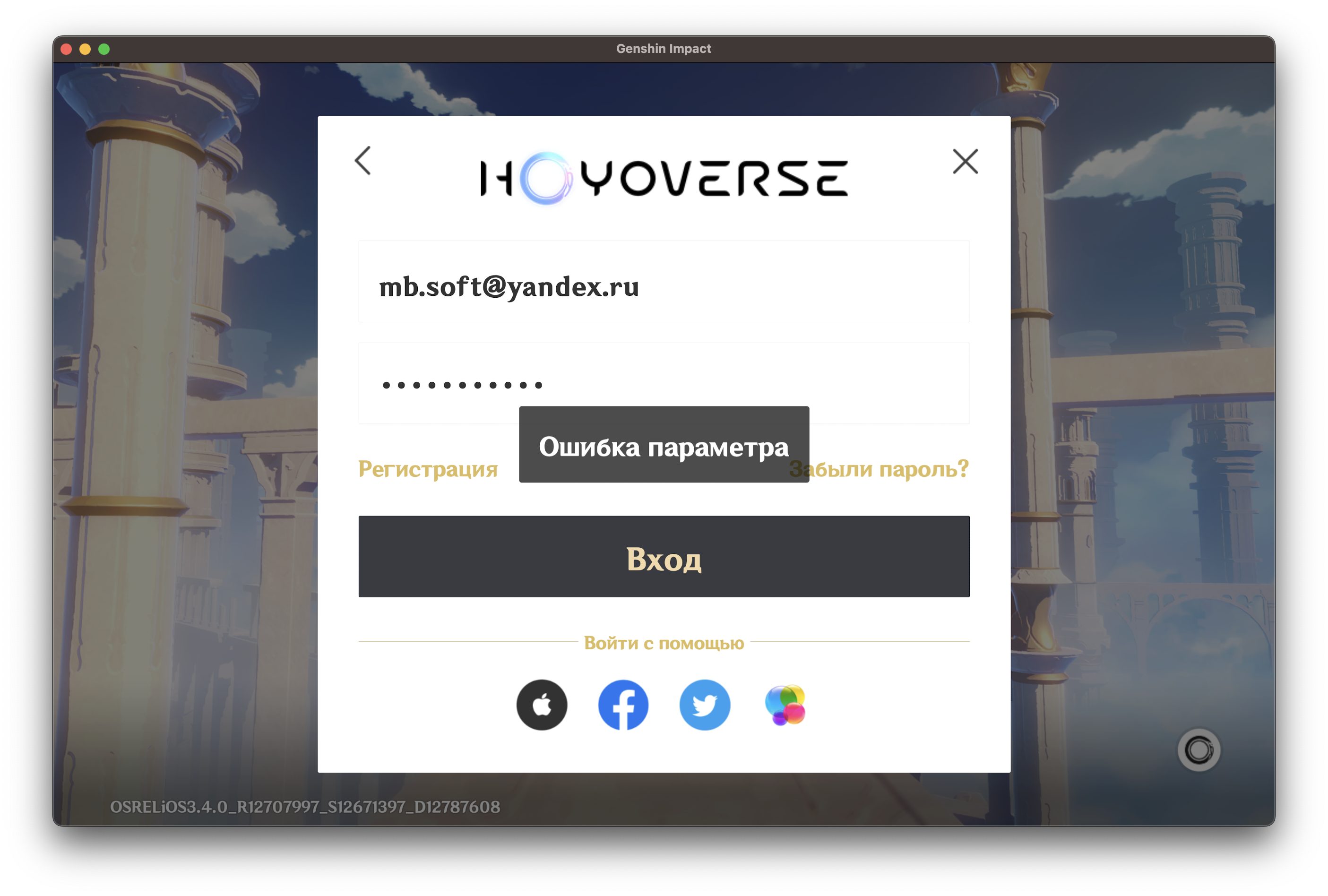
Parameter error

Steps to reproduce

Try to login in another account

Expected behaviour

Genshin captcha now working from JoseMoreville:accountsFix, but it's giving "Parameter error" while logging in with another account

Screenshot 2023-01-23 at 9 53 45 am

"Parameter error" text in Russian
Screenshot 2023-01-23 at 9 53 52 am

Crash log

No response

What version of PlayCover are you using?

2.0.3

What version of macOS are you using?

Ventura (macOS 13)

Issue Language

  • Yes my issue is written in English
Originally created by @mbs0ft on GitHub (Jan 23, 2023). Original GitHub issue: https://github.com/PlayCover/PlayCover/issues/741 ### Describe the bug Parameter error ### Steps to reproduce Try to login in another account ### Expected behaviour Genshin captcha now working from [JoseMoreville:accountsFix](https://github.com/PlayCover/PlayCover/pull/664), but it's giving "Parameter error" while logging in with another account <img width="1405" alt="Screenshot 2023-01-23 at 9 53 45 am" src="https://user-images.githubusercontent.com/22106304/213990221-bf2e8da1-a436-4c52-8f5b-400222c68512.png"> "Parameter error" text in Russian <img width="1405" alt="Screenshot 2023-01-23 at 9 53 52 am" src="https://user-images.githubusercontent.com/22106304/213990180-3be88584-6b0e-4c65-9040-9963ea3d3732.png"> ### Crash log _No response_ ### What version of PlayCover are you using? 2.0.3 ### What version of macOS are you using? Ventura (macOS 13) ### Issue Language - [X] Yes my issue is written in English
kerem 2026-03-03 18:57:09 +03:00
  • closed this issue
  • added the
    bug
    label
Author
Owner

@IsaacMarovitz commented on GitHub (Jan 23, 2023):

This is fixed in latest nightly if you enable PlayChain in App Settings

<!-- gh-comment-id:1400795556 --> @IsaacMarovitz commented on GitHub (Jan 23, 2023): This is fixed in latest nightly if you enable PlayChain in App Settings
Author
Owner

@thekngsgambit commented on GitHub (Apr 27, 2023):

It worked, Thank you!

<!-- gh-comment-id:1526119945 --> @thekngsgambit commented on GitHub (Apr 27, 2023): It worked, Thank you!
Author
Owner

@minpearl commented on GitHub (May 25, 2023):

How to fix this error please give me a solution because mine also got this error

<!-- gh-comment-id:1562346829 --> @minpearl commented on GitHub (May 25, 2023): How to fix this error please give me a solution because mine also got this error
Author
Owner

@MEMORIEmusic commented on GitHub (May 25, 2023):

How to fix this error please give me a solution because mine also got this error

Fix is written in the docs.

<!-- gh-comment-id:1562471701 --> @MEMORIEmusic commented on GitHub (May 25, 2023): > How to fix this error please give me a solution because mine also got this error Fix is written in the [docs. ](https://docs.playcover.io/getting_started/troubleshoot_login)
Author
Owner

@AJ5735 commented on GitHub (Oct 7, 2023):

This is fixed in latest nightly if you enable PlayChain in App Settings

How to fix it?

<!-- gh-comment-id:1751679670 --> @AJ5735 commented on GitHub (Oct 7, 2023): > This is fixed in latest nightly if you enable PlayChain in App Settings How to fix it?
Sign in to join this conversation.
No milestone
No project
No assignees
1 participant
Notifications
Due date
The due date is invalid or out of range. Please use the format "yyyy-mm-dd".

No due date set.

Dependencies

No dependencies set.

Reference
starred/PlayCover#350
No description provided.