[GH-ISSUE #489] [Game Support]: GODDESS OF VICTORY: NIKKE #227

Closed
opened 2026-03-03 18:55:58 +03:00 by kerem · 3 comments
Owner

Originally created by @ririzuP on GitHub (Nov 4, 2022).
Original GitHub issue: https://github.com/PlayCover/PlayCover/issues/489

https://apps.apple.com/us/app/goddess-of-victory-nikke/id1585915174

Current issues

  • Game fails to install
  • Game fails to open
  • Game crashes randomly during gameplay
  • Game does not work with keymapping
  • Game experiences graphical issues or broken UI
  • Game fails to connect to servers or complete download

More details

I found some problem with this game as listed here:

  • Game won't open at all if PlayTools installed. (meanwhile, someone can)

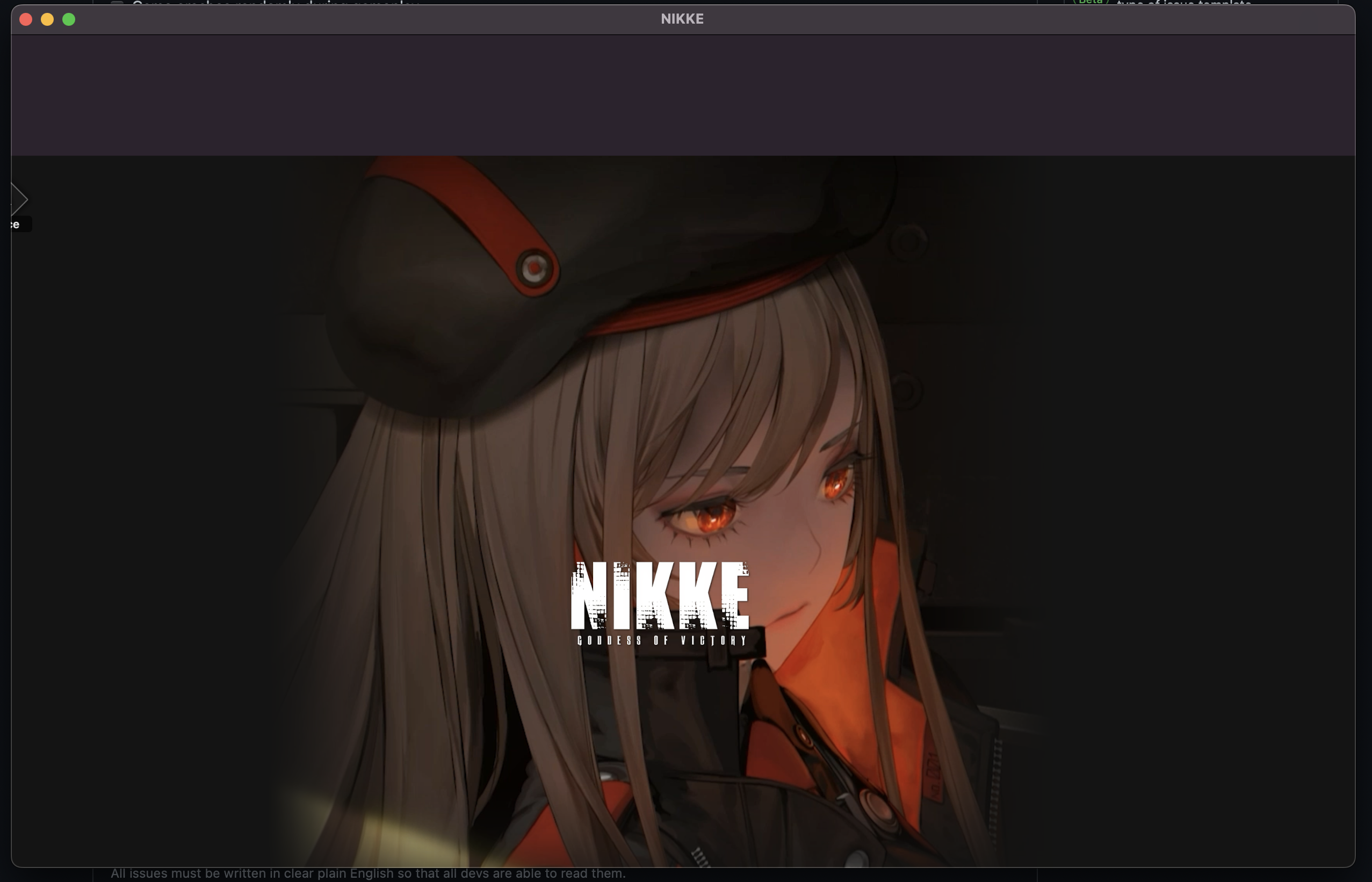
  • Resolution and UI scaling is strange.
    image
    and this is what happened when I turn on fullscreen.
    image
    this can be fixed by randomly resize the window, then restart the game.

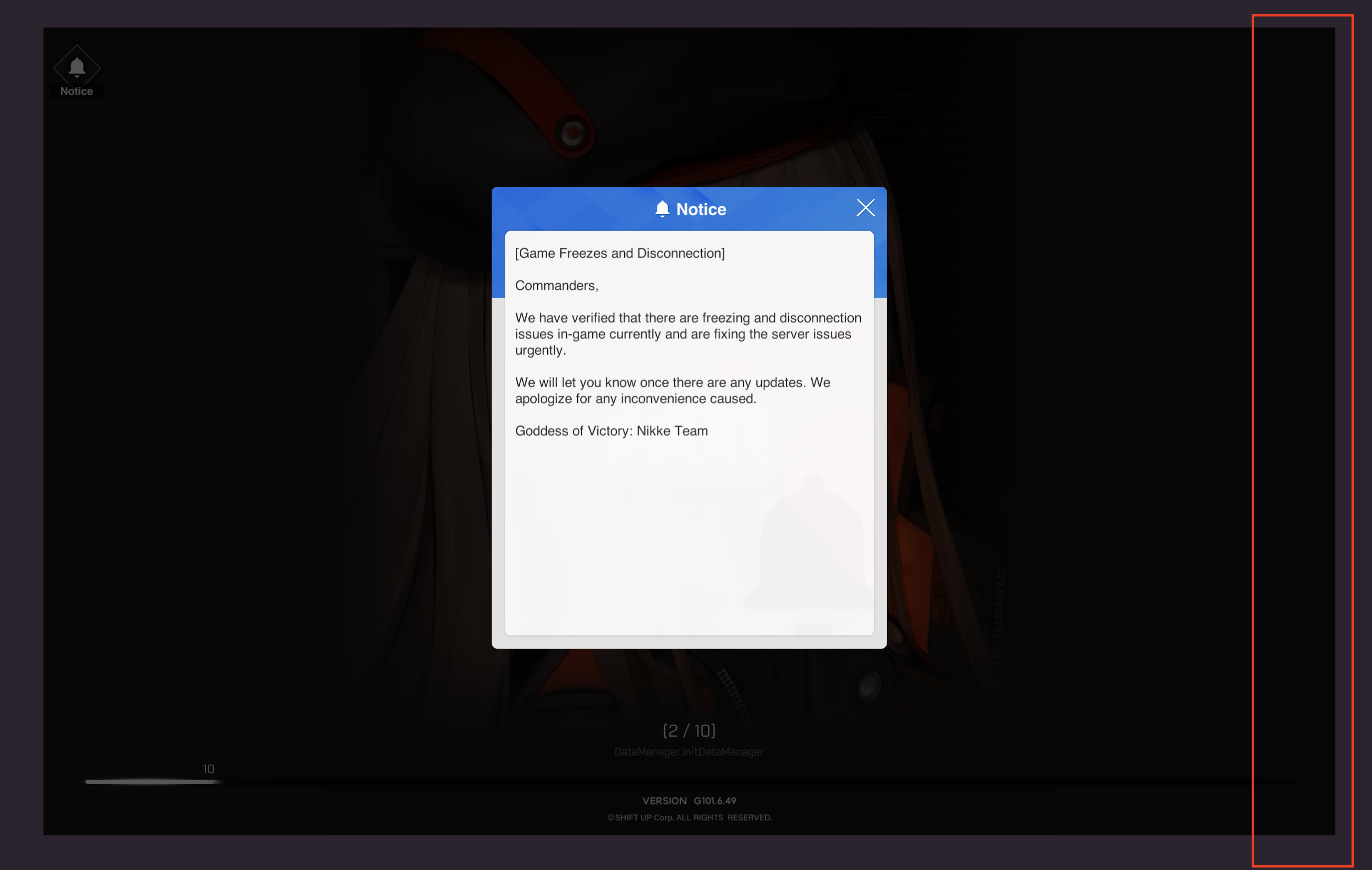
  • But sometimes, doing a procedure above cause the right-most edge of the app can't be clicked at all. For me, it's this area.
    Screen Shot 2565-11-04 at 08 22 24

Crash log

No response

Issue Language

  • Yes my issue is written in English
Originally created by @ririzuP on GitHub (Nov 4, 2022). Original GitHub issue: https://github.com/PlayCover/PlayCover/issues/489 ### App Store link https://apps.apple.com/us/app/goddess-of-victory-nikke/id1585915174 ### Current issues - [ ] Game fails to install - [ ] Game fails to open - [ ] Game crashes randomly during gameplay - [X] Game does not work with keymapping - [X] Game experiences graphical issues or broken UI - [ ] Game fails to connect to servers or complete download ### More details I found some problem with this game as listed here: - Game won't open at all if PlayTools installed. (meanwhile, someone can) - Resolution and UI scaling is strange. <img width="1277" alt="image" src="https://user-images.githubusercontent.com/23465183/199864436-fc8784e1-5312-4067-bfc6-437a96b0b63e.png"> and this is what happened when I turn on fullscreen. <img width="1680" alt="image" src="https://user-images.githubusercontent.com/23465183/199864472-0580a895-6a34-4af2-aa6e-887887c119b1.png"> this can be fixed by randomly resize the window, then restart the game. - But sometimes, doing a procedure above cause the right-most edge of the app can't be clicked at all. For me, it's this area. <img width="1374" alt="Screen Shot 2565-11-04 at 08 22 24" src="https://user-images.githubusercontent.com/23465183/199864965-b3c662bf-ce8b-4be5-addd-2285821bd5e2.png"> ### Crash log _No response_ ### Issue Language - [X] Yes my issue is written in English
kerem 2026-03-03 18:55:58 +03:00
Author
Owner

@ZhichGaming commented on GitHub (Nov 4, 2022):

Hello, thank you for opening a support thread on GitHub! For anyone interested in this issue, here's a link to a previous discussion of this issue on discord: https://discord.com/channels/871829896492642387/1037857888590381108

<!-- gh-comment-id:1302857220 --> @ZhichGaming commented on GitHub (Nov 4, 2022): Hello, thank you for opening a support thread on GitHub! For anyone interested in this issue, here's a link to a previous discussion of this issue on discord: https://discord.com/channels/871829896492642387/1037857888590381108
Author
Owner

@rbourgeat commented on GitHub (Dec 28, 2022):

Anyway you can neither connect as a guest nor via the apple login 😩

<!-- gh-comment-id:1366315050 --> @rbourgeat commented on GitHub (Dec 28, 2022): Anyway you can neither connect as a guest nor via the apple login 😩
Author
Owner

@Norieq commented on GitHub (Feb 20, 2023):

ok, I found a solution.

  1. right click on the app and show in finder. and then put in in your applications folder, and open it trough launchpad. It should be working.
    image
    image
    NOTE: You can only play in windowed mode tho
  2. however, the issue still exist. but I found a korean blog saying that you just need to resize the windows and relaunch the app.
    image
    image
    It works like a charm now.
<!-- gh-comment-id:1437385294 --> @Norieq commented on GitHub (Feb 20, 2023): ok, I found a solution. 1. right click on the app and show in finder. and then put in in your applications folder, and open it trough launchpad. It should be working. <img width="357" alt="image" src="https://user-images.githubusercontent.com/65318481/220167605-7921b721-07e2-40dc-9426-460c16b4be8d.png"> <img width="1319" alt="image" src="https://user-images.githubusercontent.com/65318481/220167726-28b48641-4006-41ef-8f53-08cc6f5fb4d4.png"> NOTE: You can only play in windowed mode tho 2. however, the issue still exist. but I found a korean blog saying that you just need to resize the windows and relaunch the app. <img width="1230" alt="image" src="https://user-images.githubusercontent.com/65318481/220174704-3db78caf-58d5-4e50-9dad-fd16c70731c5.png"> <img width="1396" alt="image" src="https://user-images.githubusercontent.com/65318481/220174791-892b6f9d-1c94-4004-a03e-e8dd63a40067.png"> It works like a charm now.
Sign in to join this conversation.
No milestone
No project
No assignees
1 participant
Notifications
Due date
The due date is invalid or out of range. Please use the format "yyyy-mm-dd".

No due date set.

Dependencies

No dependencies set.

Reference
starred/PlayCover#227
No description provided.