mirror of
https://github.com/PlayCover/PlayCover.git
synced 2026-04-26 08:15:56 +03:00
[GH-ISSUE #424] [Feature]: Launchpad/iOS like app launcher folders #198
Labels
No labels
UI
app-support
bug
bug
documentation
duplicate
enhancement
game-support
good first issue
help wanted / caution
inactive
invalid
macos-beta
pull-request
question
wontfix
No milestone
No project
No assignees
1 participant

Notifications
Due date
No due date set.
Dependencies
No dependencies set.
Reference
starred/PlayCover#198
Loading…
Add table
Add a link
Reference in a new issue
No description provided.
Delete branch "%!s()"
Deleting a branch is permanent. Although the deleted branch may continue to exist for a short time before it actually gets removed, it CANNOT be undone in most cases. Continue?
Originally created by @jwbjnwolf on GitHub (Oct 17, 2022).
Original GitHub issue: https://github.com/PlayCover/PlayCover/issues/424
Is your feature request related to a problem?
I have many original characters (OCs) that I like using with avatar creation apps like ZEPETO and Gacha Club. However I have more than the amount of active slots that Gacha provides, and ZEPETO only lets you be signed into one account.
I have used Sideloady to do cloned IPAs with customised bundle ids so I can have multiple installs.
The trouble is, while with SIP disabled, you can directly launch the apps from Finder, move them to your applications and launch from Launchpad.
But with SIP re-enabled, you have to launch them through PlayCover's UI.. and so, that means, having them all in PlayCover's launcher, which becomes a giant clutter like:
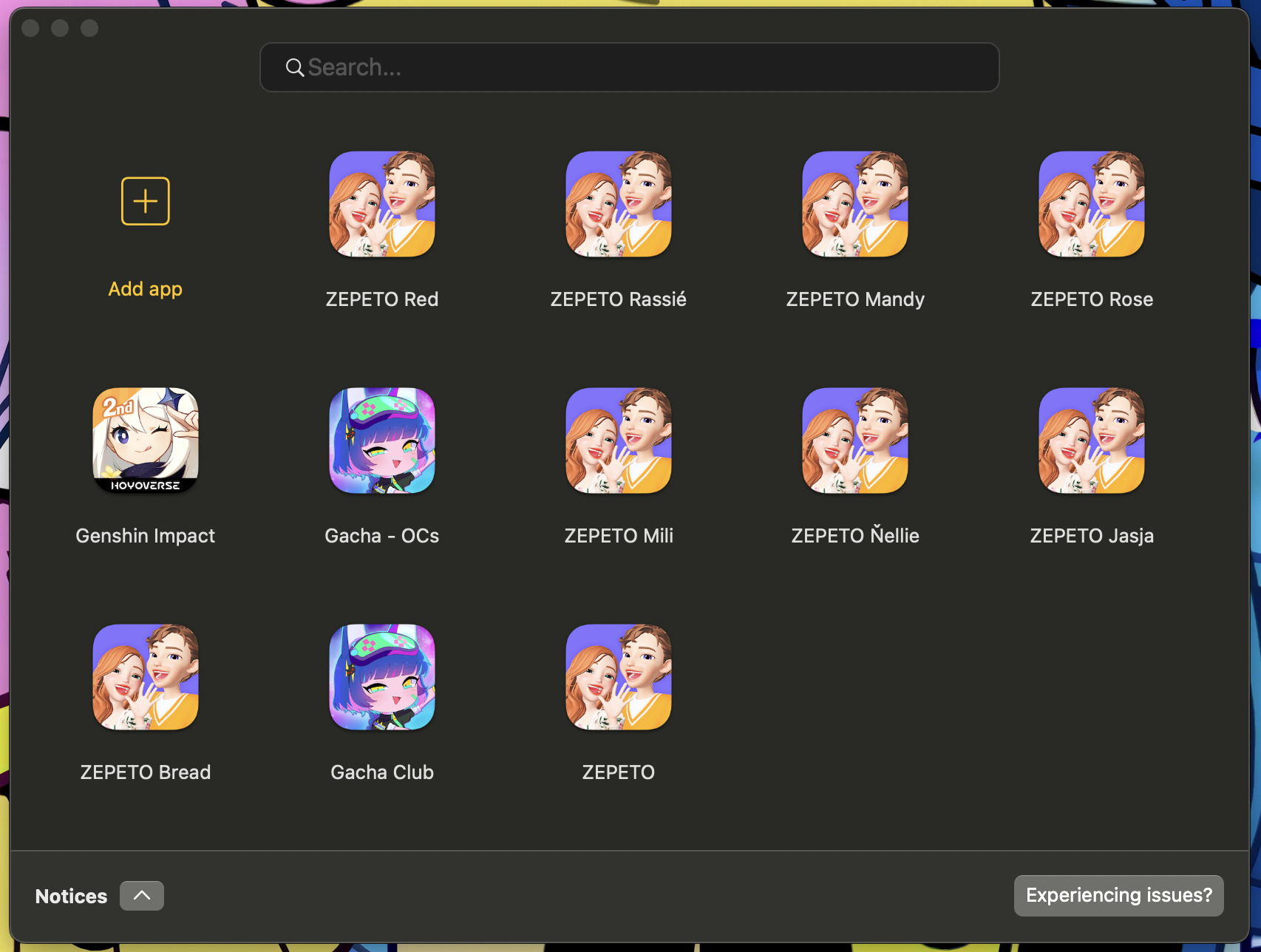
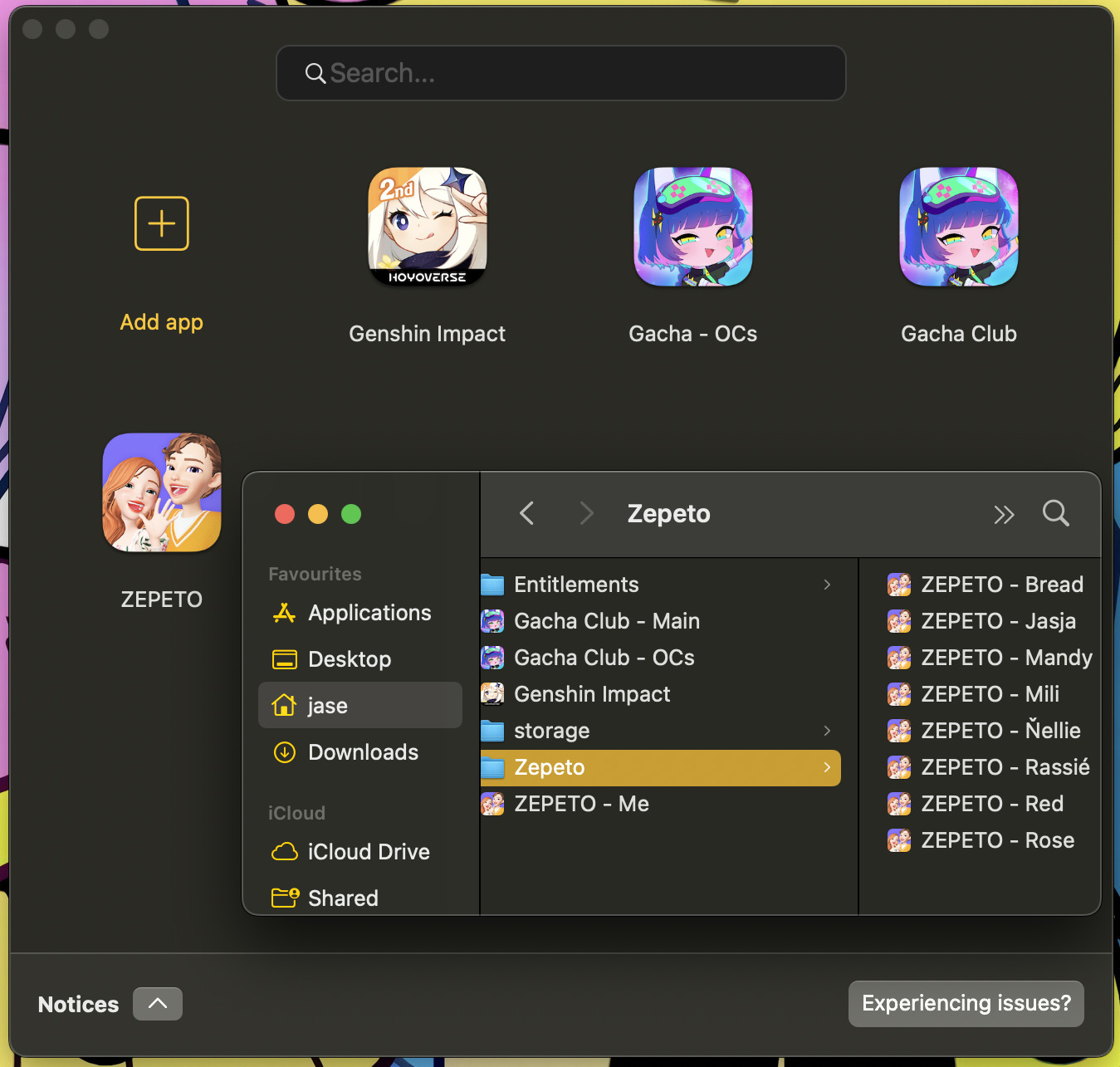
as opposed to if they where in folders, it'd be as tidy as this:
Describe the solution you'd like
The solution to this, would be let us organise into folders, have the launcher detect subdirectories with apps inside, and create said folder with said apps in the launcher, named after the name of the subdirectory, and it'd be along the lines like how folders is with Launchpad/iOS.
Alternatively, also have the ability to drag the launchers into folders again like how you'd do with Launchpad/iOS. You'd do this method so that when you installing a new update, it overwrites as normal the app file. But the subdirectory method, you'd manually move the new updated app file and overwrite the old..
This comes with the caveat that what if you are using a subdirectory for backups that you'd not want displayed? Maybe have an option for said folder, to choose hide this folder, and it'd create a hidden file like .hidefolder so that it remembers that.
Anything else?
My use case as such is niche. Not everyone would ever have the need for cloned apps, at least enough that it clutters things up like this. However folder functionality would be absolutely amazing, for folks that just have a huge amount of apps, and for folks like me that have a hoard of clones for my original characters, to just keep the launcher nice, tidy, uncluttered and organised.
Issue Language
@IsaacMarovitz commented on GitHub (Oct 17, 2022):
@jwbjnwolf We have plans for launching from Finder in the future
@jwbjnwolf commented on GitHub (Oct 17, 2022):
ooooo that'll be fabulous so can then just if want have them organised into a folder in launchpad. I look forward to it!
Edit: Unless, you mean through the launcher, you pick to launch something from in finder rather than what's there in the launcher? That'd also work just fine. But if you mean directly being able to just in Finder/Launchpad launch without going through the launcher, then def will be so amazing!
@Depal1 commented on GitHub (Oct 19, 2022):
Having user made categories in the side bar is planned too.