mirror of
https://github.com/PlayCover/PlayCover.git
synced 2026-04-26 16:25:54 +03:00
[GH-ISSUE #378] [Feature]: curved swipe #166
Labels
No labels
UI
app-support
bug
bug
documentation
duplicate
enhancement
game-support
good first issue
help wanted / caution
inactive
invalid
macos-beta
pull-request
question
wontfix
No milestone
No project
No assignees
1 participant

Notifications
Due date
No due date set.
Dependencies
No dependencies set.
Reference
starred/PlayCover#166
Loading…
Add table
Add a link
Reference in a new issue
No description provided.
Delete branch "%!s()"
Deleting a branch is permanent. Although the deleted branch may continue to exist for a short time before it actually gets removed, it CANNOT be undone in most cases. Continue?
Originally created by @uq6c on GitHub (Sep 25, 2022).
Original GitHub issue: https://github.com/PlayCover/PlayCover/issues/378
Is your feature request related to a problem?
when games need for you to swipe for input, its sometimes inconvenient to switch to mouse and do it like that, so i think adding a "curved swipe" feature would be cool.
Describe the solution you'd like
it would ask you to set a curve and set a start and end point, and then you can bind it to a key and when you press it, it executes that curve from point a to b to make some games' swipes easier.
Anything else?
i was thinking it to look kinda like a slider not in osu in the keymapping menu.
Issue Language
@amirsaam commented on GitHub (Sep 25, 2022):
You mean press A then press B++ (it means as many other keys binded) for choose? Am I right?
@uq6c commented on GitHub (Sep 25, 2022):
no i mean you press a key of choice and it executes the swipe that you chose through keymapping
@uq6c commented on GitHub (Sep 25, 2022):
i
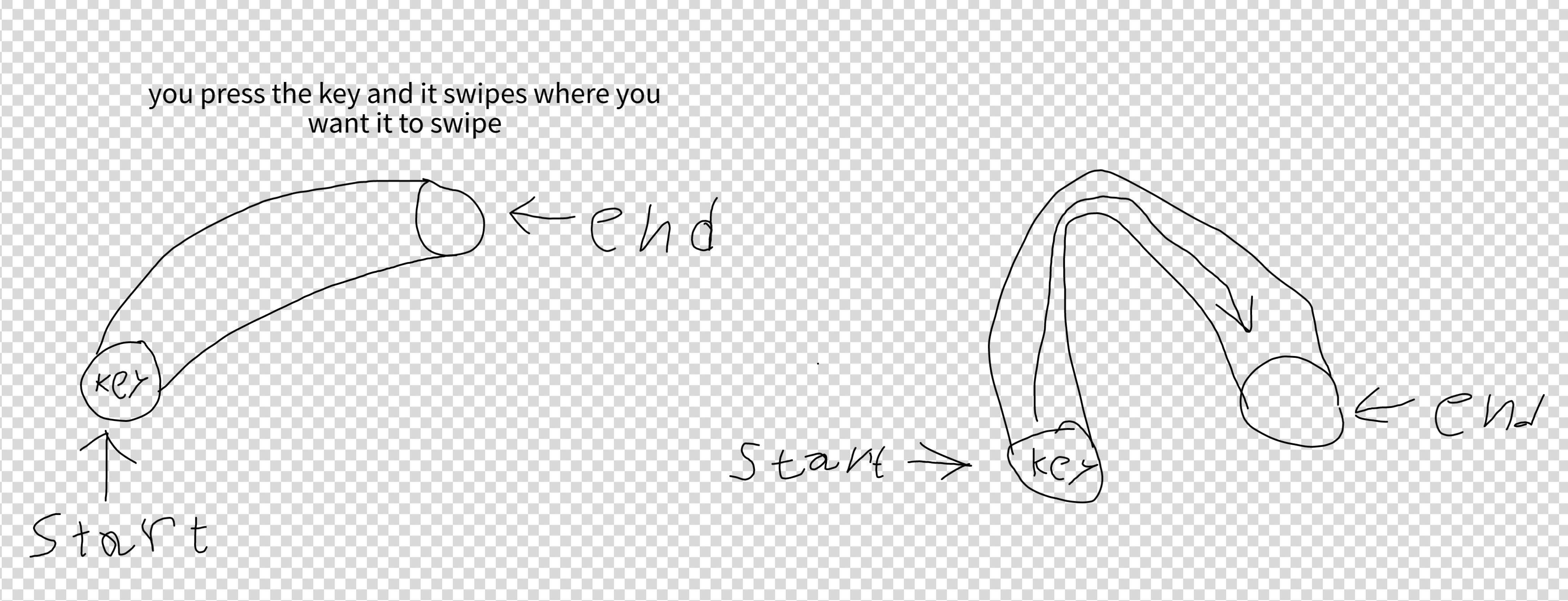
made a quick representation of what i meant, it looks like a blind 4 year old drew it but i hope this kinda puts a better idea of what it is in your head
@amirsaam commented on GitHub (Sep 25, 2022):
Clarify: You want to PlayCover do it automatically?
If yes -> It's Macro, cannot be re-added to PlayCover.
If No -> Explain your in mind solution because the only way I think is possible is you press a B++ key
@uq6c commented on GitHub (Sep 25, 2022):
no you bind a key to it, set the curve and length of the swipe, and when pressing the key, it swipes in the curve or whatever you set it to (probably would be able to set it to a straight swipe)
@amirsaam commented on GitHub (Sep 25, 2022):
You keybind 2 key or 1 in your solution?
@uq6c commented on GitHub (Sep 25, 2022):
bind 1 and when you press it swipes to the set path
@amirsaam commented on GitHub (Sep 25, 2022):
And you don't think that's a Macro?
The only possible way I think is similar to draggable button but instead of working with mouse it could be done with a second key binded in the first key's area of effect.
I dunno if that is possible in code, devs should take look into it.
@uq6c commented on GitHub (Sep 25, 2022):
i just thought that manually switching to mouse and doing the swipe mid game is inconvenient so you can add a swipe feature for it, if it is a macro, why did it get removed?
@ohaiibuzzle commented on GitHub (Sep 25, 2022):
This is considered a macro (recording a chain of multiple actions, then a single button press triggers those actions again), and thus, it will not be coming back to PlayCover.
@uq6c commented on GitHub (Sep 25, 2022):
its not a chain of multiple though? how is swiping multiple actions
@ohaiibuzzle commented on GitHub (Sep 25, 2022):
Press down on a point, move it to another point, release. Three
Contrast that to the current keybinding where one button press will always trigger a single touch event, no more no less.
@uq6c commented on GitHub (Sep 25, 2022):
why were macros removed? dosent seem like anything bad
@ohaiibuzzle commented on GitHub (Sep 25, 2022):
Cheating. Imagine if you can press one button and it simultaneously switches your character, activates their ult, and then do that for every character in your team in a row with a single press in, eg. Genshin Impact
We want to make software that enables people to play games with their otherwise compatible but blacklisted devices. Not for you to gain an advantage over touch screen users with macros
@uq6c commented on GitHub (Sep 25, 2022):
so then why are swipes not gonna be allowed?
@ohaiibuzzle commented on GitHub (Sep 25, 2022):
Take for example an FPS. You have very precise pixel perfect swipes instead of the much less accurate touchscreen swipes.
Well that's already an advantage we're giving you in terms of aiming
Again, we try to make games playable while giving as little room as possible for potential abuse. We just want to get games to be playable on Macs, not triggering publishers to ban us off
@uq6c commented on GitHub (Sep 25, 2022):
but when you would do that the plyers that you kill will spectate you and they will be able to pefectly tell that you are cheating because of the pixel perfect movement, im asking for this feature so i can switch weapons in a game i wanna play on my mac (to switch weapons in it you have to swipe) so that kinda eliminates the point of doing it because you will get get mass reported for obvious cheating, and get banned.
@ohaiibuzzle commented on GitHub (Sep 25, 2022):
Well, you just answer your own question right there. We want to limit rooms for cheating as much as possible. This is one of those things, and unfortunately I don't think implement this functionality is a good idea for us if we want to be on the good side of the publishers.
Just look at the Android emulation scene and you will see why we make these decisions.
@uq6c commented on GitHub (Sep 25, 2022):
like it is in the name, it probably will be a curve swipe, meaning you cant do pixel perfect movement and i dont know any way to cheat with curved swipes so unless theres a way, i see no reason not to add it.
@ohaiibuzzle commented on GitHub (Sep 25, 2022):
So you are saying we should make it so it curve at a static degree of curvature with an unchangable size and random starting and ending points just around where you put the keybind at?
Since if you can change any of those, you can just make a really small curve with a small curvature, and then achieve the same thing as a straight swipe.
@uq6c commented on GitHub (Sep 25, 2022):
make a minimum degree that you can curve it to so you cant make it a straight line
@ohaiibuzzle commented on GitHub (Sep 25, 2022):
Again. It is an automation/input transformation task that causes one input to be able to trigger a sequence of input events, and that falls straight into the macro category, which I don't think we will see in the short term.
I think one of us is looking into draggable buttons, and that may work for you, but definitely not swipes, at least right now.
@uq6c commented on GitHub (Sep 25, 2022):
make a minimum degree that you can curve it to so you cant make it a straight line
@XuYicong commented on GitHub (Sep 25, 2022):
What do you mean by "manually switching to mouse mid game", that's not how draggable buttons works. It automatically captures your mouse. What you need to do is just pressing your mapped key.
@uq6c commented on GitHub (Sep 25, 2022):
its not even what i am talking about man
@XuYicong commented on GitHub (Sep 25, 2022):
It's like this, if everyone else has to swipe to change weapon but you just need a single click, it's unfair. So the best you can do is to swipe using mouse.
@ohaiibuzzle commented on GitHub (Sep 25, 2022):
I mean if you want to, you can always fork PlayCover and make some kind of implementation of your idea. We'll see if the feature fits how we're trying to make PlayCover works. But for me at least this seems like we're giving our users an advantage over touch screen players.
@uq6c commented on GitHub (Sep 25, 2022):
yeah but what i mean is pressing the option key mid game to switch weapons is just inconvenient and everyone in that game does it so fast by now that its basically the same as pressing a single key
@ohaiibuzzle commented on GitHub (Sep 25, 2022):
Still, that doesn't change the fact that you only have to hit a single button instead of swiping your finger.
Hitting a button is instantaneous unlike a swipe which may have time variables
@XuYicong commented on GitHub (Sep 25, 2022):
That's exactly what I just said which you thought is not even what you were talking about. You can achieve it WITHOUT pressing option key. Your mouse is automatically captured by draggable button. You can try a recent nightly build to see for yourself how it works.
@uq6c commented on GitHub (Sep 25, 2022):
then can you add a feature to rebind the mouse toggle
@XuYicong commented on GitHub (Sep 25, 2022):
https://github.com/PlayCover/PlayTools/pull/24
Take a look at this.
@uq6c commented on GitHub (Sep 25, 2022):
no man thats not what i mean. read the comments man
@ohaiibuzzle commented on GitHub (Sep 25, 2022):
The way it is implemented right now, not at runtime. It's hard coded and requires a recompile if you want to change it.
@XuYicong commented on GitHub (Sep 25, 2022):
What you originally meant is impossible, I'm suggesting a more practical alternative. You read my comments too man.
@uq6c commented on GitHub (Sep 25, 2022):
its not impossible tho
@XuYicong commented on GitHub (Sep 25, 2022):
Yes technically it may be possible, but as ohaii just said, playcover is not allowed to do this automation for you. Other people are fast because they have good operation. It is unfair that you operate nothing but appear as fast as them.
Also it's not as bad as having to switch to mouse to switch weapon. As long as you hold a draggable button, your mouse controls this button's move. You no longer need to switch to mouse then find your weapon panel then switch back. If you're in a shooting game, I believe you always have one of your hands on your mouse during game play. If so, there is no "switching" in this process.