mirror of
https://github.com/PlayCover/PlayCover.git
synced 2026-04-26 08:15:56 +03:00
[GH-ISSUE #372] [Bug]: it keeps asking me to install xcode command line tools #165
Labels
No labels
UI
app-support
bug
bug
documentation
duplicate
enhancement
game-support
good first issue
help wanted / caution
inactive
invalid
macos-beta
pull-request
question
wontfix
No milestone
No project
No assignees
1 participant

Notifications
Due date
No due date set.
Dependencies
No dependencies set.
Reference
starred/PlayCover#165
Loading…
Add table
Add a link
Reference in a new issue
No description provided.
Delete branch "%!s()"
Deleting a branch is permanent. Although the deleted branch may continue to exist for a short time before it actually gets removed, it CANNOT be undone in most cases. Continue?
Originally created by @uq6c on GitHub (Sep 23, 2022).
Original GitHub issue: https://github.com/PlayCover/PlayCover/issues/372
Describe the bug
when i open playcover it asks me to install xcode command line, i wait, it installs, the app restarts, and it tells me to install it again.
Steps to reproduce
Expected behaviour
it should download Xcode command line like it says
Crash log
No response
What version of PlayCover are you using?
1.1.1
What version of macOS are you using?
Monterey (macOS 12)
Issue Language
@ZhichGaming commented on GitHub (Sep 23, 2022):
Just open Xcode and accept the licence.
@uq6c commented on GitHub (Sep 23, 2022):
where do i find xcode?
@ZhichGaming commented on GitHub (Sep 23, 2022):
@uq6c commented on GitHub (Sep 23, 2022):
nothing popped up when i installed it
@amirsaam commented on GitHub (Sep 24, 2022):
did you try installing xclt with this command?
xcode-select --install@elisezhu123 commented on GitHub (Sep 30, 2022):
it is just a component of Xcode you can go to the apple developer website in the develop categories click on Xcode and click the website. Then login to your Apple ID (of email phone id sometimes not ok you need to sign up a new one by email) and just download the Xcode command line tools for the version you have like the 14.1 beta 3 is the one that for macOS 13beta 9

also if you are under 13 macOS and have never download the Xcode you can use terminal by xcode-select --install
if you download the past version before you can just go to your finder library and find developer to delete the Xcode comaand line t
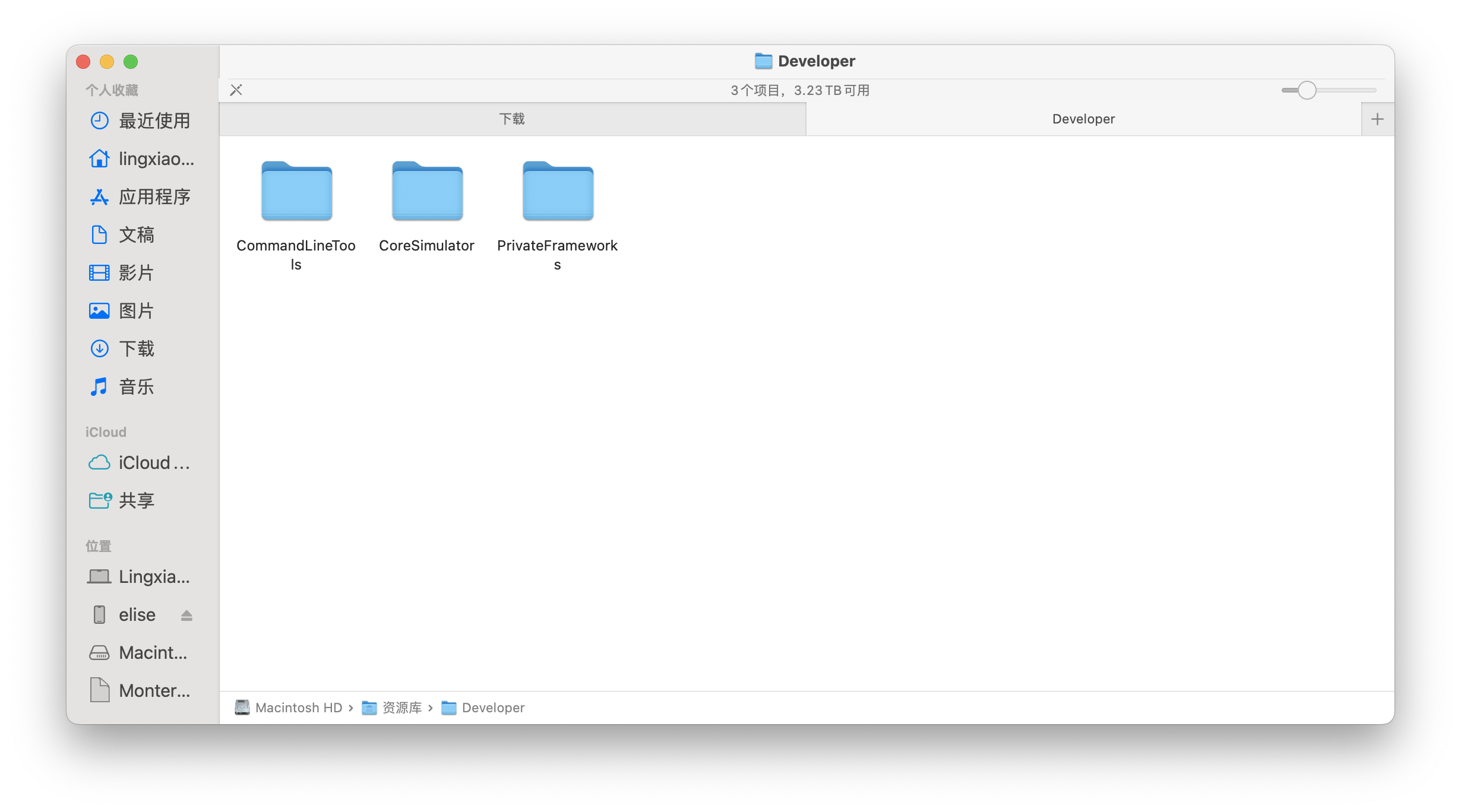
ools file
@woutervanwijk commented on GitHub (Jan 3, 2023):
I get this error too. Tried everything. Ventura 13.1, Xcode 14.2 and commandline tools installed. Also tried all fixes mentioned here (xcrun, xcodebuild, etc). Keeps asking to install the tools
@elisezhu123 commented on GitHub (Jan 5, 2023):
Xcode 14 is not the suitable version for 13.1 you should have 14.1 or 14.0 xcode and it command lines not work
发件人: Wouter van Wijk @.>
日期: 星期二, 2023年1月3日 上午2:54
收件人: PlayCover/PlayCover @.>
抄送: elisezhu123 @.>, Comment @.>
主题: Re: [PlayCover/PlayCover] [Bug]: it keeps asking me to install xcode command line tools (Issue #372)
I get this error too. Tried everything. Ventura 13.1, Xcode 14, commandline tools installed
―
Reply to this email directly, view it on GitHubhttps://github.com/PlayCover/PlayCover/issues/372#issuecomment-1369629214, or unsubscribehttps://github.com/notifications/unsubscribe-auth/AQIB3OTN3ZXKLQ56U55QY33WQQANRANCNFSM6AAAAAAQTUSUYQ.
You are receiving this because you commented.Message ID: @.***>
@woutervanwijk commented on GitHub (Jan 5, 2023):
Sorry, I have Xcode 14.2
@vesper8 commented on GitHub (Jan 5, 2023):
I'm on Xcode 14.2, I already open Xcode and was not prompted to accept any license. I actually use Xcode for development on a daily basis.
If I try to run
xcode-select --installit tells me I already have the latest version.And every time I try to open PlayCover (latest non-nightly release) it tells me I need to install Xcode Tools.
@woutervanwijk commented on GitHub (Jan 10, 2023):
Exactly the same here
@elisezhu123 commented on GitHub (Jan 11, 2023):
sudo rm -rf /Library/Developer/CommandLineTools
xcode-select --install
发件人: Wouter van Wijk @.>
日期: 星期二, 2023年1月10日 上午12:37
收件人: PlayCover/PlayCover @.>
抄送: elisezhu123 @.>, Comment @.>
主题: Re: [PlayCover/PlayCover] [Bug]: it keeps asking me to install xcode command line tools (Issue #372)
I'm on Xcode 14.2, I already open Xcode and was not prompted to accept any license. I actually use Xcode for development on a daily basis.
If I try to run xcode-select --install it tells me I already have the latest version.
And every time I try to open PlayCover (latest non-nightly release) it tells me I need to install Xcode Tools.
Exactly the same here
―
Reply to this email directly, view it on GitHubhttps://github.com/PlayCover/PlayCover/issues/372#issuecomment-1376905279, or unsubscribehttps://github.com/notifications/unsubscribe-auth/AQIB3OX7IIZMF22EHUYI5V3WRUNUZANCNFSM6AAAAAAQTUSUYQ.
You are receiving this because you commented.Message ID: @.***>